Welcome Guest ( Log In | Register )

Bump Topic Topic Closed RSS Feed

Outline · [ Standard ] · Linear+

 Samsung Galaxy Note 3 - Official v7, 3rd gen of the best phablet ever!!

views
     
ZiNKaK
post Oct 5 2013, 11:03 AM

Getting Started
**
Junior Member
222 posts

Joined: Sep 2010


I'm not sure if anyone facing this problem..

I just migrated my contacts from my old trusty note 1 to my new friend here note 3..

It seems that the birthday on my contacts are not properly sync with the S Planner Calender..

In the calender the birthday date for the particular person is on the correct date but then the picture showing another contacts picture. When clicking on the picture it will lead to the contact of the person on the picture.

In short.. 'A' birthday appears on S Planner on the right date but with 'B' picture. When see in details by clicking on B's picture will be shown 'B's contact info. So when I check B's birthday it's 'C's picture pulak so on and so forth.

Can anyone advice on how to rectify the problem?
ZiNKaK
post Oct 5 2013, 12:21 PM

Getting Started
**
Junior Member
222 posts

Joined: Sep 2010


QUOTE(vostro78 @ Oct 5 2013, 11:07 AM)
ur birthday calender save at facebook or what calender ? my 1 was get the info from contact / facebook so i add account in my note3 and setup the facebook inside. then my s planner got all the holiday + birthday information.
*
The calender is the brand new note 3 S Planner lo. I don't use calender previously. So nothing to import. The birthdays all come automatically from the birth dates I saved in my contacts.

Btw.. how come my calender don't have holidays one?
ZiNKaK
post Oct 7 2013, 01:35 PM

Getting Started
**
Junior Member
222 posts

Joined: Sep 2010


So fast got AA stock jor..

http://list.qoo10.my/item/NOTE-3-N9000-MTK...12309702#others
ZiNKaK
post Oct 10 2013, 01:10 PM

Getting Started
**
Junior Member
222 posts

Joined: Sep 2010


QUOTE(blinky @ Oct 10 2013, 12:10 PM)
Am I the only one facing this?

When my Note 3 is in standby mode, the homescreen doesn't seem to refresh itself automatically.

This means that say I put the phone on standby at 12.00am, and I unlock it 10 minutes later at 12.10am, the clock widget on my homescreen still shows 12.00am for a split second before jumping to 12.10am.

I'm not sure if this is a supposed problem, but just an observation. Maybe that's why I receive late Whatsapp messages intermittently?
*

Hmm.. I think I have this probem too.. for a split second hopefully they can fix this soon..


QUOTE(waveweaver @ Oct 10 2013, 01:00 PM)
Oooo...the lovely Orange..!!  drool.gif
*

One kinky one! Me likey!

ZiNKaK
post Oct 11 2013, 12:37 AM

Getting Started
**
Junior Member
222 posts

Joined: Sep 2010


Finally managed to update! And quite a huge increase in free RAM from before update of 1.8 to now 1.2!

Any other significant changes?
ZiNKaK
post Oct 11 2013, 06:24 PM

Getting Started
**
Junior Member
222 posts

Joined: Sep 2010


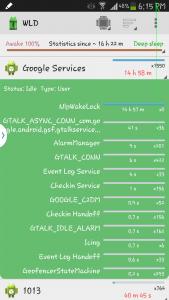
Can someone enlighten me about the 15h Google Services?

Attached Image

This post has been edited by ZiNKaK: Oct 11 2013, 06:26 PM
ZiNKaK
post Oct 11 2013, 06:37 PM

Getting Started
**
Junior Member
222 posts

Joined: Sep 2010


QUOTE(eszol @ Oct 11 2013, 06:34 PM)
That nlp wakelock is related to location collecting/reporting process by google. If you are not using Google Now, it is widely suggested that you turn off the location reporting and history from Google setting
*
Mind directing me there to the setting? Sorry and thanks icon_question.gif

Edit: I've checked and I didnot allow location access by Google. Hmmm...

This post has been edited by ZiNKaK: Oct 11 2013, 06:39 PM
ZiNKaK
post Oct 11 2013, 08:57 PM

Getting Started
**
Junior Member
222 posts

Joined: Sep 2010


QUOTE(WiLyi @ Oct 11 2013, 06:40 PM)
NLP = Network Location Provider, basically it's a Google service to collect data based on your location. It drains a lot of battery from your phone and I do suffered from it previously.

How to remedy this issue is by disabling some of the location service
1. Setting > Connection tab > location service > disable "Access to my location"
2. Google now > setting > privacy & account > turn off "Web history"
3. Google now > setting > privacy & account > Google location settings > Disable "Access location", "location reporting" & "Location history"

However if you constant need to update your current location and weather forecast, you can't disable the "Access to my location" in No. 1 above.

I disable everything about except No. 1 and my battery is rock solid and the NLPCollector wakelock no longer appear in my partial wakelock and my phone can really goes into deep sleep
*
Thanks but I think I have everything off.. I think I shall monitor it a little longer. Should the problem persist I think I might need to bug you sifus here again sweat.gif
ZiNKaK
post Oct 12 2013, 02:08 PM

Getting Started
**
Junior Member
222 posts

Joined: Sep 2010


A teardown of Note 3 for those interested to peep inside of your precious whistling.gif

http://youtu.be/kBedvTm1YGc
ZiNKaK
post Oct 12 2013, 08:32 PM

Getting Started
**
Junior Member
222 posts

Joined: Sep 2010


QUOTE(fruitie @ Oct 12 2013, 08:27 PM)
At first I wanted black, then I saw white also kinda pretty and wanted white instead to match my Note II.
Who knows when I bought mine that time, white is too limited and I settled for black. laugh.gif

Still not too bad la. At least I get to match it with SGP Hybrid Neo yellow colour, my phone will look like a bumblebee. laugh.gif
*

Must take a shot of your phone and show us when it becomes bumblebee! brows.gif
ZiNKaK
post Oct 12 2013, 09:56 PM

Getting Started
**
Junior Member
222 posts

Joined: Sep 2010


QUOTE(Andrewtst @ Oct 12 2013, 09:21 PM)
Today I see the orange color S View cover, oops! Going to by pass it.  Not my liking orange.
*

Bro.. where did u see orange S-view? Orange is my cup of tea!


Topic ClosedOptions
 

Change to:
| Lo-Fi Version
0.0524sec    0.60    7 queries    GZIP Disabled
Time is now: 2nd December 2025 - 01:14 PM