Welcome Guest ( Log In | Register )

69 Pages « < 26 27 28 29 30 > » Bottom

Outline · [ Standard ] · Linear+

Unifi TMnet Streamyx/Unifi & IPv6, Now live!

views
     
nymerine
post Dec 9 2013, 12:06 AM

Enthusiast
*****
Senior Member
920 posts

Joined: May 2010


Hmm, whenever I turned on my ipv6, my ipv6 traffic didnt go through my ipv6 enabled ssh tunneling, instead it just directly connected to any ipv6 enabled sites. Tried with my OpenVPN as well, only ipv4 traffic going through tunneling/VPN. Is there any way to fix this?
rogue
post Dec 9 2013, 11:32 AM

Getting Started
**
Junior Member
75 posts

Joined: Jun 2006
Hi,

Where does your IPv6 default route point to ?

When you say:

QUOTE
whenever I turned on my ipv6, my ipv6 traffic didnt go through my ipv6 enabled ssh tunneling, instead it just directly connected to any ipv6 enabled sites.


What do you mean ? If your IPv6 traffic comes from TM and you want it to go through your ssh/openvpn tunnel instead, this won't work unless you have source routing enabled. I don't see why you want to do this..

Please clarify..

This post has been edited by rogue: Dec 9 2013, 11:33 AM
ahlong
post Dec 9 2013, 12:42 PM

not a debt collector
****
Junior Member
610 posts

Joined: Apr 2005
From: http://127.0.0.1:80/announce


QUOTE(asellus @ Dec 8 2013, 11:28 AM)
You need wide-dhcpv6-client and radvd too I think.
*
already install it but still cant mega_shok.gif
asellus
post Dec 9 2013, 01:01 PM

#gompusas
Group Icon
Elite
4,541 posts

Joined: Jan 2003
From: BSRPPG51 Access Concentrator


QUOTE(ahlong @ Dec 9 2013, 12:42 PM)
already install it but still cant mega_shok.gif
*
If you already install wide-dhcpv6-client and still didn't get a prefix from the server, then your exchange is probably not IPv6-enabled yet.
asellus
post Dec 9 2013, 01:11 PM

#gompusas
Group Icon
Elite
4,541 posts

Joined: Jan 2003
From: BSRPPG51 Access Concentrator


QUOTE(nymerine @ Dec 9 2013, 12:06 AM)
Hmm, whenever I turned on my ipv6, my ipv6 traffic didnt go through my ipv6 enabled ssh tunneling, instead it just directly connected to any ipv6 enabled sites. Tried with my OpenVPN as well, only ipv4 traffic going through tunneling/VPN. Is there any way to fix this?
*
When you set the local port for the SSH port forwarding, you did use the 'Dynamic Auto' right? Else you won't get IPv6 SSH tunneling at all.
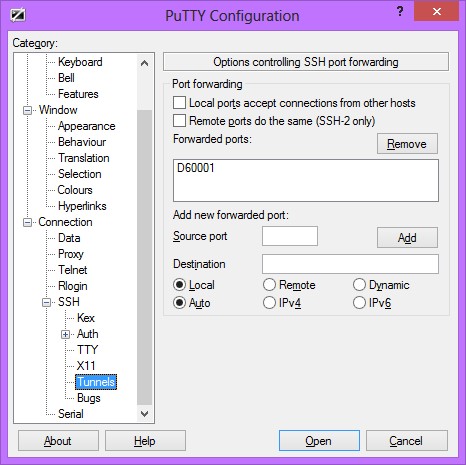
user posted image
nymerine
post Dec 10 2013, 12:38 AM

Enthusiast
*****
Senior Member
920 posts

Joined: May 2010


QUOTE(rogue @ Dec 9 2013, 11:32 AM)
Hi,

Where does your IPv6 default route point to ?

When you say:
What do you mean ? If your IPv6 traffic comes from TM and you want it to go through your ssh/openvpn tunnel instead, this won't work unless you have source routing enabled. I don't see why you want to do this..

Please clarify..
*
Sorry if my word confused you, even myself got confused reading it back. What I mean is.. let me do a simple diagram below

Ipv4 traffic -----> ssh tunneling ------> tunneled connection to destination
Ipv6 traffic ---------> not tunneled, straight to destination

is what happening to me, what I want it to be

Ipv4 + 6 -----> ssh tunneling ------> tunneled connected

QUOTE(asellus @ Dec 9 2013, 01:11 PM)
When you set the local port for the SSH port forwarding, you did use the 'Dynamic Auto' right? Else you won't get IPv6 SSH tunneling at all.

user posted image
*
Yup I did set dynamic auto and I did get Ipv6 connectivity.. but it doesn't use that, just ipv4 got tunneled through.. refer my simple diagram above.

rogue
post Dec 10 2013, 01:44 AM

Getting Started
**
Junior Member
75 posts

Joined: Jun 2006
QUOTE(nymerine @ Dec 10 2013, 12:38 AM)
Sorry if my word confused you, even myself got confused reading it back. What I mean is.. let me do a simple diagram below

Ipv4 traffic -----> ssh tunneling ------> tunneled connection to destination
Ipv6 traffic ---------> not tunneled, straight to destination

is what happening to me, what I want it to be

Ipv4 + 6 -----> ssh tunneling ------> tunneled connected
Yup I did set dynamic auto and I did get Ipv6 connectivity.. but it doesn't use that, just ipv4 got tunneled through.. refer my simple diagram above.
*
Hi,

Ok understand now. I assume you are using socks5 with ssh tunneling. Only v4 traffic will go through the tunnel. v6 traffic will use the default ipv6 route instead. If I understand correctly you need some sort of translation mechanism inbetween because if v6 traffic goes through the tunnel but the final destination is only v4, there is no way to translate it back to you since the origin is v6.

If the destination is dual-stack and reachable, then it will use v6 instead via your ipv6 default route.
rogue
post Dec 10 2013, 02:09 AM

Getting Started
**
Junior Member
75 posts

Joined: Jun 2006
QUOTE(rogue @ Dec 10 2013, 01:44 AM)
Hi,

Ok understand now. I assume you are using socks5 with ssh tunneling. Only v4 traffic will go through the tunnel. v6 traffic will use the default ipv6 route instead. If I understand correctly you need some sort of translation mechanism inbetween because if v6 traffic goes through the tunnel but the final destination is only v4, there is no way to translate it back to you since the origin is v6.

If the destination is dual-stack and reachable, then it will use v6 instead via your ipv6 default route.
*
Hi nymerine,

I just tried your setup and it seems to work. My bad. I always thought socks5 worked on v4 alone.

I tried it on a terminal and Firefox:

ssh -6 -D 1011 user@remote_host

Then I confirm it with 'netstat -tunpl | grep 1011' and I see the port bound to 127.0.0.1:1011

Then in firefox, under socks5 I just set socks host to localhost and port to 1011

www.whatismyip.com shows the tunnel v4 address and www.whatismyipv6.com shows the tunnel v6 address.
nyunyu
post Dec 10 2013, 12:42 PM

His Royal Highness
******
Senior Member
1,392 posts

Joined: Aug 2006
From: Sungai Petani


Using Padavan's firmware for Asus RT-N56U, now successfully got IPv6 without the need to use tunnelbroker anymore.

Attached Image
Attached Image

But, why after using IPv6 now I can't upload image to image hosting? for instance IMGur.com?
Moogle Stiltzkin
post Dec 10 2013, 01:23 PM

Look at all my stars!!
*******
Senior Member
4,456 posts

Joined: Jan 2003
bruce.gif

This post has been edited by Moogle Stiltzkin: Jul 15 2017, 10:51 AM
Alpha_Tay
post Dec 10 2013, 02:31 PM

Beware The Spammer Star!
******
Senior Member
1,725 posts

Joined: Jan 2003
my ipv6 working again after only 6to4 working for a long times.
Moogle Stiltzkin
post Dec 11 2013, 10:19 AM

Look at all my stars!!
*******
Senior Member
4,456 posts

Joined: Jan 2003
bruce.gif

This post has been edited by Moogle Stiltzkin: Jul 15 2017, 10:51 AM
Alpha_Tay
post Dec 11 2013, 01:40 PM

Beware The Spammer Star!
******
Senior Member
1,725 posts

Joined: Jan 2003
QUOTE(Moogle Stiltzkin @ Dec 11 2013, 10:19 AM)
what you mean ?

mine stays ipv6 forever, unless...

1. router is rebooted
2. ip is re-leased, either when i manually reconnect, or my internet goes down due to maintenance
To restore back ipv6....for reason 1 have to check the ipv6 mtu to reset in router with putty.....

reason 2, just simply re-enable the ethernet port.
*
u are correct about your area, i am correct about my area.
Moogle Stiltzkin
post Dec 11 2013, 08:22 PM

Look at all my stars!!
*******
Senior Member
4,456 posts

Joined: Jan 2003
bruce.gif

This post has been edited by Moogle Stiltzkin: Jul 15 2017, 10:51 AM
ryei
post Dec 11 2013, 08:47 PM

On my way
****
Junior Member
518 posts

Joined: Mar 2006
my youtube streaming at 50kb/s only with 4mb package.. currently on ipv6..

anyone know what's happening?
Alpha_Tay
post Dec 11 2013, 09:17 PM

Beware The Spammer Star!
******
Senior Member
1,725 posts

Joined: Jan 2003
QUOTE(Moogle Stiltzkin @ Dec 11 2013, 08:22 PM)
everybody wins?  thumbup.gif  lulz.

anyways just upgraded to win 8.1 not sure if microsoft added anything to do with ipv6  hmm.gif
*
rclxms.gif
wcypierre
post Dec 12 2013, 12:31 AM

Newbie Programmer
Group Icon
Elite
4,619 posts

Joined: Jul 2011
edit: nothing, it seems that my archlinux needs some flushing of some sort

This post has been edited by wcypierre: Dec 12 2013, 02:49 AM
mercindustries
post Dec 13 2013, 09:28 PM

Getting Started
**
Junior Member
162 posts

Joined: Apr 2006
From: KCH ✈ KUL ✈ HAN ✈ TYO


QUOTE(ryei @ Dec 11 2013, 08:47 PM)
my youtube streaming at 50kb/s only with 4mb package.. currently on ipv6..

anyone know what's happening?
*
experiencing the same thing with you. pretty much a dealbreaker
XeactorZ
post Dec 14 2013, 12:52 AM

♥ PandaDog ♥
*********
All Stars
31,607 posts

Joined: Aug 2010
that weird, already enable ipv6 but showing no internet access for ipv6
what wrong ?
yet unifi this 3 days keep dc doh.gif
rogue
post Dec 14 2013, 08:51 AM

Getting Started
**
Junior Member
75 posts

Joined: Jun 2006
QUOTE(mercindustries @ Dec 13 2013, 09:28 PM)
experiencing the same thing with you. pretty much a dealbreaker
*
Try downloading Firefox from here

I currently get full speed on VIP10

69 Pages « < 26 27 28 29 30 > » Top
 

Change to:
| Lo-Fi Version
0.0407sec    0.34    6 queries    GZIP Disabled
Time is now: 3rd December 2025 - 05:42 AM

