Welcome Guest ( Log In | Register )

69 Pages « < 16 17 18 19 20 > » Bottom

Outline · [ Standard ] · Linear+

Unifi TMnet Streamyx/Unifi & IPv6, Now live!

views
     
Sharingan
post Nov 5 2013, 11:28 PM

New Member
*
Junior Member
26 posts

Joined: Apr 2005


@asellus

Did u run successfully run Mikrotik with TM DHCP-PD ? Kinda wondering how's ur config looks like since i'm trying hard to follow the code and till now still return NULL . Well to be exact, i did get the address but i can't ping to ipv6.google.com nor www.kame.net .

My current setup:
Virtualbox 4.1.24
2 x Physical NIC
Mikrotik 5.25
ADSL 4M Streamyx

Few hours ago i did tried on pfSense 2.1-RELEASE , same condition met . Can't ping to both address at all and this time i'm quite sure that all my firewall rules are set for accept and forwarded properly. If else fails, i'll go back to tunnelbroker setup. Thanks for the attention and insights.
asellus
post Nov 6 2013, 12:06 AM

#gompusas
Group Icon
Elite
4,541 posts

Joined: Jan 2003
From: BSRPPG51 Access Concentrator


QUOTE(Sharingan @ Nov 5 2013, 11:28 PM)
@asellus

Did u run successfully run Mikrotik with TM DHCP-PD ? Kinda wondering how's ur config looks like since i'm trying hard to follow the code and till now still return NULL . Well to be exact, i did get the address but i can't ping to ipv6.google.com nor www.kame.net .

My current setup:
Virtualbox 4.1.24
2 x Physical NIC
Mikrotik 5.25
ADSL 4M Streamyx

Few hours ago i did tried on pfSense 2.1-RELEASE , same condition met . Can't ping to both address at all and this time i'm quite sure that all my firewall rules are set for accept and forwarded properly. If else fails, i'll go back to tunnelbroker setup. Thanks for the attention and insights.
*
Yes, that's how I do it. And actually is the only way to do it.

» Click to show Spoiler - click again to hide... «


Assuming you already have the PPPoE connection up and running, then:-

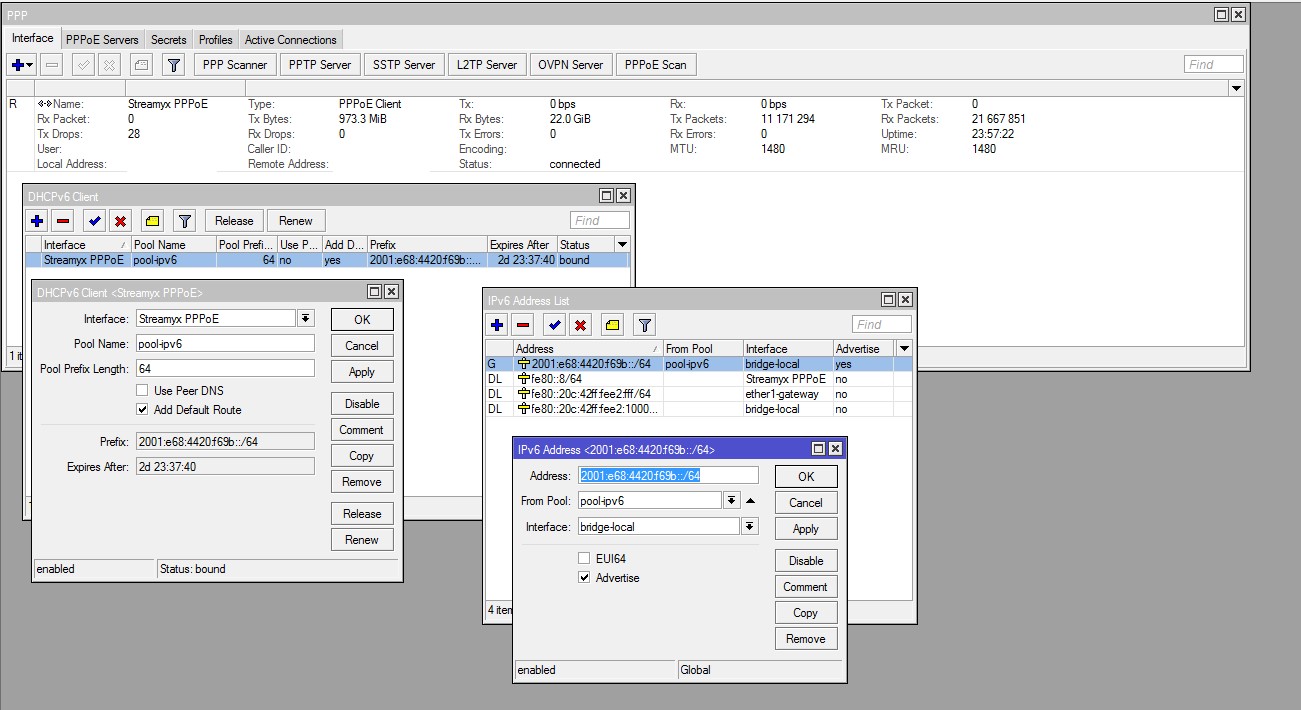
1. In 'IPv6 ---> DHCP client', add a DHCPv6 client on your PPPoE interface, give a name of the pool that will contain the /64 prefix given by TM.
2. Then, in 'IPv6 ---> Addresses', add a '::/64' address, specifying the pool name you have just created in step 1 above, run it on the interface you wanted it to run, and enable the 'Advertise' option.

With this, all devices connected to the interface you have specified at step 2 above should get IPv6 address(es) via SLAAC.
faizal87
post Nov 6 2013, 12:08 AM

piko piko pong pong
******
Senior Member
1,384 posts

Joined: Jan 2007
From: shah alam@ ampang


any advantages using ipv6?
Sharingan
post Nov 6 2013, 12:16 AM

New Member
*
Junior Member
26 posts

Joined: Apr 2005


@asellus

Ah the no.2, i did try that and yes i did get the address via SLAAC. Hmm must be my rules then. Would you mind compare mine with you then please,

CODE
/ipv6 firewall filter
add action=accept chain=input connection-state=established disabled=no \
   in-interface=ether1
add action=accept chain=forward connection-state=established disabled=no \
   in-interface=ether1
add action=accept chain=input connection-state=related disabled=no \
   in-interface=ether1
add action=accept chain=forward connection-state=related disabled=no \
   in-interface=ether1
add action=accept chain=input disabled=no dst-port=546 in-interface=ether1 \
   protocol=udp src-address=fe80::/16
add action=drop chain=input disabled=no in-interface=ether1
add action=drop chain=forward disabled=no in-interface=ether1
add action=accept chain=input comment="Allow established connections" \
   connection-state=established disabled=no


asellus
post Nov 6 2013, 12:34 AM

#gompusas
Group Icon
Elite
4,541 posts

Joined: Jan 2003
From: BSRPPG51 Access Concentrator


QUOTE(Sharingan @ Nov 6 2013, 12:16 AM)
@asellus

Ah the no.2, i did try that and yes i did get the address via SLAAC. Hmm must be my rules then. Would you mind compare mine with you then please,

CODE
/ipv6 firewall filter
add action=accept chain=input connection-state=established disabled=no \
   in-interface=ether1
add action=accept chain=forward connection-state=established disabled=no \
   in-interface=ether1
add action=accept chain=input connection-state=related disabled=no \
   in-interface=ether1
add action=accept chain=forward connection-state=related disabled=no \
   in-interface=ether1
add action=accept chain=input disabled=no dst-port=546 in-interface=ether1 \
   protocol=udp src-address=fe80::/16
add action=drop chain=input disabled=no in-interface=ether1
add action=drop chain=forward disabled=no in-interface=ether1
add action=accept chain=input comment="Allow established connections" \
   connection-state=established disabled=no

*
Something that looks like below:-

CODE

/ipv6 firewall filter
add action=accept chain=input comment="Router - Allow IPv6 ICMP" disabled=no protocol=icmpv6
add action=accept chain=input comment="Router - accept UDP traffic on port 546" disabled=no protocol=udp dst-port=546 in-interface="Streamyx PPPoE"
add action=accept chain=input comment="Router - Accept established connections" connection-state=established disabled=no
add action=accept chain=input comment="Router - Accept related connections" connection-state=related disabled=no
add action=drop chain=input comment="Router - Drop invalid connections" connection-state=invalid disabled=no
add action=accept chain=input comment="Router- UDP" disabled=no protocol=udp
add action=accept chain=input comment="Router - From our LAN" disabled=no in-interface=bridge-local
add action=drop chain=input comment="Router - Drop other traffic" disabled=no
add action=drop chain=forward comment="LAN - Drop invalid Connections" connection-state=invalid disabled=no
add action=accept chain=forward comment="LAN - Accept UDP" disabled=no protocol=udp
add action=accept chain=forward comment="LAN - Accept ICMPv6 " disabled=no protocol=icmpv6
add action=accept chain=forward comment="LAN - Accept established Connections" connection-state=established disabled=no
add action=accept chain=forward comment="LAN - Accept related connections" connection-state=related disabled=no
add action=accept chain=forward comment="LAN - Internal traffic" disabled=no in-interface=bridge-local
add action=log chain=forward comment="LAN - Log everything else" disabled=no log-prefix="Log IPv6"
add action=reject chain=forward comment="LAN - Drop everything else" connection-state=new disabled=no in-interface="Streamyx PPPoE" reject-with=icmp-no-route

Moogle Stiltzkin
post Nov 6 2013, 09:23 AM

Look at all my stars!!
*******
Senior Member
4,463 posts

Joined: Jan 2003
bruce.gif

This post has been edited by Moogle Stiltzkin: Jul 15 2017, 10:42 AM
teh_tarik_satu
post Nov 6 2013, 09:34 AM

Getting Started
**
Junior Member
140 posts

Joined: Jun 2011
noted!
faizal87
post Nov 6 2013, 09:55 AM

piko piko pong pong
******
Senior Member
1,384 posts

Joined: Jan 2007
From: shah alam@ ampang


QUOTE(Moogle Stiltzkin @ Nov 6 2013, 09:23 AM)
user posted image
1. more address space...
the first notable and obvious benefit, is for the entire netizen community, more ip addresses to accomodate more devices now and into the future  nod.gif thats one problem we can forget for now.
2. faster latency
You can run a test here
http://ipv6-test.com/pingtest/

well latency is most important for gamers. I remember a few years back when i was playing world of warcraft with Tmnut Adsl to the US server. I was averaging 600-800 MS latency. Barely playable as my reaction time was slower than other players, which is most noticeable in the battlegrounds and pvp. Basically i was playing with a nerf around my shoulders in terms of high latency  rclxub.gif

Then later i got Unifi 10mbps. My latency to US server these days around 200-300ms. This is drastically better  thumbup.gif
I suspect they achieve this by getting around the whole NAT deal in the router  hmm.gif
VOIP also benefits from lower latency. If you ever use teamspeak, Ventrilo, Mumble, skype..... you may have at some point come across latency issue, like delayed time before the message gets through via audio doh.gif So lower latency here means, less lag time between input/output of audio through the internet  cool.gif
3. improved security
IPv6 has several advantages over IPv4. IPv6 has several privacy enhancements: it has more encryption and authentication options, which ensures that networks are less susceptible to being compromised overall significantly more secure.

user posted image
4. p2p benefits
In addition IPv6 supports multicast, which saves network bandwidth by allowing bandwidth-intensive packet flows—such as multimedia streams—to simultaneously be sent to multiple destinations.

If that sounds confusing, well a very wise person (Confucious) once said, a picture is worth a thousand words  cool.gif

user posted image
But because now is still in the transistional period, there are some slight hickups for the meanwhile
5. Mobile devices retain IP addresses when moving from network to another on the go

Another advantage of IPv6 addressing is that when you're moving from place to place with your mobile device, you'll no longer need to worry with getting a new Internet address at every stop. With Mobile IPv6, whether your smartphone or tablet is connected to the Internet with Wi-Fi or WiMAX, your device should retain the same address.

If the wireless infrastructure around you is up to snuff, mobile IPv6 will let you seamlessly move from one form of wireless connectivity to another without losing your connection or needing to pick up a new IP address.
6. faster internet speed

*
» Click to show Spoiler - click again to hide... «
Moogle Stiltzkin
post Nov 6 2013, 09:56 AM

Look at all my stars!!
*******
Senior Member
4,463 posts

Joined: Jan 2003
bruce.gif

This post has been edited by Moogle Stiltzkin: Jul 15 2017, 10:44 AM
prasys
post Nov 6 2013, 01:42 PM

Heros Never Die
Group Icon
VIP
12,925 posts

Joined: Mar 2005
From: Kuala Lumpur
QUOTE(Moogle Stiltzkin @ Nov 6 2013, 09:23 AM)
user posted image
1. more address space...
the first notable and obvious benefit, is for the entire netizen community, more ip addresses to accomodate more devices now and into the future  nod.gif thats one problem we can forget for now.
2. faster latency
You can run a test here
http://ipv6-test.com/pingtest/

well latency is most important for gamers. I remember a few years back when i was playing world of warcraft with Tmnut Adsl to the US server. I was averaging 600-800 MS latency. Barely playable as my reaction time was slower than other players, which is most noticeable in the battlegrounds and pvp. Basically i was playing with a nerf around my shoulders in terms of high latency  rclxub.gif

Then later i got Unifi 10mbps. My latency to US server these days around 200-300ms. This is drastically better  thumbup.gif

6. faster internet speed
*
WoW on IPV6 - latency is stable at 160ms. This is amazing , green latency

Even LFR times , it hovers around 201-210ms...
andrew9292
post Nov 6 2013, 02:03 PM

-/Livin' On A Prayer/-
*****
Senior Member
955 posts

Joined: Sep 2008
From: Petaling Jaya


QUOTE(ssslayerrr @ Nov 5 2013, 09:25 PM)
I have access to 3 locations with unifi and all 3 have different 'situations'.

No. 1. The first location gets an wan, lan ipv6 address and lan prefix, ipv6 works with tm's dir 615, but now I'm using the asus RT N16 over there. no problems.

No. 2. The second location is able to get a wan ipv6 address, but no lan ipv6 address and no lan prefix, so, while the router itself has ipv6 internet connectivity (can ping ipv6.google.com etc), the lan clients don't.

No. 3. The third location, doesnt even get a wan ipv6 address.

So, it could be very frustrating trying to configure it when it might not be 'fully' available. I suggest you try tm's dir 615 router first and confirm that you are getting complete ipv6 functionality, if you are, then go ahead and try openwrt.

What you describe in your last paragraph sounds like the my situation no. 2, ie, your area is not getting ipv6 prefixes from tmnet yet.
*
Followed your suggestion and enabled ipv6 at TM's 615. It worked!
But I dont want to use their router and i found out it works well on OpenWRT thanks to Asellus!

QUOTE(asellus @ Nov 5 2013, 11:09 PM)
Assuming that you use Barrier Breaker, all you need to do is to run a DHCPv6-PD client on '@wan' interface, assuming of course the PPPoE interface runs on 'wan' interface. No need to get a second /64 prefix, because OpenWRT can actually use the /64 supplied to the 'wan' interface for all supporting devices in your network.

Kinda work the opposite way of routerOS.
*
Nope, I was on Attitude Adjustment before this and you triggered my curiosity on Barrier Breaker.
The problem with Barrier Breaker is that the current version takes up too much space on my DIR615-C2 4MB flash, unable to install the graphic user interface at all... hopefull this changes when the release candidate / final is out.

After doing the basic configs via SSH and just adding [option ipv6 '1'] into /etc/config/network
It works completely without problem! Much simpler than Attitude adjustment notworthy.gif

----

I found that if I dont input Google/ OpenDNS's IPv6 address, test-ipv6.com shows that ISP DNS cannot resolve IPv6.
Turning off IPv4 in Network Preferences without inputing IPv6 DNS results in lost in connectivity
saturn85
post Nov 6 2013, 03:48 PM

Folding@home
*******
Senior Member
8,686 posts

Joined: Mar 2009


QUOTE(Moogle Stiltzkin @ Nov 6 2013, 09:23 AM)
» Click to show Spoiler - click again to hide... «

*
good info. thumbup.gif

This post has been edited by saturn85: Nov 6 2013, 03:50 PM
yeam
post Nov 6 2013, 05:26 PM

New Member
*
Junior Member
16 posts

Joined: Dec 2005


Noob question.

How to configure router/client to use "IPv6"?

Router: Asus RT-N56u

From the rounter ping tool service "ipv6.google.com".

Seem the router got IPv6 WAN IP.

user posted image

but the client doesn't pick up any IPv6 address.

How can i proceed from bellow? need some manual config? or everythings should be handle by DHCP?

user posted image

user posted image
ssslayerrr
post Nov 6 2013, 05:37 PM

Enthusiast
*****
Senior Member
805 posts

Joined: Dec 2004


QUOTE(yeam @ Nov 6 2013, 05:26 PM)
Noob question.

How to configure router/client to use "IPv6"?

Router: Asus RT-N56u

From the rounter ping tool service "ipv6.google.com".

Seem the router got IPv6 WAN IP.

user posted image

but the client doesn't pick up any IPv6 address.

How can i proceed from bellow? need some manual config? or everythings should be handle by DHCP?

user posted image

user posted image
*
I don't see anything wrong with your config, its the same as my Asus RT N16. Not much more you can do, other than wait till tm starts giving out lan prefixes to your area. If you click on System Log>IPV6, you will see that you have a wan ipv6 address, but no lan ipv6 address, no prefix either.
Nickimaru
post Nov 6 2013, 08:03 PM

Getting Started
**
Junior Member
58 posts

Joined: Feb 2009
From: Kuala Lumpur, Malaysia


Yay, managed to configure IPv6 on my router biggrin.gif
» Click to show Spoiler - click again to hide... «

wKkaY: For the router database:

Router model ASUS RT-N56U
Firmware Padavan RT-N56U_3.4.3.6-069 (firmware link)
Broadband package UniFi Home VIP20

This post has been edited by Nickimaru: Nov 6 2013, 08:07 PM
TSwKkaY
post Nov 6 2013, 08:20 PM

misutā supākoru
Group Icon
VIP
6,008 posts

Joined: Jan 2003
QUOTE(Nickimaru @ Nov 6 2013, 08:03 PM)
Yay, managed to configure IPv6 on my router biggrin.gif
» Click to show Spoiler - click again to hide... «

wKkaY: For the router database:

Router model ASUS RT-N56U
Firmware Padavan RT-N56U_3.4.3.6-069 (firmware link)
Broadband package UniFi Home VIP20
*
Thanks Nicholas!
prasys
post Nov 6 2013, 08:24 PM

Heros Never Die
Group Icon
VIP
12,925 posts

Joined: Mar 2005
From: Kuala Lumpur
QUOTE(yeam @ Nov 6 2013, 05:26 PM)
Noob question.

How to configure router/client to use "IPv6"?

Router: Asus RT-N56u

From the rounter ping tool service "ipv6.google.com".

Seem the router got IPv6 WAN IP.

user posted image

but the client doesn't pick up any IPv6 address.

How can i proceed from bellow? need some manual config? or everythings should be handle by DHCP?

user posted image

user posted image
*
Stock Firmware ? Get rid of it and use padavan's RT56U

https://code.google.com/p/rt-n56u/


maxiscool
post Nov 6 2013, 08:27 PM

Casual
***
Junior Member
379 posts

Joined: Jan 2003
QUOTE(Sharingan @ Nov 5 2013, 11:28 PM)
@asellus

Did u run successfully run Mikrotik with TM DHCP-PD ? Kinda wondering how's ur config looks like since i'm trying hard to follow the code and till now still return NULL . Well to be exact, i did get the address but i can't ping to ipv6.google.com nor www.kame.net .

My current setup:
Virtualbox 4.1.24
2 x Physical NIC
Mikrotik 5.25
ADSL 4M Streamyx

Few hours ago i did tried on pfSense 2.1-RELEASE , same condition met . Can't ping to both address at all and this time i'm quite sure that all my firewall rules are set for accept and forwarded properly. If else fails, i'll go back to tunnelbroker setup. Thanks for the attention and insights.
*
Hi @Sharingan ,

I'm facing the same issue whereby I'm not able to ping the domain name. However when tried with web browser, I'm able to surf the IPV6 domain.

Are you able to get thru this?

Thanks.
prasys
post Nov 6 2013, 08:27 PM

Heros Never Die
Group Icon
VIP
12,925 posts

Joined: Mar 2005
From: Kuala Lumpur
For those who are using RT-56U

1. You need to flash to this 3rd party firmware. ASUS Firmware does support IPV6 for some reason it's super broke and it does not have radvd installed (which is needed to advertise to local computers) -> https://code.google.com/p/rt-n56u/

2. Once you have configured , go to IPV6 and set it up as follows

Do not bother off-loading to hardware for some reason it locks up. I think there might be a bug with the firmware I am using.

Just use get IP from both source , because one is from advertisement and other one is via DHCPv6. Not sure which one TM is using , so just put both


For DNSv6 , you can get the DNS servers automatically or use Google DNS Servers


Attached thumbnail(s)
Attached Image
Sharingan
post Nov 6 2013, 08:36 PM

New Member
*
Junior Member
26 posts

Joined: Apr 2005


QUOTE(maxiscool @ Nov 6 2013, 08:27 PM)
Hi @Sharingan ,

I'm facing the same issue whereby I'm not able to ping the domain name. However when tried with web browser, I'm able to surf the IPV6 domain.

Are you able to get thru this?

Thanks.
*
@maxiscool

Hey there buddy, well i haven't figure it out yet since i'm quite confused as to @asellus config. In the statement that asellus pasted, i noticed that there's a bridge interface . Not sure on how to achieve this or what interface to bind/group with into the bridge. Will dig deeper later on since i'm quite handful with other task atm. I'm sure prasys or wkKay wouldn't mind shedding some light on this situation.

@asellus ,
Sorry for the late reply, i'm still figuring it out your full config atm and as i mentioned in this post, atm i'm kinda got my hands full with other tasks to complete. But if you wouldn't mind to shed some light on your full config please , it would really help us Mikrotik users here. Thanks .

69 Pages « < 16 17 18 19 20 > » Top
 

Change to:
| Lo-Fi Version
0.0168sec    0.39    6 queries    GZIP Disabled
Time is now: 8th December 2025 - 07:29 AM