Welcome Guest ( Log In | Register )

Outline · [ Standard ] · Linear+

 Iconia W4 (W3-810 refresh) 8" tablet IPS screen, Baytrail Z3740 - Available Dec 6, 2013

views
     
tabletman
post Dec 7 2013, 08:38 PM

Getting Started
**
Junior Member
256 posts

Joined: Feb 2012
QUOTE(ben3003 @ Dec 7 2013, 08:33 PM)
how heavy is this tablet? btw, windows store got dedicated tablet style book reader?
*
430g is the same weight of the first generation samsung galaxy tab. It is heavier than current generation of 7" and 8" tablets, but it is still light enough that you merely feel like carrying a book.

tabletman
post Dec 7 2013, 08:42 PM

Getting Started
**
Junior Member
256 posts

Joined: Feb 2012
QUOTE(silrave @ Dec 7 2013, 08:36 PM)
hmm actually tablet win 8.1 and laptop win 8 got what difference?
i just know laptop win8 boot fast but .... when go to desktop mode need to load also > <
tab win8.1 is pro version can install apps if wanna do coding basic coding like html coding those be ok right ?
*
yes
tabletman
post Dec 7 2013, 08:46 PM

Getting Started
**
Junior Member
256 posts

Joined: Feb 2012
QUOTE(ben3003 @ Dec 7 2013, 08:33 PM)
how heavy is this tablet? btw, windows store got dedicated tablet style book reader?
*
Well, Kindle is available for every tablet. This site is very good for recommending the best apps for Windows 8:

http://www.techsupportalert.com/best-free-...=0,1#Page-Index

tabletman
post Dec 7 2013, 08:49 PM

Getting Started
**
Junior Member
256 posts

Joined: Feb 2012
QUOTE(shirley_andy @ Dec 7 2013, 12:41 PM)
On real Windows 8.1, not RT version.

But it seems that other than metro UI, windows desktop mode isn't too suitable with 8" tablet.
*
This tool is super useful if you try to use desktop mode using touch interface.

http://www.lovesummertrue.com/touchmousepo...n-us/index.html
tabletman
post Dec 7 2013, 09:00 PM

Getting Started
**
Junior Member
256 posts

Joined: Feb 2012
QUOTE(andrekua2 @ Dec 6 2013, 02:16 PM)
Didnt asked if 1099 can be discounted later or not.

But really cold cold pc fair. This year may be the last of its kind. For the first time, no problem walking around. No need bumping and rubbing shoulders.

Saw T100 but meh, really much expensive at 1399 even though it has SSD and 500GB keyboard dock. I thought it had 64GB SSD but only 32GB SSD. I wonder what can you install with 32GB.
*
Windows 8.1 is going to take 12.9Gb out of 32GB (which is most likely only 29GB), then depending on whether there is a recovery partition installed (which is likely to take 5-6Gb), you will probably be left with 13Gb. But if you removed the recovery partition then you will have about 19GB free. Still not much, so if you have big installation you probably want to move it to the microSD slot. Or keep the apps on the SSD limited to essential stuff, and keep others on the HDD in the keyboard dock.
tabletman
post Dec 7 2013, 09:21 PM

Getting Started
**
Junior Member
256 posts

Joined: Feb 2012
QUOTE(andrekua2 @ Dec 6 2013, 08:01 PM)
I only used it for short moment and my opinion remains the same as when I installed Win8 into my Acer 1825PTZ tablet. Microsoft ruin the whole experience. It is simple and utterly unusable. You can see why people rush to sell their W700, P3, Surface, for example. I suspect its gonna be worse with 8" models.

Microsoft really need to start deciding to implement two modes, not having it co-exist, especially in smaller form factor tablet. The big Metro UI are only useful for simple stuffs like surfing, playing games, launching apps, checking mails for example. However, when it comes to the need to change simple setting, you still need to go into Control Panel. The control panel that comes with Metro UI is just simple quite useless.

Just for example, I cant change the default search provider when launching IE from Metro UI. I need to goto desktop mode where everything is so tiny and hard to click. I need to go into IE settings, and then Manage Addons in order to change it. How do you think this make you feel Windows8 is likeable as a touch device? To adjust to bigger text size, you also need to go into Desktop mode control panel to do so.

I think the whole Windows 8.1 as being a huge upgrade is overhyped. It is still a pretty neat device to have, when you are on the go, no doubt about that, especially if you really need X86 compatibility. Other than that, this again proved why Windows is losing ground yet again, given how much Android tablets like Note 10.1 (2014) had advance once again. Microsoft is only saved by our own overly reliant on X86.
*
Yup, desktop mode is not easy to use with touch interface alone. There are a few things can make it easier though.

1. As someone else has already point out, use a virtual onscreen mouse:
http://www.lovesummertrue.com/touchmousepo...n-us/index.html

2. If you have a smartphone, a ipad or an Android tablet, you can use it as a mouse/keyboard input device for Windows. Try app such as Unified Remote:
http://www.unifiedremote.com/

3. Of course, you can always get bluetooth keyboard/mouse combo, or even those bluetooth mini keyboard. But those are costly instead of the free methods above.

4. Finally, get a USB hub and connect wired keyboard/mouse!

tabletman
post Dec 7 2013, 09:28 PM

Getting Started
**
Junior Member
256 posts

Joined: Feb 2012
QUOTE(ajaibman @ Dec 7 2013, 04:20 PM)
how come you all got 999? mine one 1099, the Sales said no more 899, just bought around 2pm same Acer booth.. but then I got the 8gb thumb drive+ 3 years warranty package and bluetooth speaker + 100 Rm Parkson voucher without extra charges..
*
Well if you get RM100 Parkson voucher, it seems it is more or less RM999 also?

tabletman
post Dec 10 2013, 06:08 PM

Getting Started
**
Junior Member
256 posts

Joined: Feb 2012
QUOTE(ajaibman @ Dec 10 2013, 11:33 AM)
Or, another work around, use the Wifi Storage NAS like/cloud storage... + Bluetooth keyboard and HDMI connection to the monitor.. and let the USB port only for charging.

PS: Last nite instead turning on my Rig to torrenting, I used the W4, surprisingly the battery still last until morning with 4x2Gb torrent download capped @ 5mbps.. (Stored @ the SDHC)
*
Does anyone know what is the cheapest cost of a microHDMI cable? I have found one selling for RM60. Anyone seen any cheaper?


tabletman
post Dec 10 2013, 06:15 PM

Getting Started
**
Junior Member
256 posts

Joined: Feb 2012
QUOTE(silrave @ Dec 8 2013, 07:58 PM)
all talk about w4 no ppl talk about t100 lol
2nd hand surface pro dunno sell how much
*
There is another pinned thread under Mobile COmputing that seems to have active discussion on T100.

tabletman
post Dec 20 2013, 03:02 PM

Getting Started
**
Junior Member
256 posts

Joined: Feb 2012
QUOTE(hart932 @ Dec 18 2013, 04:13 PM)
Reason for the low W4 supply is because their W3, W510, W700 tablet sales were low. All their dealers & distributer giving same excuses that there is very low demand for Windows tablet. When these sort of communications goes to the top management, they dont dare to carry more stocks considering the general market sentiment is poor & buyers are very cautious of increased living cost.

I was having bfast one day & the fellow sitting next table happened to be one of the local Microsoft mgmt person coordinating Windows pc sales in M'sia. He was giving same kind of reporting to his overseas boss over the phone.
*
W3 is practically dead on arrival due to all the needed features being missed out. (1) very very bad screen in today's bright IPS screen being norm. (2) very limited storage (32Gb) that tries to run a full version of Windows 8, no expandable storage such as microSD (3) prices way too high (RM1200) when there are so many other tablets selling cheaper (iPad mini RM999, Android even lower) and looks BETTER.

I also have purchased W500 and W700 in the past. W510 is basically a better upgrade for W500 with better CPU performance, better screen and much better battery life. Overall CPU performance will still be a bit lacking for those who wants more mainstream PC performance. W700, the original 1080p model comes with a 2nd gen I3 processor. It would have been better if it comes with an actual 3rd gen i5 processor like those model sold in the USA, but our price here is a bit cheaper, especially at the end it was sold for RM1999. I personally like mine but I feel a Windows tablet at this size is really a lot better if it comes with an active stylus. Then Acer stop selling the 1080p model with replace it with a newer model P3 with 3rd gen CPU but 768p resolution, and sells it at RM2399. This model is a lot less appealing especially now that Microsoft Surface 1st gen, which have better processor, double the storage and active stylus, is being sold around RM2800 including the type cover.

Acer really needs to know how to read the market demand and put it the right features and prices their products right.
P3 won't sell at current price, it needs to be lowered, much more.


tabletman
post Dec 23 2013, 06:07 PM

Getting Started
**
Junior Member
256 posts

Joined: Feb 2012
QUOTE(baba8210 @ Dec 23 2013, 12:08 AM)
how u guys closing app u dont want to use including background running? is it using task manager to end task is the proper way to close? after 5 day of using i feel the system is not stable, everyday the system at least hang one time. is this the hardware problem or windows problem. i only install virtual mouse and meta trader for desktop and flash for mozilla. and app normally from store. when using google chrome, somethime there is no respond around 1-2 minute(at least 1 day have occur few time). is there anyone have the same problem that i mention above
*
If I really want to be sure that a process gets killed, I use sysinternals processor explorer.
http://technet.microsoft.com/en-us/sysinte...s/bb896653.aspx

I Did not really notice the tablet hang for 1-2 minute. Though there are few occassion it seems to take a bit longer to do some tasks, like 1-2 seconds delay. But that happens very infrequently.

The only problem I noticed with this tablet is that if I tried to charge the unit when it is still on, sometimes the tablet just become not responsive. Or if I have put the unit to sleep (screen off) and then charges the unit, then sometimes I cannot use the power-on button to wake it. So to avoid all these problems, I simply don't charge the unit unless it has been shut down. As the units last a long time on a charge so this is only a little annoyance to me. Maybe this is the reason Acer decides to wait a month before selling this in USA?

tabletman
post Dec 28 2013, 11:08 PM

Getting Started
**
Junior Member
256 posts

Joined: Feb 2012
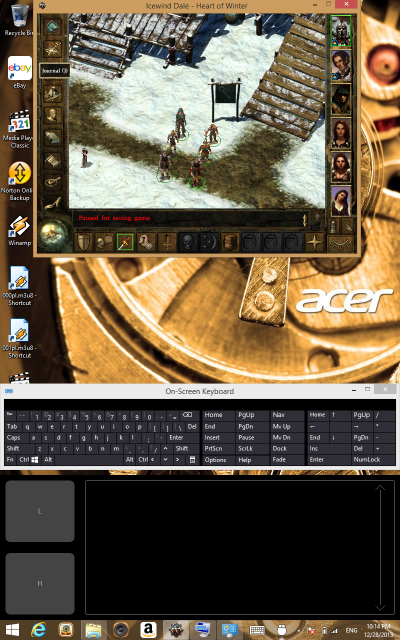
Playing Ice Wind Dale in portrait mode:

user posted image

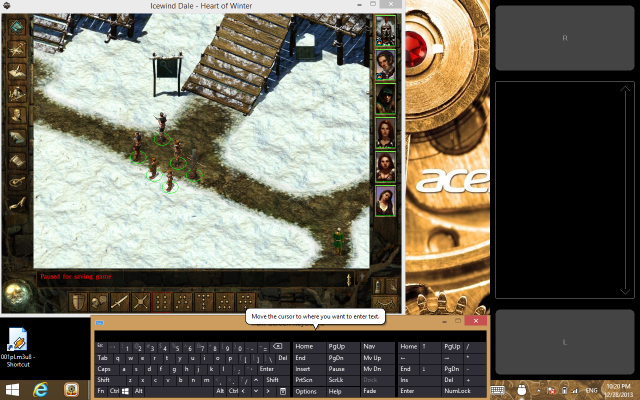
Playing Ice Wind Dale in landscape mode:

user posted image

tabletman
post Jan 6 2014, 02:58 PM

Getting Started
**
Junior Member
256 posts

Joined: Feb 2012
QUOTE(danieloo @ Jan 3 2014, 01:07 PM)
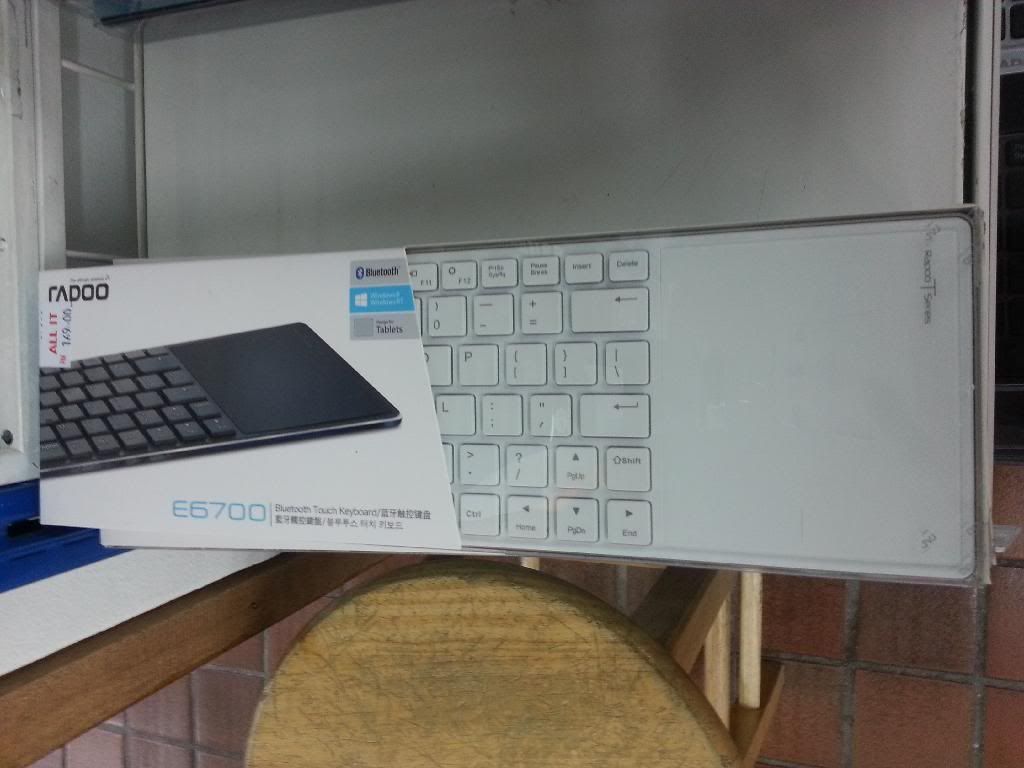
Just back from PJ IT Mall. Saw this at All IT. Too bad only have white color. Else I will grab it if there are black color.

user posted image
*
Definitely have seen this in Viewnet (LowYat). But only white color as well.

tabletman
post Jan 17 2014, 12:17 PM

Getting Started
**
Junior Member
256 posts

Joined: Feb 2012
Today's PC Expo has started. Has anyone able to get the elusive $899 Acer W4?

tabletman
post Jan 23 2014, 11:19 AM

Getting Started
**
Junior Member
256 posts

Joined: Feb 2012
Asus ViVo Note 8 news here: (already out in China)

http://www.imp3.net/10/show.php?itemid=43891


tabletman
post Jan 29 2014, 04:29 PM

Getting Started
**
Junior Member
256 posts

Joined: Feb 2012
QUOTE(cphilip @ Jan 26 2014, 06:58 PM)
hi, I am interested in getting the acer w4. there is one thing i would appreciate feedbacks from w4 owners.

what i like about my previous windows pocket pc, and my current androids, ipad is that they are able to do instant on and instant sleep (not much battery drain while sleep.)

But of course, these devices are limited to what one can do when compared to a full windows 8 or ubuntu tablets.

But then again, tablets with full windows os in the past take long time to boot up and load all the drivers, processes, services. After pressing the power on button, you have to wait and wait until the device becomes usable.

Of course, the alternative is to use hibernate. So, my question is can bay trail solve this problem because I read that the processor handles power management very efficiently and almost as good as how arm processors handles power management. Thanks
*
Even for desktop, if you install Windows on a SSD, the boot up won't take more than a few seconds. As for instant on and instant sleep, any Windows desktop/notebook/tablet support the sleep function will do instant wake/sleep, and of course with SSD you don't even need to hear the HDD spinning up upon doing so.

tabletman
post Feb 4 2014, 11:46 AM

Getting Started
**
Junior Member
256 posts

Joined: Feb 2012
QUOTE(cphilip @ Jan 29 2014, 07:01 PM)
but for my non-clover trail and non-bay trail netbook / notebooks, when i leave the pc in sleep state (not hibernate state), by the time i want to use it to give a presentation the next morning, the battery is half gone.
Interesting, I will need to try it on my ultrabook sometimes. Supposedly "sleep" mode means the CPU is drawing very little power, HDD/SDD has powered down, and RAM is being kept alive still. But draining half the battery seems a bit surprising. Assuming you have a 42WH battery (which is really small for a notebook), and it is 8 hours sleep, it means drawing 2.625 watt of power during sleep mode.

Do you have USB charging on? I usually turned that off as well.

This post has been edited by tabletman: Feb 4 2014, 11:52 AM
tabletman
post Feb 7 2014, 02:46 PM

Getting Started
**
Junior Member
256 posts

Joined: Feb 2012
QUOTE(cphilip @ Feb 6 2014, 01:59 AM)
Anybody here owns both asus t100 and acer w4?

I wonder which has better battery life -T100 or W4?

And on battery life, how do they compare with nexus 7 (2013) and surface pro?
*
Well, only has W4, so the opinions here is strictly from observation on W4 and the battery ratings that has been obtained from various websites.

Without a doubt Surface Pro will be the shortest. Most websites found it to last for about 5 hours. It is not surprising as the CPU simply requires a lot more power even when idle. The battery size is only 42WHour. So even drawing 8 watt will mean the battery will run out slightly after 5 hour.

W4, considering light use, it probably will last 7 hours to 10 hours, depending on the "light use" pattern. My own use pattern last around 9 hours. But really, maybe someone else can break it down for you in term of video playback, web surfing, office productivity etc. Having said that, 3D gaming will drains the battery fast.


tabletman
post Feb 11 2014, 09:45 AM

Getting Started
**
Junior Member
256 posts

Joined: Feb 2012
QUOTE(cphilip @ Feb 8 2014, 01:14 AM)
Thanks marauderz,

It is very good to know that with the special built stylus, Adoit Jot, using it as a mouse to do graphic work inside powerpoint is manageable. i have experienced both wacom and the resistive type digitizer.

With the resistive type digitizer, i had a hard time to use it as a mouse for manipulating shapes in powerpoint.

Well, since it appears that the transparent tip of the stylus offers the solution, I am a few steps open to getting the acer w4 instead of waiting for the asus vivotab note 8.

I am after all not too concern with the pressure sensitive feature. I am more interested in the hover feature of the wacom because it helps out in hitting more accurately the spot on the screen where i need to click on.

But of course, the pricing of the asus vivotab note 8 might be attractive, we don't know yet. One thing good about the acer w4 compared to the asus 8 inch is the w4 has hdmi out. I am sure it takes less battery power to transfer 8 inch screen to a larger monitor by using the hdmi out than to use wireless solution (correct me if i am wrong).

Having a wacom pen is nice but i have also experienced losing a wacom pen before. Maybe the wacom pen for asus 8 inch  will not be as expensive to replace as compared to replacing a adoit jot, i don't know.
*
After actually using a pen with desktop mode, my own experience is that the hover feature is not too useful if you want to hit those small menu or box accurately. The problem is when you start hitting the surface, your aim may be off even though it was spot on awhile earlier. For a more accurate control of hitting small UI interface, the virtual mouse pad is still a lot more accurate and useful, the disadvantage is it will take up some screen space. Drawing is still easier with the pen instead of a mouse though, virtual or not. The pen is not a complete replacement for a mouse as there are gesture and precise control that you can do with a mouse that is completely impossible with a pen.
tabletman
post Feb 11 2014, 09:50 AM

Getting Started
**
Junior Member
256 posts

Joined: Feb 2012
QUOTE(cphilip @ Feb 8 2014, 01:14 AM)
But of course, the pricing of the asus vivotab note 8 might be attractive, we don't know yet. One thing good about the acer w4 compared to the asus 8 inch is the w4 has hdmi out. I am sure it takes less battery power to transfer 8 inch screen to a larger monitor by using the hdmi out than to use wireless solution (correct me if i am wrong).
*
By the way, this is the first appearance of Vivo Note 8 in Microsoft online store.

http://www.microsoftstore.com/store/msusa/...84500#techspecs


2 Pages  1 2 >Top
 

Change to:
| Lo-Fi Version
0.0377sec    0.54    7 queries    GZIP Disabled
Time is now: 5th December 2025 - 02:45 PM