

My USB OTG + Charge cables are here... time to see if I'll end up burning anything....
Iconia W4 (W3-810 refresh) 8" tablet IPS screen, Baytrail Z3740 - Available Dec 6, 2013
Iconia W4 (W3-810 refresh) 8" tablet IPS screen, Baytrail Z3740 - Available Dec 6, 2013
|
|
 Dec 26 2013, 11:25 PM Dec 26 2013, 11:25 PM
Return to original view | Post
#101
|
 
Senior Member
3,390 posts Joined: Feb 2005  
|
My USB OTG + Charge cables are here... time to see if I'll end up burning anything....
|
|
|
|
|
|
Dec 27 2013, 01:28 AM
Return to original view | Post
#102
|
|
Senior Member
3,390 posts Joined: Feb 2005
|
QUOTE(funguss @ Dec 26 2013, 11:32 PM) Can charge and use other USB devices at the same time ? Ok.. done the testing and.. nope.. I think the cable was meant for powering the USB device being plugged into the tablet instead of the tablet itself. |
|
|
Dec 27 2013, 09:53 PM
Return to original view | Post
#103
|
|
Senior Member
3,390 posts Joined: Feb 2005
|
QUOTE(gaffer9678 @ Dec 27 2013, 07:53 PM) I hooked up my MS wedge touch mouse with the W4, Yes, I did see this happen when I was testing the Acer W4 as well, it is not a Baytrail issue because the same mouse used on the Dell Venue 8 Pro doesn't have any problems.and the mouse cursor lagged and stuttered so bad I couldn't use it. makes me wonder if something like this happened with other baytrail devices.. I'll go poke around the settings and see if I can find out anything. |
|
|
Dec 27 2013, 11:55 PM
Return to original view | Post
#104
|
|
Senior Member
3,390 posts Joined: Feb 2005
|
Ok, found the problem. Short version, go into device manager, find the WiFi adapter and go disable Bluetooth Collaboration under the Advanced menu.
Long version, read here. http://www.marauderzstuff.com/PermaLink,gu...38ccf60237.aspx |
|
|
Dec 28 2013, 12:40 AM
Return to original view | Post
#105
|
|
Senior Member
3,390 posts Joined: Feb 2005
|
QUOTE(gaffer9678 @ Dec 28 2013, 12:05 AM) Nice interesting find. Thanks for sharing Hmm.. doesn't seem to be a perfect fix though, but I'd say it fixes it for the most part. |
|
|
Dec 28 2013, 01:05 AM
Return to original view | Post
#106
|
|
Senior Member
3,390 posts Joined: Feb 2005
|
Here's a video guide for setting the switch.
|
|
|
|
|
|
Dec 28 2013, 11:15 PM
Return to original view | Post
#107
|
|
Senior Member
3,390 posts Joined: Feb 2005
|
QUOTE(tabletman @ Dec 28 2013, 11:08 PM) Playing Ice Wind Dale in portrait mode: If you don't need the extra keys in the On Screen Keyboard, you might want to give the more easily accessible System Keyboard a try.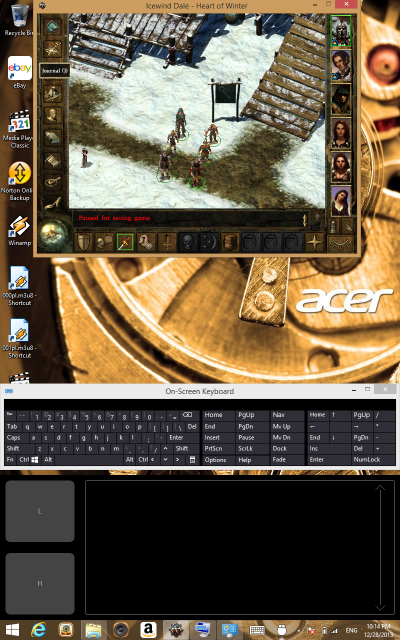 Playing Ice Wind Dale in landscape mode: 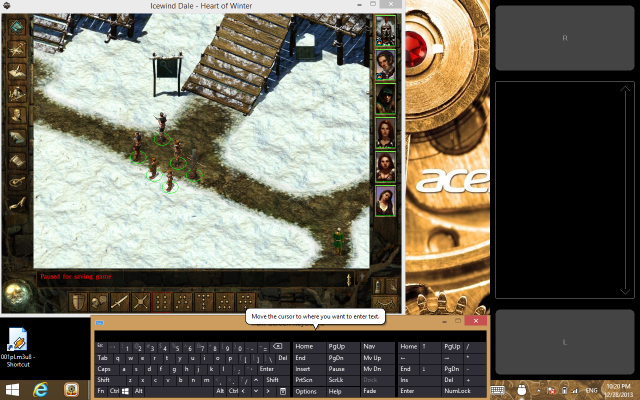 http://www.marauderzstuff.com/PermaLink,gu...00f2d10294.aspx |
|
|
Dec 29 2013, 12:40 AM
Return to original view | Post
#108
|
|
Senior Member
3,390 posts Joined: Feb 2005
|
QUOTE(marauderz @ Dec 27 2013, 11:55 PM) Ok, found the problem. Short version, go into device manager, find the WiFi adapter and go disable Bluetooth Collaboration under the Advanced menu. Ok, seems like Disabling the Bluetooth Collaboration might cause issues with certain BT devices, trying the setting at AUTO now and see.Long version, read here. http://www.marauderzstuff.com/PermaLink,gu...38ccf60237.aspx |
|
|
Dec 30 2013, 03:00 PM
Return to original view | Post
#109
|
|
Senior Member
3,390 posts Joined: Feb 2005
|
QUOTE(andrekua2 @ Dec 29 2013, 06:35 AM) Hardware limitation most probably. Well.. this is bloody weird... I just checked a demo unit in All IT, and their BT Collaboration setting WAS indeed at AUTO...but now my unit at AUTO isn't demonstrating the problem... hmmmm... interesting issues..It uses the Broadcom SDIO module enabling WiFi and Bluetooth in one chip. |
|
|
Dec 30 2013, 03:35 PM
Return to original view | Post
#110
|
|
Senior Member
3,390 posts Joined: Feb 2005
|
QUOTE(danieloo @ Dec 30 2013, 03:29 PM) Yah...Saw that offer. Hm.. should I get it to replace W4? But W4 seems ssufficient for my needy. ask yourself what are your needs, Surface Pro has a lot of processing power, but the W4 has a long battery life.How much worth for a week old W4? With Cover & SP? |
|
|
Dec 30 2013, 05:54 PM
Return to original view | Post
#111
|
|
Senior Member
3,390 posts Joined: Feb 2005
|
QUOTE(StupidGuyPlayComp @ Dec 30 2013, 05:33 PM) around 4 hours, sayonara...........surface pro 2 is better 4 hours for Ivy Bridge is actually quite good, don't dish it!  |
|
|
Dec 30 2013, 09:38 PM
Return to original view | Post
#112
|
|
Senior Member
3,390 posts Joined: Feb 2005
|
QUOTE(hart932 @ Dec 30 2013, 06:18 PM) For most outdoor ppl, 4hrs is not enough for day use & its worst than the battery life of ultrabooks or laptops. Don't forget to add the weight of the charger cable. Often users end up needing to find a place with wall power supply to continue using just like normal laptops. Don't forget the Acer W4 has a slight issue with power banks.With the atom tablets, I can bring pc work to the most remote part of the world without electricity supply for several days. Heck the 8in tab + power banks wont even weight more than most ultrabook!  Of course there is still a way to get it to charge via a power bank. |
|
|
Dec 31 2013, 11:55 AM
Return to original view | Post
#113
|
|
Senior Member
3,390 posts Joined: Feb 2005
|
QUOTE(StupidGuyPlayComp @ Dec 31 2013, 07:01 AM) http://www.thestar.com.my/Tech/Tech-News/2...st-your-budget/ Typo? These people just C&P some press release lar. Article feels so dead and bland. I guess the editor is typo.............microsoft store instead of google play store |
|
|
|
|
|
Jan 1 2014, 12:13 AM
Return to original view | Post
#114
|
|
Senior Member
3,390 posts Joined: Feb 2005
|
QUOTE(Hackezkk @ Dec 31 2013, 08:11 PM) Can i use or add custom keyboard button overlay on game?like xyz n wasd key There's a yes and no answer to that question.YES you can with http://gameplay.gestureworks.com only works for DirectX based games though. NO because... the W4 only has 2GB of RAM, while the virtual controller works great on my Surface Pro, on the W4 where many games are ALREADY complaining about low memory BEFORE I activate the overlay... lots of random crashes. |
|
|
Jan 2 2014, 11:35 PM
Return to original view | Post
#115
|
|
Senior Member
3,390 posts Joined: Feb 2005
|
QUOTE(Eiraku @ Jan 2 2014, 03:57 PM) @marauderz: Where did you get that USB charging doodad anyway? The one that comes with the button? Should be useful in tricking more iPad spec USB ports to charge my N2 (charges faster with more amps) and (hopefully) the W4. At RM40, this is the cheapest I've seen this design available.http://www.ipmart.com.my/main/product/ipma...php?prod=402150 |
|
|
Jan 3 2014, 01:05 AM
Return to original view | Post
#116
|
|
Senior Member
3,390 posts Joined: Feb 2005
|
QUOTE(andrekua2 @ Jan 2 2014, 11:58 PM) Asus seem certain to launch a best all rounder 8'' tablet with wacom stylus for USD 299. Lets wait and see. Don't see much use for stylus in Win8.1 unless you develop your own stylus app like Samsung did. But what about?- Onenote!! - Autodesk Sketchbook Express - Fresh Paint And countless other apps that can benefit from a digitizer!  |
|
|
Jan 3 2014, 01:06 AM
Return to original view | Post
#117
|
|
Senior Member
3,390 posts Joined: Feb 2005
|
QUOTE(danieloo @ Jan 3 2014, 12:21 AM) I have got a 64GB Class 10 Kingston MicroSD. I think the reason Windows doesn't let you use FAT32 is because the file system doesn't support the large disk that well.Should I format it NTFS or exFat? Ah.... I use Partition Magic to format it FAT32. Done. Use exFAT if you intend to use the card with other devices, NTFS if it's going to be used in Windows only. |
|
|
Jan 3 2014, 06:43 PM
Return to original view | Post
#118
|
|
Senior Member
3,390 posts Joined: Feb 2005
|
QUOTE(funguss @ Jan 3 2014, 05:25 PM) Hi, I don't think the W4 has a real gps, tried running the maps app in the car, it can't properly track.Has anyone tried any GPS navigation with the W4 ? Someone posted this earlier : http://navigatorfree.mapfactor.com/en/ |
|
|
Jan 3 2014, 09:49 PM
Return to original view | Post
#119
|
|
Senior Member
3,390 posts Joined: Feb 2005
|
QUOTE(baba8210 @ Jan 3 2014, 06:43 PM) anyone know where can get screen protector and pouch? how much? thanks I got my screen protector at AOne Plus, Digital Mall at RM59. higher than RRP by RM10. |
|
|
Jan 3 2014, 10:49 PM
Return to original view | Post
#120
|
|
Senior Member
3,390 posts Joined: Feb 2005
|
QUOTE(hart932 @ Jan 3 2014, 02:17 PM) One thing about trackpad keyboards, they are hard to use in Win8 especially when u need to drag & left click same time. Its not the same as type on keyboard & navigate on touch screen which is so much faster. What do you mean by drag and left click? You mean drag with left mouse button down to do multi select? You don't know about that double tap and drag gesture of trackpads? granted that still only works in small areas. |
| Change to: |  0.0230sec 0.0230sec
 1.10 1.10
 7 queries 7 queries
 GZIP Disabled GZIP Disabled
Time is now: 9th December 2025 - 03:39 PM |
 Quote
Quote