Welcome Guest ( Log In | Register )

Bump Topic Topic Closed RSS Feed
6 Pages < 1 2 3 4 > » Bottom

Outline · [ Standard ] · Linear+

 Sony Xperia™ Z/ZL, Official Thread V9, Still Stay Strong!

views
     
mafioso
post Oct 14 2013, 01:06 PM

 
*******
Senior Member
6,155 posts

Joined: Jul 2012
From: Today, 00:01 AM
QUOTE(benny888 @ Oct 13 2013, 05:56 PM)
Nephrite is right. Always be polite to those service staffs. Never complain n criticize/condemn  the phone . Just be frank n tell them nicely your problem.
These service center guys listen to all customer  complains the whole day. No one will go n praise how happy they are with the phone. They are human beings and a kind word will help them to serve you better.
I have seen several nasty customer at HTC n Samsung centers before n seriously I get irritated by the way they talk .
*
worked in phone line before.
and yes some customers can ask very very annoying questions.. laugh.gif

and all they want is quickly get the phone back while claiming warranty.. thats why i always push them go directly to service center.. when they go argue back and say "you just dont wanna take the responsibility, dont you?"

i tembak them "no sir, its not that.. if you want to get your phone back ASAP. its best to send it directly to service center. if you send it through here, we'll have to wait for the dispatch team to come over once every few days. that is why it takes 1-2 weeks to get your phone back"


summore got 1 time, 1 customer even asked me if there's an app to weight something. lol?
example: put a box on top of the phone screen and it will tell you how many grams/kg it is.. doh.gif doh.gif

QUOTE(teckyang97 @ Oct 14 2013, 09:15 AM)
Same,they rejected my warranty by claiming it water damaged
*
did you dropped it into the water or something? were the paper slip under the flaps pink?

This post has been edited by mafioso: Oct 14 2013, 01:09 PM
mafioso
post Oct 14 2013, 06:37 PM

 
*******
Senior Member
6,155 posts

Joined: Jul 2012
From: Today, 00:01 AM
just figured out a way to get your personal files through command prompt in case your stock rom screws up and unable to boot but do not want to reflash via flashtools (at the same time wiping) and losing personal data..

should i write the guide out? if anyone's interested or maybe OP can pin it to first page.. hmm.gif

however, requirements are:

1. rooted
2. have custom CWM
3. USB debugging enabled in Developer options
4. phone must be able to access recovery mode (custom)

This post has been edited by mafioso: Oct 14 2013, 06:43 PM
mafioso
post Oct 16 2013, 03:42 PM

 
*******
Senior Member
6,155 posts

Joined: Jul 2012
From: Today, 00:01 AM
QUOTE(SonnyCooL @ Oct 16 2013, 03:14 PM)
possible letting my unit (few day old and used for 2 day only) ......
can't tahan the battery life man, today go out at 8, battery left 30% at 11+ than stop using it and battery fully gone now ...
wondering what is running behind ...
screen time 22%
but google app is 55% (wondering what google app it run in the back end) sad.gif
*
dont think u have to sell it first..

play around, most likely you havent configured it properly, let everything sync, etc..
mafioso
post Oct 17 2013, 12:31 AM

 
*******
Senior Member
6,155 posts

Joined: Jul 2012
From: Today, 00:01 AM
QUOTE(Daniel969 @ Oct 16 2013, 11:23 PM)
Is this 4.2.2?
*
most likely 4.2.2 but a different version (like .423, .244, .67, etc)
mostly its still .67

QUOTE(teikboon @ Oct 16 2013, 11:25 PM)
anyone used Xperia Z long enough to make a review on the USB cover flap with opening it on daily basic for charging? Any sign of tear and wear?
*
mine is loose but can still cover it.
so far no noticable wear and tear..

QUOTE(SonnyCooL @ Oct 16 2013, 11:46 PM)
guy where is all those notifications file save at ???
*
what kinda notification do you mean?
sms tones?

to access them you need root access and a root explorer... /system/media/audio/notifications/

This post has been edited by mafioso: Oct 17 2013, 12:31 AM
mafioso
post Oct 17 2013, 04:17 PM

 
*******
Senior Member
6,155 posts

Joined: Jul 2012
From: Today, 00:01 AM
any of u guys having random reboots on firmware .67?
mafioso
post Oct 17 2013, 06:25 PM

 
*******
Senior Member
6,155 posts

Joined: Jul 2012
From: Today, 00:01 AM
QUOTE(Nephrite @ Oct 17 2013, 06:08 PM)
No random reboot happen before to me even up to 5 days din`t off the phone still kicking strong.
*
okay. must be a buggy app.. will slowly uninstall the last thing i installed until it doesnt happen again..

thanks nod.gif
mafioso
post Oct 17 2013, 07:12 PM

 
*******
Senior Member
6,155 posts

Joined: Jul 2012
From: Today, 00:01 AM
QUOTE(SiIverStar @ Oct 17 2013, 07:04 PM)
Try repairing use pcc...i also got that prob b4...after some update....no more prob so far..only at kampung low signal with G..
*
hmmm i dont have that problem for 2-3 weeks after relocking BL and went back to stock rom (pure stock) but with root lah..

until few days ago when i installed a few apps at once, so i dunno which app is causing it laugh.gif
just re-installed 1 app, see if it'll happen again. nod.gif
mafioso
post Oct 18 2013, 02:36 AM

 
*******
Senior Member
6,155 posts

Joined: Jul 2012
From: Today, 00:01 AM
QUOTE(jajac @ Oct 17 2013, 03:42 PM)
Anybody encounter problem like suddenly no signal at all for 20-30 seconds ? Sometimes also no data at all for 20-30 seconds even if you are browsing?
*
most likely bad area..

i also.. no worries..
but i got scared shiat-less when i first kena tho..

cuz my previous phone also suddenly die due to suddenly no connection
totally becomes an "X" icon on the network signals.. laugh.gif
mafioso
post Oct 20 2013, 06:53 PM

 
*******
Senior Member
6,155 posts

Joined: Jul 2012
From: Today, 00:01 AM
QUOTE(wind3524 @ Oct 20 2013, 05:55 PM)
New phone! Xperia Z1S Leaked.
http://www.gsmarena.com/sony_xperia_z1s_pr...s-news-7012.php
Might be the international version of the Sony Xperia Z1 mini.
*
errrghhhh..

sony is becoming like samsung adi? same design, different specs. :\

i hope sony wont be like this.. if not they're just like the others.. (tho every company's main goal is to earn money only)

QUOTE(soonlee33 @ Oct 20 2013, 09:41 AM)
Battery consumption feels higher after the update :hmm
*
you mean .67?

mine is fine.. if you are rooted use greenify to hibernate the apps..
then configure the settings properly nod.gif (not greenify settings.. your other settings like sync, etc)

unplugged at 5am yesterday at 98%, wifi off. woke up at 11am, still 98%
after 7 hours.. thumbup.gif

This post has been edited by mafioso: Oct 20 2013, 07:04 PM
mafioso
post Oct 20 2013, 10:09 PM

 
*******
Senior Member
6,155 posts

Joined: Jul 2012
From: Today, 00:01 AM
QUOTE(Nephrite @ Oct 20 2013, 09:07 PM)
Huh your phone really sleep well for 7 hour.  icon_rolleyes.gif
*
Yea kinda satisfied with it. thumbup.gif
mafioso
post Oct 21 2013, 12:48 AM

 
*******
Senior Member
6,155 posts

Joined: Jul 2012
From: Today, 00:01 AM
QUOTE(ultraman90 @ Oct 20 2013, 10:20 PM)
How to do that..Playing video like a small app.?
*
i think there are apps..

just search on the play store " small apps for sony" or "small apps"
mafioso
post Oct 21 2013, 08:48 AM

 
*******
Senior Member
6,155 posts

Joined: Jul 2012
From: Today, 00:01 AM
QUOTE(emkay @ Oct 21 2013, 08:40 AM)
Guys, any idea how to install adobe flash player? Do I need to install different browser? which browser is recommended. Tq
*
just get the .apk nod.gif

http://forum.xda-developers.com/showthread.php?t=1774336

to test if it works: go to youtube.com (make sure you dont set to launch it in the browser by default)
, play any video.. if you're able to play.. it works nod.gif
mafioso
post Oct 21 2013, 02:20 PM

 
*******
Senior Member
6,155 posts

Joined: Jul 2012
From: Today, 00:01 AM
QUOTE(Daniel969 @ Oct 21 2013, 02:19 PM)
guys, i dont wanna lost my game data
so what app u guys can recommend for me to backup my app data ?
*
are you rooted?

if you are maybe you can manually backup the folder instead

or you can go with titanium backup (which also requires root)
mafioso
post Oct 21 2013, 03:46 PM

 
*******
Senior Member
6,155 posts

Joined: Jul 2012
From: Today, 00:01 AM
QUOTE(Daniel969 @ Oct 21 2013, 03:32 PM)
i didnt root bcoz it will void warraty? is it?
*
im not sure but as long as you dont unlock the bootloader.. your warranty wont be voided..

about root.. as long as you're able to flash the rom back to full stock.. you'll be fine.
mafioso
post Oct 21 2013, 08:59 PM

 
*******
Senior Member
6,155 posts

Joined: Jul 2012
From: Today, 00:01 AM
QUOTE(ILoveXperia @ Oct 21 2013, 05:49 PM)
just update my phone to the latest firmware smile.gif .67 firmware.
rooted and ready to play around with it. previously update through pc companion cause softbrick to my phone, now all solves. luckily manage to use my phone back brows.gif
*
make sure you install xposed and try out the modules!!

good modules for the xperia z:

1. long press toggles to bring to their respective settings page (eliminates the need to flash custom stock rom for that feature)
2. gxmod (flashlight as a toggle..but you gotta swap one of the toggles you dont use for that)
3. gravitybox module (ported most of the AOSP features - pie, CRT effect, clock settings, etc)
4. semc patch (disables that annoying "you have disabled your data" notification)
5. app setting module (per app dpi.. paranoid android's feature)
6. advanced power menu (bring's reboot menu into stock rom)
7. xuimod (bring's in listview.. animation that was from AOSP roms)
8. others if you wish to try, you can download from the xposed app itself, it has a download section for more modules. nod.gif

basically you no need to even think about flashing custom roms/unlock bootloader anymore. just your rooted stock. you can have what custom roms used to offer nod.gif thumbup.gif

most importantly = battery life is NOT affected
my xperia z is still able to sleep properly when it should.. tongue.gif

This post has been edited by mafioso: Oct 21 2013, 09:02 PM
mafioso
post Oct 21 2013, 09:38 PM

 
*******
Senior Member
6,155 posts

Joined: Jul 2012
From: Today, 00:01 AM
QUOTE(wind3524 @ Oct 21 2013, 09:22 PM)
Interesting. Got link for Xposed?
*
http://forum.xda-developers.com/showthread.php?t=1574401

you need to activate the module first..

1. install
2. open app
3. go to framework tab
4. click that "install" button or something
5. it should turn from red to green
6. after that reboot

7. go to xposed app, download tab, search for the modules you want to try

to activate the module, you have to reboot tho. after that you wont have to (unless necessary)
cuz some mods no matter how you change, it still needs to reboot to take affect thumbup.gif
mafioso
post Oct 21 2013, 11:17 PM

 
*******
Senior Member
6,155 posts

Joined: Jul 2012
From: Today, 00:01 AM
QUOTE(emkay @ Oct 21 2013, 10:28 PM)
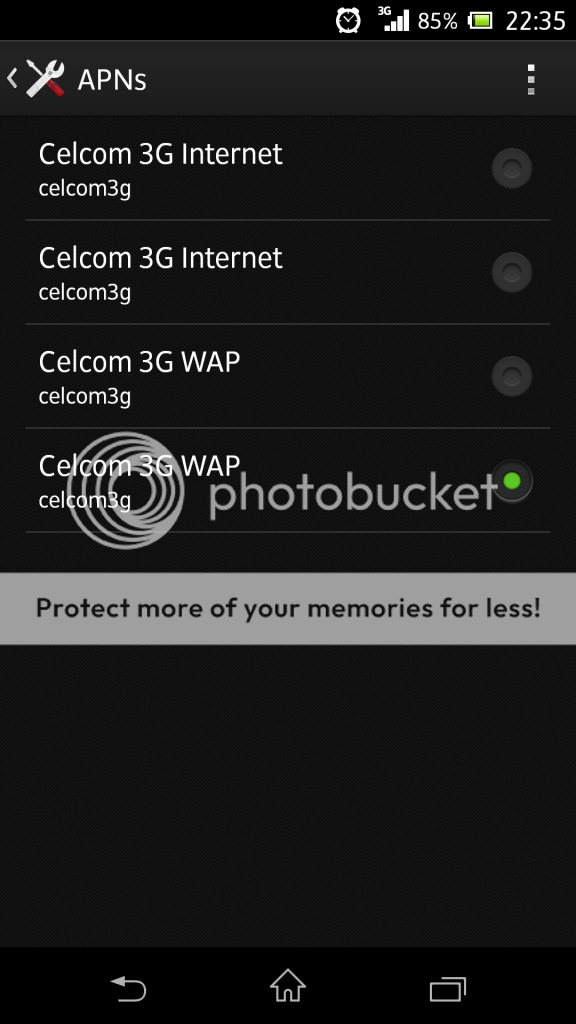
Who is using Celcom? Could you kindly share the APN setting. How many APN setting that it should have? I tried download the setting using sms 20999 but it didn't work. Tried solutions from google search also didnt work. Please help me....

The setting that I got from celcom have 4 APN
user posted image

With this APN settings, I can surf the net but I still can't download from playstore or log in to google hang out.
*
Settings -> Xperia™ -> Internet Settings -> Download

you should get back your proper APN settings.. nod.gif
mafioso
post Oct 22 2013, 12:17 AM

 
*******
Senior Member
6,155 posts

Joined: Jul 2012
From: Today, 00:01 AM
QUOTE(emkay @ Oct 22 2013, 12:14 AM)
Thanks man. It really work  rclxms.gif . The solution is so simple that make me doh.gif . Thanks again man.
*
its okay.. at least now you learn something new.. thumbup.gif

but not sure if this is just limited to xperia only or not.. cuz i dont see these back when i was using touchwiz sweat.gif
mafioso
post Oct 22 2013, 08:34 AM

 
*******
Senior Member
6,155 posts

Joined: Jul 2012
From: Today, 00:01 AM
QUOTE(Ronald_loulan @ Oct 22 2013, 08:29 AM)
I need it!!!!
THANKS!!!  rclxms.gif
*
Refer few posts back for the recommended modules for our xperia Z thumbup.gif
mafioso
post Oct 22 2013, 11:09 AM

 
*******
Senior Member
6,155 posts

Joined: Jul 2012
From: Today, 00:01 AM
QUOTE(emkay @ Oct 22 2013, 11:04 AM)
Even among xperias there are many features that are very usefull but not all have it. For example in my son's xperia tipo, one can reset the phone without losing everthing. It simply reset the phone to default setting. All your apps & data are still intact.
*
even apps installed on the playstore?

hmm, this is weird but could be a good feature..

for me when i reset i would prefer to start fresh, cuz sometimes some apps are keeping the phone awake and its kinda hard to find which one is it sweat.gif

but so far im satisfied with sony's rom.. even more "vanilla" than those AOSP roms available on XDA nod.gif
somemore its themed nicer.. looks more elegant.. laugh.gif

6 Pages < 1 2 3 4 > » Top
Topic ClosedOptions
 

Change to:
| Lo-Fi Version
0.0539sec    0.69    7 queries    GZIP Disabled
Time is now: 7th December 2025 - 08:45 AM