

 May 30 2006, 09:18 AM


QUOTE(minde @ May 30 2006, 08:55 AM)
hi...when i try to save my avi file.....the normal file size of 49mb rises up 1GB....how do reduce this? do i use DivX codex? and how do i resize all of the frame?

You need to select the codec in order to bring down the file size either using DivX or XviD.Refer to this screen: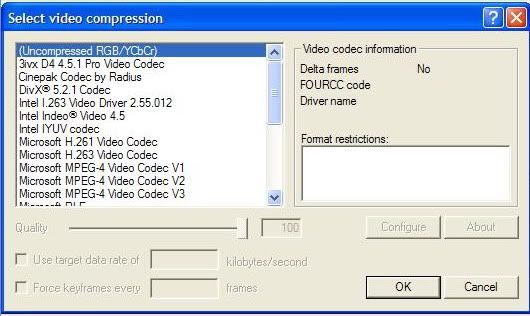
As you can see from the above screen, the file is huge when not compressed.Select DivX in order to do the compression.The bitrate will determine the final size and quality also.DivX and Xvid has built in calculator to calculate the bitrate & file size.
Another link which give you some idea on how to use VirtualDub (this guide using XviD instead):
http://forum.lowyat.net/index.php?showtopi...dpost&p=6914281
To resize the frame, you need to use the filter in the VirtualDub.
This post has been edited by keyz: May 30 2006, 09:19 AM
 Quote
Quote
 0.0132sec
 0.53
0.53
 6 queries
 GZIP Disabled