

QUOTE(steventan85 @ Sep 2 2013, 10:46 PM)
google for the result ... type biz68 lte quota and result will be out ....according to fruitie , its true la...not sure for other ppl

Yes, I can confirm got cap 
Experienced it
Maxis Maxis Biz68 Mobile Internet V3, Updates on #1
|
|
 Sep 2 2013, 10:56 PM Sep 2 2013, 10:56 PM
Return to original view | Post
#21
|
 
Elite
8,410 posts Joined: Jul 2008  
|
QUOTE(steventan85 @ Sep 2 2013, 10:46 PM) google for the result ... type biz68 lte quota and result will be out ....according to fruitie , its true la...not sure for other ppl Yes, I can confirm got cap Experienced it |
|
|
|
|
|
Sep 3 2013, 11:05 AM
Return to original view | Post
#22
|
|
Elite
8,410 posts Joined: Jul 2008
|
QUOTE(lepo @ Sep 3 2013, 09:47 AM) guys, can we bypass Maxis torrent restriction if using VPN? Yes, you can bypass any ISP restriction by using VPN |
|
|
Sep 3 2013, 11:46 AM
Return to original view | Post
#23
|
|
Elite
8,410 posts Joined: Jul 2008
|
QUOTE(kahjye @ Sep 3 2013, 11:26 AM) ya..what happened? Eh, read first page   |
|
|
Sep 3 2013, 12:00 PM
Return to original view | Post
#24
|
|
Elite
8,410 posts Joined: Jul 2008
|
QUOTE(zr125 @ Sep 3 2013, 11:58 AM) I'm confused a bit. First post : what is the throttled speed after 30GB?If we connected to LTE, then capped. The after that we connected to DC back, no capped? Right? or the capped become permanent?  That is very helpful |
|
|
Sep 3 2013, 12:06 PM
Return to original view | Post
#25
|
|
Elite
8,410 posts Joined: Jul 2008
|
QUOTE(lepo @ Sep 3 2013, 12:04 PM) 1 of FAQ not apply to me, wonder why, lucky me then. Keyword : stay low  |
|
|
Sep 3 2013, 08:22 PM
Return to original view | Post
#26
|
|
Elite
8,410 posts Joined: Jul 2008
|
QUOTE(fabianz03 @ Sep 3 2013, 08:06 PM) I think I'm throttled at 10Mbps guys Exceeded quota? On H+ or LTE also same, full bar on both Bukit Damansara area, not sure about other areas though, but syukurlah |
|
|
|
|
|
Sep 3 2013, 09:56 PM
Return to original view | Post
#27
|
|
Elite
8,410 posts Joined: Jul 2008
|
QUOTE(zhiyuanchan @ Sep 3 2013, 09:53 PM) Airplane mode and restart it's useless, since i'm facing this problem from last Friday. Just complaint to them you having slow network and they will carry out the proper measure Ask them network reset in this time will facing any problem? Since now so sensitive in this package.  Guidelines on the first page |
|
|
Sep 4 2013, 12:14 AM
Return to original view | Post
#28
|
|
Elite
8,410 posts Joined: Jul 2008
|
QUOTE(echoesian @ Sep 4 2013, 12:04 AM) ZTE MF190 or Huawei E353 is better? Get E3131E353 had been replaced by E3131 Don'thave experience with MF190 but as usual ZTE is not as simple as hHuawei |
|
|
Sep 4 2013, 05:38 PM
Return to original view | Post
#29
|
|
Elite
8,410 posts Joined: Jul 2008
|
QUOTE(merchant9 @ Sep 4 2013, 05:31 PM) I will try to run my BT overnight tonight and see if there's any favorable results. Thank you. I recommend deluge as client, use forced inbound encryption Anyway, you won't be able to use your connection when torrent, it will be totally jammed 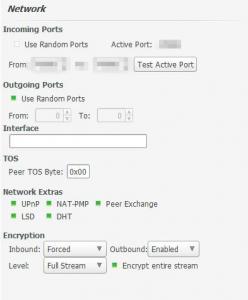
|
|
|
Sep 4 2013, 10:43 PM
Return to original view | Post
#30
|
|
Elite
8,410 posts Joined: Jul 2008
|
QUOTE(echoesian @ Sep 4 2013, 08:46 PM) Some forummers here are offering the unlimited plan but most of the ppls here are saying no more this thing since 27 Aug. So who's right who'd wrong? I updated the first page about this matter Should be clearer now Should have done that earlier |
|
|
Sep 5 2013, 04:15 PM
Return to original view | Post
#31
|
|
Elite
8,410 posts Joined: Jul 2008
|
QUOTE(chding @ Sep 5 2013, 04:12 PM) any way to know which band the LTE modem connected to? What modem you use |
|
|
Sep 5 2013, 04:25 PM
Return to original view | Post
#32
|
|
Elite
8,410 posts Joined: Jul 2008
|
QUOTE(chding @ Sep 5 2013, 04:20 PM) I have both MF820D and K5006 Adoi, both don't allow you to do soSell both of them and get a Huawei one if you really want to play with frequency |
|
|
Sep 5 2013, 04:37 PM
Return to original view | Post
#33
|
|
Elite
8,410 posts Joined: Jul 2008
|
QUOTE(thpace @ Sep 5 2013, 04:35 PM) those who sometimes face slow page loading but good speedtest result Everyone should do thisTry changing your dns setting to google dns or opendns. Same case like TM, their dns server is slow.. For those who want to change DNS on PC, tutorial here |
|
|
|
|
|
Sep 5 2013, 04:55 PM
Return to original view | Post
#34
|
|
Elite
8,410 posts Joined: Jul 2008
|
QUOTE(thpace @ Sep 5 2013, 04:50 PM) a much simpler way.. if anyone using a wireless router like TP-LINK MR3020 Yup, very simple on router that's why I mention for those use modem on PC since usually changing on the adapter screen dont workMaxis will override any custom dns you put in the wireless router with their own dns server. You can see this in the Status page under DNS Server section The way to bypass this is to go to your DCHP setting and replace the dns with google dns or opendns ip. By doing this, mean all your devices connected to the router will use the custom dns server. You wont have to adjust your laptop or install any software  This post has been edited by blacktubi: Sep 5 2013, 04:55 PM |
|
|
Sep 5 2013, 06:46 PM
Return to original view | Post
#35
|
|
Elite
8,410 posts Joined: Jul 2008
|
QUOTE(tesh94 @ Sep 5 2013, 06:26 PM) Using the biz68 . It seems the speed is so terrible. Only getting a max upload/download of 500kbps Where is your location?Ps : using google dns . We do have a fairly great quide on first page on why your connection is slow |
|
|
Sep 5 2013, 06:50 PM
Return to original view | Post
#36
|
|
Elite
8,410 posts Joined: Jul 2008
|
QUOTE(Psychosis @ Sep 5 2013, 06:49 PM)   Still the same  Try doing ipconfig /all on your PC see what is the DHCP acquired DNS address |
|
|
Sep 5 2013, 06:55 PM
Return to original view | Post
#37
|
|
Elite
8,410 posts Joined: Jul 2008
|
QUOTE(phh9310 @ Sep 5 2013, 05:02 PM) If i use mifi sierra 760s ? How to setting my mifi ?? Here you go Attached thumbnail(s) 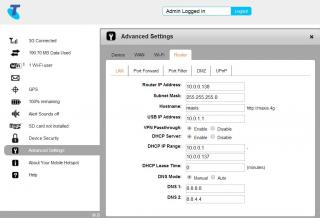
|
|
|
Sep 5 2013, 07:09 PM
Return to original view | Post
#38
|
|
Elite
8,410 posts Joined: Jul 2008
|
QUOTE(phh9310 @ Sep 5 2013, 07:08 PM) what setting i need to configure ? No bro, follow my screenshot, it's on the Router Tab[attachmentid=3616479] |
|
|
Sep 5 2013, 07:12 PM
Return to original view | Post
#39
|
|
Elite
8,410 posts Joined: Jul 2008
|
QUOTE(Psychosis @ Sep 5 2013, 06:56 PM) Where do I get the DHCP acquired DNS address?  I checked mine, once changed the DNS it also changes on the status page, probably you need to perform a reboot. I checked mine, once changed the DNS it also changes on the status page, probably you need to perform a reboot.Else need to manually set at DHCP |
|
|
Sep 5 2013, 07:16 PM
Return to original view | Post
#40
|
|
Elite
8,410 posts Joined: Jul 2008
|
QUOTE(phh9310 @ Sep 5 2013, 07:15 PM) dns setting done but i need other info about the setting The profile one you can just ignore, wont make a signficant difference |
|
Topic ClosedOptions
|
| Change to: |  0.0451sec 0.0451sec
 0.61 0.61
 7 queries 7 queries
 GZIP Disabled GZIP Disabled
Time is now: 9th December 2025 - 11:05 AM |
 Quote
Quote