Welcome Guest ( Log In | Register )

Bump Topic Topic Closed RSS Feed
3 Pages  1 2 3 >Bottom

Outline · [ Standard ] · Linear+

 MSI Gaming Notebook V.II, The Refreshed model yet more powerful!

views
     
Areas Elysian
post Sep 10 2013, 05:59 PM

Regular
******
Senior Member
1,132 posts

Joined: Oct 2010
LoL..

Eiraku will never let that experience with his adapters go... tongue.gif

Do batteries really cost that much? RM 500?

Also, while batteries costs RM 500 and adapter costs RM 100... the headache and time spent on friend adapters = priceless tongue.gif

There are some things money can't buy.. for others, there's Master Card.
Areas Elysian
post Sep 11 2013, 08:49 AM

Regular
******
Senior Member
1,132 posts

Joined: Oct 2010
QUOTE(Zakov @ Sep 10 2013, 07:05 PM)
Still waiting for your stock GE40 Ram stick. biggrin.gif
*
OMG I am so sorry!

Been so busy lately. I'll PM you tonight on that!

A thousand forgiveness!
Areas Elysian
post Oct 24 2013, 10:24 PM

Regular
******
Senior Member
1,132 posts

Joined: Oct 2010
Hey guys.

How many of you over here are using the MSI GS70 Stealth here? The missus wants that laptop (that's more powerful than mine... yes... lol).

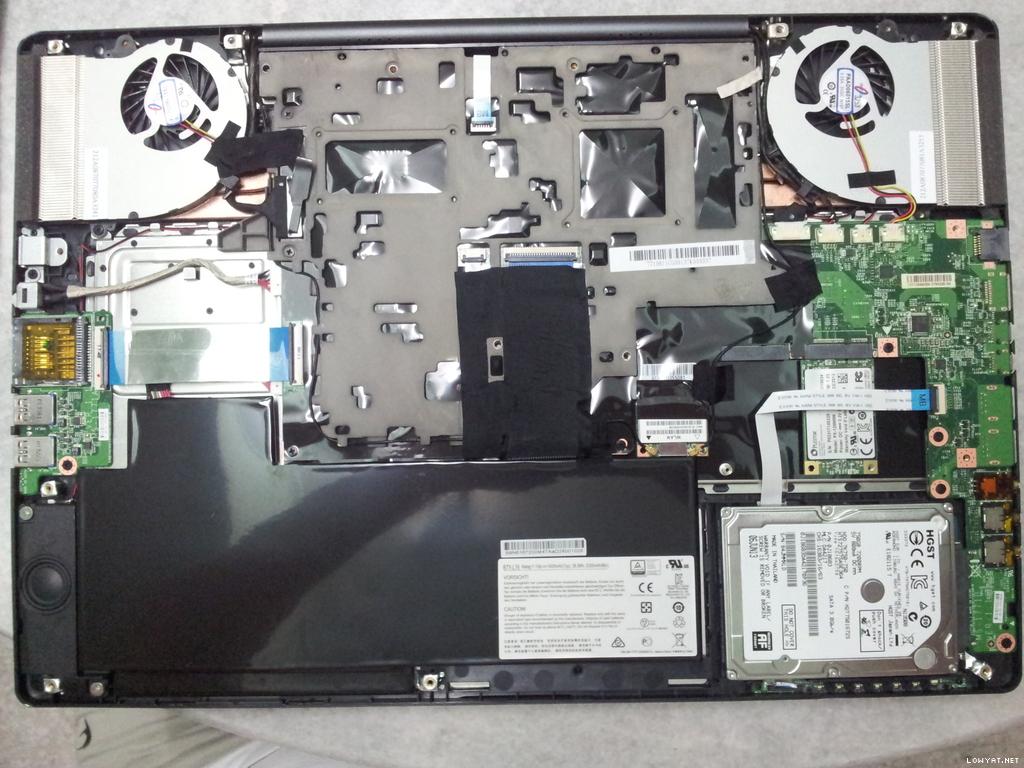
Basically, what I want to know is, with the GS70, the basic HDD model, has anyone opened the bottom cover before? I just want to know what is the configuration there. Does it come with two SATA slots or what.

Thanks!
Areas Elysian
post Oct 24 2013, 11:35 PM

Regular
******
Senior Member
1,132 posts

Joined: Oct 2010
QUOTE(Unseen83 @ Oct 24 2013, 10:39 PM)
ask storm88 smile.gif
*
LoL.. Yeah, he would be more likely to have one opened before.. geek's porn.. LOL.. the insides of a laptop! biggrin.gif
Areas Elysian
post Oct 25 2013, 01:15 AM

Regular
******
Senior Member
1,132 posts

Joined: Oct 2010
QUOTE(Unseen83 @ Oct 24 2013, 11:38 PM)
ah... that new...  ia m google it now see what i get
*
Enjoy your porn. smile.gif

» Click to show Spoiler - click again to hide... «


To any GS70 owners out there, especially those who purchased the HDD edition only.

Is yours anything like what is in the photo above in the spoiler?

What it shows is a standard SATA, and two mSATA directly on the motherboard.

I am just wondering if the HDD version only has the mSATA slots or not.

Edit:
I added a pdf of a disassembly guide for the GS70.

This post has been edited by Areas Elysian: Oct 25 2013, 01:48 AM


Attached File(s)
Attached File  MS_1771_Disassembly_guide.pdf ( 623.87k ) Number of downloads: 10
Areas Elysian
post Oct 25 2013, 10:18 AM

Regular
******
Senior Member
1,132 posts

Joined: Oct 2010
QUOTE(SuperVelocity @ Oct 25 2013, 09:59 AM)
This is a HDD version with Crucial SSD M500, suppose to have 2 SDD slots, but from what I seen, is only 1 slot which is already taken up by the SDD already.
*
The 2 SSD slots = mSATA, which is located above the Crucial SSD.

I just needed to confirm if the HDD version came with the mSATA ports or not, since I went to some shop last night that called up MSI and said need to bring in to have a special mSATA board installed and all. =\..

Edit:
Here's another picture, courtesy of zzloo.

For this one, there's only one mSATA SSD installed in additional to the standard SATA HDD.

» Click to show Spoiler - click again to hide... «


This post has been edited by Areas Elysian: Oct 25 2013, 10:20 AM
Areas Elysian
post Oct 25 2013, 02:10 PM

Regular
******
Senior Member
1,132 posts

Joined: Oct 2010
QUOTE(zaicon @ Oct 25 2013, 12:38 PM)
zzzloo bought the non-SSD model, and added his own MSATA.

» Click to show Spoiler - click again to hide... «


So, it should have 2 MSATA ports  laugh.gif
*
Sounds good!

Thanks! smile.gif
Areas Elysian
post Oct 25 2013, 02:24 PM

Regular
******
Senior Member
1,132 posts

Joined: Oct 2010
QUOTE(Unseen83 @ Oct 25 2013, 12:45 PM)
biggrin.gif don't tell me.. tell person ask... smile.gif i got top dog in MSI gaming notebook .. lolz

edit;; to me minimum on notebook for gaming is GTX 770m or HD8970m(my opinion ja)
*
Very subjective. Notebook is very compromising when it comes for gaming. For me 90% of my gaming is done on the desktop. The GE40 is just the portable compromised machine. LOL
Areas Elysian
post Oct 25 2013, 05:22 PM

Regular
******
Senior Member
1,132 posts

Joined: Oct 2010
QUOTE(Unseen83 @ Oct 25 2013, 02:35 PM)
in 2 week time i be saying like you... " i be gaming on my desktop, my gt70 for door opener"
*
These powerhouse are still useful.. when on the move and stuff.. and especially small machines such as the GE40 or the GS70 that packs a punch.. I always find the response from friends/colleagues fascinating, how they would be surprised that a small light machine can boot up and play Skyrim Ultra etc... LOL
Areas Elysian
post Oct 26 2013, 05:05 PM

Regular
******
Senior Member
1,132 posts

Joined: Oct 2010
QUOTE(SuperVelocity @ Oct 26 2013, 04:28 PM)
Just wanna ask, for GS70 SuperRaid SSD model. Does the window OS install on one 64 GB SSD or both???

Will  it affect if in the future I wanna upgrade to bigger capacity SSD will I lost the SuperRaid feature?
*
On both.

What it uses is RAID 0, where it will treat 2 or more drives to be like one.

If you want to upgrade, you will need to upgrade 2 x SSD of the same size.

So currently it comes with128GB, consisting of 2 x 64GB mSATA SSD.

If you want 256GB in RAID 0 setup, you'll need to get 2 x 128GB mSATA SSD.

And so on and so forth.
Areas Elysian
post Oct 28 2013, 09:00 AM

Regular
******
Senior Member
1,132 posts

Joined: Oct 2010
QUOTE(ZRong223 @ Oct 27 2013, 04:51 PM)
Gosh! I saw some people at Notebookreview forum also suffer issues regarding the Spacebar key.....
*
QUOTE(hamtanchiuyan @ Oct 27 2013, 05:12 PM)
hmmm.... im using GS70.. mine seems fineee..... its been a week already i had this lappy...
*
It's one of those where some gets it others don't. There's a video on YouTube currently with a guy replicating the issue on his Shift key, complaining about Newegg.com etc.

Usually opening the keys and fiddling around with the retainer clips and/or metal holder etc can solve it. Fix it at your own risk. LOL. Any slight angle variation can cause undesired results, especially with long keys that can warp shape easily like the space bar.

QUOTE(SuperVelocity @ Oct 27 2013, 10:02 PM)
Thanks for the enlightment bro! Appreciate it.
*
No worries. smile.gif

Do enjoy your machine, it's pretty good. The only grip I can say about it is.. the foot print is much larger than most standard 17" (as they had to make it thin and what not), so finding a bag/back pack that fits is a little more challenging as they don't make as many 17" bag/back packs like TicTacs anyway, and that the numeric pad's keys are smaller than the other keys on the keyboard, so it takes some getting used to.

Areas Elysian
post Oct 28 2013, 03:09 PM

Regular
******
Senior Member
1,132 posts

Joined: Oct 2010
QUOTE(Eiraku @ Sep 11 2013, 12:38 AM)
@Elysian: It's a terribad MSI oversight, supplying 90w adapters for a laptop that sucks 130w at full load. AND that was the ONLY real issue I have had with the GE40 anyway lol, everything else has been super.

@davidmak: Oh mai. I'm waiting for my 1202 to come in to replace my Intel Advanced-N (which in turn replaced the single-band Azurewave crap MSI was bundling with the GE40). I got a Broadcom BCM943228HMB too from eBay but that came faulty (ugh).

Yeah, I've gone through 3 WIFI cards already. Now using the Intel, which ONLY works with the standard Win8 driver - upgrading it to anything newer from Intel makes it stupid lol.

Don't tell me the 1202 has issues too. Sheesh.

Does ANYONE make GOOD, SOLID WIFI cards ANYMORE?
*
Eiraku,

Just to wake you up from the dead with regards to this thread. tongue.gif..

LOL

Planning to change from the current Azurewave crap.. I am planning to get a bluetooth mouse.. and we all know how this Azurewave thingy has bad drop out and connection issues with bluetooth active at the same time.. so yeah..

What are you currently having in your GE40? Still using bluetooth + wifi on it simultaneously?

Also, with regarding to MSI supplying 90w adapter for a 130w sucking machine, it's not an oversight. It was intended. Just that they didn't put a warning that's all. I remember reading somewhere about how MSI, to keep the weigh down on their lighter portable machines, they will provide with smaller adapters and will use the battery + adapter to source the power as and when the machine needs it.
Areas Elysian
post Oct 29 2013, 05:03 PM

Regular
******
Senior Member
1,132 posts

Joined: Oct 2010
QUOTE(SuperVelocity @ Oct 28 2013, 10:50 PM)
Thanks for the advise bro. Still in dilemma on which version to take at the moment.
*
What are you deciding between?

QUOTE(hawk @ Oct 29 2013, 12:10 AM)
Sifu, how hot can GE40 be when not playing high end game?
Not a hardcore gamer, but want to get a laptop for work and capable to run games like CS, SG, and maybe Warcraft or Diablo.
like the weight and battery life (6.5hours?), but worry of the heat.
So, I am thinking of GP60, GE40, or GE60
*
Heat under gaming is not too bad as long as you're in a well ventilated and air conditioned place. It does get warm when you're rendering/processing images/videos for long period. I know I had mine hit 90+ then. But under gaming it rarely passes 80.

Alternatively you get a notebook cooler to help with the airflow, and also remember to reapply a good paste as well for the CPU/GPU. MSI put too much.
Areas Elysian
post Oct 30 2013, 08:47 AM

Regular
******
Senior Member
1,132 posts

Joined: Oct 2010
QUOTE(RJ1 @ Oct 29 2013, 08:58 AM)
Hi all,

I bought GS70 stealth about a month ago, and everything was fine until about a week ago. There is a loud crackling sound coming from the left side of the unit even after boot up. At first I thought it was the fan, but it is not a normal wheezing fan sound. It is like the sound of fan stuck into something. Or maybe also the sound of something else. But it is not normal at all. Anyone with the same problem?
*
Hmm..

I know my GE40's CPU does give out whining sounds when under load.. not the FAN.. But for me that was really faint and can only be heard with a really quiet room (no aircond/fan/music/etc).
Areas Elysian
post Nov 7 2013, 05:14 PM

Regular
******
Senior Member
1,132 posts

Joined: Oct 2010
QUOTE(vankodoq @ Nov 7 2013, 12:06 PM)
Just knew that Malaysia doesn't impose tax to imported laptop. If I knew it sooner I'd go for the MSi GT60-2OD from US or Canada. sweat.gif
*
I bought my GE40 back in July and it was mentioned a few times there? LOL

But then remember that shipping is quite expensive though. I got freaking lucky that mine was USD 50 for FedEx.. it's usually about USD 150-200+ generally. So you may not save much.
Areas Elysian
post Nov 12 2013, 08:21 AM

Regular
******
Senior Member
1,132 posts

Joined: Oct 2010
QUOTE(Unseen83 @ Nov 9 2013, 03:09 AM)
hmm... correction.. Electronic product include NB under 500Us dollarNO TAX, higher 500.. Malaysia take 5-6% tax/VAT smile.gif
*
Hmm?

I purchased my GE40 from the USA for USD 1,347.88 with no issues at all. It came in via FedEx, with the full price and content declared...
Areas Elysian
post Nov 21 2013, 09:58 PM

Regular
******
Senior Member
1,132 posts

Joined: Oct 2010
Just an update for whoever is looking for the GE40.

» Click to show Spoiler - click again to hide... «


Picked up the GE40-20C 290MY which comes with FullHD screen.

I just calibrated and tested the screen. The screen on the standard 1600x900 model had 68% sRGB gamut, the new FullHD screen has 99% sRGB gamut, as well as much better viewing angles.

So make sure to pick up the FullHD model if possible. Unfortunately I didn't do a full test on the old screen, so I can't comment on the difference with contrast/brightness etc.

But a big thumbs-up on the improvement.
Areas Elysian
post Nov 26 2013, 02:14 PM

Regular
******
Senior Member
1,132 posts

Joined: Oct 2010
Just a quick update on the GE40's screen between the FullHD 1920x1080 model and the standard 1600x1080 model.

In additional to having a much better colour gamut (99% sRGB vs the 68% sRGB on the standard screen), the viewing angles are also much much better. I'll take some viewing angles shots and try to upload them by the end of the week.

Areas Elysian
post Nov 28 2013, 09:01 AM

Regular
******
Senior Member
1,132 posts

Joined: Oct 2010
Further update. 1920x1080's screen for the GE40 is at 240 cd/m2 versus the reported 120+/- of the original 1600x900 screen.
Areas Elysian
post Dec 23 2013, 06:12 PM

Regular
******
Senior Member
1,132 posts

Joined: Oct 2010
QUOTE(Eiraku @ Dec 8 2013, 01:30 AM)
Yeah pretty much. That said that particular seller has been known to mis-spec before.

Checking the MSI global site pretty much confirms what zaicon said: It's just a better screen with the 760. In which case I no saddings so much because I prefer a lower native reso for better gaming anyway. But the better panel does intrigue me.

That said, I'm prolly shelving my old "get SSD plan" unless I can find a cheap 500GB SSD - I'm actually more in need of space now compared to performance lol. Where the eff are the 2-3TB laptop HDDs people?
*
Come to the dark side (or bright side)... come~ come~~

68% sRGB on the 1600x900 vs the 99% sRGB on the 1920x1080...

Also.. the viewing angle is absolutely crazy! Absolutely no colour shift AT ALL at the extreme angles for both vertical and horizontal! There's still contrast/brightness shift, but at the very extreme levels... Hehe........... poison~ poison~ biggrin.gif

3 Pages  1 2 3 >Top
Topic ClosedOptions
 

Change to:
| Lo-Fi Version
0.0501sec    0.42    7 queries    GZIP Disabled
Time is now: 2nd December 2025 - 09:23 PM