Welcome Guest ( Log In | Register )

Bump Topic Topic Closed RSS Feed

Outline · [ Standard ] · Linear+

 Official Windows Phone 8 Discussion Thread! V3, Manually Flash your Lumia 920 with Amber

views
     
spirit breaker
post Oct 9 2013, 11:46 PM

Getting Started
**
Junior Member
175 posts

Joined: Oct 2012
QUOTE(lcy851031 @ Oct 9 2013, 12:04 AM)
Unofficial changelog for WP8 GDR3 + Bittersweet Shimmer update:

Windows Phone 8 GDR 3

-Support for 1080p display for new devices like the Lumia 1520.
-Support for new processors.
-3 medium or 6 small tiles on a row for phones with screen resolution higher than WXGA (1280 x 768) including Lumia 920, 925, 928, 1020 and of course the Lumia 1520.
-Close apps by tapping on the X on top right in multitasking view. The icon of the app appears below.
-Custom tones for text or IM, voicemail, email and reminders (confirmed earlier by Windows Phone Central)
-Screen Rotation lock: When auto-rotate screen is off, your screen will stay in the current orientation when you rotate your phone.
Driving Mode: Turns of all notifications except texts and phone calls when you're driving. You can also turn calls and texts off completely or set Driving Mode to text and automatic reply like "Hey, I am driving right now. I'll reply you later." Driving Mode can start automatically when your phone connects to a Bluetooth device.
-Connect to WiFi in OOBE when switching on your new phone for the first time or after you your reset your phone, so you can restore your data even before connecting to a cellular network.
-Attach Office files (.doc, .xls, .ppt) and .pdf files in email.

Nokia Bittersweet shimmer firmware

-Glance Screen: Notifications in glance screen similar to the notifications on the lock screen. Choose from any of the 20 accent colours for night mode instead of just red in Amber. You can choose whether you want to keep the glance screen always on when charging, in Amber it is always on when charging.
-New apps: Nokia Camera, Storyteller, etc.

http://www.wpcentral.com/changelog-gdr3-wi...ersweet-shimmer

http://www.nawzil.com/WindowsPhone8
*
which updates that lumia 620 won't receive?
spirit breaker
post Oct 12 2013, 03:39 PM

Getting Started
**
Junior Member
175 posts

Joined: Oct 2012
QUOTE(300thecat @ Oct 11 2013, 08:15 PM)
Meh, Nokia should've released it as an in-built feature in Glance, not as a separate app.
*
agree.. but still, love the app
spirit breaker
post Oct 24 2013, 09:50 PM

Getting Started
**
Junior Member
175 posts

Joined: Oct 2012
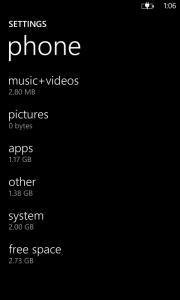
guys.. i need help with my storage.. other slot is seriously bugging me.. anyone can help cleaning this up?


Attached thumbnail(s)
Attached Image
spirit breaker
post Oct 25 2013, 12:13 AM

Getting Started
**
Junior Member
175 posts

Joined: Oct 2012
QUOTE(xSean @ Oct 24 2013, 10:05 PM)
cannot clear it unless u format it...

see next,update got clear some of data but still it won't clear until left 100-200mb...
*
if format then my data,contact,app will disappear right? that sucks man..
spirit breaker
post Oct 26 2013, 02:51 PM

Getting Started
**
Junior Member
175 posts

Joined: Oct 2012
QUOTE(xSean @ Oct 26 2013, 01:40 PM)
why need to do? I still get notification without open the app as long as it got set the background task on the setting
*
my whatsapp don't run in background setting but i still got instant notification

spirit breaker
post Oct 26 2013, 06:32 PM

Getting Started
**
Junior Member
175 posts

Joined: Oct 2012
whatsapp is soo much better now.. the app is running smoothly, no delay notification and whatsoever.. it has improved a lot
spirit breaker
post Nov 5 2013, 12:44 PM

Getting Started
**
Junior Member
175 posts

Joined: Oct 2012
can't wait for official gdr3
spirit breaker
post Jan 10 2014, 03:46 PM

Getting Started
**
Junior Member
175 posts

Joined: Oct 2012
why is mine said your phone is up to date? lumia 620
spirit breaker
post Jan 10 2014, 04:44 PM

Getting Started
**
Junior Member
175 posts

Joined: Oct 2012
QUOTE(evilpuppy @ Jan 10 2014, 03:53 PM)
620 not yet. currently waiting for approval...

http://www.nokia.com/global/support/softwa...n-asia-pacific/
*
awwww... so sad..
spirit breaker
post Jan 12 2014, 12:24 AM

Getting Started
**
Junior Member
175 posts

Joined: Oct 2012
where to download app folder?
spirit breaker
post Jan 12 2014, 09:10 AM

Getting Started
**
Junior Member
175 posts

Joined: Oct 2012
somehow today i can't connect to my own wifi.. any idea why and how to solve?

spirit breaker
post Jan 12 2014, 03:22 PM

Getting Started
**
Junior Member
175 posts

Joined: Oct 2012
QUOTE(dgboy @ Jan 12 2014, 10:46 AM)
open the router settings and set the WiFi channel to 1~11.

on your phone, delete the saved network, search and save it again.
*
thanks.. btw, when will lumia black released on 620?
spirit breaker
post Feb 2 2014, 02:05 PM

Getting Started
**
Junior Member
175 posts

Joined: Oct 2012
still waiting black update on 620..
spirit breaker
post May 4 2014, 09:09 PM

Getting Started
**
Junior Member
175 posts

Joined: Oct 2012
guys, need some help here. i can't get online using my data. already did the soft reset and nothing works.. it works on my 620 but not my 630.. using maxis in 630.. can anyone solve this? btw, both was on 8.1 dev preview..
spirit breaker
post May 4 2014, 09:36 PM

Getting Started
**
Junior Member
175 posts

Joined: Oct 2012
[quote=dgboy,May 4 2014, 09:13 PM]
630 available already?

Access Point is set? It's under Settings.
*


sorry, it is 625. my bad. btw, my access point seems fine. same thing happen to my 620 but soft reset did the job. however, the same thing didn't occur to my 625. soft reset solved nothing. is there any way to solved this other than hard reset? pretty painful to do it..huu
spirit breaker
post May 4 2014, 10:14 PM

Getting Started
**
Junior Member
175 posts

Joined: Oct 2012
QUOTE(dgboy @ May 4 2014, 09:55 PM)
have you tried swapping sim cards?

set network to 3G rather than 4G?

try toggling Flight Mode?

last resort, do hard reset (backup the Apps + Settings using WiFi first, then you can restore when the phone reboots).
*
did swap my sim.. it turns out the problem is not my phone, its my sim.. need to go to center to change.. thanks yaw!!!
spirit breaker
post Jun 18 2014, 08:38 PM

Getting Started
**
Junior Member
175 posts

Joined: Oct 2012
facebook beta updated.. new interface, faster,smoother
spirit breaker
post Aug 1 2014, 07:45 AM

Getting Started
**
Junior Member
175 posts

Joined: Oct 2012
QUOTE(evilpuppy @ Jul 26 2014, 06:24 PM)
you may also backup your chat to whatapps server.

just access your whatapps settings > chat settings > backup

swap phone, simply login your whatapps, all your chat history will restore.
*
if i backup and do a hard reset, will all my chat can recover or only group?
spirit breaker
post Aug 1 2014, 09:08 AM

Getting Started
**
Junior Member
175 posts

Joined: Oct 2012
QUOTE(evilpuppy @ Aug 1 2014, 08:30 AM)
Not sure about all chat can be restoring to new phone. But same devices can restore all chat and group chat history.
*
thanks.. gonna hard reset my phone.. live lock screen beta is causing laggy.. soft reset didn't do the job.. do you have any other solution be4 i hard reset my phone?
spirit breaker
post Aug 1 2014, 09:13 AM

Getting Started
**
Junior Member
175 posts

Joined: Oct 2012
QUOTE(Rei7 @ Aug 1 2014, 09:09 AM)
Just uninstall the live lock screen should be fine.
I'm using the live lock screen and no issues at all on 1020.
*
still lag.. it loading everytime i unlock my phone...

2 Pages  1 2 >Top
Topic ClosedOptions
 

Change to:
| Lo-Fi Version
0.2845sec    0.81    7 queries    GZIP Disabled
Time is now: 10th December 2025 - 10:10 AM