Welcome Guest ( Log In | Register )

Outline · [ Standard ] · Linear+

 HTC One Max Discussion Thread V1, Yet another Phablet.

views
     
denver
post Apr 21 2014, 09:28 AM

Casual
***
Junior Member
336 posts

Joined: Dec 2004


I'm thinking if getting a HTC One Max. I have a HTC One right now, but my HTC One camera has the purple tint issue, which is really annoying. I read that HTC One Max also using the came camera hardware as HTC One. Is the One Max camera ok? Does it suffer from the purple tint issue?
denver
post Apr 21 2014, 07:28 PM

Casual
***
Junior Member
336 posts

Joined: Dec 2004


That's good to know. Thanks.

One more thing to ask, one of the most outstanding feature of the HTC One is that when you browse the web and you pinch to zoom, the phone would automatically wrap the text on the screen so that we don't have to scroll left and right (just need to scroll up and down only). This is also the same when reading emails, I can just zoom in and make the fonts larger, and the phone would wrap the text so that everything appear on the screen without needing me to scroll left and right. As far as I know, no other phone manufacturer (Samsung, LG etc) can do this. Before I spend my money to buy the HTC One max, just want to confirm that HTC One Max can also do this text wrap? If you have HTC One Max, can you check for me? Thanks.


This post has been edited by denver: Apr 21 2014, 07:53 PM
denver
post Apr 26 2014, 01:15 AM

Casual
***
Junior Member
336 posts

Joined: Dec 2004


QUOTE(shawn87 @ Apr 23 2014, 04:25 PM)
can u explain more how to do this? im using one max but dont know how to do this if its avaialble in one max
*
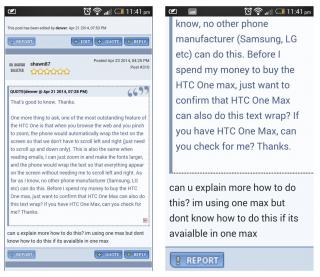
Its quite simple. When you are browsing the web using your phone, let's say you are browsing this forum using your HTC One Max, all the text should be "wrapped" so that you dont have to scroll left and right. See the screenshot below, the one with the normal font size. With the text wrapped like this, you just need to scroll up and down only. No need to scroll left and right.

Now, if you double tap on the screen or zoom to make the font bigger, the phone will automatically adjust the formatting and make all the fonts that has been increased in size to "wrap" or appear all on the same screen, so that you can read the entire sentence on the same screen. On other phones (e.g. iphone, ipad, samsung etc), if you zoom in and increase the font size, you will have to scroll right to read the entire (enlarged) text sentences. See the second screenshot, the one with the bigger font size. You can read all the enlarged text without needing to scroll right.

I took both screenshot using my HTC One. I just like to confirm that HTC One Max also can do the same.

Attached Image
denver
post May 8 2014, 11:59 AM

Casual
***
Junior Member
336 posts

Joined: Dec 2004


QUOTE(denver @ Apr 26 2014, 01:15 AM)
Its quite simple. When you are browsing the web using your phone, let's say you are browsing this forum using your HTC One Max, all the text should be "wrapped" so that you dont have to scroll left and right. See the screenshot below, the one with the normal font size. With the text wrapped like this, you just need to scroll up and down only. No need to scroll left and right.

Now, if you double tap on the screen or zoom to make the font bigger, the phone will automatically adjust the formatting and make all the fonts that has been increased in size to "wrap" or appear all on the same screen, so that you can read the entire sentence on the same screen. On other phones (e.g. iphone, ipad, samsung etc), if you zoom in and increase the font size, you will have to scroll right to read the entire (enlarged) text sentences. See the second screenshot, the one with the bigger font size. You can read all the enlarged text without needing to scroll right.

I took both screenshot using my HTC One. I just like to confirm that HTC One Max also can do the same.

Attached Image
*
Can anyone with a HTC One MAX check if they can do the text-wrap like the screenshot attached?
denver
post May 9 2014, 11:41 AM

Casual
***
Junior Member
336 posts

Joined: Dec 2004


QUOTE(ckchan @ May 8 2014, 01:15 PM)
as far as i know, text wrap is a feature removed since kitkat (google removed it). so most of the browser running in kitkat will no longer have this feature. but some 3rd party browser still have this feature like Opera and dolphin.

http://www.androidpolice.com/2014/01/28/bu...ot-coming-back/

i'm not sure if the stock browser in HTC still have this feature or not.
*
Yeah, I know. Luckily for me, I waited before upgrading to KitKat. I am still using Jelly Bean on my HTC One, and after finding out about it, I have no plans to upgrade my HTC One to Kitkat. I am not going to install something that will remove one of the most useful features of this HTC phone.

But now since I am planning to buy HTC One Max....I'm just looking to confirm that those who are using HTC One Max on Jelly Bean still have this text wrap features, and those who has upgraded to KitKat, this feature has been lost. To those who has HTC One Max, can you check your phone for me? Thanks.
denver
post May 20 2014, 02:56 PM

Casual
***
Junior Member
336 posts

Joined: Dec 2004


QUOTE(Veren @ May 17 2014, 05:04 PM)
Bro, i'm not sure for one max but my One already upgraded kitkat & text wrap still functioning. I think One max should b the same.
*
Just want to check, the text wrap is still functioning in email and browser? The article i read said text wrap email should still function, but web browser's text wrap function has been disabled by google. If HTC somehow can still do text wrap in browser, then that is great.
denver
post May 21 2014, 10:35 PM

Casual
***
Junior Member
336 posts

Joined: Dec 2004


QUOTE(Veren @ May 20 2014, 04:40 PM)
i tested everything u mention. In htc one kitkat, apps made by google confirm text wrap removed. mean chrome and gmail text wrap removed. but in htc default browser (which is internet) text wrap still functioning perfectly like before. Also Mail apps by HTC also text wrap functioning. So I dun think one max will make any difference.
*
That's exactly what I wanted to know. Thank you for detailed testing, really appreciate it. smile.gif


Change to:
| Lo-Fi Version
0.0233sec    0.48    7 queries    GZIP Disabled
Time is now: 6th December 2025 - 07:23 PM