Outline ·
[ Standard ] ·
Linear+
connect ps2 to projector
|
TSwork_tgr
|
 Jul 31 2013, 11:52 PM, updated 13y ago Jul 31 2013, 11:52 PM, updated 13y ago
|

|
my ps2 is the fat type so it doesn't have HDMI cable. the projector only got HDMI to connect to my ps2. So i have to buy a convertor for RCA (red, yellow, white ) connects to HDMI.
i wonder is there any such convertor in the market.
anyone has used it and is it good ?
This post has been edited by work_tgr: Jul 31 2013, 11:54 PM
|
|
|
|
|
|
TSwork_tgr
|
Aug 2 2013, 09:04 AM
|
|
|
QUOTE(RAMChYLD @ Aug 1 2013, 08:04 AM) PS2 never had HDMI. The best it could do is VGA. But not all games support VGA. Your best bet would be to buy a PS2 component cable and use that to connect the PS2 to the projector if the projector has component input. If not, then you must buy a component to HDMI converter. Thanks for your reply. Now I understand better about the converter. QUOTE(darosha @ Aug 2 2013, 02:01 AM) i think ramchild already answer your question. i'm just saying the same thing. only more illustrated use the av multi output port (or what other call S-video/SVGA) i thought when you buy a ps2, you got free of this thing, right?  and if your projector only accept hdmi, sadly to say you need converter as shown below there's no cable as rca is analog and hdmi is digital, that need converter 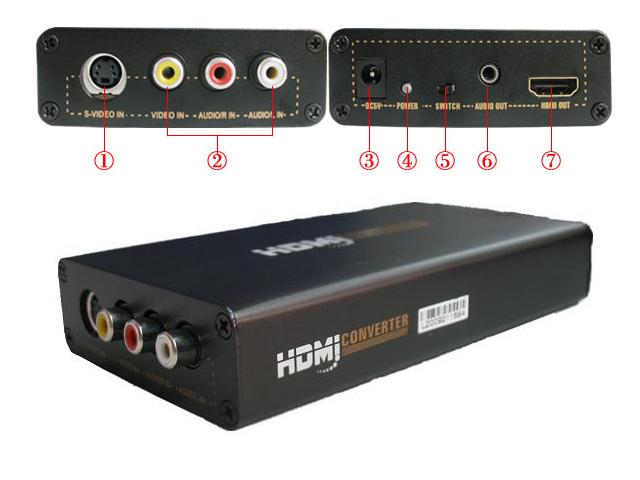 Actually, I had bought a cable converter from RCA to HDMI, unluckily it didn't function. I am now looking for the HDMI converter like the photo. Hopefully it works. Thanks |
|
|
|
|
|
TSwork_tgr
|
Aug 2 2013, 07:10 PM
|
|
|
QUOTE(RAMChYLD @ Aug 2 2013, 11:05 AM) I strongly agree with this post and recommend component input if your projector supports it. This is because the PS2 supports progressive scan and even 1080i HD output through component. However, very few games support HD video. I don't recommend the official VGA cable because very few games natively support it (it was originally made for the PS2 Linux kit). However there are also third party VGA cables that are really component/SCART-RGB cables with a VGA converter built in. Those have better compatibility. What is component input? U mean red, yellow, white ports? So, convert RCA to VGA is better then RCA to HDMI? |
|
|
|
|
|
TSwork_tgr
|
Aug 3 2013, 01:08 PM
|
|
|
QUOTE(RAMChYLD @ Aug 2 2013, 10:58 PM) Component is a set of 5 RCA connectors (as opposed to 3 RCA connectors in composite). It offers better color reproduction and support for up to 1080i HD analog HD as well as analog progressive scan (480p, 576p and 720p) and analog widescreen. Edit:It looks like this. Red and white on left carries audio, and Red, Green and Blue on the right carries video. 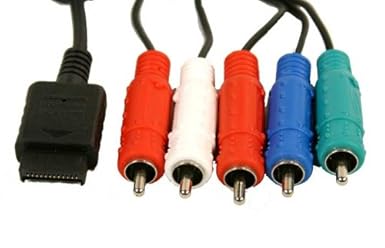 Honestly, it doesn't matter if you convert to VGA or to HDMI, since the source signal is analog anyway. However, your converter box must support component input, and if you intend to play Gran Turismo 4, the converter box supporting 1080i input is a plus since GT4 is one of the few games that can make the PS2 go into 1080i HD mode. So., what i need to buy now are 1. Component cable (for better output) 2. Converter box However, where should i connect the loudspeakers ? Should i connect loudspeakers to the converter box or projecter? |
|
|
|
|
|
TSwork_tgr
|
Aug 4 2013, 12:47 PM
|
|
|
QUOTE(RAMChYLD @ Aug 3 2013, 11:24 PM) Either should work, but if you need to use the loudspeaker for multiple sources that plug into the projector, connecting it to the projector makes more sense since it will get sound from whatever that you plug into the projector. Btw, what model is your projector? I thought most modern projectors has HDMI, VGA, Component and Composite? My projector is Acer K130. It's a pico projector, so it doesn't have component and composite. It comes with a built in soundspeaker but low sound. |
|
|
|
|
|
TSwork_tgr
|
Aug 4 2013, 05:59 PM
|
|
|
QUOTE(figure8 @ Aug 4 2013, 01:35 PM) i'm sure your model include an i/o connector for composite input. plz check again. Yes , it come with a cable i/o to vga. I can use that cable to connect to pc but no sound. Unless i use a converter to connect RCA to VGA, i can't connect that cable direct to PS2. Actually i also want to connect my DvD player to projector too. However, the DvD player is also old model with RCA too. |
|
|
|
|
|
TSwork_tgr
|
Aug 4 2013, 06:38 PM
|
|
|
can I use this one ? Attached thumbnail(s)
|
|
|
|
|
|
TSwork_tgr
|
Aug 5 2013, 10:50 AM
|
|
|
QUOTE(RAMChYLD @ Aug 5 2013, 12:52 AM) Hmmm, I find information that you need a special cable for connecting component to the projector. I suspect it's a cable that is one end component and the other end for universal I/O. QUOTE(gundamalpha @ Aug 5 2013, 02:51 AM) What projector are you using? Edit: missed your post. You just need the right adapter for used with the K130 from Acer itself without needing to resort for 3rd party adapters. Got such adapter/ cable? That's so great!! Am goin to look for it. This post has been edited by work_tgr: Aug 5 2013, 02:07 PM |
|
|
|
|
|
TSwork_tgr
|
Aug 5 2013, 01:55 PM
|
|
|
QUOTE(gundamalpha @ Aug 5 2013, 11:52 AM) IIRC the K130 is using a mini HDMI as input right? If it is then it shouldn't be too hard to find a mini HDMI adapter for component/compositeyes ... true ! ... but, i can't find it |
|
|
|
|



 Quote
Quote

 0.0226sec
 0.64
0.64
 7 queries
 GZIP Disabled