Welcome Guest ( Log In | Register )

Bump Topic Topic Closed RSS Feed
6 Pages < 1 2 3 4 5 > » Bottom

Outline · [ Standard ] · Linear+

 ** Google Nexus 4 Official Thread V11 **, 4.3 Jelly Bean rolled out! Read 1st post

views
     
teckyang97
post Sep 2 2013, 10:25 PM

RIP NEXUS 2010-2016
*******
Senior Member
3,516 posts

Joined: Nov 2011
From: Subang Jaya


QUOTE(Ah hao @ Sep 2 2013, 10:08 PM)
Just know this function in n4, i not sure either is new or i didnt notice b4.

Dial pad

Autocomplete - just start touching numbers or letters and the dial pad will suggest phone numbers or names. To turn on this feature, open your phone app settings and enable “Dial pad autocomplete.”
*
Well,I guess you didn't notice,I have been using this features long long time ago lol
teckyang97
post Sep 2 2013, 10:40 PM

RIP NEXUS 2010-2016
*******
Senior Member
3,516 posts

Joined: Nov 2011
From: Subang Jaya


QUOTE(nsg86 @ Sep 2 2013, 10:25 PM)
Fair enough ..
Guys , last one left [Nexus 4 Glass-M Premium Glass Screen Protector]..
hahahaha, ready stock biggrin.gif
*
Good luck on your sales with a good price,the sunway pyramid one is really overpriced,they claimed that the retail price is RM120 doh.gif
teckyang97
post Sep 3 2013, 12:48 AM

RIP NEXUS 2010-2016
*******
Senior Member
3,516 posts

Joined: Nov 2011
From: Subang Jaya


QUOTE(Xirality @ Sep 3 2013, 12:45 AM)
Never buy accs from them. Blood sucker. They sell thin rubber casing for HTC One at rm1xx. Crazy.
*
Haha,retail shop is always greedy,unless shop like item.com is cheap la
teckyang97
post Sep 4 2013, 09:37 PM

RIP NEXUS 2010-2016
*******
Senior Member
3,516 posts

Joined: Nov 2011
From: Subang Jaya


QUOTE(cslai89 @ Sep 4 2013, 09:33 PM)
Nice phone but not so gd power button. T.T
*
I do not know how many times I clicked my power button,but until today its still perfect and fine,just one case of power button loosen,then people start to think the power button is not good quality,well,even the highest quality power button in the world will get loosen 1 million sales out of one
teckyang97
post Sep 6 2013, 08:27 PM

RIP NEXUS 2010-2016
*******
Senior Member
3,516 posts

Joined: Nov 2011
From: Subang Jaya


Just bought ringke fusion from dark devon,I noticed the case side TPU is very slippery,does anyone feel the same
teckyang97
post Sep 7 2013, 01:25 AM

RIP NEXUS 2010-2016
*******
Senior Member
3,516 posts

Joined: Nov 2011
From: Subang Jaya


QUOTE(illuminarias @ Sep 6 2013, 11:09 PM)
Nope. Feels perfectly fine to me.
*
Fine is sure fine,what I'm asking is whether is it slippery or less grip?
teckyang97
post Sep 7 2013, 01:23 PM

RIP NEXUS 2010-2016
*******
Senior Member
3,516 posts

Joined: Nov 2011
From: Subang Jaya


QUOTE(faiz2036 @ Sep 7 2013, 12:47 PM)
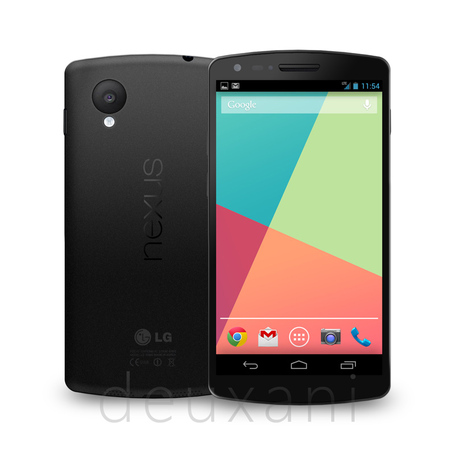
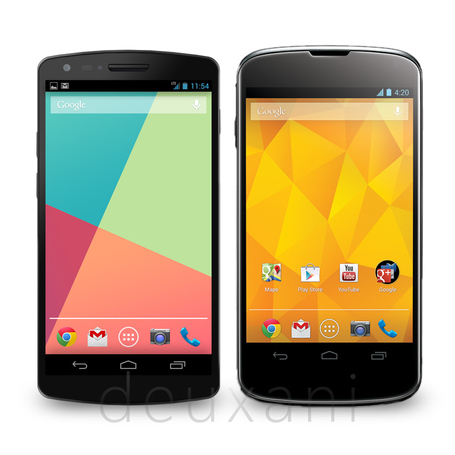
user posted image

user posted image

This is imagining picture from the verge.. look good.  drool.gif
*
I only have one complain for it,the camera is too big,other than that everything is good rclxms.gif
teckyang97
post Sep 7 2013, 02:47 PM

RIP NEXUS 2010-2016
*******
Senior Member
3,516 posts

Joined: Nov 2011
From: Subang Jaya


QUOTE(Ah hao @ Sep 7 2013, 02:37 PM)
if the camera is great i wont mind that  drool.gif

but if camera is still mediocre while back camera big like that... very sarcastic, lol tongue.gif
*
But you know nexus camera cry.gif
teckyang97
post Sep 7 2013, 05:22 PM

RIP NEXUS 2010-2016
*******
Senior Member
3,516 posts

Joined: Nov 2011
From: Subang Jaya


QUOTE(phantomash @ Sep 7 2013, 05:03 PM)
Yup. I'm just saying it can produce better photo quality, since teckyan97 thought its a bad thing. tongue.gif
*
I have never said its bad,I just said I don't like it,what I meant by "you know nexus camera" is that I have experienced galaxy nexus and nexus s camera,and its not good,not the new nexus 5 which I haven't even experience yet

This post has been edited by teckyang97: Sep 7 2013, 05:31 PM
teckyang97
post Sep 8 2013, 01:36 AM

RIP NEXUS 2010-2016
*******
Senior Member
3,516 posts

Joined: Nov 2011
From: Subang Jaya


QUOTE(skip2malou @ Sep 7 2013, 09:03 PM)
Yes i felt the same ... that is why i sold off mine hahaha ...
Umobile user here but no problems with 3g around my area.
Is the signal at your place weak ? if 3G is on and the signal is weak, could be due to that.
*
Well,there's nothing wrong with slippery to me,just wanna double check whether its true a not tongue.gif

QUOTE(IwanAGP @ Sep 7 2013, 09:34 PM)
S4's camera also quite big right? A little hump on the back for a better camera or a flatter back for a lousy camera, I choose the former.  blush.gif
Erm... Actually... Sometimes bigger lens is for a bigger sensor. When the sensor is bigger, of course a bigger lens is needed to let light in. Aperture is another thing. Sensor size should be the main factor in controlling the "size" of a "camera" on a "phone".

Nokia Pureview 808 has a 1/1.2" sensor thus it's big like a monster biggrin.gif
Lumia 1020 has a 1/1.5" or 2/3" sensor which is smaller so the hump is also smaller. Of course they slim down and redesigned other parts too. Best to ask nokia what they did biggrin.gif
Xperia Z1 has a 1/2.3" sensor, which is the same size as the one used in QX10. The numbers may not sound like a huge difference but this 1/2.3" sensor is actually about a quarter of the size of the 1/1.2" sensor in 808.

user posted image

So... The biggest controlling factor in the size of the camera on a phone is the sensor size. The lens size and thus the "hump" due to the camera depends on the sensor size.

iPhone/One/S4 all using 1/3.2 or 1/3" sensor. Quite a lot smaller.

Other factors affecting include image stabilisation like the one in LG G2 and Lumia 1020. I'm referring to Optical Stabilisation, not software based stabilisation. Optical means there's a mechanism that compensates the sensor positioning with any movement or vibration due to our hands or body movement. S4/One/iPhone/Z1 all not equipped with this feature.

Not expert too. Just my understandings. Enjoy icon_rolleyes.gif

EDIT: Seems like HTC One has OIS. biggrin.gif
Did you update your Antutu score? Antutu is now on V4 with some new tests for "Multitask", "Dalvik" and some changes to the GPU test. biggrin.gif
*
That's why I never like Samsung products,oversized and plastic design,but for the size,they really did a good job on galaxy s4,screen on s4 is amazing too,just the plastic design I dont like

teckyang97
post Sep 8 2013, 12:55 PM

RIP NEXUS 2010-2016
*******
Senior Member
3,516 posts

Joined: Nov 2011
From: Subang Jaya


Guys,will my data be wiped if I flashed google factory image?
teckyang97
post Sep 8 2013, 04:01 PM

RIP NEXUS 2010-2016
*******
Senior Member
3,516 posts

Joined: Nov 2011
From: Subang Jaya


QUOTE(cowithgun @ Sep 8 2013, 03:21 PM)
if you wanna keep your data, dont use the flash-all.sh / flash-all.bat.

instead, extract the image, flash it manually:

CODE
adb reboot bootloader
fastboot flash bootloader bootloader-mako-makoz20i.img
fastboot reboot-bootloader
fastboot flash radio radio-mako-m9615a-cefwmazm-2.0.1700.84.img
fastboot reboot-bootloader
fastboot flash system system.img
fastboot flash boot boot.img
fastboot format cache
fastboot reboot

*
I don't know how to flash factory image via cmd,all the details in XDA is too complicated,I normally flash using nexus 4 root tookit
teckyang97
post Sep 8 2013, 07:28 PM

RIP NEXUS 2010-2016
*******
Senior Member
3,516 posts

Joined: Nov 2011
From: Subang Jaya


QUOTE(IwanAGP @ Sep 8 2013, 07:09 PM)
It's really easy actually. Just install fastboot driver, download fastboot.exe from android sdk, plug in your Nexus 4 in fastboot mode, copy paste cowithgun's cmd command line by line. It's that easy biggrin.gif

But don't do anything wrong la else big problem biggrin.gif
Wait... Erm... That QX10 costs one Nexus 4. That QX100 costs two Nexus 4. You sure the logic is right? biggrin.gif

But this kind of investment is sort of worth it in long term. Since you can still use your phone camera when you didn't bring this external camera. Also can sort of "add-on" to get better image when you did bring them. It's future proof since it's compatible with both Android and iOS. You can change N phones yet still keep this camera.

But it's kinda expensive. Only good for those with extra money in their pocket.
*
I'm using window XP,I'm not sure why my comp cant detect my nexus 4 even with adb driver installed,while in my sister windows 7/8 laptop can detect and works well
teckyang97
post Sep 9 2013, 01:33 AM

RIP NEXUS 2010-2016
*******
Senior Member
3,516 posts

Joined: Nov 2011
From: Subang Jaya


Having headache with nexus 4 can't be detected on my PC,I tried install or uninstall on my PC,now it doesn't even work on my sister PC,I tried all solutions on XDA,it didn't work also,I guess its hardware issue
teckyang97
post Sep 9 2013, 11:50 AM

RIP NEXUS 2010-2016
*******
Senior Member
3,516 posts

Joined: Nov 2011
From: Subang Jaya


QUOTE(superjoe @ Sep 9 07:51 AM)
Try unable usb debug mate. Install driver restart ur computer then try to connect to again.
*
Obviously I have done that already,I even tried different cable

QUOTE(DarkSilver @ Sep 9 2013, 10:39 AM)
Use different USB Cable?

Have you revert back everything to STOCK to test?
*
Same result

QUOTE(Shengz @ Sep 9 2013, 10:58 AM)
Forget about it. I also have this issue.
I plugged in Win XP, nothing shown up.. Just heard ding dong.. rclxms.gif
I plugged in Win 7, everything works. flex.gif
But when I go back home, I plugged into Win XP laptop, works fine, again. rclxub.gif

I install uninstall install uninstall until fed up, so, best solution, FORGET about IT! laugh.gif
*
Mine windows xp/7/8 won't work now,first time stress with USB issue,haiz sad.gif

QUOTE(Ah hao @ Sep 9 2013, 11:26 AM)
best solution, buy a window 8 computer and everything works  biggrin.gif

my window xp cant function too, it can be detected but once u want to transfer file it fails.
*
My sister laptop wp8 doesn't work too
teckyang97
post Sep 9 2013, 04:37 PM

RIP NEXUS 2010-2016
*******
Senior Member
3,516 posts

Joined: Nov 2011
From: Subang Jaya


QUOTE(Shengz @ Sep 9 2013, 11:57 AM)
For Win 7/8, try update the driver for /Portable Devices/Nexus 4 in Device Manager.
Use (Standard MTP Device) ---> MTP USB Device

Win XP, can't help, I also dying seeking for driver.
*
Tried many many times already,failed also

QUOTE(benny888 @ Sep 9 2013, 12:02 PM)
Just use the Nexus toolkit to reinstall the drivers will usually do the trick. Use the PDANet option. I have faced this situation before few times already in all the Nexus I have used since first Nexus One. I am using WinXP on desktop and Win7 on Netbook
*
If its that simple,I wouldn't have go through the whole night and find a solution

QUOTE(Shengz @ Sep 9 2013, 03:00 PM)
Thanks bro. Fastboot works as always.
But MTP is problematic, some pc recognized some don't, tried all available drivers on web still couldn't solve.
teckyang97 has the worst experience right now, none of his pc able to use MTP. brows.gif
If anybody able to help him, he will marry to you. blush.gif
*
Booting into Recovery,fastboot,or reboot command works for me at nexus 4 root toolkit,the problem is the phone is charging,and PC got sound,just the PC never detect my device,sorry I not gay xD
teckyang97
post Sep 9 2013, 05:07 PM

RIP NEXUS 2010-2016
*******
Senior Member
3,516 posts

Joined: Nov 2011
From: Subang Jaya


QUOTE(IwanAGP @ Sep 9 2013, 04:45 PM)
I thought you're just trying to do fastboot flash to flash factory image? doh.gif
*
Nope,I wanted to pull or push file from devices,and i also wanted to transfer file to my phone or phone to pc,but it didn't work,the worst thing is PC can't detect,my only option is using nexus root toolkit to flash

QUOTE(cowithgun @ Sep 9 2013, 04:56 PM)
when everything else fail.. "user" error, change "user"!  laugh.gif

sorry cannot contribute anything helpful to your problem. my n4 is able to connect to my Mac and Windows machine without fuss...

when all else fail, try this old-skool trick to transfer file:

1. start cmd.exe
2. To copy file from notebook to phone:
CODE
- adb push c:\location\of\file.mp3 /sdcard/

3. To copy file from phone to notebook:
CODE
- adb pull /sdcard/file.img c:\location\


Can use wildcard too..
*
OK,will try ASAP,thanks smile.gif

QUOTE(Shengz @ Sep 9 2013, 05:00 PM)
How many PCs are you using? Neither one had the MTP working before?
God bless you. laugh.gif
Sorry for gloat over you. Finally found someone who felt the frustrated feeling like me. I spent half a day configuring that bloody pc but to no avail. Joke apart, if I found solution will let you know. laugh.gif

teckyang93
Try this bro. My mother using that pc. I can't try it.
http://www.microsoft.com/en-in/download/de...s.aspx?id=19153
*
You spelled my name wrong LOL!BTW will try ASAP smile.gif
teckyang97
post Sep 9 2013, 05:26 PM

RIP NEXUS 2010-2016
*******
Senior Member
3,516 posts

Joined: Nov 2011
From: Subang Jaya


sad to say,all the method you guys said didn't work well,thanks you guys,I think I will just manually upload files to my Box account one by one
teckyang97
post Sep 9 2013, 10:32 PM

RIP NEXUS 2010-2016
*******
Senior Member
3,516 posts

Joined: Nov 2011
From: Subang Jaya


QUOTE(nightwalkertzs @ Sep 9 2013, 06:02 PM)
i faced the same problem as yours, and then i keep search back the thread that i referred. But i found that I lost that site already. Sorry  sad.gif ..

That is some kinds of work that need to force install naked google usb driver into ur windows and then let it recognize as mass storage. But somehow i lost the step, so i cannot refer you the site.

But something i know is that.
1. please make sure u are selecting MTP at the USB computer connection there.

2. Normally, there are some apps just like wifi file transfer:
- https://play.google.com/store/apps/details?...ansferpro&hl=en
I am using this since my 1st day of using nexus 4. This is convenient even at my home/office

3. And i found this site while i am searching back. But i didn't know whether it works or not. But maybe u can have a shot on it. Wish you luck. blush.gif
http://forums.androidcentral.com/google-ne...age-device.html
*
Thanks,but my titanium backup is over 1gb+,it would be a hassle if I wipe my phone data and download via my computer and have to upload to the phone again

QUOTE(goskype @ Sep 9 2013, 09:19 PM)
your USB drive mechanism could be faulty hmm.gif

It happened to me with some of my Hard-drives because I didn't eject them and just plug out
*
Well,service center only open at weekdays for LG,totally no free time to go,they should open at weekend
teckyang97
post Sep 10 2013, 06:23 PM

RIP NEXUS 2010-2016
*******
Senior Member
3,516 posts

Joined: Nov 2011
From: Subang Jaya


Seriously piss off today,nexus 4 root toolkit can detect through fastboot,but can't flash stock rom and wipe all data,I need to sent to warranty this Friday,what to do cry.gif

6 Pages < 1 2 3 4 5 > » Top
Topic ClosedOptions
 

Change to:
| Lo-Fi Version
0.0482sec    0.65    7 queries    GZIP Disabled
Time is now: 17th December 2025 - 04:45 AM