
Welcome Guest ( Log In | Register )

Bump Topic Topic Closed RSS Feed

Outline · [ Standard ] · Linear+

 Astro B.yond Episode VI (Version 11.0), HD, PVR, IPTV and VOD

views
     
GHOSTVIC
post Nov 10 2013, 07:37 AM

Casual
***
Junior Member
369 posts

Joined: Nov 2010
Guys i have doubts guide me please, i already have ASTRO BEYOND without HD subscribed... looks like ASTRO opens few HD channels for preview limited time. My astro beyond not connected HDMI to my LG TV... but i still can view HD channels... so im wondering is it the channels work without HDMI connected ?

i thought ASTRO BEYOND HD view needs HDMI cable, but still can display without that cable.. even normal tv can view just that mine is HD TV so the quality of HD channels different...

So im wondering, once that limited preview ends.. and if i subscribe for HD package do i must use HDMI cable connected from ASTRO BEYOND DECODER to LG TV ? otherwise it doesnt works ?... but how could that be possible we can view now without the HDMI cable connected ?

That means ASTRO BEYOND HD as long you have HD TV should be ok ? then why some saying need HDMI cable other wise no display ?


tak paham...
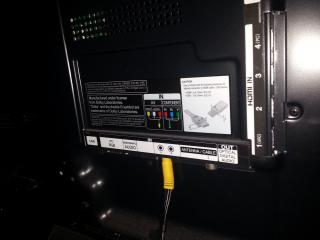

Attached Image Attached Image Attached Image


another thing how the setup should be, when subscribe for HD package... just plug the HDMI cable from DECODER to LGTV ?.. no need those AUDIO VIDEO cable connected ?

if you look above pics.. 1st pic 1 single out put come from TV connects to 3 output AUDIO n VIDEO which comes from DECODER...yesterday i just tested connect HDMI cable and unplug those 3 AV cables if any display but nothing.... another thing i noticed HD channels as dolby digital sound...

LG TV has OPTICAL DIGITAL AUDIO and ASTRO DECODER has COAXIAL DIGITAL AUDIO.... both different cables... any chance we connect from decoder COAXIAL DIGITAL AUDIO cable to LGTV OPTICAL DIGITAL AUDIO.... i see there is some converter to do that...


but im not sure it works or not... above pics are beyond decoder behind components...

anybody can clear my doubt, appreciate it...


This post has been edited by GHOSTVIC: Nov 10 2013, 07:39 AM
GHOSTVIC
post Nov 18 2013, 05:42 AM

Casual
***
Junior Member
369 posts

Joined: Nov 2010
QUOTE(Anonymous34 @ Nov 10 2013, 10:10 AM)
HDMI, Composite and Component all output the same thing. The different thing is the quality. For HDMI it can output 576i, 576p, 720p and 1080i. For composite and composite it only outputs 576i.
THat means during promotion your HDMI port is activated if I'm not wrong. So you just plug your HDMI cable in there and watch with the HDMI source on your TV.
Once the promotion ends you just watch the composite/component source don't have to unplug your HDMI cable, so when there's free preview, you can just watch straight la! rclxm9.gif
If you subscribe to HD services you can use your HDMI port liao, of course, unplug the composite cable from your TV and decoder and enjoy watching in HD(Not really lol)!
UPDATE: I didn't saw your HDMI port not activated sorry. Maybe it's not activated for promotion period. As for the LG TV has Optical Digital Audio, that's output to your Amp/ home theater. Not for your decoder to connect. Same theory applies where the coaxial cable connects to your Amp/ home theater sweat.gif
Hope this clear all your doubts  smile.gif
*
yo bro thanks for the reply...

ok now im not using HDMI cable.. just composite and able to see HD channels for this promotion period, and i saw its 576i... but even that looks cool.... after promotion period ends if activate HD service i dont think need HDMI cable... just the quality like u saying.. so now in this promotion period if i remove my composite cable and just plug HDMI cable... do you think i able to see the display ?

what cable should i remove on the composite since.. got AUDIO and VIDEO... isnt that sound and video able to travel on single HDMI cable ?


This post has been edited by GHOSTVIC: Nov 18 2013, 05:44 AM

Topic ClosedOptions
 

Change to:
| Lo-Fi Version
0.0312sec    0.26    7 queries    GZIP Disabled
Time is now: 6th December 2025 - 01:18 PM