

 Jul 23 2013, 12:43 PM, updated 13y ago


As a group of Project management individuals, we share the same sentiments, limitation of help, resources and assistance because these resources are expensive. We went on tons of scenarios that we had a huge time wasted in just attaining one goal and by that, we do not want you, hard working individuals, to encounter same scenario hence in order to make your working lives easier and more efficient we offer excel based tools that will help you attain your career goals.
1) Work Plan v1.0
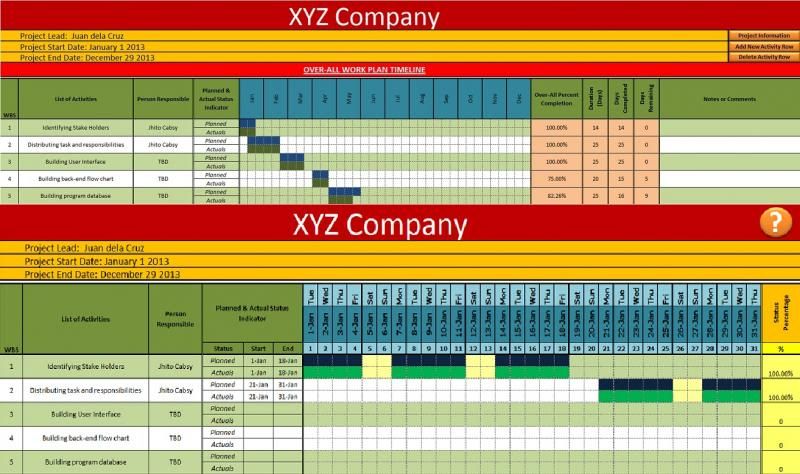
The goal in each business, project or career is to accomplish a specific tasks measured by time, man-power and specially money. Most of the managers are responsible in developing a game plan to attain the team or even the company's goal. This involves defining mission in attaining the objectives and goals, identifying tasks or activities to complete the objective, and defining cost involve in each project, tasks or activities. After identifying vital information in attaining the goal, managers also need to allocate this responsibilities to each individual to his/her team mates and the most important part is to provide timeline which will help determine when will the team reach the finish line.
We understand how hard it is to track these vital data and most of the free and even expensive Gantt chart software or templates are limited and are not able to provide what we need so we are here to offer a cost efficient tool that will help us attain our goal. Below are the features of our work plan tool:
Monthly Tracking
Each activity/task will compose of number of days for completion, it is essential to track each progress and completion in a monthly basis hence this tool provides the user to have full tracking and monitoring on each tasks and activities per month for a year.
Planned & Actual Comparison
It is essential to know what is the target date of completion in any tasks, activity or action at the same time it is also important to know what is the exact progress of the responsible team in completing the task to ensure that the team is doing the best they can to cope up with the service level of agreement. Our work plan tool provides a comparison of the scheduled or planned completion against actual performance to ensure an easier monitoring process.
Status Percentage per Month
Sometimes its not enough to see a graph representation of the a projects progress hence we have come up with a better solution that can accommodate those managers who are into numbers, this feature will enable managers to see a percentage value from 0% as not started to 100% as a representation of the activity, task is complete.
Yearly Summary Dashboard
A monthly tracking is important since this provides a more detailed and specific monitoring process for a manager however it is still vital to have a certain process were in managers can immediately identify the progress of each tasks. Our work plan tool provides a dashboard that will help manager immediately identify the activity's/tasks over-all completion, planned days of completion, actual days completed, and remaining days to complete. With this feature, it will be easier for the manager to immediately identify any bottle-neck or hold up in any activities or tasks.
Budget & Cost Tracker
In any business, it is very essential to ensure that each things stays within the company's budget, this is to ensure that the company will not lose any amount of budget hence there should always be an allocation of money. Our work plan tool provides a feature to maintain, monitor and track the budget of a project with this feature, managers will have the ability to pre allocate budget per activity to provide a good forecasting of budget allocation.
To do List Tracker
Delegating is one of the hardest responsibility of a manager. He/She needs to monitor it religiously to ensure completeness of the tasks as this might affect the progress and can cause delay which will lead to unable to get within the service level agreed. Our work plan provides help to the manager to ensure that he/she is able to monitor each tasks that were deligate to his/her subordinates.
Workplan Screen Shot:
2) TimeSheet v1.0
Tracking and monitoring your team is one of the is one of the tedious task of a manager. Different performance aspects that you need to monitor, from simple things such as tardiness, leave tracking, etc up to the complicated parts such as total over-time hours, total working hours, tasks that are performed, etc.
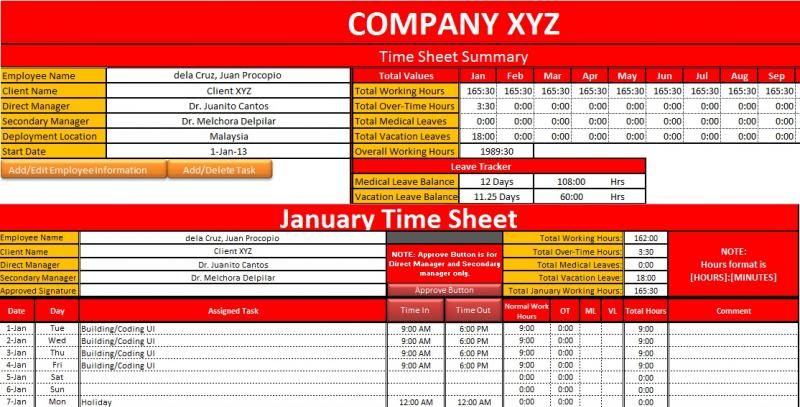
Our TimeSheet tool will help you monitor how many hours your people consume not only per day, not only per month but also for the whole year. Below are the features of our TimeSheet tool which will make your lives easier:
Task Control
As manager we would like to verify that all of the tasks of our subordinates are properly aligned according to their role and business needs, this feature will allow managers to control what are the tasks that his/her subordinates will do each day.
Real-Time based Time-In & Time-Out
This is a real time based feature were in the user will use a time-in button which will reflect the actual time the minute the user click the time in button. This feature will allow the managers to see the exact working hours up to the last minute their people did.
Monthly Summary with Auto-Computation
This feature allows the manager to review the number of hours spent daily in a monthly view, and each month tab have an automatic computation of the total working hours, total medical/vacation leave consumed and total over-time hours.
Approval Button
This button will get the managers username that he/she use in logging in to the computer hence once a manager completed the review of the time sheet he/she will affix his/her approval using the approval button and the system will get the user login name and put it into the approved signature. This feature helps upper managerment to ensure that their lead or manager do their job in reviewing their teams time sheet
Summary Sheet
This sheet provides a full summary information on your subordinate including an automated calculation of the working hours your employee consumed including the normal working hours, over-time hours, leave hours which is computed for the whole year.
Time Sheet Screen Shot:
3) Planner v1.0
In any project management, it exercise the discipline of planning, organising and managing all activities and schedules of each individual to bring out the successful accomplishment on each tasks or even earning the renewal of project service. This will provide credibility of your team that you and your subordinates implies an organised execution in completing any tasks and responsibility.
Our Planner Tool will help you and your team properly monitor all necessary activities and will help you remind what are the current activities in your teams schedule:
Per Month Based Calendar
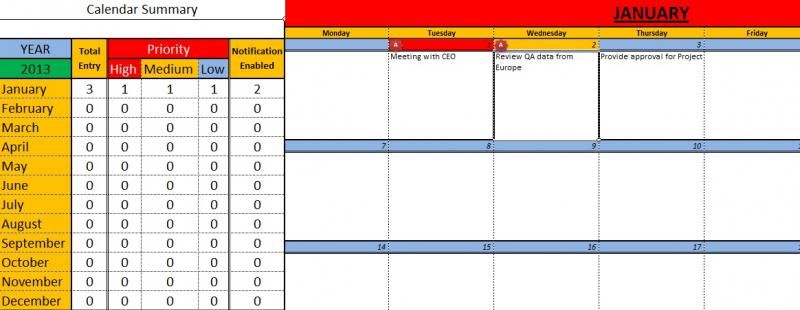
This planner is composed of 12 months monitoring system. This features enables the user to identify immediately what are the the scheduled activity per month
Severity/Importance Indicator
Each activity have different key holder in a project. Some of the activities depends on another activity. This feature will enable the user to identify the importance or severity of each activity scheduled. This will ensure that all important meetings or scheduled activity will be highlighted.
Alert Notification
We have to admit, human as we are we need someone or something to remind us the activities we need to do. Yes we have mobile application but what if mobile application is not allowed in the project premises or what if one of the team do not have a smart phone to use the same application? so we go to outlook or lotus, what if a team member is sick but he/she have desktop PC at home and badly needs to know what to do next? This feature will enable the user to get reminded frequently if there are tasks or activities with notification enabled. With this feature there are no individual will have an excuse "But no one reminded me about this"
Summary with Link per Month
It will be a pain to one by one check on each month if you have an activity or tasks so we made is easier for you to see and directly go to the desired month or activity. This feature will display on which month have activity inputted, it will even display if the activity have high importance or notification enable with this feature it will be easier for the user to immediately locate the important activity without browsing the month one by one.
Planner Screen Shot:
How to Purchase:
1) Send us your request to get a copy of the tools
2) We will provide you the 10 days trial copy of the tool for you to test it, once confirmed that you want to have the full version, we will reply to your mail the payment methods (Bank Transfer or Paypal).
3) Once payment is confirmed we will send you the Full version copy of the tool you wish to purchase.
Price: Template cost only RM 20 each or RM 50 for the 3 amazing templates.
Please contact +60133142011 or email us at 3cinnovation@gmail.com to avail this templates or to avail the free 10 days trial.
We also offer free consultation for any of your Reporting, Tracking or monitoring problem. Please send your query to 3cinnovation@gmail.com we are more than happy to provide you a cost effecient yet very effective solutions.
This post has been edited by 3CInnovation: Jul 23 2013, 01:39 PM
 Quote
Quote
 0.0181sec
 0.84
0.84
 5 queries
 GZIP Disabled