

 Aug 27 2013, 12:16 PM


Official Launch : 26th May 2012
Official In Store : 30th May 2012
I9300 is the only set bring by Samsung Malaysia Electronic. While the I9305 (LTE) only available through AP set. But the LTE coverage so far is very limited, yet so far only Maxis and Celcom got 4G LTE coverage, other carrier no idea
Baseband? Modem?
» Click to show Spoiler - click again to hide... «
Baseband and modem are all about the network such as wifi/gps/telco network.
Country Code:
1. Type on the Keypad > *#1234#
2. Tap on Settings > About Device > Baseband version. ( Example I9300DXLE8 - DX is Region code or Network Code )
List Region Code of Galaxy S III
BD = Cyprus, Greece
BH = Mitteleuropäisch
CE = Benelux (Belgium, Netherlands)
CP = Finland
DB = Vietnam
DC = Thailand
DD = India
DT = Australia
DX = Indonesia, Malaysia, Philippines, Singapore, Vietnam
DZ = Malaysia, Singapore
JA = South Africa
JC = Algeria, Morocco, Nigeria, South Africa, Tunisia
JP = Algeria, Egypt, Iran, Iraq, Kuwait, Morocco, Nigeria, Oman, Pakistan, Saudi Arabia, South Africa, Syria, Tunisia, Turkey
MT = Switzerland
PO = France (PlayerOne)
XA = Austria, France, Germany, Italy, Netherlands, Switzerland, United Kingdom
XB = Denmark, Norway, Sweden
XC = Portugal, Spain
XD = Croatia, Czech, Hungary, Slovakia
XE = Bulgaria, Estonia, Kazakhstan, Latvia, Lithuania, Russia, Ukraine, Germany (Eastern Europe)
XF = Bulgaria, Croatia, Romania
XG = unter anderen Germany
XX = Austria, Belgium, France, Germany, Hungary, Italy, Spain, United Kingdom (Western Europe)
XP = Europe (English, German, French, Italian, Spanish, Nederlands, Polski, Portugues and Turkish)
XW = UK, Italy, Germany, France, Australia, Netherlands, Belgium, Switzerland
ZC = China, Hong Kong
ZH = Hong Kong
ZT = Taiwan
Provider or Network Samsung Galaxy S3 Code
AD = O2, Austria
AE = SFR, France
AA = T-Mobile, United Kingdom
AI = Tim, Italy
AM = Vodafone
AN = E-Plus, Germany
AO = O2, Germany
AS = KPN, Netherland
AU = Mobilkom, Austria
BB = Tmn, Portugal
BF = Optimus, Portugal
BG = Telefonica, Spain
BM = Swisscom, Switzerland
BN = Amena, Spain
BO = T-Mobile, Germany
BU = Vodafone
BV = Orange, Switzerland
BW = O2, United Kingdom
CD = Proximus, Belgium
CG = Telia Mobitel, Sweden
CH = SingTel, Singapore
CK = Tele2 Comviq, Sweden
CT = Tdc, Denmark
CU = One, Austria
CV = Telenor, Norway
DT = Optus, Australia
DV = Telstra, Australia
EF = Celcom, Malaysia
JB = Vodacom, South Africa
MD = Telia Sonera, Finland
MJ = Vodafone, Italy
MM = Tele Ring, Austria
MV = NetCom, Norway
NA = Nrj, France
NB = Tele2 Norway, Norway
NE = H3g Nordic, Sweden
NP = H3g, Italy
RF = T-Mobile
RS = T-Mobile
SS = Vodafone, Japan
User Manual : http://www.scribd.com/doc/93637061/User-Manual-I9300 or download here, if not working then go samsung apps download
CSC?
» Click to show Spoiler - click again to hide... «
CSC is the list of APN, if you got malaysia CSC (DX letter) the phone will automatically list the APN when you change simcard. no need to manually key in anymore
» Click to show Spoiler - click again to hide... «
Samsung firmware version number reference
the last three letters appear on the firmware code or name is the firmware version and follows a naming convention by Samsung which represents the build date and version of the firmware. so you can tell by looking at the firmware code which is a newer one (click here for Samsung firmware code reference list)
for example, I9100XWKI4 is an older firmware, I9100XWKI8 is somewhat newer than KI4 (8 is greater than 4), while I9100XWKK5 is newer than KI8 (K is greater then I), etc. but what is the meaning of these three letters?
actually, for instance, the last three letters of I9100XWKI8 is K, I and 8, represents the year, the month of the firmware was built and the versioning respectively. here is the break down for these letters for Samsung Galaxy SII I9100
- the first letter represents the year
J = 2010
K = 2011
L = 2012
M = 2013, etc
so XWKI8 is a 2011 firmware while XXLA4 is a 2012 firmware
- the second letter represents the month
A = January
B = February
C = March
D = April
E = May
F = June
G = July
H = August
I = September
J = October
K = November
L = December
so XWKI8 is built on September 2011, while XXLA4 on January 2012
- the third letter represent the version
so XWKI4 is the forth version, while XWKI8 is the eighth version and XXKPA is the tenth version (A=10, B=11, C=12, etc)
as a result:
- XWKI8 is built on 2011 (K) September (I) and is the 8th (8) version
- XXLA4 is built on 2012 (L) January (A) and is the 4th (4) version
recently u can find some ICS beta versions leaked like I9100XXLP2, I9100XXLP6, I9100XXLPB, etc. the second last letter P refers to pre-release, beta, test built, development, and the like. and u will now know that, XXLPB is built on 2012 (L), is a test built or pre-release (P), and is the eleventh (B) version
UPDATE 18 May 2012:
looks like Samsung now use the letter P for all ICS firmware
for example:
I9100XXKP4 (2011 December), I9100XXLPH (2012 February), I9100XXLPQ (2012 March), I9100BULPC (2012 April), I9100XWLPD (2012 May)
N7000XXLPY (2012 May), N7000ZSLPF (2012 May)
no details about what the P refers to for now
Added on September 3, 2012, 9:47 pm Samsung firmware code reference
each firmware version consists of 3 parts: phone model, country/region code and firmware version number
for example: I9000XXJVQ
phone model = I9000
country/region code = XX
firmware version = JVQ
click here for Samsung CSC code reference
click here for Samsung firmware version number reference
the table below shows all Samsung firmware country/region letter codes gathered from the internet
Code Country
AW Hungary
AZ France
BD Cyprus, Greece
BY Greece
CB Poland
CE Benelux
CP Denmark, Finland, Norway, Sweden
DB Vietnam
DC Thailand
DD India
DT Australia
DX Indonesia, Malaysia, Philippines, Singapore, Vietnam
DZ Malaysia, Singapore
JA South Africa
JC Algeria, Morocco, Nigeria, South Africa, Tunisia
JP/JR Arabic
JV/JX Algeria, Egypt, Iran, Iraq, Kuwait, Morocco, Nigeria, Oman, Pakistan, Saudi Arabia, South Africa, Syria, Tunisia, Turkey
JW West Africa
KA Turkey
ME France
MK Serbia
MS France, Germany, Italy, Netherlands, Portugal, Spain, Turkey, UK
MT Switserland
MY Italy
NH Latvia
PO France
PU Russia
UB Brazil
XA Austria, France, Germany, Italy, Netherlands, Switzerland, United Kingdom
XB Denmark, Norway, Sweden
XC Portugal, Spain
XD Croatia, Czech, Hungary, Slovakia
XE Bulgaria, Estonia, Kazakhstan, Latvia, Lithuania, Russia, Ukraine
XF Bulgaria, Croatia, Romania
XP UK, France, Italy, Spain, Netherlands, Poland, Portuguese, Turkey
XW Austria, Belgium, France, Germany, Hungary, Italy, Spain, United Kingdom
XX Austria, Belgium, France, Germany, Hungary, Italy, Nordic, Spain, United Kingdom
ZC/ZS China, Hong Kong
ZH Hong Kong
ZT Taiwan
so for example:
I9000XXJPO means it is a rom for Austria, Belgium, France, Germany, Hungary, Italy, Spain, United Kingdom
I9100ZSKI3 means it is a rom for Hong Kong

the last three letters appear on the firmware code or name is the firmware version and follows a naming convention by Samsung which represents the build date and version of the firmware. so you can tell by looking at the firmware code which is a newer one (click here for Samsung firmware code reference list)
for example, I9100XWKI4 is an older firmware, I9100XWKI8 is somewhat newer than KI4 (8 is greater than 4), while I9100XWKK5 is newer than KI8 (K is greater then I), etc. but what is the meaning of these three letters?
actually, for instance, the last three letters of I9100XWKI8 is K, I and 8, represents the year, the month of the firmware was built and the versioning respectively. here is the break down for these letters for Samsung Galaxy SII I9100
- the first letter represents the year
J = 2010
K = 2011
L = 2012
M = 2013, etc
so XWKI8 is a 2011 firmware while XXLA4 is a 2012 firmware
- the second letter represents the month
A = January
B = February
C = March
D = April
E = May
F = June
G = July
H = August
I = September
J = October
K = November
L = December
so XWKI8 is built on September 2011, while XXLA4 on January 2012
- the third letter represent the version
so XWKI4 is the forth version, while XWKI8 is the eighth version and XXKPA is the tenth version (A=10, B=11, C=12, etc)
as a result:
- XWKI8 is built on 2011 (K) September (I) and is the 8th (8) version
- XXLA4 is built on 2012 (L) January (A) and is the 4th (4) version
recently u can find some ICS beta versions leaked like I9100XXLP2, I9100XXLP6, I9100XXLPB, etc. the second last letter P refers to pre-release, beta, test built, development, and the like. and u will now know that, XXLPB is built on 2012 (L), is a test built or pre-release (P), and is the eleventh (B) version
UPDATE 18 May 2012:
looks like Samsung now use the letter P for all ICS firmware
for example:
I9100XXKP4 (2011 December), I9100XXLPH (2012 February), I9100XXLPQ (2012 March), I9100BULPC (2012 April), I9100XWLPD (2012 May)
N7000XXLPY (2012 May), N7000ZSLPF (2012 May)
no details about what the P refers to for now
Added on September 3, 2012, 9:47 pm Samsung firmware code reference
each firmware version consists of 3 parts: phone model, country/region code and firmware version number
for example: I9000XXJVQ
phone model = I9000
country/region code = XX
firmware version = JVQ
click here for Samsung CSC code reference
click here for Samsung firmware version number reference
the table below shows all Samsung firmware country/region letter codes gathered from the internet
Code Country
AW Hungary
AZ France
BD Cyprus, Greece
BY Greece
CB Poland
CE Benelux
CP Denmark, Finland, Norway, Sweden
DB Vietnam
DC Thailand
DD India
DT Australia
DX Indonesia, Malaysia, Philippines, Singapore, Vietnam
DZ Malaysia, Singapore
JA South Africa
JC Algeria, Morocco, Nigeria, South Africa, Tunisia
JP/JR Arabic
JV/JX Algeria, Egypt, Iran, Iraq, Kuwait, Morocco, Nigeria, Oman, Pakistan, Saudi Arabia, South Africa, Syria, Tunisia, Turkey
JW West Africa
KA Turkey
ME France
MK Serbia
MS France, Germany, Italy, Netherlands, Portugal, Spain, Turkey, UK
MT Switserland
MY Italy
NH Latvia
PO France
PU Russia
UB Brazil
XA Austria, France, Germany, Italy, Netherlands, Switzerland, United Kingdom
XB Denmark, Norway, Sweden
XC Portugal, Spain
XD Croatia, Czech, Hungary, Slovakia
XE Bulgaria, Estonia, Kazakhstan, Latvia, Lithuania, Russia, Ukraine
XF Bulgaria, Croatia, Romania
XP UK, France, Italy, Spain, Netherlands, Poland, Portuguese, Turkey
XW Austria, Belgium, France, Germany, Hungary, Italy, Spain, United Kingdom
XX Austria, Belgium, France, Germany, Hungary, Italy, Nordic, Spain, United Kingdom
ZC/ZS China, Hong Kong
ZH Hong Kong
ZT Taiwan
so for example:
I9000XXJPO means it is a rom for Austria, Belgium, France, Germany, Hungary, Italy, Spain, United Kingdom
I9100ZSKI3 means it is a rom for Hong Kong
Call Recording
» Click to show Spoiler - click again to hide... «
it is included in the phone but it is disable, you need to flash this mod
Titanium backup? Nandroid backup?
 - credit waveweaver
» Click to show Spoiler - click again to hide... «
Kies is well known for its un-reliable.
Titanium backup - for your apps and data.
Nandroid backup - for complete whole things (app + data + phone system..etc..). You do Nandroid before flashing custom roms. If anything bad happen during flashing you can restore back to your previous set up by using your Nandroid.
Titanium backup - for your apps and data.
Nandroid backup - for complete whole things (app + data + phone system..etc..). You do Nandroid before flashing custom roms. If anything bad happen during flashing you can restore back to your previous set up by using your Nandroid.
Mobile ODIN?
» Click to show Spoiler - click again to hide... «
mobile odin can do all that PC Odin do but from your phone, so you dont have to have a pc with you to flash all those odin stuff. get it here: http://forum.xda-developers.com/showthread.php?t=1347899
Video Tutorial for those extra paranoid user that want to root (thank you JayceOoi)
» Click to show Spoiler - click again to hide... «
How to root Samsung Galaxy S3 with CF-Root?
How to backup Samsung Galaxy S3 with ClockworkMod Recovery?
How to restore Samsung Galaxy S3 with ClockworkMod Recovery?
How to install update zip with ClockworkMod Recovery on Samsung Galaxy S3?
How to install firmware on Samsung Galaxy S3 with ClockworkMod Recovery?
How to restore stock firmware on Samsung Galaxy S3?
BUYING THE PHONE 
What to do when you first get your phone
Warranty Issue:
Warranty are supposed to be register by the phone dealer. But after few days if your phone still not registered, you can do it your self by following below method.
How to check warranty
Send PC " YOUR IMEI" to 62002 (for maxis and digi) or 33802 (for celcom)
IMEI: dial *#06# on your phone
How to register eWarranty yourself (without help from dealer) - credits to lostasylum
email to the following address: ewarranty.sme@samsung.com
with the following details:
FULLNAME:
CONTACT NO:
IMEI NO:
SERIAL NO:
and a scanned copy of the receipt. apparently samsung will revert within 3 weeks
-credit TamiyaOne
1) Photostat your receipt & warranty card (with dealer chop) on a piece of paper.
2) Write down:
ATTN: Samsung e-Warranty Team
Subject: e-Warranty registration
Your name :
Your contact no:
and the IMEI Number:
2) Fax to the following number: 03-77117298[/quote]
OR you can PM our very helpful member and ask him to register for you.
FallenOut
PM him this detail:
Phone no:
Name:
IMEI No:
Accessories Related
OTG Cable

HDTV adapter

Card reader
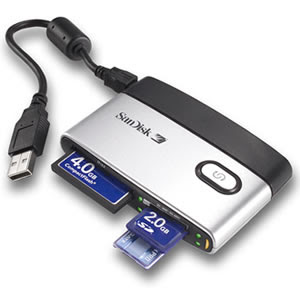
MicroSD
solarwing
SANDISK MicroSDHC 32GB Class 6 MOBILE ULTRA 30MB/S ***NEW- RM 105/pcs
SANDISK MicroSDHC 32GB Class 10 MOBILE ULTRA 30MB/S ***NEW- RM 115/pcs
SANDISK MicroSDXC 64GB Class 6 MOBILE ULTRA 30MB/S ***NEW- RM 215/pcs
SANDISK MicroSDXC 64GB Class 10 MOBILE ULTRA 30MB/S ***NEW- RM 220/pcs
SANDISK SDXC 128GB Class 10 EXTREME 45MB/S ***NEW- RM 580/pcs
stylus

Screen Protector
Casing
NFC Tag and what it is
Extended Battery Kit 3000mah
Touchwiz Mod : http://forum.xda-developers.com/showthread.php?t=1848582
Note II Gallery & Camera : http://forum.xda-developers.com/showthread.php?t=1876397
Pop up browser like Note II : http://forum.xda-developers.com/showthread.php?t=1946477
For more please looks for theme and apps link at above post
What to do when you first get your phone
» Click to show Spoiler - click again to hide... «
1) check for matching IMEI (dial *#06#) with phone and box.
2) check all contents are available in box
3) check for dead pixels. use samsung function test by typing this code *#0*# into the dialer. go through all the test and make sure everything is working
4) check for any hardware defects by pressing the phone at several spots for squeaking or weird noises.
5) check for yellow tint, open up a white picture and check the screen for yellow-ish
2) check all contents are available in box
3) check for dead pixels. use samsung function test by typing this code *#0*# into the dialer. go through all the test and make sure everything is working
4) check for any hardware defects by pressing the phone at several spots for squeaking or weird noises.
5) check for yellow tint, open up a white picture and check the screen for yellow-ish
Warranty Issue:
» Click to show Spoiler - click again to hide... «
Warranty are supposed to be register by the phone dealer. But after few days if your phone still not registered, you can do it your self by following below method.
How to check warranty
Send PC " YOUR IMEI" to 62002 (for maxis and digi) or 33802 (for celcom)
IMEI: dial *#06# on your phone
How to register eWarranty yourself (without help from dealer) - credits to lostasylum
email to the following address: ewarranty.sme@samsung.com
with the following details:
FULLNAME:
CONTACT NO:
IMEI NO:
SERIAL NO:
and a scanned copy of the receipt. apparently samsung will revert within 3 weeks
-credit TamiyaOne
1) Photostat your receipt & warranty card (with dealer chop) on a piece of paper.
2) Write down:
ATTN: Samsung e-Warranty Team
Subject: e-Warranty registration
Your name :
Your contact no:
and the IMEI Number:
2) Fax to the following number: 03-77117298[/quote]
OR you can PM our very helpful member and ask him to register for you.
FallenOut
PM him this detail:
Phone no:
Name:
IMEI No:
Accessories Related
» Click to show Spoiler - click again to hide... «
OTG Cable
HDTV adapter
Card reader
MicroSD
» Click to show Spoiler - click again to hide... «
solarwing
SANDISK MicroSDHC 32GB Class 6 MOBILE ULTRA 30MB/S ***NEW- RM 105/pcs
SANDISK MicroSDHC 32GB Class 10 MOBILE ULTRA 30MB/S ***NEW- RM 115/pcs
SANDISK MicroSDXC 64GB Class 6 MOBILE ULTRA 30MB/S ***NEW- RM 215/pcs
SANDISK MicroSDXC 64GB Class 10 MOBILE ULTRA 30MB/S ***NEW- RM 220/pcs
SANDISK SDXC 128GB Class 10 EXTREME 45MB/S ***NEW- RM 580/pcs
stylus
Screen Protector
» Click to show Spoiler - click again to hide... «
Casing
» Click to show Spoiler - click again to hide... «
NFC Tag and what it is
Extended Battery Kit 3000mah
» Click to show Spoiler - click again to hide... «
should be can bought from any SEP, confirmed can bought from SEP Mid Valley(beside Jusco Entrance, thanks miloy2k
Touchwiz Mod : http://forum.xda-developers.com/showthread.php?t=1848582
Note II Gallery & Camera : http://forum.xda-developers.com/showthread.php?t=1876397
Pop up browser like Note II : http://forum.xda-developers.com/showthread.php?t=1946477
For more please looks for theme and apps link at above post
[/quote]
 Quote
Quote
 0.0498sec
 1.06
1.06
 7 queries
 GZIP Disabled