Welcome Guest ( Log In | Register )

Bump Topic Topic Closed RSS Feed
7 Pages < 1 2 3 4 > » Bottom

Outline · [ Standard ] · Linear+

 The SSD Thread V4, Solid State Drive

views
     
wildwestgoh
post Aug 23 2013, 10:08 AM

Look at all my stars!!
*******
Senior Member
2,215 posts

Joined: Jul 2005


QUOTE(marfccy @ Aug 23 2013, 01:44 AM)
ive no idea as well in picking SSDs

ive read their review by Anand and TomsHardware

seeing from benchmark, it isnt really the fastest nor the cheapest

but it does come with extra features that they didnt go deep into doh.gif
*
Sequential Read/Write only important for those doing transcoding videos in massive amounts, other than that, 4K is for daily usage where smaller files Read/Write is much frequent than you reading couple hundreds of MBs.
The higher capacity provide better speed but that's all depends on each person wallet as well, if you can afford those high-end units, then you can enjoy those freaking high speed, but in the end, 4K read/write and access time is utmost important in any situation, be it massive workload, or daily usage.
Anyway, those doing massive transcoding will use RAID0 to compensate the sequential read/write speed, this is where normal users (over 95%) does not really needs.
I'm darn happy already after 2 weeks with my new SSD+HDD, no need to head for tea when booting up my laptop, no need to sweat while turning off my laptop, just click Shut down, close the lid, pack everything up, it's just that fast. cool2.gif Oh... few more, loading apps is just... so fast that I'm tapping the table using other users laptop. (Waiting can be frustrating... sweat.gif doh.gif )
wildwestgoh
post Aug 28 2013, 01:59 PM

Look at all my stars!!
*******
Senior Member
2,215 posts

Joined: Jul 2005


QUOTE(Xu3r @ Aug 28 2013, 01:12 PM)
Can someone help me cry.gif
Two mSATA PLEXTOR M5M 256GB raid 0 or single crucial m500 960GB ?

I am going to buy a gaming notebook msi Gs70 and upgrade the following option
*
For me I would choose single SSD, replace the original HDD so you won't feels the HDD heat coming from the top of your keyboard space.
As for the mSATA, it has RAID, you can use it for mSATA RAID SSD but you probably won't notice the difference of single vs RAID0 performance so it's up to you if you wallet can afford.

Or... just buy both options and become SSD King. brows.gif
wildwestgoh
post Aug 29 2013, 08:19 AM

Look at all my stars!!
*******
Senior Member
2,215 posts

Joined: Jul 2005


QUOTE(ipohzeng @ Aug 28 2013, 08:49 PM)
hi there. planning to get a ssd to replace my primary hdd in my laptop (have a secondary in my dvd-rom drive). been considering these so any advice is very much appreciated (reliability, lifespan, speed etc..) on which to get.

1.  Samsung 840 Evo 120gb
2.  Corsair Force GS 128gb
3.  Plextor M5P 128gb
4.  Crucial M500

Thanks!!!

ps: are any of the listed above in 1.8 inch in size?
*
All listed are 2.5" SSD, very hard to find 1.8".
You can try your luck at garage by searching "1.8 ssd", the only 1.8" SSD I found is Intel X18, pretty old model.
As for reliability, Intel is known for it but lifespan wise will vary from luck and usage, speed wise Samsung and Crucial could top the chart right now, but most of it is 2.5" size SSD.
wildwestgoh
post Aug 29 2013, 01:28 PM

Look at all my stars!!
*******
Senior Member
2,215 posts

Joined: Jul 2005


QUOTE(Randylee @ Aug 29 2013, 12:10 PM)
Plextor M5s 128gb good? or should i top up abit go to other brand l;ike crucial??
*
Yes for its price, value for every performance that you'll get from it.
If you need just that little extra performance then go for the latest Crucial, very fast, price also very "fast" brows.gif

This post has been edited by wildwestgoh: Aug 29 2013, 01:30 PM
wildwestgoh
post Aug 29 2013, 01:34 PM

Look at all my stars!!
*******
Senior Member
2,215 posts

Joined: Jul 2005


QUOTE(Randylee @ Aug 29 2013, 01:30 PM)
If compare with m5? if m5 better, i only need top up rm35
*
What will you be using it for? Benchmarking numbers?
wildwestgoh
post Aug 29 2013, 04:12 PM

Look at all my stars!!
*******
Senior Member
2,215 posts

Joined: Jul 2005


QUOTE(Randylee @ Aug 29 2013, 01:59 PM)
no la ~normal use only~for speedn up boot
*
Only for boot up? doh.gif
Just get any SSD that suits your budget will do, the only differences probably only up to 2~5 seconds different, or maybe you won't even feel it cause you won't even have time to pick up your cup of coffee after you turn your PC on and it's already at the desktop. brows.gif
wildwestgoh
post Aug 30 2013, 01:10 PM

Look at all my stars!!
*******
Senior Member
2,215 posts

Joined: Jul 2005


QUOTE(lok3i @ Aug 29 2013, 05:19 PM)
Wanna ask a bit.

For SSD which method can prolong the SSD lifespan? Create 2 partition or just 1 partition for all?

Example:
I buy Plextor M5S 128GB.

1. I create 90GB partition just for Windows and 38GB partiton for stuff and downloading (only direct download not torrent).

or

2. Just 128GB single partition for all
THANX =)
*
Don't think create partition will do any wear down harm, I did mine like 60/59 (119GB formatted) to keep my other portable programs + documents in another drive for easy OS re-installation.

Just wonder if create partition will actually impact the overall performance, that's the real question here, hope some sifu here can answer this, doing this myself is kind of time consuming.

QUOTE(ck.chunkeat @ Aug 29 2013, 08:28 PM)
I need some serious help guys..

I have a SSD and i intend to install win8 on it. My HDD have win7 in it.

My question is: How should i do it?
Previously someone told me that I can just fresh install win8 on ssd, then I can boot into ssd and get my files from hdd. I can choose to delete the os on the hdd if i want to, is that true?
*
Yes, you can do that if you want to, you can retrieve your data from the other HDD after you have installed your Windows 8 but beware that sometimes Windows may detect another active drive (boot partition/volume) at your other HDD if connected on the same board (SATA) and it may just add up to your boot up list.
Anyway, you just need to install Windows 8 using just the SSD along to prevent something like above happen then plug-in your HDD into your system after you have installed the OS, not sure if it'll still detect the active partition or not but worth a try whistling.gif
After that, well, just continue copy data from that HDD, wipe the HDD clean then re-format and use it as normal HDD. wink.gif
wildwestgoh
post Sep 2 2013, 09:47 AM

Look at all my stars!!
*******
Senior Member
2,215 posts

Joined: Jul 2005


QUOTE(ck.chunkeat @ Sep 1 2013, 07:14 PM)
Hi guys, Im running win8 on a 8gb ram system.
My question is that is page file required? for now my page file is set to automatic and theres 4.6gb of page file.

Since I heard that if my ram is alot, i don't really need page file. Is that true?
*
You can, if you don't really utilize the RAM for extreme purpose such as photoshop huge image and I mean seriously huge (couple of mega-pixels with tons of effects) and plenty of them all at once.
Gaming wise, there's already a game (Lost Planet 3) require 8GB RAM so I'm not too sure if leaving pagefile-less would crash it? (Sifu please continue....)

QUOTE(sotong168 @ Sep 1 2013, 11:40 PM)
spoon-feed me pls blush.gif  how to set and make it stays permanently? i had set it before, but then when dvdrw comes, he plays ninja hide n seek, the whole drive vanished in bios post vmad.gif
*
Check the BIOS for every single available drive when you bootup with all drive plugged-in.
Btw, what's your PC? Desktop? Laptop?
I haven saw such event where one drive will disappear unless it's the PATA era (Master/Slave jumper) where you must set the jumper carefully. hmm.gif
Please also do some camera shots for all the drives list, so we do know what's exactly happened inside your BIOS, with everything plugged-in of course. nod.gif
wildwestgoh
post Sep 3 2013, 10:33 AM

Look at all my stars!!
*******
Senior Member
2,215 posts

Joined: Jul 2005


QUOTE(ben3003 @ Sep 2 2013, 11:20 PM)
anyone plz help? anything wrong with my reading? the ssd is on sata3 tho.. but not direct intel one cos my z68 mobo don have direct intel controller on sata3..
*
Have you tried steps below? (Please use AS SSD in all benchmarks)
1. Latest chipset drivers on the SATA port that you installed.
2. Tested with optimization yet? Benchmark 1 before and 1 after to rectify if it helps.
3. How about benchmark on Intel SATA?
Also, please list your exact mainboard model (revision if available) + others hardware installed if possible.

wildwestgoh
post Sep 3 2013, 01:25 PM

Look at all my stars!!
*******
Senior Member
2,215 posts

Joined: Jul 2005


QUOTE(ben3003 @ Sep 3 2013, 12:08 PM)
my driver all after install windows 8 then i straight test. optimization done based on the website provided at 1st page. i think my mobo don have intel sata, the intel one is sata2. my mobo is ASRock Z68 Pro 3, revision i cant be sure.
*
Please provide the AS SSD benchmark screen shot then we can go further.
Also please do the test on Intel SATA2 port as well, well make it 2 test then one on your SATA3 and one on Intel SATA2, and lets Sifu here judge if you should just use the Intel SATA2.
wildwestgoh
post Sep 4 2013, 09:42 AM

Look at all my stars!!
*******
Senior Member
2,215 posts

Joined: Jul 2005


QUOTE(ben3003 @ Sep 3 2013, 01:39 PM)
kk i will try later.. but i getting this ultra dma crc error or something like tat at SMART.. say wat maybe cable problem?

this is i plug into my mobo SATA3 port
[attachmentid=3612928]

this is i plug into SATA2 port
[attachmentid=3612918]

please advice.. my fren also got the same result, i dunno wat he plug la but he just got his desktop 1 week ago.. i5 4670, b85 chipset i think, asrock also. sorry, i searched the net, it says that both sata2 and sata3 is controlled by z68 chipset.. so if like that more weird...
*
Ok, use Intel SATA2, no need to think too much, you'll never utilize that high sequential read in daily usage so don't worry too much about SATA2 speed, it seems the 3rd party chipset is not optimized.
When you see the access time, it's obvious Intel chips is a clear winner, access time is 2nd to 4K read/write most important point to consider your SSD setup, it'll determine how much time to write data back to SSD which will eventually affect the 4K write, the Intel SATA port even has better access time for 4K read and access time, so there's no more doubt if you want to continue using your current system.

Intel SATA FTW!!

QUOTE(sotong168 @ Sep 3 2013, 08:49 PM)
today i clear cmos as suggested and attach ssd (port0)>  dvdrw (port1) > hdd (port2) one by one, seems ok at first but then happened again after reboot (ssd disappeared), last resort is to detach the dvdrw and problem gone completely. mine is gigabyte ga-h87n-wifi & plextor m5s, both already flashed with the latest firmware.

some suggested to detach other hdd during os installation, i will give it a try for my next wins8.1 update in oct, for the time being just need to bare with no odd, anyhow not a big deal as i rarely use dvdrw actually, and furthermore i hv external odd.
*
I wonder if it's BIOS issue in certain board, just like certain server BIOS of which it'll boot into removable drive even with the HDD attached, and some BIOS even has trouble setting the HDD as the default boot drive.
I'm not too sure about your mainboard settings so you might need to takes time to dive into every single possible settings to find out about certain keywords as below:
Boot removable drive
Priority boot
Delay boot/start
... that's all I can know of. sweat.gif
Try different settings such as disable Boot removable drive (USB/DVD drive??), Priority boot the normal drive boot setup, Delay boot/start to delay few seconds to allow system to fully detect other hardware before start booting.

Good luck!
wildwestgoh
post Sep 5 2013, 09:06 AM

Look at all my stars!!
*******
Senior Member
2,215 posts

Joined: Jul 2005


QUOTE(skylinelover @ Sep 4 2013, 05:36 PM)
i just found out my OS HDD suddenly got so many bad sectors on the brink of dying off soon...i am planning 2 replace it with either 256GB or 512GB ssd...i want 2 know is it overkill getting either size just 2 installing the windows only hmm.gif hmm.gif
*
128GB is enough for OS only, you can also install most resource hungry programs in it.
But if you plan to install Games on it as well and plenty of them, then go for 256GB if you can afford it.

QUOTE(shohoku_14 @ Sep 4 2013, 06:59 PM)
sifu... wanna ask a bit...
my laptop is ASUS A53SV-SX053V.. can i change to my HDD to SSD??
*
Yes you can, but I can't be sure about the hard disk height on that model, is the 750GB 9mm in height? If so then you can install almost every SSD in the market right now, if 7.5mm will need to fork more for some models, wonder why they tend to be much expensive. hmm.gif

This post has been edited by wildwestgoh: Sep 5 2013, 09:09 AM
wildwestgoh
post Sep 17 2013, 08:12 AM

Look at all my stars!!
*******
Senior Member
2,215 posts

Joined: Jul 2005


QUOTE(nuekkacak @ Sep 13 2013, 10:49 AM)
Mine also dell laptop.. When i show my dell, the technician start to  doh.gif .. They refuse to install it for me.. So i DIY while wacthing this video.. Take risk on my own..  nod.gif
*
I'm surprise you call up Dell to install 3rd party hardware into your laptop. doh.gif
Dell does not responsible for 3rd party hardware installation nor will they help you install it, it's beyond their scope of technical assistant and some (very strict one) will probably mark your unit as void of warranty due to user's fault, but most will still service them.
Either way I installed the SSD myself, so darn easy, just careful with clip base where you have to use some plastic to pry instead of using steel screwdriver (taught by one of the Dell engineer).

wildwestgoh
post Sep 24 2013, 11:21 AM

Look at all my stars!!
*******
Senior Member
2,215 posts

Joined: Jul 2005


QUOTE(Petai Kota Bharu @ Sep 23 2013, 10:06 PM)
Around 300 something can get it right? If second hand is it preferrable?
*
Second hand only if you're desperate and can afford the aftermath, otherwise it's better to just go for new one.
This is a wear and tear product, you're not sure if the product has been stressed to a certain degree. hmm.gif
wildwestgoh
post Oct 1 2013, 01:38 PM

Look at all my stars!!
*******
Senior Member
2,215 posts

Joined: Jul 2005


QUOTE(Shengz @ Oct 1 2013, 12:42 PM)
The current best value for money? Felt a bit wasted staying with conventional HDD on i5 & 8gb ram.
*
You can't go wrong with either Plextor or Crucial, both value for money as of current market price.
You can even convert your conventional HDD to DVD drive slot if you can't spend over RM400 for SSD and needs the space constantly on your laptop, like I what have right now, 120GB SSD + 1TB HDD on my laptop, both speed and space. wink.gif
wildwestgoh
post Oct 31 2013, 04:38 PM

Look at all my stars!!
*******
Senior Member
2,215 posts

Joined: Jul 2005


QUOTE(Ancient-XinG- @ Oct 31 2013, 11:00 AM)
Hi, all.
I just got SanDisk Ultra Plus 128 GB to replace my 1TB 5200 rpm HDD. And i am totally new to SSD. After doing some reading on the net, i found that writing on SSD is not that good as the wearing level will increase. But anyhow, i only have 1 slot for Disk and not 2 slot, thus, secondary HDD isn't work. I will constantly use and external HDD instead to store Musics, Movies, and Pictures. And here come my questions :
- How to move some file to SSD. Is that ok to do so? Example, some important docs i will put in to my SSD. Is that ok to copy into SSD? Will "move" file harming?
  Yes, I use my SSD to store Word/Excel documents, they're fine as they're. Moving file will perform some writes on the SSD but I'll put that on the last answer.

- Is that ok to plug my external HDD to my laptop all the time once my laptop is on?
  Depends on your access frequency, if you keeps on accessing it only once every half hour, the HDD will wake up from standby mode, external HDD will turn into standby mode (sleep?) when it's not in use (default usually is 10 minutes), constantly waking up (spin up time) will cause wear and tear of the HDD. If you going to use it every now and then, then you may plug in, but I still suggest to put more frequent access data into your SSD.

- Is that ok to perform anti virus full scan once a month?
  Yes you may, virus scans only READ so it's practically ok, no WRITE (harm?) done. 

- Is CCleaner good for the registry cleaner and browser cookies cleaner? Will it cause the overwrite problem?
  I don't suggest using this any more since SSD access latency is way fast that you wouldn't even feel its (registry) chocking, unless you seriously put more than 50 heavy programs on startup (doubt anyone is crazy enough to do that).

- Windows update will constantly adding file, will this wear down my SSD?
  OK, WRITE will always "harm" the SSD wear level, but if you can do some calculation, each node will have around 2,000~3,000 cycles before they start wearing out, so times it with the amount of storage (128GB in this case) then you get around 256TB (2,000 cycles) before the whole SSD is worn down, that's if you can write that much, even a normal office SQL server only does 80TB of WRITE in 3 years, for your case, it's very very small.

Thanks for taking time to read my question and i am totally new in SSD. Hope some light is shed. smile.gif
*
There's some articles on the first page, read them if you have time, I took around 3 days to read and understand, plus just follow this thread, you may found interesting stuff going around and way to solve them, optimizing SSD, etc. wink.gif

This post has been edited by wildwestgoh: Oct 31 2013, 04:53 PM
wildwestgoh
post Nov 7 2013, 02:15 PM

Look at all my stars!!
*******
Senior Member
2,215 posts

Joined: Jul 2005


QUOTE(nuekkacak @ Nov 7 2013, 08:04 AM)
hai fren.. my laptop have plextor m5s 256g.. superb speed..

But currently, add another HDD optical drive caddy.. And suprisely drop the speed of SSD.. very noticable during window login.. i think at least 10 sec drop..

Anyone can help? icon_question.gif
*
I have the HDD caddy bay myself, the HDD is the original from the laptop itself, I have yet seen drop by 10 seconds.... still boot up within 15 seconds to the login screen (sometimes much less than 10 seconds), just a tad few more seconds to the Metro Start screen after entering the password.
If you notice the decrease of boot speed probably due to the fact that the whole system have to wait for the HDD to spin up, detect and start booting it up.
Do you use UEFI for your OS? Or do you switch to legacy mode?
wildwestgoh
post Nov 8 2013, 11:36 AM

Look at all my stars!!
*******
Senior Member
2,215 posts

Joined: Jul 2005


QUOTE(azarimy @ Nov 8 2013, 11:04 AM)
hi. i'm considering SSD for my desktop. i know typically ppl will recommend the 120gb ones, but i wanna know if there's any limitations or shortcomings (particularly speed wise) on getting the sub-100gb SSDs?

i plan to use windows 7 64bit, and apart from my operating system, i would probably install graphics/3d modelling software, at most would use about 30gb in total. what would u recommend? any particular brand/model i should get?

my budget is about RM300, but depending on recommendation, i can push up to RM400.
*
With your budget, you can get a 120GB easy, or does your local store jack up the price so high you can't get it within RM400? shocking.gif
wildwestgoh
post Dec 23 2013, 09:10 AM

Look at all my stars!!
*******
Senior Member
2,215 posts

Joined: Jul 2005


QUOTE(kimsim @ Dec 23 2013, 07:22 AM)
finally got this 2 for speeding test out..
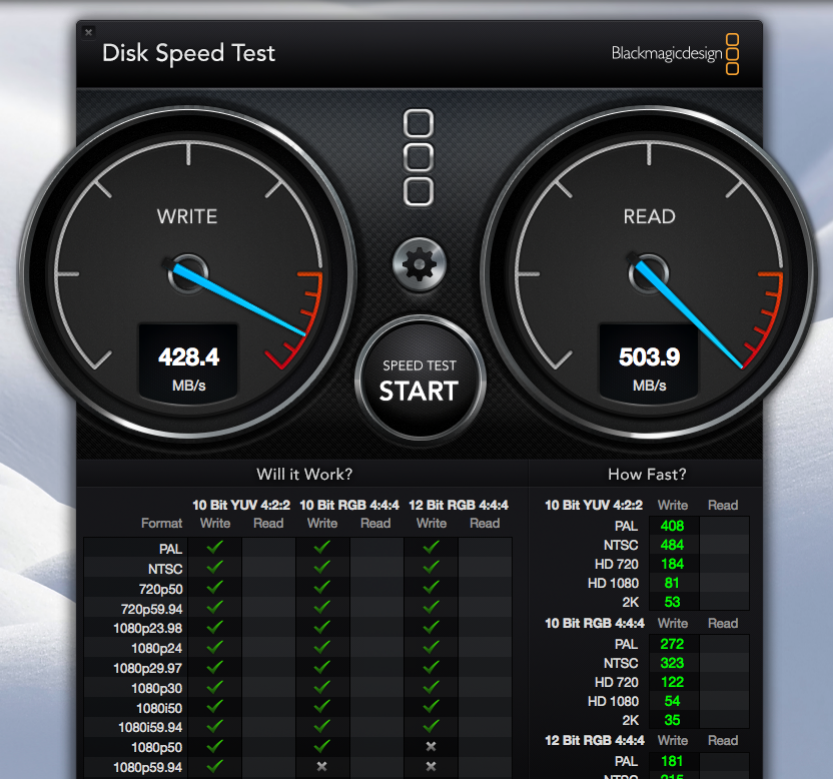
» Click to show Spoiler - click again to hide... «

actually this both slightly feels is different on launch app only.
*
Erm, my next company database server storage will change course, "switch to Samsung", hehehehehe brows.gif , get the "Pro"! thumbup.gif
wildwestgoh
post Dec 23 2013, 09:23 AM

Look at all my stars!!
*******
Senior Member
2,215 posts

Joined: Jul 2005


QUOTE(Uncle Ron @ Dec 23 2013, 09:18 AM)
Owh, i see... So what brand & model should i buy?  sweat.gif

Btw thanks for rplying me...  notworthy.gif
*
Samsung Evo series is the sweet spot right now for the speed and IOPS, shocking high vs the Intel counterpart.
But if you just need a program/OS speed up, I think any SSD will do, just a tad 1~2 seconds different in real-life feels, buy with guts whistling.gif .
Btw I chose Plextor and no regret! thumbup.gif

7 Pages < 1 2 3 4 > » Top
Topic ClosedOptions
 

Change to:
| Lo-Fi Version
0.0627sec    0.25    7 queries    GZIP Disabled
Time is now: 2nd December 2025 - 03:04 PM