Outline ·
[ Standard ] ·
Linear+
PC Audio Creative GigaWorks S750 7.1 speaker repair, A short guide and info with pictures...
|
dlduscg
|
 Feb 12 2015, 06:35 AM Feb 12 2015, 06:35 AM
|
New Member


|
QUOTE(bobbyh222 @ Feb 10 2015, 07:37 PM) all that is on the trans is TWI 885239 0350 Yes, I see what you mean. I guess that may not help much. There is another way, but it may require the help of an expert on transformers to translate the code on the transformer, or to calculate the specifications you need to find one that will do the same job. Usually a parts list is available with the repair manual, however, we don't have either. In any case T2 is likely to be expensive if you are even able to find one. It might be easier to find another PSU board than the T2. That will probably bring you to the point of having to decide whether or not to even try to fix it. I wish I could help further but I have exhausted my efforts, and hope that someone else out there reading this can offer a better solution. |
|
|
|
|
|
k3lvinNdad
|
Feb 12 2015, 09:38 AM
|
|
|
QUOTE(bobbyh222 @ Feb 10 2015, 07:37 PM) all that is on the trans is TWI 885239 0350 I believe the transformer with model no. 0350 is roughly this spec... Volts, Primary: 240/480, 230/460, 220/440V Volts, Secondary: 120, 115, 110V VA Rating: 350 VA Frequency Rating: 50/60 Hz because ACME ELECTRIC, EATON, SIEMENS also have almost the same spec... example: ACME ELECTRIC AE06-0350 EATON C0350E6U Siemens MT0350L TWI might refer to brand/company 885239 might refer to part no. 0350 might refer to model Hope this help  |
|
|
|
|
|
Ricter
|
Feb 18 2015, 02:12 AM
|
New Member
|
QUOTE(dlduscg @ Feb 10 2015, 02:46 AM) I assume your fix worked because you have it in the phones. Make sure all of the connectors inside the box are properly seated and did not get twisted or pulled out when you close the box. Make sure that the green led is on and stays on when you apply power. Carefully plug in your inputs inputs and outputs and recheck the input source, DVD player, PC, or whatever you are using is on and running. Inspect the audio control plugs for damage, bent pins etc, and are plugged in and seated correctly. Does the red led on the audio control stay lit and when you press the power on the audio control are all the led lighted? Then let me know what is happening please. All connected and not sound. where is the problem? wtf power supply? Attached thumbnail(s)


|
|
|
|
|
|
dlduscg
|
Feb 18 2015, 03:36 AM
|
New Member
|
QUOTE(Ricter @ Feb 18 2015, 02:12 AM) All connected and not sound. where is the problem? wtf power supply? Everything you show me is good, but what I can not see is the inside especially how the boards are connected. One wrong connection and no sound, if you can show the inside it would help greatly. |
|
|
|
|
|
Ricter
|
Feb 18 2015, 05:21 AM
|
New Member
|
|
|
|
|
|
|
dlduscg
|
Feb 18 2015, 01:13 PM
|
New Member
|
QUOTE(Ricter @ Feb 18 2015, 05:21 AM) ok if you need more photos tell me and, thank Hi, Thanks for the images I can see there is quite a bit of glue still on the boards, but I do not believe that you have a power problem mainly because you have a steady green light and your remote control also shows the power is there. I can not see all of the connectors, however I am mainly concerned with the amount of glue residue on the ribbon connectors that connect the amplifiers to the output board. See attached photo of the connector. The pins on the boards must be carefully and thoroughly cleaned as well as the connectors on the ribbon. Have you tried connecting the subwoofer speaker yet? Anyway look for a possible bad or dirty connection there and let me know what you find. Some pictures when you are finished will help. Attached thumbnail(s)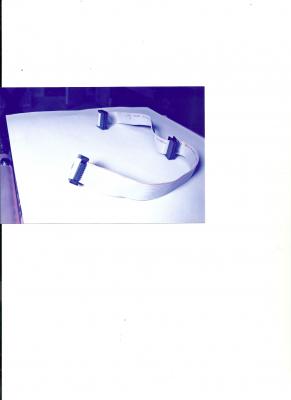
|
|
|
|
|
|
Ricter
|
Feb 18 2015, 10:30 PM
|
New Member
|
QUOTE(dlduscg @ Feb 18 2015, 01:13 PM) Hi, Thanks for the images I can see there is quite a bit of glue still on the boards, but I do not believe that you have a power problem mainly because you have a steady green light and your remote control also shows the power is there. I can not see all of the connectors, however I am mainly concerned with the amount of glue residue on the ribbon connectors that connect the amplifiers to the output board. See attached photo of the connector. The pins on the boards must be carefully and thoroughly cleaned as well as the connectors on the ribbon. Have you tried connecting the subwoofer speaker yet? Anyway look for a possible bad or dirty connection there and let me know what you find. Some pictures when you are finished will help. i connected the cable of different form,and not sound, there is a special way to connect? and yes i connect the sub and not sound |
|
|
|
|
|
dlduscg
|
Feb 18 2015, 11:34 PM
|
New Member
|
QUOTE(Ricter @ Feb 18 2015, 10:30 PM) i connected the cable of different form,and not sound, there is a special way to connect? and yes i connect the sub and not sound The cable I showed you in the photo is most critical. Yes, if this cable is not connected correctly, you will not get the sound. It does not matter which end you make the connections as long as the red striped wire of the ribbon is always connected to the number one pin, which is also marked on the circuit board. Look at the circuit boards and you will see a white arrow marking on the board which shows the number one pin. The connector also has an arrow marking point to the number one pin. It is possible that one of the three connectors is incorrect and that would prevent the audio sound. Also, since the voltages delivered by these connectors are very small, some glue on the pins or inside the connectors may be preventing the sound, or that the connectors are not well seated because of glue or other interference. Also look for damage to the traces leading to pins which may have been caused by scraping off glue, they are very fine traces and should be looked at with a magnifying glass. The sub woofer gets its power directly from the amplifiers and therefore if you apply power to the remote audio control box and the wires are properly connected to the speaker, you should get sound, however, I do not know what would happen if the connectors are not properly connected. I believe you said that the green power light on the main power supply stays on steady, when you turn on the audio control do you hear the start relay turn on? This post has been edited by dlduscg: Feb 18 2015, 11:45 PM |
|
|
|
|
|
kenn723
|
Feb 19 2015, 01:30 AM
|
|
|
Hi everyone, i have a megaworks THX 550 and was playing with it awhile ago. Suddenly i heard a boom sound and it doesnt work anymore. Is it the power supply? The transformer is still working (with light) and the remote of the speaker has no lights. Thanks
This post has been edited by kenn723: Feb 19 2015, 01:30 AM
|
|
|
|
|
|
Ricter
|
Feb 21 2015, 03:25 AM
|
New Member
|
QUOTE(dlduscg @ Feb 18 2015, 11:34 PM) The cable I showed you in the photo is most critical. Yes, if this cable is not connected correctly, you will not get the sound. It does not matter which end you make the connections as long as the red striped wire of the ribbon is always connected to the number one pin, which is also marked on the circuit board. Look at the circuit boards and you will see a white arrow marking on the board which shows the number one pin. The connector also has an arrow marking point to the number one pin. It is possible that one of the three connectors is incorrect and that would prevent the audio sound. Also, since the voltages delivered by these connectors are very small, some glue on the pins or inside the connectors may be preventing the sound, or that the connectors are not well seated because of glue or other interference. Also look for damage to the traces leading to pins which may have been caused by scraping off glue, they are very fine traces and should be looked at with a magnifying glass. The sub woofer gets its power directly from the amplifiers and therefore if you apply power to the remote audio control box and the wires are properly connected to the speaker, you should get sound, however, I do not know what would happen if the connectors are not properly connected. I believe you said that the green power light on the main power supply stays on steady, when you turn on the audio control do you hear the start relay turn on? i have sound for the headphone but not for the speakers where is the problem? if I connect the subwoofer only and dont have sound? Attached thumbnail(s)
|
|
|
|
|
|
Ricter
|
Feb 21 2015, 03:27 AM
|
New Member
|
QUOTE(dlduscg @ Feb 18 2015, 11:34 PM) The cable I showed you in the photo is most critical. Yes, if this cable is not connected correctly, you will not get the sound. It does not matter which end you make the connections as long as the red striped wire of the ribbon is always connected to the number one pin, which is also marked on the circuit board. Look at the circuit boards and you will see a white arrow marking on the board which shows the number one pin. The connector also has an arrow marking point to the number one pin. It is possible that one of the three connectors is incorrect and that would prevent the audio sound. Also, since the voltages delivered by these connectors are very small, some glue on the pins or inside the connectors may be preventing the sound, or that the connectors are not well seated because of glue or other interference. Also look for damage to the traces leading to pins which may have been caused by scraping off glue, they are very fine traces and should be looked at with a magnifying glass. The sub woofer gets its power directly from the amplifiers and therefore if you apply power to the remote audio control box and the wires are properly connected to the speaker, you should get sound, however, I do not know what would happen if the connectors are not properly connected. I believe you said that the green power light on the main power supply stays on steady, when you turn on the audio control do you hear the start relay turn on? i have sound for the headphone but not for the speakers where is the problem? if I connect the subwoofer only and dont have sound? |
|
|
|
|
|
dlduscg
|
Feb 21 2015, 11:25 AM
|
New Member
|
QUOTE(Ricter @ Feb 21 2015, 03:25 AM) i have sound for the headphone but not for the speakers where is the problem? if I connect the subwoofer only and dont have sound? I understand that you have all the inputs connected to your computer and you are playing sound ? And you have speaker outputs also connected ? And you have head phones connected to the audio control and you hear sound in the phones ? And when you unplug the phones from the audio control you still do not hear anything from the speakers ? Is that correct ? |
|
|
|
|
|
Ricter
|
Feb 21 2015, 07:03 PM
|
New Member
|
QUOTE(dlduscg @ Feb 21 2015, 11:25 AM) I understand that you have all the inputs connected to your computer and you are playing sound ? And you have speaker outputs also connected ? And you have head phones connected to the audio control and you hear sound in the phones ? And when you unplug the phones from the audio control you still do not hear anything from the speakers ? Is that correct ? i have sound only in the head phones |
|
|
|
|
|
dlduscg
|
Feb 22 2015, 06:14 AM
|
New Member
|
QUOTE(Ricter @ Feb 21 2015, 07:03 PM) i have sound only in the head phones OK, your power is ok and your amps are ok. Possibly speakers incorrectly connected check polarity or system is muted |
|
|
|
|
|
kenn723
|
Feb 23 2015, 10:55 PM
|
|
|
QUOTE(kenn723 @ Feb 19 2015, 01:30 AM) Hi everyone, i have a megaworks THX 550 and was playing with it awhile ago. Suddenly i heard a boom sound and it doesnt work anymore. Is it the power supply? The transformer is still working (with light) and the remote of the speaker has no lights. Thanks Guys, any idea on this? Otherwise i might be selling it off if it still has value and get a new speaker. This Creative Megaworks THX 550 has been serving me for some time however the sound quality is still beats most speakers out there. Im has been living without speaker sound for few weeks.  |
|
|
|
|
|
dlduscg
|
Feb 24 2015, 01:37 AM
|
New Member
|
QUOTE(kenn723 @ Feb 23 2015, 10:55 PM) Guys, any idea on this? Otherwise i might be selling it off if it still has value and get a new speaker. This Creative Megaworks THX 550 has been serving me for some time however the sound quality is still beats most speakers out there. Im has been living without speaker sound for few weeks. I would like to help you but like the Gigaworks S750 there are also glue problems which has been the major reason for failures of the 750 and probably something you will have to deal with with the THX 550, however if you can find a link to obtain a schematic that would help a lot, here is an article I came across recently. Maybe this can help lead you to solve your problem: Quote My system also would not turn on. The problem was on the power PCB - the one with the two large heat sinks attached. I found that the piece of PCB track joining the 2M ohm resistor (connected to the LINE-SENSE pin of the TOP243Y switcher) to the positive output of the full-wave bridge rectifier, was broken. This could have been caused by corrosion from the glue (which covered that section of track). I also replaced the 2M (0,5W) ohm resistor, just in case it was also to blame. The 2M ohm resistor is located under one of the two black heat sinks. I used a short piece of wire to replace the PCB track (from the large filter capacitor next to the resistor) to the 2M ohm resistor. Plugged everything back in, and it worked! Unquote In addition, there is always the creative website discussion forum, but you will have to sign in to participate: http://forums.creative.com/search.php?do=processAnything can be fixed if you want to spend time and research and if you have the tools. A schematic is always where you have to begin. Let us know how you make out, in the meantime I will do some looking around also. Good luck. |
|
|
|
|
|
Ricter
|
Feb 27 2015, 05:34 AM
|
New Member
|
QUOTE(dlduscg @ Feb 22 2015, 06:14 AM) OK, your power is ok and your amps are ok. Possibly speakers incorrectly connected check polarity or system is muted hello dlduscg , I still find the bug , any ideas ? I do not get any sound from the speakers not even the sub .The speakers are connected properly. label all before disconnecting. This post has been edited by Ricter: Feb 27 2015, 05:38 AM |
|
|
|
|
|
dlduscg
|
Feb 27 2015, 07:13 AM
|
New Member
|
QUOTE(Ricter @ Feb 27 2015, 05:34 AM) hello dlduscg , I still find the bug , any ideas ? I do not get any sound from the speakers not even the sub .The speakers are connected properly. label all before disconnecting. Hi Ricter, I have been thinking about your problem, but it is very difficult for me to begin troubleshooting without seeing everything you have done. 1) The first part of the problem was to replace all the caps on the main PSU board to restore your power source, remove degraded glue and eliminate potential future problems as well. It appears that this was a success since all indications are that you now have power. 2) The second problem is to restore audio to your speakers. Using your PC sound board to provide the audio, you plugged that into the input jacks of the amp but when you plug the speakers into the amp output jacks you do not get any sound from any of the speakers. However, you do get audio sound from the audio control phone jack. The audio control phone jack allows you to monitor the audio through the ear pods/phones and you should be able to adjust the volume and check the speakers, however, when you have the phones plugged in, the speakers are automatically muted and you should only hear audio sound in your ear phones. The hand remote control has a mute button on it, which allows you to mute the speakers at will. The switch that controls the mute, probably a transistor, may need to be replaced, or it is something entirely different. The problem is that you have been working on a lot of stuff all over the boards, and you should first verify that you did not accidentally cause the problem, or may have inadvertently made a bad connection, soldering, or otherwise. Since I am unable to examine your work, it will be up to you, at your end to try and back track your work and see if everything is indeed ok. Check out the hand remote mute button, and the audio control box, and see if you have all of the speakers in your ear phones, and that you can adjust the volume as well while you are plugged into the audio control box. This post has been edited by dlduscg: Feb 27 2015, 07:19 AM |
|
|
|
|
|
thebundok
|
Feb 28 2015, 03:11 AM
|
New Member
|
QUOTE(dlduscg @ Feb 27 2015, 12:13 AM) Hi Ricter, I have been thinking about your problem, but it is very difficult for me to begin troubleshooting without seeing everything you have done. Is it even remotely possible that the problem is in the control box and not at the source? Something as simple as whatever is supposed to trigger when you remove the headphones is staying engaged and thus not routing the sound back out to the speakers? |
|
|
|
|
|
dlduscg
|
Feb 28 2015, 05:27 AM
|
New Member
|
QUOTE(thebundok @ Feb 28 2015, 03:11 AM) Is it even remotely possible that the problem is in the control box and not at the source? Something as simple as whatever is supposed to trigger when you remove the headphones is staying engaged and thus not routing the sound back out to the speakers? Yes, the operation of the audio control can also be used as a diagnostic tool, and that is certainly open for consideration. In addition, the remote control has the mute button which will indicate whether or not the system is muted; when muted the remote control speaker LEDs flash repeatedly when the system is muted. I do not have access to the remote control, and therefore can not use it to find out what effect it has on my S750. In fact, I have the same problem in reverse; all of my speakers work, but I can not get all of the speakers audio when I plug in the phones. The mute feature is working the way it is supposed to on the speakers I can hear in phones. Not having a complete schematic and not having easy access to the boards makes it difficult to trace a problem and is much like trying to find a needle in a haystack. Since Ricter can get the audio in his phones, I would be interested in knowing what happens when he up-mixes, and whether or not he has volume control or is missing any of the selections or adjustments, and if he has a remote control handy. This would show if the system is operating normally thru the audio control. In addition the audio control has a USB port to connect another device without going thru his computer. That would also be interesting to know if he can get that audio and by plugging that into the 750 input jack and if the corresponding speaker works. Also, I know that mixing up connectors can cause a loss of audio, but not having my audio control working properly, does not give me useful info. I'm hoping he is reading this or anyone else and tries a few of my suggestions and reports back, otherwise I am getting real frustrated both with his problem and my own, because of the lack of appropriate and needed schematic information. Glad to hear someone is also interested in this. |
|
|
|
|



 Quote
Quote


 0.0291sec
 0.28
0.28
 6 queries
 GZIP Disabled