Welcome Guest ( Log In | Register )

Bump Topic Topic Closed RSS Feed

Outline · [ Standard ] · Linear+

News Y510p FHD 4700MQ GT755m@3399; i7 GT755X2 W8.1@3999, Y510p/Y410p add on gpu GT755M5/GT755M4 ^

views
     
Blackpanthere
post Aug 21 2013, 10:46 PM

New Member
*
Junior Member
23 posts

Joined: Jun 2013
QUOTE(ruztynail @ Aug 21 2013, 07:04 PM)
can any one who bought the y510p can pls confirm ur batt is which of the following?

62 Wh Lithium-Ion, 5800 mAh,
or
72 Wh Lithium-Ion, 6700 mAh,

thanks.. info is on the sticker behind ur batt..
*
72 Wh Lithium-Ion, 6700 mAh. Cell made in Japan, Furthere processed in China.
Blackpanthere
post Aug 23 2013, 03:35 AM

New Member
*
Junior Member
23 posts

Joined: Jun 2013
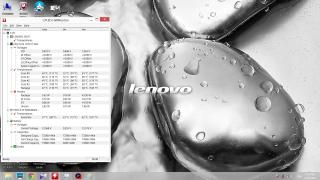
Is it normal to get 45-50 degree C just doing non-gaming task? like surfing and some music playing?

Kind of warm palm there...

Tried run around half an hour Metro Last Light game directly shoot up more than 70 degree C, can feel the left hand burning hot....

Anyone having the same temperature issue?

Am running on normal cooling pad too, plus standard ceiling fan room during midnight tim. cry.gif

Attached Image

This post has been edited by Blackpanthere: Aug 23 2013, 03:36 AM
Blackpanthere
post Aug 23 2013, 01:50 PM

New Member
*
Junior Member
23 posts

Joined: Jun 2013
QUOTE(ruztynail @ Aug 23 2013, 10:52 AM)
Pretty normal for heavy tasking. Tats why I use a cooling pad. But idle or normal usage mine is still cool to the touch.
*
Anyways just to bring down the temperature below 40 degree besides just cooling pad? Or maybe disable some of the tasking? need to get ice pack my hand lo... if continuous use for several hours... rclxub.gif
Blackpanthere
post Aug 23 2013, 01:52 PM

New Member
*
Junior Member
23 posts

Joined: Jun 2013
QUOTE(ytlay @ Aug 23 2013, 11:23 AM)
u can use throttle stop to control cpu and temperature when necessary.  smile.gif
*
May I know how to throttle stop to bring down the temperature? I'm usual use balance power mode, unless go for short gaming use high performance mode under power options.

Cooling pad ain't helping much... TQ rclxms.gif
Blackpanthere
post Aug 23 2013, 02:39 PM

New Member
*
Junior Member
23 posts

Joined: Jun 2013
QUOTE(Dbassnut @ Aug 23 2013, 02:02 PM)
Hi Black,
What cooling pad are you using? Could you take a photo of how you place the laptop on the pad? Also, where are the fans on the pad placed?
The Lenovo Y510P has its exhaust fans blowing out the hot are at the sides so you need to check that this hot air is not being recirculated back into the laptop by the cooling pad.
*
Am not at home at the moment so can't snap a pic for ya....
Its' a no big branded brand cooling pad (Inno NC37 Unique Style Notebook Cooling Pad White Inno NC37) with around 12cm diameter fan.... some how I felt it's good enough wind blowing upward when it's turn on. I placed it below the laptop grill part, the original laptop cooling system kept on blowing plenty of hot air on left hand side (which somehow cause my hand pretty pretty warm or burn feel on long hours).

It maybe the position of the cooling system Lenovo design ba... rclxub.gif
Blackpanthere
post Aug 23 2013, 03:32 PM

New Member
*
Junior Member
23 posts

Joined: Jun 2013
QUOTE(ErgoProxi @ Aug 23 2013, 03:06 PM)
Is ergostand cooling pad good enuf?
*
Do you mean Cooler Master Notepal ergostand? Ergostand

I have no idea eh... I just think it's the laptop cooling system design issues... cooling pad just cool down a lil degree C.
Blackpanthere
post Aug 23 2013, 03:34 PM

New Member
*
Junior Member
23 posts

Joined: Jun 2013
QUOTE(tachlio @ Aug 23 2013, 03:11 PM)
I think best Cooler pad for Y410P/510P

is this

CM U2
*
If really that good, then presume Y410/510p users will get this cooling pad n sell like hot pisang goreng... Possible is the Lenovo cooling ventilation system design issue ba... rclxub.gif
Blackpanthere
post Aug 23 2013, 03:41 PM

New Member
*
Junior Member
23 posts

Joined: Jun 2013
QUOTE(Dbassnut @ Aug 23 2013, 03:08 PM)
Yup, agree that Lenovo Cooling design isn't that good compared to Asus G series. but the price.  tongue.gif
& the infamous Asus Service Center horror stories.

Your cooler is
http://innosupply.com.my/Home.asp?pageid=3...d=25&prodid=739

Where is it sucking the air in? through the sides or from the back?
*
Hi there,

Agreed with you just for the spec n price wise, duno about build quality yet... but Y510p felt a lil fragile plastic... mostly from M.I.C.

Most of the air suck from bottom, side ways got a lil bit la... b4 I bought this I compare to some of the cooler master big brand, only think I go is the output air toward the laptop ventilation system. So I grab this cheaper version of other brand which seems working ok to cool a bit my 14inch old ASUS. The cooling pad output air is pushing upward force, I even try to move my laptop toward left hand side the hot spot, but seems like it's the laptop internal cooling system part that need work much harder to keep the system nice and cold.

Haha... Luckily my old Asus lappy didnt give me much problem besides getting old and battery flat due to ageing.

Perhaps when I try play game, bring a long aluminium foil and crack an egg wait for few minutes just to get the egg half cook with the hot lappy. doh.gif
Blackpanthere
post Aug 23 2013, 03:44 PM

New Member
*
Junior Member
23 posts

Joined: Jun 2013
QUOTE(tachlio @ Aug 23 2013, 03:17 PM)
I think you can get direct with Hikari, my bro bought the one with fan

http://www.coolermaster-usa.com/product.php?product_id=2940

Added

I saw fan edition @ Digital mall QBM, maybe you can look around there
*
Ya, saw many ppl comment and review this model. Adjustable fan position but is it strong enough for the fan or not still have to check out is it genuine part. As you know a lot of replica out there too... hehe... notworthy.gif

Blackpanthere
post Aug 23 2013, 03:47 PM

New Member
*
Junior Member
23 posts

Joined: Jun 2013
QUOTE(ErgoProxi @ Aug 23 2013, 03:40 PM)
Nope. Air-con is da best cooling. tongue.gif
Played metro last light in library & temp was 72 max instead of 87.
*
Haha... you're the man! rclxms.gif

If your electricity bill is cap the price la... direct blow from right hand side way... perhaps those notebookreview websites should do an experiment on this... thumbup.gif

Laptop working in freezing condition lolz...
Blackpanthere
post Aug 23 2013, 03:49 PM

New Member
*
Junior Member
23 posts

Joined: Jun 2013
Anyone tried the "Always on USB" features? seems like doesn't work when I put on hibernate or sleep mode.

Not like my old Asus laptop when put hibernation mode, there's still power coming out from USB to charge up devices.
Blackpanthere
post Aug 23 2013, 04:31 PM

New Member
*
Junior Member
23 posts

Joined: Jun 2013
QUOTE(ErgoProxi @ Aug 23 2013, 03:51 PM)
Librarian kicked me out because i was playing games for hours.  tongue.gif
The library was kinda packed.
'
*
Should grab some bigger books to barricade around your laptop then...
Blackpanthere
post Aug 23 2013, 04:34 PM

New Member
*
Junior Member
23 posts

Joined: Jun 2013
QUOTE(russell612 @ Aug 23 2013, 03:55 PM)
Hmm, maybe they kicked you out because you are playing games rather than reading books tongue.gif . BTW, is the cooling of the Y series really that bad?
*
I can only say a lil warm for me (not gaming time), if you play those graphic demanding game temperature directly shoot upward. These were just what I experience so far la... Have to check out with other users.

Plus it's finger print nightmare, need to wipe this badass laptop everytime man... sweat.gif
Blackpanthere
post Aug 23 2013, 05:08 PM

New Member
*
Junior Member
23 posts

Joined: Jun 2013
QUOTE(ErgoProxi @ Aug 23 2013, 04:38 PM)
Huh? I use external keyboard n mouse.
*
No wonder la... doh.gif totally doesn't affect you at all... the only thing only the laptop cooling system tried very hard to chilled down the system...
Blackpanthere
post Aug 23 2013, 06:55 PM

New Member
*
Junior Member
23 posts

Joined: Jun 2013
QUOTE(tachlio @ Aug 23 2013, 05:50 PM)
Before Lenovo logo show, press F2, go bios enable this function smile.gif
*
TQ, I give it a try later on... Cheers!
Blackpanthere
post Aug 23 2013, 06:58 PM

New Member
*
Junior Member
23 posts

Joined: Jun 2013
After a quick talk to Lenovo representative regarding the Y510p Temperature, they say pretty normal wa...

Even tried in air con room just help a bit eh...

hmm.gif


Attached thumbnail(s)
Attached Image
Blackpanthere
post Aug 24 2013, 04:43 PM

New Member
*
Junior Member
23 posts

Joined: Jun 2013
QUOTE(ErgoProxi @ Aug 23 2013, 11:37 PM)
So, you don't trust me? cry.gif
*
Trust bro trust.... got something to ask about warranty that moment... asked the temperature is it like that or not la... let them know we got warm palm ba... notworthy.gif
Blackpanthere
post Sep 12 2013, 12:26 AM

New Member
*
Junior Member
23 posts

Joined: Jun 2013
QUOTE(storytellerz @ Sep 9 2013, 09:45 AM)
how come ur single GPU can achieve such high score? I wish I get that score too sad.gif
your graphics and gaming graphics both 6.9 but mine only 5.0 and 6.8. sad.gif
*
Same result as yours.... 5.0
Blackpanthere
post Nov 29 2013, 10:16 PM

New Member
*
Junior Member
23 posts

Joined: Jun 2013
Anyone using single GPU Y510p when using LAN cable for internet connection kept on dc or sometimes say the cable is unplug?

Kept on swapping between wifi and Lan internet.... X_X

Topic ClosedOptions
 

Change to:
| Lo-Fi Version
0.0524sec    0.50    7 queries    GZIP Disabled
Time is now: 9th December 2025 - 07:13 PM