Welcome Guest ( Log In | Register )

Bump Topic Topic Closed RSS Feed
7 Pages  1 2 3 > » Bottom

Outline · [ Standard ] · Linear+

 Sony Xperia Z & Xperia ZL offcial thread V7, jelly 4.2 update arrived

views
     
mafioso
post Jun 13 2013, 01:34 AM

 
*******
Senior Member
6,153 posts

Joined: Jul 2012
From: Today, 00:01 AM
hi all,

i am mostly gonna get this phone (xperia z) and i've been checking out alot of reviews/ scratch test / drop test, etc..

1 thing i noticed was that the "SONY" logo is attached to the shatterproof screen protector as well? so if one were to take it off, the logo comes off together..

my question is.. will it affect the sensitivity if i were to apply a screen protector over the shatterproof protector?

did anyone try this? some feedback would be nice to allow me to be prepared for the pros and cons of getting this phone tongue.gif

This post has been edited by mafioso: Jun 13 2013, 01:34 AM
mafioso
post Jun 13 2013, 02:09 AM

 
*******
Senior Member
6,153 posts

Joined: Jul 2012
From: Today, 00:01 AM
QUOTE(acid427 @ Jun 13 2013, 01:55 AM)
No problem on sensitivity for me after apply screen protector on shatterproof film. IINM if u take out the shatterproof film, ur warranty will void (sorry if wrong info)  laugh.gif
*
serious? okay.. because on youtube many of the videos they remove it and apply their own screen protector.. sweat.gif

you using clear screen or anti glare screen protector?
are you on a custom rom as well? AOSP based?

hmm i think i saw a review saying it wont void, but who wants the "SONY" logo to be taken off right.. not that we like to advertise, but having the logo makes it feels different while holding/using it, dont you think?

some say sony is trolling with the logo sticking onto their shatterproof screen guard. laugh.gif
mafioso
post Jun 13 2013, 10:05 AM

 
*******
Senior Member
6,153 posts

Joined: Jul 2012
From: Today, 00:01 AM
QUOTE(acid427 @ Jun 13 2013, 02:14 AM)
» Click to show Spoiler - click again to hide... «

*
QUOTE(6006 @ Jun 13 2013, 02:31 AM)
» Click to show Spoiler - click again to hide... «

*
QUOTE(vincent829 @ Jun 13 2013, 07:49 AM)
» Click to show Spoiler - click again to hide... «

*
QUOTE(Andrewtst @ Jun 13 2013, 08:12 AM)
» Click to show Spoiler - click again to hide... «

*
QUOTE(droidtrix @ Jun 13 2013, 08:31 AM)
» Click to show Spoiler - click again to hide... «

*
walao.. first time i get so many response in a phone thread laugh.gif

hows the screen btw guys? its TFT and i googled, ppl say it looks more natural compared to the s4 (too clear and looks fake sometimes)..

can the "clear-ness" be compared with s2? (my current phone)

and okay.. can i buy the nilkin screen protector here in garage sales?

btw andrewtst, what is TA? Timescape A ___ ? Apps?

thanks! thumbup.gif

This post has been edited by mafioso: Jun 13 2013, 10:06 AM

mafioso
post Jun 13 2013, 10:08 AM

 
*******
Senior Member
6,153 posts

Joined: Jul 2012
From: Today, 00:01 AM
QUOTE(Andrewtst @ Jun 13 2013, 10:06 AM)
TA is the part store every phone unique ID, include complete functionality of BE2 and DRM.

http://forum.xda-developers.com/showthread.php?t=2292598
*
bookmark-ed.. thanks!!

btw, hows the screen? i tested in sony center the other day, it looks quite blurry and not that clear.. camera as well
maybe the display model is still using the old firmware?

cuz some say after the firmware update, screen + camera became clearer.. right? laugh.gif
mafioso
post Jun 13 2013, 10:19 AM

 
*******
Senior Member
6,153 posts

Joined: Jul 2012
From: Today, 00:01 AM
QUOTE(Andrewtst @ Jun 13 2013, 10:09 AM)
Yep, Sony Store Malaysia is lazy, never update firmware.

New firmware improve the screen quality and camera quality as well.
*
ok.. all can be found on XDA?
official firmware for msia, etc.

if yes when i bought it i'll start downloading all the necessary stuff.
mafioso
post Jun 13 2013, 10:27 AM

 
*******
Senior Member
6,153 posts

Joined: Jul 2012
From: Today, 00:01 AM
QUOTE(jeff10012003 @ Jun 13 2013, 10:22 AM)
that's the thing, there's no such thing as official firmware for malaysia anymore. pc companion/update service simply get the global LTE from any server and install it.
In short, just search for a global unbranded LTE installer, and you can install already..
*
i guess i'll take a snapshot of the firwmare version/details when i buy it. just in case..

but wont that void the warranty? if you install some other country's official rom..
mafioso
post Jun 13 2013, 11:01 AM

 
*******
Senior Member
6,153 posts

Joined: Jul 2012
From: Today, 00:01 AM
QUOTE(Andrewtst @ Jun 13 2013, 10:30 AM)
Yup. No such things, all country firmware can cross flash, I did it since using 1st Android phone.
Haha! Yeah!

You may enter following key to test out something.

*#*#7378423#*#* - Enter at Phone Dial Pad, this is Service Code.

If worried on warranty, once you root, the service center can reject also. It depends, and don't ever tell them you root before even you did. Just un-root back and flash back stock before send back. If can't un-root back due to completely dead, they can't find out also.

If not wrong Malaysia using same firmware as Singapore one or unbranded Global (not those Singtel edition) where you can find at XDA also.
*
i see.. sony seems to work differently..

samsung do have different country variants.. so if you flash a different country one = warranty void
does it work with odin? or thats only for samsung..

http://forum.xda-developers.com/showthread.php?t=2297717

is this the right place to get stock rom? nod.gif
mafioso
post Jun 13 2013, 11:14 AM

 
*******
Senior Member
6,153 posts

Joined: Jul 2012
From: Today, 00:01 AM
QUOTE(Andrewtst @ Jun 13 2013, 11:11 AM)
Flash ROM not official is void warranty but you can flash back origin before send for repair.

Try this - http://forum.xda-developers.com/showthread.php?t=2233312, it is older version unbranded Singapore firmware but you can get latest after that. I don't think got people post Malaysia version before at XDA. I think Singapore and Malaysia is same. At least it is always same for Samsung.

Actually can do own FTF from PC Companion, but need some step, just Google around.
*
alright i guess i should start learning again for sony phones..

used samsung for 2 years already.. got used to everything laugh.gif

anyway, thanks! you've been very helpful! when i get the phone i guess i'll let you know thumbup.gif !
mafioso
post Jun 13 2013, 12:07 PM

 
*******
Senior Member
6,153 posts

Joined: Jul 2012
From: Today, 00:01 AM
QUOTE(Andrewtst @ Jun 13 2013, 11:24 AM)
Welcome. smile.gif

Actually this Sony Xperia Z also my 1st Sony Android Phone.

Previously I use mostly Samsung Android.

My 1st Android phone is HTC Google Nexus One -> Samsung Galaxy S II (G) -> Samsung Galaxy S III.

Others like Samsung Galaxy Note II, Samsung Galaxy W and Sony Xperia ZL is my sister phone.
*
btw i forgot to ask 1 more question, if you buy the nilkin screen protector, do they provide the back one as well?

since its glass, i guess its worth in investing in one? to protect the back from getting scratched as well.. hmm.gif
mafioso
post Jun 13 2013, 12:17 PM

 
*******
Senior Member
6,153 posts

Joined: Jul 2012
From: Today, 00:01 AM
QUOTE(Andrewtst @ Jun 13 2013, 12:13 PM)
Don't be Honami, I don't want change phone now. hehe

Ya, front and back.

They is two type Nilkin, below is the one I buy.

user posted image
*
this one you bought in garage sales too?

QUOTE(uzary @ Jun 13 2013, 12:14 PM)
we use this to protect the back glass and no more finger print. rclxms.gif  an unique transparent protector.

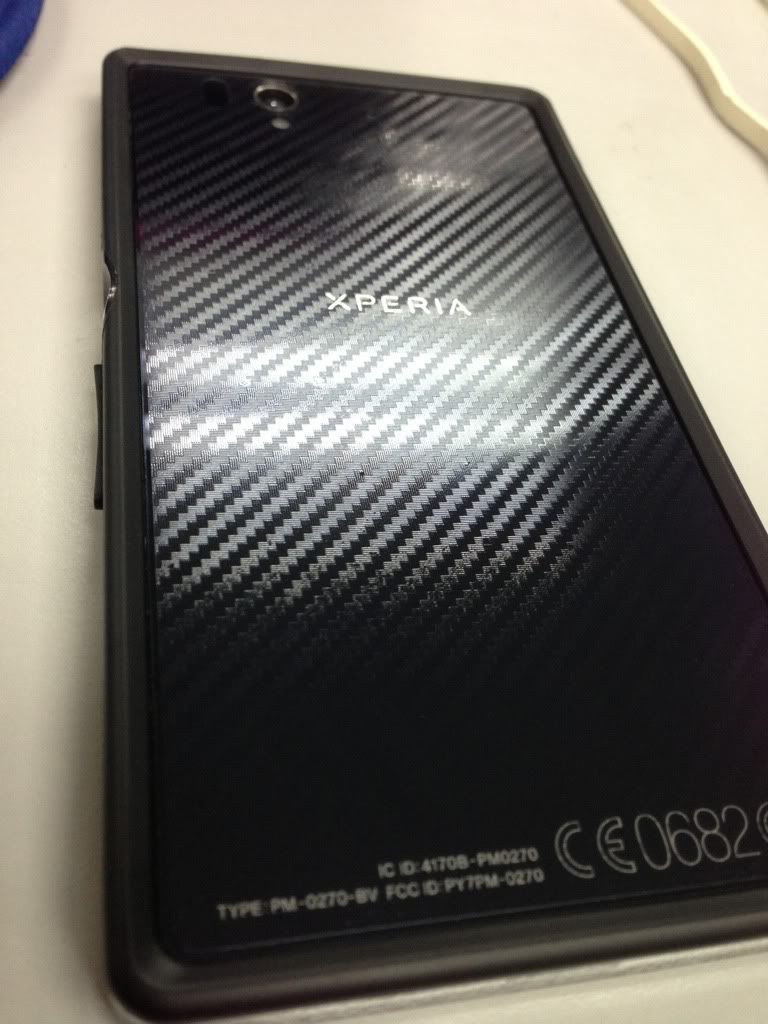
user posted image

user posted image im using this one, carbon design.

user posted image

ask ping325 for details.  icon_rolleyes.gif  thumbup.gif
*
thank guys..! omg seriously feels like a restart. have to check this/that all over again laugh.gif
i wonder if they have a plain protective shield.. without any design on it..

mafioso
post Jun 13 2013, 12:29 PM

 
*******
Senior Member
6,153 posts

Joined: Jul 2012
From: Today, 00:01 AM
QUOTE(Andrewtst @ Jun 13 2013, 12:27 PM)
Yup, I also use that checkbox as back, hehe.

user posted image
*
easily snap/unsnap? or must stick like those screen protectors? haha.
mafioso
post Jun 13 2013, 12:33 PM

 
*******
Senior Member
6,153 posts

Joined: Jul 2012
From: Today, 00:01 AM
QUOTE(Andrewtst @ Jun 13 2013, 12:30 PM)
It is much thicker, easier apply than those normal screen protector.
*
i see, actually i plan to use the phone as a naked phone when i get it this time..
since its fully glass.. seems like there's no point putting on backcovers.. laugh.gif
mafioso
post Jun 13 2013, 12:39 PM

 
*******
Senior Member
6,153 posts

Joined: Jul 2012
From: Today, 00:01 AM
QUOTE(Andrewtst @ Jun 13 2013, 12:37 PM)
The side will scratch one, I had few small line, so now I no longer use it naked.

I use this

user posted image

user posted image
*
okay, perhaps i will invest in one protective sheet then..

seems to cover the side as well icon_rolleyes.gif

there's also a hardware to charge the phone sideways, is that the one?
mafioso
post Jun 13 2013, 12:43 PM

 
*******
Senior Member
6,153 posts

Joined: Jul 2012
From: Today, 00:01 AM
QUOTE(Andrewtst @ Jun 13 2013, 12:40 PM)
Yep, that charging dock need to purchase separately. Official price at RM 118.00
*
just checked out your phone blog.

nice theme set up. rclxms.gif

okay, i guess i will check out more stuff on XDA. thanks! =]
mafioso
post Jun 15 2013, 10:35 PM

 
*******
Senior Member
6,153 posts

Joined: Jul 2012
From: Today, 00:01 AM
hey guys

i think im getting this phone tmr
just a couple of more questions before i go full force on this phone laugh.gif

1. i just googled "enable mass storage xperia z"
-> it seems like i can only enable this for external SD card?
if i were to flash a CM10.1 rom, will it be able to enable for both internal/external? as i do not want to install bloat software on my laptop just to transfer files (like itunes sweat.gif )

2. right now i could only think of 1 question (alot has been going on my mind)

however, i do know there is no perfect phone, so there's always a give and take. icon_rolleyes.gif
mafioso
post Jun 15 2013, 10:58 PM

 
*******
Senior Member
6,153 posts

Joined: Jul 2012
From: Today, 00:01 AM
QUOTE(ChuanHong @ Jun 15 2013, 10:39 PM)
Hmm. Should be no problem for ur question one. I think flash cm10.1 u have to unlocked bootloader which will void ur warranty. So fast after purchase then wish to flash custom rom ady? For me, I prefer stock rom. Soon xperia z will got android 4.2 officially. Now got leaks rom already.. Cn have a look.
*
haha nope, ofcuz wont plan to root first.. use it for a few months. read stuff on XDA first then only root. laugh.gif
thanks! nod.gif

QUOTE(eddmecha @ Jun 15 2013, 10:47 PM)
well for the bold part if u just wanna use mass storage to transfer files i suggest u use an app called wifi file explorer by Dooblou it serves me well...can view internal n external storage wireless transfer some more...btw i am using the pro version which only cost 0.99cents
*
wow didnt think of that software.. im currently using it on my s2 all along. LOL
maybe the excitement made my brain cannot function properly laugh.gif
mafioso
post Jun 15 2013, 11:08 PM

 
*******
Senior Member
6,153 posts

Joined: Jul 2012
From: Today, 00:01 AM
QUOTE(ChuanHong @ Jun 15 2013, 11:02 PM)
For daily usage, I think stock rom is far from enough. Hardware which is on top 10 in world. Snappy, smooth and fast.. Maybe u prefer pure android then might use cm10.1. Ya read more review and guide in xda will help.. For me, temporary I didn't got any thought to root my ZL. let it be original.. Haha
*
yea and no matter what.. new phone = standard.. wont root first.. just in case in the first 1-2 months it screwed up sweat.gif

but its gonna be a major jump from me from a samsung phone to sony.. (first time)

not that i want to divert the thread..
but i googled for so many reviews.. s4 wins everything..

can you guys lemme know what are the good things about this xperia Z?

so far i only know its

- something new to me (new brand, new way of using)
- on screen keys
- shatterproof layer
- underwater phone
- different UI (not touchwiz)

some more? nod.gif (i might have missed out some important review links)
mafioso
post Jun 15 2013, 11:25 PM

 
*******
Senior Member
6,153 posts

Joined: Jul 2012
From: Today, 00:01 AM
QUOTE(ChuanHong @ Jun 15 2013, 11:21 PM)
I'm not xperia z users but is zl user from yesterday start buy and use it.. Ok why I buy sony instead of famous Samsung, htc one out there. Let say Samsung for enough. S4, yes, confirm its a top phone and hv good quality. The things I hate not the name, not design. But is I spend nearly rm2k to buy a high end 2gb phone, but it's left me 8gb out of 16gb internal memory, 7xx free ram available for user out of 1.8gb ram (system default running 1-1.1gb ram). I spend so much and only get 7xx free ram which is not worth for me. I prefer to customise and add widget, running many apps on background. So I wish got more ram and don't want feel lag. Samsung, review from my friends which all using s4. Power hunger, can't pass 5pm with normal usage. I don't know how they use, but do have 3G, social MSG apps and others..

Choose sony coz of design, more ram and easier to use. Even my mum also know. Simple UI and understandable.

The things u will like in Sony I think is the power button which located at mid of right hand side.. Easier to access for a big phone. On screen key, the earphone.
Assume less already, some bloatware like play now, app extra all can uninstall.. I only disable the google+ on my ZL. Others just left it running as usual.. I like the small apps like video player.. I like fb messenger can pop chat head..
*
what! 16gb cut off to become only 8gb on the s4? shakehead.gif
even s2 got at least 11GB.

thanks for this review btw. smile.gif
yea i kinda like xperia z's design too.. haha.

btw, does anyone know how to access recovery? since there's no hardware keys for the home button!
Andrewtst tagged you since you helped me out few days ago nod.gif

This post has been edited by mafioso: Jun 15 2013, 11:26 PM
mafioso
post Jun 16 2013, 01:22 AM

 
*******
Senior Member
6,153 posts

Joined: Jul 2012
From: Today, 00:01 AM
QUOTE(Andrewtst @ Jun 16 2013, 12:05 AM)
Immediate press and hold the lower down volume button when purple pink or green notification light appear at SONY logo during phone boot up, hold it until it get access the recovery of CWM  or TWRP.
*
so its power button + volume down for recovery
and power button + volume up for download mode?

oh yes, btw bro.. what is the original samsung warranty company? laugh.gif

like sony ericsson was midland, etc..

This post has been edited by mafioso: Jun 16 2013, 01:39 AM
mafioso
post Jun 16 2013, 02:05 AM

 
*******
Senior Member
6,153 posts

Joined: Jul 2012
From: Today, 00:01 AM
QUOTE(droidtrix @ Jun 16 2013, 01:47 AM)
Authorised Distributors  - Midland / Thorus / Dynamics - Sony Malaysia

                                    - Samsung Malaysia - themself
*
so tmr when i unbox the phone, i check if the xperia's warranty is under that 3.. then its legit? nod.gif

7 Pages  1 2 3 > » Top
Topic ClosedOptions
 

Change to:
| Lo-Fi Version
0.0442sec    0.48    7 queries    GZIP Disabled
Time is now: 1st December 2025 - 10:24 PM