Outline ·
[ Standard ] ·
Linear+
Haswell, Devil's Canyon, Pentium G3258 OC V1, 4790K/4760K/4770K/4670K/G3258 | LGA1150
|
TSowikh84
|
 Aug 25 2013, 12:59 AM Aug 25 2013, 12:59 AM
|
i7 Clan


|
QUOTE(arerife @ Aug 25 2013, 12:50 AM) Okay, i want to ask what different using intel burn test and linx? because now Im using intel burn test, i can hit 4.5Ghz (1.255v) with max temperature 78c But when im using prime95 it hit 93c. IBT and LinX have the same stressing engine so use either one will do just fine for you. Your IBT/LinX might be outdated with no AVX instruction to yield GFlops 130+. Try the LinX in the first post which should work well for Haswell. By rights at the same vCore and CPU frequency, IBT/LinX should generate more heat than Prime95. Good luck This post has been edited by owikh84: Aug 25 2013, 01:01 AM |
|
|
|
|
|
arerife
|
Aug 25 2013, 01:07 AM
|
|
|
QUOTE(owikh84 @ Aug 25 2013, 12:59 AM) IBT and LinX have the same stressing engine so use either one will do just fine for you. Your IBT/LinX might be outdated with no AVX instruction to yield GFlops 130+. Try the LinX in the first post which should work well for Haswell. By rights at the same vCore and CPU frequency, IBT/LinX should generate more heat than Prime95. Good luck if im using the LinX on the first page you gave. I need to put maximum problem size and memory? |
|
|
|
|
|
TSowikh84
|
Aug 25 2013, 01:10 AM
|
i7 Clan
|
QUOTE(arerife @ Aug 25 2013, 01:07 AM) if im using the LinX on the first page you gave. I need to put maximum problem size and memory? Just click on the "ALL" button:  |
|
|
|
|
|
arerife
|
Aug 25 2013, 01:15 AM
|
|
|
QUOTE(owikh84 @ Aug 25 2013, 01:10 AM) Just click on the "ALL" button: ok, i will post the result later. thanks!  |
|
|
|
|
|
MathsGeniusOrNot
|
Aug 25 2013, 02:49 AM
|
|
|
hey guys i have i5-4670k and what is the average ghz i can overclock to? have aftermarket fans( noctua d14) 4.5ghz?
and what motherboard should i get? still deciding... Gigabyte sniper m5 mATX or udh4/udh3 or any others u guys can recommend? im new to oc-ing. and dont plan to overclock my motherboard as i dont think i need it. just going to clock cpu and gpu.. :-) btw clock motherboard got wad advantages? thx guys
|
|
|
|
|
|
arerife
|
Aug 25 2013, 12:33 PM
|
|
|
i dont know why.... but when i stress using linX, it stopped after 30 minutes(error) but the temp still under control (below 75c)
the vcore is 1.26v
But if i using IBT, i can stress more then 2 hours without any error or system down but the temperature will hit more then 80c.
|
|
|
|
|
|
OC4/3
|
Aug 25 2013, 06:01 PM
|
.
|
QUOTE(arerife @ Aug 25 2013, 12:33 PM) i dont know why.... but when i stress using linX, it stopped after 30 minutes(error) but the temp still under control (below 75c) the vcore is 1.26v But if i using IBT, i can stress more then 2 hours without any error or system down but the temperature will hit more then 80c. Try increase a wee bit of vcore and see how it goes |
|
|
|
|
|
arerife
|
Aug 25 2013, 10:26 PM
|
|
|
QUOTE(OC4/3 @ Aug 25 2013, 06:01 PM) Try increase a wee bit of vcore and see how it goes what the ideal vcore range for 4770k? i thought 1.26 already high on 4.5Ghz. Edited: i followed the cstkl1 guide using linpack 11, and i got 100c on core 2 while stressing 4.3ghz on 1.2v i reduce vcore it wont boot up. But when im using IBT, i only got 93c max temp on core 2. Others seem fine. This post has been edited by arerife: Aug 26 2013, 01:31 AM |
|
|
|
|
|
TSowikh84
|
Aug 26 2013, 07:12 AM
|
i7 Clan
|
QUOTE(arerife @ Aug 25 2013, 10:26 PM) what the ideal vcore range for 4770k? i thought 1.26 already high on 4.5Ghz. Edited: i followed the cstkl1 guide using linpack 11, and i got 100c on core 2 while stressing 4.3ghz on 1.2v i reduce vcore it wont boot up. But when im using IBT, i only got 93c max temp on core 2. Others seem fine. IBT/LinX in the first post is older eg. 10.3.7.012 and like I reported earlier the IBT/LinX 11.0.5.009 is not working with Haswell i7 (error out within the first run). Linpack is more stressful because it has a newer library (11.0.5.009). So, can say that linpack 11.0.5.009 is the best app to stress Haswell atm. |
|
|
|
|
|
arerife
|
Aug 26 2013, 06:41 PM
|
|
|
This is my result 4.5Ghz/1.26v noctua NH-U14s Pull configuration Corsair Vengeance 1866Mhz CL9 - 2400Mhz 11-11-11-30 1.62v / 2200Mhz 10-10-10-27 1.5v  But i dont know why cpu-z keep showed 1.28v. Can someone explain me about this?  Help me if i'm doing it wrong. |
|
|
|
|
|
stasio
|
Aug 26 2013, 07:29 PM
|
|
|
QUOTE(arerife @ Aug 26 2013, 06:41 PM) This is my result 4.5Ghz/1.26v noctua NH-U14s Pull configuration Corsair Vengeance 1866Mhz CL9 - 2400Mhz 11-11-11-30 1.62v / 2200Mhz 10-10-10-27 1.5v But i dont know why cpu-z keep showed 1.28v. Can someone explain me about this? Use CPU-Z 1.64.0 or latest HWiNFO (Sensor page): http://www.hwinfo.com/beta/hw64_423_1984.zipThis post has been edited by stasio: Aug 26 2013, 07:30 PM |
|
|
|
|
|
arerife
|
Aug 26 2013, 07:32 PM
|
|
|
QUOTE(stasio @ Aug 26 2013, 07:29 PM) Thanks, it showed the correct one. Is it my vcore too high? |
|
|
|
|
|
stasio
|
Aug 26 2013, 08:15 PM
|
|
|
QUOTE(arerife @ Aug 26 2013, 07:32 PM) Thanks, it showed the correct one. Is it my vcore too high? It's in "normal" range......average.  |
|
|
|
|
|
TSowikh84
|
Aug 26 2013, 08:39 PM
|
i7 Clan
|
QUOTE(arerife @ Aug 26 2013, 06:41 PM) This is my result 4.5Ghz/1.26v noctua NH-U14s Pull configuration Corsair Vengeance 1866Mhz CL9 - 2400Mhz 11-11-11-30 1.62v / 2200Mhz 10-10-10-27 1.5v But i dont know why cpu-z keep showed 1.28v. Can someone explain me about this? Help me if i'm doing it wrong. Nice try. A good start before going to a more stressful stability test such as linpack/LinX/IBT/Prime95. Welcome to the club mate.  btw, AIDA doesn't really stress the RAM at all and the vCore as well that's why I have stopped using it. My 4.5GHz with M6E: » Click to show Spoiler - click again to hide... « This post has been edited by owikh84: Aug 26 2013, 08:41 PM |
|
|
|
|
|
stasio
|
Aug 26 2013, 09:53 PM
|
|
|
QUOTE(owikh84 @ Aug 26 2013, 08:39 PM) Nice try. A good start before going to a more stressful stability test such as linpack/LinX/IBT/Prime95. Welcome to the club mate. btw, AIDA doesn't really stress the RAM at all and the vCore as well that's why I have stopped using it. My 4.5GHz with M6E: AIDA64 must be set,to stress the RAM ......Preference/General/.....Memory Block Size (512 MB,1 GB,2 GB) as by default is 16 MB only.....   This post has been edited by stasio: Aug 26 2013, 09:53 PM This post has been edited by stasio: Aug 26 2013, 09:53 PM |
|
|
|
|
|
TSowikh84
|
Aug 26 2013, 10:03 PM
|
i7 Clan
|
QUOTE(stasio @ Aug 26 2013, 09:53 PM) AIDA64 must be set,to stress the RAM ......Preference/General/.....Memory Block Size (512 MB,1 GB,2 GB) as by default is 16 MB only..... Oops missed that. no wonder my vCore was so unrealistic haha |
|
|
|
|
|
TSowikh84
|
Aug 26 2013, 10:09 PM
|
i7 Clan
|
|
|
|
|
|
|
stasio
|
Aug 26 2013, 10:20 PM
|
|
|
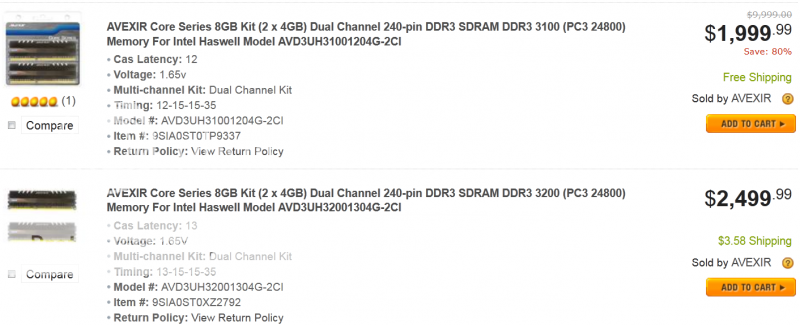
Huh,12-15-15 is cheaper then 13-15-15...?......  ....but $2K.........  Edit: Haha....this one is the best...... SAVE : $7,999.01 (80%) !!!!Ahhh is DDR3-3100..... Newegg do mistake in title....should be...DDR3 3200 (PC3 25600)  Btw, for Gigabyte Z87 users...special AIDA64 3.00.2580: http://users.aida64.com/aida64extreme_build_2580_stasio.zipfully support Haswell.......will be new Beta version soon. This post has been edited by stasio: Aug 26 2013, 10:51 PM |
|
|
|
|
|
stasio
|
Aug 28 2013, 12:11 PM
|
|
|
ADATA XPG V2 8GB (2 x 4GB) 240-Pin DDR3 SDRAM DDR3 3100 .......$1K http://www.neweggbusiness.com/Product/Prod...m=9B-20-211-803http://www.newegg.com/Product/Product.aspx...N82E16820211803This post has been edited by stasio: Aug 28 2013, 12:12 PM |
|
|
|
|



 Quote
Quote



 0.0283sec
 0.58
0.58
 6 queries
 GZIP Disabled