Welcome Guest ( Log In | Register )

Bump Topic Topic Closed RSS Feed

Outline · [ Standard ] · Linear+

 How to Split Screen to Projector + Monitor?, by using Notebook (VGA + HDMI output)

views
     
TSNightFelix
post May 31 2013, 10:58 AM, updated 13y ago

Samsung Exynos
********
All Stars
17,467 posts

Joined: May 2008
From: Lazada


Okay, the question is as tittle. I have attached a picture for easy understanding.

How to Split (Clone or Duplicate whatever you like to call) Screen to Projector + External Monitor?
by using Notebook with the VGA output and HDMI output.

Actually the real question is I can splitting into the Projector and External Monitor, but my main Notebook screen is blank? hmm.gif
Anyone know the reason why? or just our Notebook hardware doesn't support more than 3 display? or is there any other alternate solution?


Attached thumbnail(s)
Attached Image
Clem1982
post May 31 2013, 02:30 PM

Just Helping Out ^^
*******
Senior Member
8,746 posts

Joined: Jul 2010
From: S.A.B.A.H


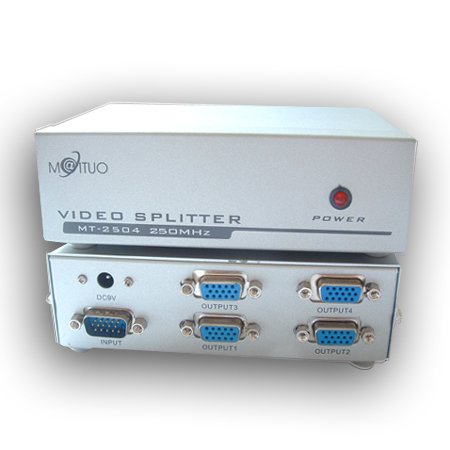
I think you'd need one of these

user posted image

I've used quite a few laptops and none of them can connect out to 2 different display media simultaneously, but someone who has came across one let me know tongue.gif
TSNightFelix
post May 31 2013, 04:40 PM

Samsung Exynos
********
All Stars
17,467 posts

Joined: May 2008
From: Lazada


QUOTE(Clem1982 @ May 31 2013, 02:30 PM)
I think you'd need one of these

user posted image

I've used quite a few laptops and none of them can connect out to 2 different display media simultaneously, but someone who has came across one let me know tongue.gif
*
Alright, but the external monitor is LCD TV, so should I use HDMI or use back to VGA? any difference?
With the picture you provide above, so connecting to projector shouldnt be a problem.
Clem1982
post May 31 2013, 04:50 PM

Just Helping Out ^^
*******
Senior Member
8,746 posts

Joined: Jul 2010
From: S.A.B.A.H


QUOTE(NightFelix @ May 31 2013, 04:40 PM)
Alright, but the external monitor is LCD TV, so should I use HDMI or use back to VGA? any difference?
With the picture you provide above, so connecting to projector shouldnt be a problem.
*
There will be differences but I wouldn't be too worried about that, I didn't know what connection you're using but there are also HDMI splitters

user posted image

IINM, for every kinda A/V connection there are splitters hmm.gif
TechnoG
post May 31 2013, 04:59 PM

Look at all my stars!!
*******
Senior Member
9,338 posts

Joined: Mar 2010


buy a VGA splitter box from ALLIT. IINM, 4 outputs is RM39 or RM59. hmm.gif
» Click to show Spoiler - click again to hide... «

the price is based on the amounts of output ports you want.

problem now is, everything runs on VGA. Have to figure out if you want to use HDMI..
but I'm pretty sure I saw a HDMI splitter box before too.

p/s: done this setup for my church. If anything you want to ask, do shoot me a PM.
TSNightFelix
post May 31 2013, 05:08 PM

Samsung Exynos
********
All Stars
17,467 posts

Joined: May 2008
From: Lazada


QUOTE(TechnoG @ May 31 2013, 04:59 PM)
buy a VGA splitter box from ALLIT. IINM, 4 outputs is RM39 or RM59. hmm.gif
» Click to show Spoiler - click again to hide... «

the price is based on the amounts of output ports you want.

problem now is, everything runs on VGA. Have to figure out if you want to use HDMI..
but I'm pretty sure I saw a HDMI splitter box before too.

p/s: done this setup for my church. If anything you want to ask, do shoot me a PM.
*
Wow, I think you just gave another great alternate solution.

Okay, so now I have some picture on my mind, the question is, based on the photo you shown me above,
can I have 2 VGA input and then with at least 2 or more VGA output?

So that I can have 2 of my laptop connect into this VGA splitter box, and then I can manage the output from either from laptop A or laptop B, like those event management did on their system. Possible? hmm.gif
TechnoG
post May 31 2013, 05:16 PM

Look at all my stars!!
*******
Senior Member
9,338 posts

Joined: Mar 2010


QUOTE(NightFelix @ May 31 2013, 05:08 PM)
Wow, I think you just gave another great alternate solution.

Okay, so now I have some picture on my mind, the question is, based on the photo you shown me above,
can I have 2 VGA input and then with at least 2 or more VGA output?

So that I can have 2 of my laptop connect into this VGA splitter box, and then I can manage the output from either from laptop A or laptop B, like those event management did on their system. Possible?  hmm.gif
*
that I'm afraid I can't help you. tongue.gif we do have a box which is running on 6 outputs and 1 output, an extra addition to the 6 inputs 1 output. I dont think you can find any box here with 2 outputs..unless you buy another box and super-sub the VGA output, but I dont think it'll work like that.

Possible, provided you have 2 outputs. smile.gif The 6 inputs 1 output box we currently have runs on buttons, lets say Laptop 1 is plugged to port A, and Laptop 2 is plugged to port B. Note that the connection is always active, you change the screen by just pressing the A/B/C/D etc buttons on the box.

TSNightFelix
post May 31 2013, 05:36 PM

Samsung Exynos
********
All Stars
17,467 posts

Joined: May 2008
From: Lazada


QUOTE(TechnoG @ May 31 2013, 05:16 PM)
that I'm afraid I can't help you. tongue.gif we do have a box which is running on 6 outputs and 1 output, an extra addition to the 6 inputs 1 output. I dont think you can find any box here with 2 outputs..unless you buy another box and super-sub the VGA output, but I dont think it'll work like that.

Possible, provided you have 2 outputs. smile.gif The 6 inputs 1 output box we currently have runs on buttons, lets say Laptop 1 is plugged to port A, and Laptop 2 is plugged to port B. Note that the connection is always active, you change the screen by just pressing the A/B/C/D etc buttons on the box.
*
I think you don't get what I mean. Picture will easy explain.
check my bottom attachment. I mean possible to have such splitter box I illustrate below?

This post has been edited by NightFelix: May 31 2013, 05:37 PM


Attached thumbnail(s)
Attached Image
TechnoG
post May 31 2013, 05:53 PM

Look at all my stars!!
*******
Senior Member
9,338 posts

Joined: Mar 2010


QUOTE(NightFelix @ May 31 2013, 05:36 PM)
I think you don't get what I mean. Picture will easy explain.
check my bottom attachment. I mean possible to have such splitter box I illustrate below?
*
I'm not too sure about that, looks impossible imho.

because at the moment the output for this kind of boxes work by buttons that are assigned to each ports. Lets say if you want a display in Output 1 as stated in your diagram, you press the button A and Output 2 button B etc. That is why there is only 1 input.

wait, you want to display both external monitor and projector simultaneously?
TSNightFelix
post May 31 2013, 10:34 PM

Samsung Exynos
********
All Stars
17,467 posts

Joined: May 2008
From: Lazada


QUOTE(TechnoG @ May 31 2013, 05:53 PM)
I'm not too sure about that, looks impossible imho.

because at the moment the output for this kind of boxes work by buttons that are assigned to each ports. Lets say if you want a display in Output 1 as stated in your diagram, you press the button A and Output 2 button B etc. That is why there is only 1 input.

wait, you want to display both external monitor and projector simultaneously?
*
Alright, then I just stick back what you have suggest me and go look for it.

Yes, display both external monitor and projector simultaneously, and my notebook screen still on.
TechnoG
post Jun 1 2013, 12:50 PM

Look at all my stars!!
*******
Senior Member
9,338 posts

Joined: Mar 2010


QUOTE(NightFelix @ May 31 2013, 10:34 PM)
Alright, then I just stick back what you have suggest me and go look for it.

Yes, display both external monitor and projector simultaneously, and my notebook screen still on.
*
then you have to find vga splitter box without the buttons so that all 3 displays will be active. smile.gif
set your graphic settings too to enable the tri display and whether you want it extended or same display.
TSNightFelix
post Jun 2 2013, 07:17 PM

Samsung Exynos
********
All Stars
17,467 posts

Joined: May 2008
From: Lazada


QUOTE(TechnoG @ Jun 1 2013, 12:50 PM)
then you have to find vga splitter box without the buttons so that all 3 displays will be active. smile.gif
set your graphic settings too to enable the tri display and whether you want it extended or same display.
*
Thank you for your humble sharing and advice. I will look into it and try it see how its works.

Topic ClosedOptions
 

Change to:
| Lo-Fi Version
0.0251sec    0.65    6 queries    GZIP Disabled
Time is now: 18th December 2025 - 03:51 PM