

Game Setting Page:


Finish at 50:28 minutes! No error!

Biostar Tforce 6100 Overclocking Discussion, Biostar Tforce 6100 modded bios inside!
|
|
  Jun 12 2006, 11:44 PM Jun 12 2006, 11:44 PM
Return to original view | Post
#21
|
 
Junior Member
330 posts Joined: Jul 2005 From: Singpore / Johor Bahru  
|
Game = Warcraft 3 : The Frozen Throne @ Dota 6.27b AI v1.71
Game Setting Page: Finish at 50:28 minutes! No error! |
|
|
|
|
|
Jun 12 2006, 11:59 PM
Return to original view | Post
#22
|
|
Junior Member
330 posts Joined: Jul 2005 From: Singpore / Johor Bahru
|
Remark : The onboard GPU Graphic performance will be change depent by your system configure, So, I think Vtec(Rock) using 525/550 Mod bios the 3D Mark 03 can be higher than me.
Have anyone flashed this bios can post your 3D Mark 2001/2003 to share your score with us. Thanks! |
|
|
Jun 13 2006, 08:44 AM
Return to original view | Post
#23
|
|
Junior Member
330 posts Joined: Jul 2005 From: Singpore / Johor Bahru
|
QUOTE(Vtec(Rock) @ Jun 13 2006, 12:57 AM) this is 3Dmark 01 result with 550mhz result.   wow! nice! over 6k score in 3D mark 2001 liao! wow! nice! over 6k score in 3D mark 2001 liao!  |
|
|
Jun 14 2006, 12:51 AM
Return to original view | Post
#24
|
|
Junior Member
330 posts Joined: Jul 2005 From: Singpore / Johor Bahru
|
QUOTE(malutapimau @ Jun 13 2006, 11:04 AM) thats awesome! Imposible to do this, HTT muitiplier only have 1x , 1.5x , 2x , 2.5x , 3x , 4x , 5x only. jian_yi how do you mod the bios? im curios ive a request could you mod the bios to has more flexible fid? like add 3.5x multplier to it? so we can run out pc say 285 x 3.5 = close to stock htt bus 1000mhz? thanks  |
|
|
Jun 14 2006, 11:11 PM
Return to original view | Post
#25
|
|
Junior Member
330 posts Joined: Jul 2005 From: Singpore / Johor Bahru
|
New! Biostar TForce-939 mod BIOS "0615" Tested based on CU51M602.RH
3D Mode : 525 / 550 / 575 Mhz  version versionNew change log: (Stable Version) CODE * Based on Official 602 * HT Frequency: Add 1.5x and 2.5x * Cas: Add 1.5T * Tras: Add 1T, 2T, 3T, 4T * Trcd: Add 1T * Trp: Add 1T * K8 CnQ: Move to "Advanced Chipset Features" -------------------------------------------------------------------------------------- * Change Onboard GeForce 6100 speed to 2D : 275Mhz / 3D Peformance : 525 /550 / 575Mhz Mod by Jian_yi, Powered by overclockmaster.com This BIOS already tested, running very well! Based on 0615 550Mhz mod BIOS, Game : 2006 FIFA World Cup Operating System : WinXP SP2 Eng. with Directx 9.0c build Feb 2006 Driver : Nvdia Forceware 81.98 BIOS : 0615 550Mhz Mod BIOS Game Setting : Default setting      RUN THIS GAME DAMN SMOOTH!!!  *****All the BIOS have tested & run well! Depent by your mainboard, if anyone pass 3D Mark 03 can try your luck to update & use the 0615 575Mhz Onboard GeForce 6100 BIOS; if you failed run 3D Mark 03 on 0615 550Mhz BIOS, please downgrade to use 0615 525Mhz BIOS, Thanks!***** Download BIOSTAR TForce-939 0615 mod BIOS: This post has been edited by Jian_yi: Jun 14 2006, 11:27 PM Attached File(s)  TForce939.0615.525.zip ( 423.44k )
Number of downloads: 21
TForce939.0615.550.zip ( 423.44k )
Number of downloads: 14
TForce939.0615.575.zip ( 423.44k )
Number of downloads: 11
TForce939.0615.525.zip ( 423.44k )
Number of downloads: 21
TForce939.0615.550.zip ( 423.44k )
Number of downloads: 14
TForce939.0615.575.zip ( 423.44k )
Number of downloads: 11 |
|
|
Jun 15 2006, 12:03 AM
Return to original view | Post
#26
|
|
Junior Member
330 posts Joined: Jul 2005 From: Singpore / Johor Bahru
|
Biostar TForce-939 mod BETA BIOS "0701" based on CU51M602.RH
3D Mode : 525Mhz version only Change log: CODE * Based on Official 602 * HT Frequency: Add 1.5x and 2.5x * Cas: Add 1.5T * Tras: Add 1T, 2T, 3T, 4T * Trcd: Add 1T * Trp: Add 1T * K8 CnQ: Move to "Advanced Chipset Features" -------------------------------------------------------------------------------------- * Change Onboard GeForce 6100 speed to 2D : 275Mhz / 3D Peformance : 525Mhz * Remove Boot Screen Bitmap * Add Recovery System (Restore Card function) Mod by Jian_yi, Powered by overclockmaster.com *****This BETA BIOS untested, use it for your ownrisk!***** Download BIOSTAR TForce-939 0701 mod BETA BIOS: This post has been edited by Jian_yi: Jun 15 2006, 12:03 AM Attached File(s)
TForce939.0701.525.Beta.zip ( 411.34k )
Number of downloads: 11 |
|
|
|
|
|
Jun 15 2006, 09:10 AM
Return to original view | Post
#27
|
|
Junior Member
330 posts Joined: Jul 2005 From: Singpore / Johor Bahru
|
QUOTE(jon89 @ Jun 15 2006, 01:52 AM) erm....u mean the htt?? I lowered to 3x already.....kena lower summore ah?? Do u disable WinXP SP2 DEP or not? Not every one processsor can run higher HTT & lower muitiplier. My 4000+ also can't do like this.   Have anyone success run 0615 575Mhz BIOS?  This post has been edited by Jian_yi: Jun 15 2006, 09:11 AM |
|
|
Jun 15 2006, 08:31 PM
Return to original view | Post
#28
|
|
Junior Member
330 posts Joined: Jul 2005 From: Singpore / Johor Bahru
|
QUOTE(nakata101 @ Jun 15 2006, 08:06 PM) Untill now .... we still dun have any problem.. n yup.. the score for graphic benchmark also increase.... but not much...... The Score improve a little in 3D Mark 03, but when u play games you will feel have much better than before, quite damn smooth if depend with original 425Mhz erm, I think everyone can test NFS:MW game using original 425Mhz & 525 / 550 Mhz 0615 mod BIOS, you can see the different also .This post has been edited by Jian_yi: Jun 15 2006, 08:34 PM |
|
|
Jun 16 2006, 11:51 AM
Return to original view | Post
#29
|
|
Junior Member
330 posts Joined: Jul 2005 From: Singpore / Johor Bahru
|
QUOTE(Vtec(Rock) @ Jun 16 2006, 03:04 AM) this is my with 575 bios................ 1546 score only at 575Mhz  ???? erm, what the score u running at 550Mhz 3D Mark 03? ???? erm, what the score u running at 550Mhz 3D Mark 03? |
|
|
 Jun 29 2006, 12:01 AM Jun 29 2006, 12:01 AM
Return to original view | Post
#30
|
|
Junior Member
330 posts Joined: Jul 2005 From: Singpore / Johor Bahru
|
hehehe
! My new Record!See below the picture~ New BIOS let me get this score in 3D Mark 03  . .Before that I hit 14xx only...    Wait my good news~ |
|
|
Jul 3 2006, 05:47 PM
Return to original view | Post
#31
|
|
Junior Member
330 posts Joined: Jul 2005 From: Singpore / Johor Bahru
|
Biostar TForce-939 6100 mod BIOS "0703" based on CU51M602.RH
Release date : 03/07/2006 -------------------------------------------------------- GF6100 Onboard GPU Speed: File Name 2D / 3D / Performance 3D TForce939.0703.575.bin : 275Mhz / 475Mhz / 575Mhz TForce939.0703.550.bin : 275Mhz / 475Mhz / 550Mhz TForce939.0703.525.bin : 275Mhz / 475Mhz / 525Mhz TForce939.0703.500.bin : 275Mhz / 425Mhz / 500Mhz -------------------------------------------------------- New change log: * Change Onboard GeForce 6100 Display speed. * Improve onboard GF6100 Display performance. * Turbocache support up to 512MB when BIOS setting at 128MB Frame Size. * Update onboard Geforce 6100 GPU BIOS to Version 5.51.22.28.00. * Change Boot Screen full bitmap. *****For better performance, please use Nvdia Forceware 84.21 or above***** Tested with TForce939.0703.550.bin, compare with 0615 moded BIOS; New 0703 Onboard GPU better 10%~12% performance than before. Mod by Jian_yi, Powered by The Rebels Haven Computer Forum. This BIOS tested, running very well!  This post has been edited by Jian_yi: Jul 3 2006, 05:50 PM Attached File(s)
TForce939.0703.Series.zip ( 1.61mb )
Number of downloads: 64 |
|
|
 Jul 3 2006, 09:48 PM Jul 3 2006, 09:48 PM
Return to original view | Post
#32
|
|
Junior Member
330 posts Joined: Jul 2005 From: Singpore / Johor Bahru
|
QUOTE(Eg6 @ Jul 3 2006, 05:55 PM) i have a problem here.erm...my A64 clock at 312Htt at 3X 2.8Ghz over.stable at prime and SP2004 run.even i run 3Dmark 01 and 05 over 5 times also no hang.but the problem is 1st run for 3dmark03 it hang already.ar....cannot run 3dmark 03 what the BIOS version you use?   |
|
|
Jul 3 2006, 10:14 PM
Return to original view | Post
#33
|
|
Junior Member
330 posts Joined: Jul 2005 From: Singpore / Johor Bahru
|
QUOTE(Eg6 @ Jul 3 2006, 10:05 PM) the 1 u mod 1 lar...500mhz.kekeke Erm, maybe your system setting have problem. So far we tested the mod BIOS "have problem" most in 550Mhz & 575Mhz, because this is C51G onboard chipset quality problem... this seem like as processor, some processor (AMD Athlon64 3000+) can hit to 2.7Ghz, but some ppl only can hit to 2.4~2.5Ghz. Normally, all the BIOSTAR Tforce 6100-939 can use 500Mhz and no problem...If you tried 500Mhz and no problem, you can flash the 525Mhz to try can run or not, my mainboard can run 575Mhz & no problem found. |
|
|
|
|
|
Jul 7 2006, 11:13 PM
Return to original view | Post
#34
|
|
Junior Member
330 posts Joined: Jul 2005 From: Singpore / Johor Bahru
|
QUOTE(Vtec(Rock) @ Jul 7 2006, 10:56 PM) erm...most pll dunwan use 6100 onboard ae.all waiting stock 7300GT.yeah nice.anyway up for T-Force! T-Force Series Moded BIOS is only add value... |
|
|
Jul 17 2006, 04:40 PM
Return to original view | Post
#35
|
|
Junior Member
330 posts Joined: Jul 2005 From: Singpore / Johor Bahru
|
Biostar TForce-939 6100 mod BIOS "0717"
Release date : 17/07/2006 -------------------------------------------------------- GF6100 Onboard GPU Speed: File Name 2D / Thrtl / Performance 3D TForce6100_939.0717.575.bin : 275Mhz / 475Mhz / 575Mhz TForce6100_939.0717.550.bin : 275Mhz / 475Mhz / 550Mhz TForce6100_939.0717.525.bin : 275Mhz / 475Mhz / 525Mhz TForce6100_939.0717.500.bin : 275Mhz / 425Mhz / 500Mhz -------------------------------------------------------- New change log: * Update Boot Screen bitmap. * Update Boot Screen BIOS information. * Support Nvdia PureVideo Acceleration Technology. Modify by Jian_yi, Powered by The Rebels Haven Computer Forum. This BIOS tested, running very well! Guide to Enable Nvdia Purevideo Step 1: Install Nvdia Forceware 84.21 or above drivers. Step 2: Download Nvdia PureVideo Decoder: CODE http://fm.aooa.cn/hdtv/NVIDIA_PureVideo_Decoder_1.02-185.rar Step 3: Download Windows Media Player 11 Beta: CODE http://download.microsoft.com/download/e/e/e/eeeb2d1e-8000-4f23-b770-ddb34a9c8f45/wmp11-windowsxp-x86-enu.exe Step 4: Download PowerDVD 7.0 Deluxe via Bittorent from ISOHunt (File Size : 37.48MB): CODE http://isohunt.com/torrents.php?ihq=PowerDVD&ext=&op=and&iht=5 Step 5: Download 1080i HD-MPEG2 HDTV Video file (375 MB): CODE http://demod.dvico.com/hdtv/Australia_2.tp Step 6: Follow the Step 1 ~ Step 6, After download & install it, Done! ----------------------------------------------------------------------------  Download Biostar TForce6100-939 0717 mod BIOS: CODE http://www.overclockmaster.com/downloads/TForce6100_939.0717.Series.zip ---------------------------------------------------------------------------- Picture :(Picture Blur because I using my Nokia 6600 to snapshot the screen, sorry, No camera...  ) ) Nvdia PureVideo Acceleration Disable (Video Acceleration "not in use")  CPU Usage up to 33% with non-Purevideo Acceleration!  HDTV 1080i Video File Source (Australia_2.tp) ~ 375MB  Australia_2.tp is using Nvdia Video & Audio Decoder. Continue..... This post has been edited by Jian_yi: Jul 18 2006, 12:48 PM |
|
|
Jul 17 2006, 04:53 PM
Return to original view | Post
#36
|
|
Junior Member
330 posts Joined: Jul 2005 From: Singpore / Johor Bahru
|
 Testing via PowerDVD 7.0 Deluxe Version  Only using 5~18% CPU Usage (PureVideo Acceleration enable) when playing Australia_2.tp  PureVideo Acceleration enable on Geforce 6100  Don't Forget to setting Frame size Geforce 6100 to 128MB share in BIOS setting This post has been edited by Jian_yi: Jul 17 2006, 04:54 PM |
|
|
Jul 28 2006, 01:09 AM
Return to original view | Post
#37
|
|
Junior Member
330 posts Joined: Jul 2005 From: Singpore / Johor Bahru
|
Biostar TForce-939 6100 mod BIOS "0728"
Release date : 28/07/2006 -------------------------------------------------------- GF6100 Onboard GPU Speed: File Name 2D / Thrtl / Performance 3D TForce6100_939.0728.600.bin : 275Mhz / 475Mhz / 600Mhz TForce6100_939.0728.575.bin : 275Mhz / 475Mhz / 575Mhz TForce6100_939.0728.550.bin : 275Mhz / 475Mhz / 550Mhz TForce6100_939.0728.525.bin : 275Mhz / 475Mhz / 525Mhz TForce6100_939.0728.500.bin : 275Mhz / 425Mhz / 500Mhz TForce6100_939.0728.475.bin : 275Mhz / 425Mhz / 475Mhz -------------------------------------------------------- New change log: * Update Mod BIOS base on CU51M607.RH * Add new 3D performance Mode 600Mhz / 475Mhz * Support Nvdia PureVideo Acceleration Technology. * Update NvRaid boot rom BIOS from 6.21 to 7.03 version. Modify by Jian_yi, Powered by The Rebels Haven Computer Forum. This BIOS tested, running very well! Download : CODE http://www.overclockmaster.com/downloads/TForce6100_939.0728.Series.zip This post has been edited by Jian_yi: Jul 28 2006, 01:13 AM |
|
|
Nov 30 2006, 12:48 AM
Return to original view | Post
#38
|
|
Junior Member
330 posts Joined: Jul 2005 From: Singpore / Johor Bahru
|
huh, hi everyone, I have my new BIOSTAR TForce6100-939 mod BIOS, anyone wanna try? I will PM him my bios...
|
|
|
Nov 30 2006, 11:15 PM
Return to original view | Post
#39
|
|
Junior Member
330 posts Joined: Jul 2005 From: Singpore / Johor Bahru
|
QUOTE(kucingfight @ Nov 30 2006, 12:51 PM) yeah, i don mind tryin it out. see your PM... Good Job Jian_Yi. any improvements on the latest mod?  |
|
|
Dec 26 2006, 12:27 AM
Return to original view | Post
#40
|
|
Junior Member
330 posts Joined: Jul 2005 From: Singpore / Johor Bahru
|
Biostar TForce6100-939 Moded BIOS Discussion
Hope any feedback & any problem with using Mod BIOS can reply here, that I want to know the bug... ok, my lastest bios update is mod BIOS for Biostar Tforce6100-939 <1128> version. Change Log & What News : BIOS Setting Changes:
Download Here :
1128_part1.zip ( 1.58mb )
Number of downloads: 184
1128_part2.zip ( 1.18mb )
Number of downloads: 244What is SOYO Enet? Actually SOYO Enet is a restore card function, all the fuction same as a real restore card... but... today, the restore card function already build-in to mainboard. Ok, dun't talk any more here, I will show you all to recovery back your data in 10 seconds with using SOYO Enet... After you flashed the SOYO Enet Edition BIOS, you will see... the boot screen like this... 
First, you need to install SOYO Enet Driver... 
Download:
EnetDri.zip ( 254.83k )
Number of downloads: 21After you installed the Enet Driver, please restart your system...... Press Alt+R to start SOYO Enet setup before WinXP starting boot... 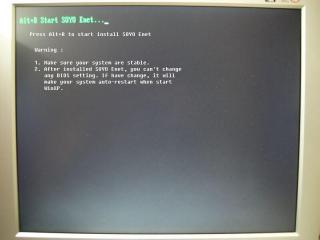
Then you will see the chinese SOYO Enet setup screen, but nvr mind, I already explain to english, see the picture... Step 1 The First Setup Screen Please Enter at Setup button 
Step 2 Please Select the Partition which you wanna to protect... 
Step 3 Please Select the protect mode... 
Step 4 1. If you wanna change the admin password, just enter at Second button (Resetting Administrator Password) 

2. Enter to First button to start the protection...
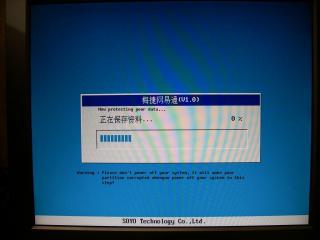
Ok, all done! your partition that you selected will start the protection, if you want to restore your partiton, pls hit [F9] at black screen before WinXP Operating System startup... This is SOYO Enet PDF guide book, just for our chinese members... Download:  manual_no_boot.pdf ( 965.39k )
Number of downloads: 972
manual_no_boot.pdf ( 965.39k )
Number of downloads: 972This post has been edited by Jian_yi: Dec 26 2006, 01:55 AM |
|
Topic ClosedOptions
|
| Change to: |  0.0211sec 0.0211sec
 0.71 0.71
 7 queries 7 queries
 GZIP Disabled GZIP Disabled
Time is now: 4th December 2025 - 02:55 PM |
 Quote
Quote