Welcome Guest ( Log In | Register )

55 Pages « < 36 37 38 39 40 > » Bottom

Outline · [ Standard ] · Linear+

 Dell Vostro 5460, Ultrabook

views
     
skysoblue93
post Dec 8 2013, 11:23 AM

Getting Started
**
Junior Member
211 posts

Joined: May 2010


QUOTE(nexus2238 @ Dec 7 2013, 01:48 PM)
I understand you did not clone the HDD to SSD.
So before you take out the HDD, did you change the boot sequence in the BIOS, from HDD 1st to USB drive 1st?
If you do, then you can boot using an USB drive. Try that. (do you know how to make a USB boot disc?)
Now, swap the SSD with the HDD. Make sure the mode is AHCI and not IDE.
Now boot the laptop using the USB boot disc. Install OS on the SSD.
*
read properly where i said, bios hang, even it if doesnt, it cant detect ssd. 'Detect', not boot. SSD is non-existence to the system.

To your question.

1. I cloned hdd to ssd.
2. I know how to boot from usb
3. I did try to boot from usb with ssd inside. Either the bios cant event boot to usb, or booted. but Windows installation cant detect ssd drives to install.
4. I tried all bios setting to pair with ssd. ahci uefi legacy ,anything wont work. theres no ide for this laptop.
5. I can boot my desktop while paired with the ssd, but not my laptop.

thanks

This post has been edited by skysoblue93: Dec 8 2013, 11:27 AM
nexus2238
post Dec 8 2013, 11:26 AM

Look at all my stars!!
*******
Senior Member
4,195 posts

Joined: Sep 2012


QUOTE(skysoblue93 @ Dec 8 2013, 11:23 AM)
read properly where i said, bios hang, even it if doesnt, it cant detect ssd. 'Detect', not boot. SSD is non-existence to the system.
*
No BIOS in this world list "SSD", it's all HDD smile.gif
Can you confirm you did not follow the step I suggest?
If you don't, how do you expect the laptop to behave after you just take out the HDD and swap in the SSD?

I did read you post smile.gif
You mentioned you took out the HDD and put in the SSD, and after that you could not get into the BIOS.
My suggestion is that you change the BIOS boot sequence before you take out the HDD.
You don't need to be so stuck up, you know, I am just trying to help.
If you don't like it, fine by me. Take care.

This post has been edited by nexus2238: Dec 8 2013, 11:29 AM
skysoblue93
post Dec 8 2013, 11:28 AM

Getting Started
**
Junior Member
211 posts

Joined: May 2010


QUOTE(nexus2238 @ Dec 8 2013, 11:26 AM)
No BIOS in this world list "SSD", it's all HDD  smile.gif
Can you confirm you did not follow the step I suggest?
If you don't, how do you expect the laptop to behave after you just take out the HDD and swap in the SSD?
*
read post above.

when i said bios cant detect ssd, i mean drives.

Primary Drives : no primary drives

thats what it says in the bios.\


as in the video, the laptop DOES detect the ssd as intel blabla.. mine just say, No Primary Drives

This post has been edited by skysoblue93: Dec 8 2013, 11:29 AM
skysoblue93
post Dec 8 2013, 11:31 AM

Getting Started
**
Junior Member
211 posts

Joined: May 2010


QUOTE(nexus2238 @ Dec 8 2013, 11:26 AM)
No BIOS in this world list "SSD", it's all HDD  smile.gif
Can you confirm you did not follow the step I suggest?
If you don't, how do you expect the laptop to behave after you just take out the HDD and swap in the SSD?

I did read you post smile.gif
You mentioned you took out the HDD and put in the SSD, and after that you could not get into the BIOS.
My suggestion is that you change the BIOS boot sequence before you take out the HDD.
You don't need to be so stuck up, you know, I am just trying to help.
If you don't like it, fine by me. Take care.
*
To change the bios setting, i had to put hdd.. there no way for me to change bios setting while ssd in is the bay.
Yes i did try your method.

no stuck up here. smile.gif


edit : ill post some pictures for you in an hour. ill replace my hdd with ssd and take some pictures smile.gif

edit : heres picture

user posted image - Stuck forever here [legacy]

user posted image - Stuck 30 mins here (f2 have been pressed, notice the "entering setup") [legacy]

user posted image - stuck forever here [uefi]


user posted image - stuck here 30 mins. f2 have been pressed. Notice the entering setup [uefi]


user posted image - manage to get into bios setting afte]30 mins. See 'Fixed HDD'.


user posted image - Legacy Setting usb as 1st boot.

user posted image - uefi setting

In all conditions, usb boot drive are plugged/not plugged.

This post has been edited by skysoblue93: Dec 8 2013, 12:59 PM
Alexdino
post Dec 10 2013, 03:12 PM

Look at all my stars!!
*******
Senior Member
2,006 posts

Joined: Sep 2007

did you clone the boot drive (system partition) along (disk0 or disk1)?

try use the Boot Configuration Data Editor to see where is ur bootdrive.

the root problem came from the "window boot manager"

LOL at dell comments.. sorry i was late, my gf laptop have NO PROBLEM running with SSD (corsair Neutron) alone..

just one thing my gf version came with no-windows (price at 2k), i did a full format and installation with win7(64) cd..not dell version.. not sure if this one of the cause to your problem.

This post has been edited by Alexdino: Dec 10 2013, 03:40 PM
-kytz-
post Dec 10 2013, 03:24 PM

10k Club
********
All Stars
12,573 posts

Joined: Nov 2008
QUOTE(Alexdino @ Dec 10 2013, 03:12 PM)
did you clone the boot drive along?

LOL at dell comments.. sorry i was late, my gf laptop have NO PROBLEM running with SSD alone..
*
Ok, wait. Your GF's laptop is the Dell Vostro 5470 and can run SSD as boot drive without any problems? hmm.gif
Alexdino
post Dec 10 2013, 03:26 PM

Look at all my stars!!
*******
Senior Member
2,006 posts

Joined: Sep 2007

QUOTE(-kytz- @ Dec 10 2013, 03:24 PM)
Ok, wait. Your GF's laptop is the Dell Vostro 5470 and can run SSD as boot drive without any problems? hmm.gif
*
yes. so far no problem...ssd (7mm, 9mm wont fit) in place of hdd.. Not mSata.

please ensure when you clone, clone the boot drive (system partition) alone..

it took me an hour to get it correct.. it is not as difficult as my asus g55vw --> msata.. sweat.gif maybe i should open up shop..LOL smile.gif

This post has been edited by Alexdino: Dec 10 2013, 03:30 PM
-kytz-
post Dec 10 2013, 03:36 PM

10k Club
********
All Stars
12,573 posts

Joined: Nov 2008
QUOTE(Alexdino @ Dec 10 2013, 03:26 PM)
yes. so far no problem...ssd (7mm, 9mm wont fit) in place of hdd.. Not mSata.

please ensure when you clone, clone the boot drive (system partition) alone..

it took me an hour to get it correct.. it is not as difficult as my asus g55vw --> msata.. sweat.gif  maybe i should open up shop..LOL  smile.gif
*
I don't intend to clone at all. Can't just install a brand new OS into the SSD by using the recovery disc? (Since the OS is saved in the BIOS?)
Alexdino
post Dec 10 2013, 03:45 PM

Look at all my stars!!
*******
Senior Member
2,006 posts

Joined: Sep 2007

QUOTE(-kytz- @ Dec 10 2013, 03:36 PM)
I don't intend to clone at all. Can't just install a brand new OS into the SSD by using the recovery disc? (Since the OS is saved in the BIOS?)
*
hmm.gif do you have any other win cd other than recovery disk? need to know hows the recovery disk install the windows. you need to identify the boot drive [EFI system partition].

try to install using windows cd (not recovery) you wont have much problem.

one more thing remember it only fit 7mm ssd

This post has been edited by Alexdino: Dec 10 2013, 03:47 PM
-kytz-
post Dec 10 2013, 03:47 PM

10k Club
********
All Stars
12,573 posts

Joined: Nov 2008
QUOTE(Alexdino @ Dec 10 2013, 03:45 PM)
hmm.gif do you have any other win cd other than recovery disk? need to know hows the recovery disk install the windows. you need to identify the boot drive [EFI system partition].

try to install using windows cd (not recovery) you wont have much problem.
*
I have no idea as well. I sold off my Dell Studio XPS 16 about a year back and I do remember there's a Windows recovery disc but I did not do any HDD upgrading, so I'm not too sure how it works also actually hmm.gif
Alexdino
post Dec 10 2013, 03:50 PM

Look at all my stars!!
*******
Senior Member
2,006 posts

Joined: Sep 2007

QUOTE(-kytz- @ Dec 10 2013, 03:47 PM)
I have no idea as well. I sold off my Dell Studio XPS 16 about a year back and I do remember there's a Windows recovery disc but I did not do any HDD upgrading, so I'm not too sure how it works also actually hmm.gif
*
best way is to use a win cd and install through boot option in bios..

since my gf model came without win (most affordable option) so no recovery for me to test out.

replace the hdd with 7mm ssd (i bought corsair Neutron for my gf laptop, so far no problem at all)

This post has been edited by Alexdino: Dec 10 2013, 03:51 PM
Alexdino
post Dec 10 2013, 10:45 PM

Look at all my stars!!
*******
Senior Member
2,006 posts

Joined: Sep 2007

lol..my bad sweat.gif my gf is 5460 not 5470.. i didnt know u all talking on 5470 tongue.gif

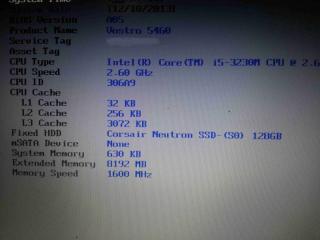
Attached Image

if ssd is not support, go try the so call ssd-hdd hybrid drive.. used old model on my asus seem ok.

This post has been edited by Alexdino: Dec 10 2013, 10:46 PM
kam_4160
post Dec 14 2013, 11:12 PM

New Member
*
Junior Member
33 posts

Joined: Aug 2010
hey guys, my i5m 5460 was burn cpu, and change mainboard for 5 times on last month. becarefull on overheat issue. damn dell....
Khalid21
post Dec 15 2013, 10:16 AM

Regular
******
Senior Member
1,138 posts

Joined: May 2010
QUOTE(kam_4160 @ Dec 14 2013, 11:12 PM)
hey guys, my i5m 5460 was burn cpu, and change mainboard for 5 times on last month. becarefull on overheat issue. damn dell....
*
any solution on that matter

skysoblue93
post Dec 15 2013, 10:56 AM

Getting Started
**
Junior Member
211 posts

Joined: May 2010


QUOTE(Alexdino @ Dec 10 2013, 10:45 PM)
lol..my bad  sweat.gif  my gf is 5460 not 5470.. i didnt know u all talking on 5470  tongue.gif

Attached Image

if ssd is not support, go try the so call ssd-hdd hybrid drive.. used old model on my asus seem ok.
*
lol i had this problem long ago already.I am already using msata now cuz ssd just wont work. msata works wonderful without problem and hassle. Booting takes less than 10second. everything is snappy

QUOTE(kam_4160 @ Dec 14 2013, 11:12 PM)
hey guys, my i5m 5460 was burn cpu, and change mainboard for 5 times on last month. becarefull on overheat issue. damn dell....
*
wah overheat? my laptop(5470) never overheat.. even when im playing games, the laptop is cooler than any other laptop out there.
kam_4160
post Dec 15 2013, 05:45 PM

New Member
*
Junior Member
33 posts

Joined: Aug 2010
overheat on CPU and chipset but not the aluminium surface =.='''
last month my 5460 suddenly blackout, and change mainboard for 5 times within 2 weeks. at the last 2 diagnostic only notice is overheat problem, even achieve 100 C on CPU at that time. lastly change heating pad only been ok. dunno can last for hw long.......
according to that dell technician, he even been handling a vostro 5460 with melting dashboard.
Seen dell QC and parts being worst and worst already.....
nexus2238
post Dec 15 2013, 05:51 PM

Look at all my stars!!
*******
Senior Member
4,195 posts

Joined: Sep 2012


QUOTE(kam_4160 @ Dec 15 2013, 05:45 PM)
overheat on CPU and chipset but not the aluminium surface =.='''
last month my 5460 suddenly blackout, and change mainboard for 5 times within 2 weeks. at the last 2 diagnostic only notice is overheat problem, even achieve 100 C on CPU at that time. lastly change heating pad only been ok. dunno can last for hw long.......
according to that dell technician, he even been handling a vostro 5460 with melting dashboard.
Seen dell QC and parts being worst and worst already.....
*
that is issue with bad thermal paste hmm.gif
Make sure the inlet / outlet vent is clean. If you are really paranoid, re-apply the thermal paste once a year should be more than sufficient (use that opportunity to clean the fan inside as well).
Khalid21
post Dec 15 2013, 06:15 PM

Regular
******
Senior Member
1,138 posts

Joined: May 2010
QUOTE(skysoblue93 @ Dec 15 2013, 10:56 AM)
lol i had this problem long ago already.I am already using msata now cuz ssd just wont work. msata works wonderful without problem and hassle. Booting takes less than 10second. everything is snappy
wah overheat? my laptop(5470) never overheat.. even when im playing games, the laptop is cooler than any other laptop out there.
*
Bro... where u bought Msata half size for your dell...local retailer?
Alexdino
post Dec 16 2013, 09:43 AM

Look at all my stars!!
*******
Senior Member
2,006 posts

Joined: Sep 2007

QUOTE(Khalid21 @ Dec 15 2013, 06:15 PM)
Bro...  where u bought Msata half size for your dell...local retailer?
*
i dont think you can get half-cut locally, was searching it last time (february) in lowyat, no one know what is 1/2-cut.. sweat.gif, not sure now.
Khalid21
post Dec 16 2013, 10:31 AM

Regular
******
Senior Member
1,138 posts

Joined: May 2010
QUOTE(Alexdino @ Dec 16 2013, 09:43 AM)
i dont think you can get half-cut locally, was searching it last time (february) in lowyat, no one know what is 1/2-cut.. sweat.gif, not sure now.
*
any link where you buy the half size msata...

55 Pages « < 36 37 38 39 40 > » Top
 

Change to:
| Lo-Fi Version
0.0291sec    0.21    6 queries    GZIP Disabled
Time is now: 3rd December 2025 - 05:32 AM