


Attached thumbnail(s)
Samsung Galaxy Note II LYN's Official Thread V22, 2nd Gen of the original "Phablet" XXDMC3
|
|
 May 12 2013, 02:43 PM May 12 2013, 02:43 PM
Return to original view | Post
#1
|
 
Senior Member
1,461 posts Joined: Apr 2005  
|
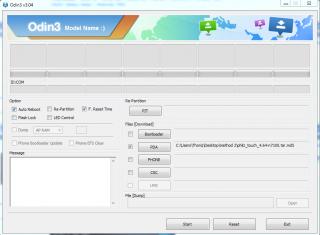
This is my 1st time to root my note 2. However, I have problem in very 1st step. My ID:COM didn't turn to blue after connecting my device to PC usb. Already install Samsung USB driver. On normal mode, the same PC can detect phone as I can access the phone storage from MyComputer.
Attached thumbnail(s)
|
|
|
|
|
|
May 12 2013, 02:53 PM
Return to original view | Post
#2
|
|
Senior Member
1,461 posts Joined: Apr 2005
|
QUOTE(joytest @ May 12 2013, 02:51 PM) You should be using the TAR file right, and not the TAR.MD5 file? Thanks joytest for prompt reply. I got the file from Dr Ketan method 2. Wrong file? |
|
|
May 12 2013, 02:55 PM
Return to original view | Post
#3
|
|
Senior Member
1,461 posts Joined: Apr 2005
|
QUOTE(andrewtho @ May 12 2013, 02:53 PM) Have you entered into Download Mode before you connect it to Odin? Yes. Already press Vol down + Home +Power. And then, press Volume UP button. |
|
|
May 12 2013, 03:09 PM
Return to original view | Post
#4
|
|
Senior Member
1,461 posts Joined: Apr 2005
|
QUOTE(joytest @ May 12 2013, 03:03 PM) So are you already in Download Mode? Ok, will try to use method 1 and use benny888 file.Anyway you could also try Dr Ketan's method 1, but use the file by benny888 as per this https://forum.lowyat.net/index.php?act=findpost&pid=59496003 Then use Mobile Odin to flash in the recovery. |
|
|
May 12 2013, 03:21 PM
Return to original view | Post
#5
|
|
Senior Member
1,461 posts Joined: Apr 2005
|
I managed to get blue color for ID:COM. What I do is to connect my phone then open Odin. Only this way I can get blue for ID:COM.
Tried using benny888 file but it Failed.  |
|
|
May 12 2013, 03:27 PM
Return to original view | Post
#6
|
|
Senior Member
1,461 posts Joined: Apr 2005
|
QUOTE(benny888 @ May 12 2013, 03:23 PM) Use mobile odin only to flash the twrp recovery file I try to root my phone by using your file here in odin PC. What are you trying to do?? Already install Mobile Odin but can't use it since I haven'y root my phone. This post has been edited by kurtkantoi: May 12 2013, 03:28 PM |
|
|
|
|
|
May 12 2013, 03:37 PM
Return to original view | Post
#7
|
|
Senior Member
1,461 posts Joined: Apr 2005
|
QUOTE(benny888 @ May 12 2013, 03:33 PM) What error message you got running odin Now its working. Just change to Odin 1.85 that included in the zip file.Maybe your phone is not detected while odin is running Try use another USB port or use another cable  Now, I will use Mobile Odin to TWRP image recovery. I can use any image in the download site is it? |
|
|
May 12 2013, 03:45 PM
Return to original view | Post
#8
|
|
Senior Member
1,461 posts Joined: Apr 2005
|
QUOTE(benny888 @ May 12 2013, 03:40 PM) Use the latest one if you want . Why bother even to use those older versions The new version did not detect my phone and keep failing when I try to root. Is there any difference or risk if I'm using old Odin? |
|
|
May 12 2013, 03:55 PM
Return to original view | Post
#9
|
|
Senior Member
1,461 posts Joined: Apr 2005
|
QUOTE(benny888 @ May 12 2013, 03:49 PM) I m referring to twrp Thanks. I haven't flash TWRP. Is it ok? Plan to backup everything first.I never use odin above 1.87 as the newer versions above usually unreliable |
|
|
May 12 2013, 04:47 PM
Return to original view | Post
#10
|
|
Senior Member
1,461 posts Joined: Apr 2005
|
QUOTE(benny888 @ May 12 2013, 03:58 PM) TWRP is many, many times better than CWM. Have listed many times why this is so. N not going to repeat it again Sorry. This is my 1st time root android. I just flash TWRP recovery in Mobile Odin. Now I know TWRP is an apps to for recovery purpose. The reason I mention that I want to back up my device because I'm following step 2 which is backup my EFS folder. I didn't know I can do this in TWRP. So after backup my device with TWRP, can I say my rooting is complete? |
|
|
May 12 2013, 04:59 PM
Return to original view | Post
#11
|
|
Senior Member
1,461 posts Joined: Apr 2005
|
QUOTE(joytest @ May 12 2013, 04:49 PM) In a way yes. But make sure you keep at least 2 copies of your EFS backup, one on the phone and one on the PC. And you should keep one in some cloud service. Your other backup (system, data) can be stored anywhere else you wish. Good backup practice should be weekly for most things, which can be automated via Titanium. You can also go down the path of flashoholism  QUOTE(benny888 @ May 12 2013, 04:51 PM) Rooting is done when you flash chainfire root file. Thanks for your assistance in rooting my device. Recovery only for slightly advanced users who want to do backup/restore rom n flash custom rom, kernel or modem Now My PC didn't detect my phone. May I know which folder is store the backup file? I already rename the backup file but when I try to search using Astro file manager, I can't find the file. |
|
|
May 12 2013, 05:14 PM
Return to original view | Post
#12
|
|
Senior Member
1,461 posts Joined: Apr 2005
|
QUOTE(joytest @ May 12 2013, 05:01 PM) \TWRP\Backups Thanks joytest. Such a huge file. Around 3.5GB in my phone (ticked all option in TWRP backup). So for better backup, I should get Titanium & Nandroid is it? Since they provide online/cloud backup. |
|
|
May 12 2013, 05:29 PM
Return to original view | Post
#13
|
|
Senior Member
1,461 posts Joined: Apr 2005
|
QUOTE(joytest @ May 12 2013, 05:17 PM) Not necesarily. Nandroid is done via the recovery. So what you have is a "nandroid" in TWRP format. A nandroid is everything on your phone, and is an insurance policy in case you screw up flashing a new ROM. Ok. Will try out custom ROM once I have confident and installed Titanium in my phone. Titanium backs up your app+data and lets you make selective restore or full restore after a new ROM.  |
|
|
|
|
|
May 13 2013, 12:16 PM
Return to original view | Post
#14
|
|
Senior Member
1,461 posts Joined: Apr 2005
|
Just rooted my phone yesterday and did backup with TWRP recovery. Does it backup everything on my phone? apps, data, sms, phone log, EFS folder? Do I need to do backup with Titanium Backup?
|
|
|
May 13 2013, 05:21 PM
Return to original view | Post
#15
|
|
Senior Member
1,461 posts Joined: Apr 2005
|
Is it safe to uninstall samsung keyboard apps? I already have swiftkey run on my phone. The reason I'm asking because in the list of Application safe to remove, it stated as 'caution'. Coution meaning it will only danger to those dont have any other keyboard than samsung keyboard is it?
|
|
|
May 13 2013, 05:24 PM
Return to original view | Post
#16
|
|
Senior Member
1,461 posts Joined: Apr 2005
|
QUOTE(alexng2208 @ May 13 2013, 05:22 PM) better not then currently just use TB free. already backup all apps in this TB free. should be safe to uninstall is it? just freeze it (if you are using TBPro)  How about all HUB thingy? Does it reflect to anything? Say Game Hub. Is the game save for my apps store there? |
|
|
May 14 2013, 07:33 AM
Return to original view | Post
#17
|
|
Senior Member
1,461 posts Joined: Apr 2005
|
Is there any legal issue to record phone conversation? If no, can someone suggest any apps to enable call recording? Thanks.
|
|
|
May 14 2013, 07:48 AM
Return to original view | Post
#18
|
|
Senior Member
1,461 posts Joined: Apr 2005
|
QUOTE(benny888 @ May 14 2013, 07:43 AM) My favorite a free app from appstar "auto call recorder". Sound recording n playback is excellent I will try this one. Thanks benny888 for your suggestion. |
|
|
May 14 2013, 10:33 AM
Return to original view | Post
#19
|
|
Senior Member
1,461 posts Joined: Apr 2005
|
Will flash rom for the first time in short. Nandroid backup with TWRP recovery and apps with TB free. Is there anything else I need to backup before proceed to flash?
I'm going to flash with monxDIFIED v13. |
|
|
May 14 2013, 10:43 AM
Return to original view | Post
#20
|
|
Senior Member
1,461 posts Joined: Apr 2005
|
QUOTE(alexng2208 @ May 14 2013, 10:37 AM) yes boss... i will review criskelo Thanks. Will view that later. Now pray that this flash went well. nah.. you are good already... hurry and flash don't forget http://forum.xda-developers.com/showthread.php?t=2233006 to change every other aspect such as kernel modem bootanimation bla bla bla One question, once the flash is complete, do I need to install TB to sync all apps? Will it clash if I install TB from app store and it will also sync my apps? |
|
Topic ClosedOptions
|
| Change to: |  0.0224sec 0.0224sec
 0.92 0.92
 7 queries 7 queries
 GZIP Disabled GZIP Disabled
Time is now: 10th December 2025 - 12:00 AM |
 Quote
Quote