

QUOTE(hewtwok @ May 8 2013, 05:23 PM)
is there a sticker covering the camera lens? 

Yes there is..I didn't notice also until I really look into it..but I still left it there =P 
Samsung GALAXY S4 official thread V.2, LTE will launch at June :)
|
|
 May 8 2013, 05:29 PM May 8 2013, 05:29 PM
Return to original view | Post
#21
|
 
Senior Member
2,775 posts Joined: Jan 2003  
|
QUOTE(hewtwok @ May 8 2013, 05:23 PM) is there a sticker covering the camera lens? Yes there is..I didn't notice also until I really look into it..but I still left it there =P |
|
|
|
|
|
May 8 2013, 06:34 PM
Return to original view | Post
#22
|
|
Senior Member
2,775 posts Joined: Jan 2003
|
QUOTE(hewtwok @ May 8 2013, 05:33 PM) ah ic. there is sticker along the metalic side also Along the metal sides..I took off the moment I got the phone  QUOTE(antt00 @ May 8 2013, 05:35 PM) Check also if you have a sticker on the home button. THERE IS?!  People tend to miss that one as well. People tend to miss that one as well. Mine macam tarak |
|
|
May 9 2013, 08:44 AM
Return to original view | Post
#23
|
|
Senior Member
2,775 posts Joined: Jan 2003
|
I have yet to experience the the phone rebooting while using the camera..however I do notice the slow boot up the camera
But as a casual user - I'm fine with it (almost similar to my Desire HD..so I'm used to it) As for smoothness - I admit Iphones is smooth..but the S4 is ALMOST as smooth as the Apple products (I've got Iphone 4, 5 and an Ipad 2 at home - belonging to family members but I've had fair share of usage) I guess I'm not a perfectionist and I'm not picky I also noticed the demo units has this default "Demo" mode? MAYBE (I'm just assuming from being a casual Android user) that mode takes abit of processing? That's why the lag? I've been using my phone for about 4 days now..I felt it's better than those demo units? PS: Demo units tested at Digi Store in Sunway Pyramid Oh well..that's just me Anyway..I bought the new Papago! SG & MY on Google Play..just for your info..it seems to not work properly as the maps downloaded to your SD card could "not be found"..when I browse through with the "My Files" app..the files could be seen.. I've sent an email to Papago to help me out..so..those planning to get Papago! Better hold your horses for now |
|
|
May 9 2013, 09:03 AM
Return to original view | Post
#24
|
|
Senior Member
2,775 posts Joined: Jan 2003
|
QUOTE(daryl020189 @ May 9 2013, 09:00 AM) Papago is working perfectly. Is this your version of Papago?I'm getting this error 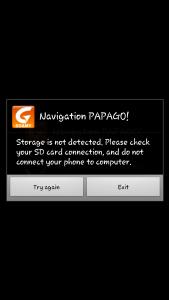
I have 32gb memory card on board btw This post has been edited by madman20: May 9 2013, 09:04 AM |
|
|
May 9 2013, 09:05 AM
Return to original view | Post
#25
|
|
Senior Member
2,775 posts Joined: Jan 2003
|
QUOTE(ashwin988 @ May 9 2013, 09:04 AM) I just want to ask you guys something.. its a bit off topic but just a question about Maxis. Have any of you noticed that your data seems to be getting used up faster these 2 months? I can never ever reach my 1.5gb quota but for the past 2/3 months, i seem to be...my usage has not differed much. Just asking around as well. The description in the Google Play store states they are using the MalFreeMaps..check it outI am thinking of getting the papago system as well for my phone. I don't know if i should get it from the store, or get the copy from Papago Malaysia. Which is cheaper? Both are the same right, meaning both can use Malfreemaps? |
|
|
May 9 2013, 09:22 AM
Return to original view | Post
#26
|
|
Senior Member
2,775 posts Joined: Jan 2003
|
QUOTE(daryl020189 @ May 9 2013, 09:18 AM) Papago is the latest version in the playstore Uh..yeah..I know?But I also found out that I tried a few other apps (MyCar Recorder & aLapRecorder) They detected my "Memory Card" as the internal storage ~_~ I guess that's why it couldn't detect my card? |
|
|
|
|
|
May 9 2013, 09:24 AM
Return to original view | Post
#27
|
|
Senior Member
2,775 posts Joined: Jan 2003
|
QUOTE(antt00 @ May 9 2013, 09:21 AM) BTW papago uses internal memory not your 32gb memory card. Ah..so I need to move the map file from the memory card to the phone? |
|
|
May 9 2013, 09:57 AM
Return to original view | Post
#28
|
|
Senior Member
2,775 posts Joined: Jan 2003
|
QUOTE(antt00 @ May 9 2013, 09:37 AM) Location should be /sdcard/NaviM11SGMY/Maps/"The extracted Malfree folder" (eg. MFM-PPG-X8.5-X9-130410) I'll give it a go again tonight..I uninstalled the app and deleted the files just to be sureSorry to bother..but just wanna reconfirm the procedures: 1. Install Papago 2. Download map (via in-app Papago) 3. Ensure that the map is "/sdcard/NaviM11SGMY/Maps/[The extracted Malfree folder]" Correct? |
|
|
May 9 2013, 10:05 AM
Return to original view | Post
#29
|
|
Senior Member
2,775 posts Joined: Jan 2003
|
QUOTE(antt00 @ May 9 2013, 10:00 AM) I actually initiated download through the app when i first bought it but then stop it immediately as i already got the MFM maps. So i just copy the map over to the directory and start papago and start using it from there. Hmmmmmmmmmm...that's the case I'll download the MFM direct from my PC and upload it to my phoneI'll do that once I'm home One other question..as mentioned earlier (few posts back)..I've tried the MyCar Recorder and aLapRecorder..I noticed they still used the internal memory card instead of my external to capture the videos.. |
|
|
May 9 2013, 10:56 AM
Return to original view | Post
#30
|
|
Senior Member
2,775 posts Joined: Jan 2003
|
QUOTE(thesnake @ May 9 2013, 10:56 AM) Guys, i tried downloading Real Racing 3 it says my S4 is not compatible with the game? Im using the octa core from Digi. Yea..same here..my friend ajak play..but can't..sad ='( |
|
|
May 9 2013, 11:11 AM
Return to original view | Post
#31
|
|
Senior Member
2,775 posts Joined: Jan 2003
|
QUOTE(thesnake @ May 9 2013, 10:59 AM) Aik? is it software incompatibility or? Real racing 3 also cant play, fail No idea..but I searched online and seen some youtube videos stating they played RR3 on 9500 edition (I searched specifically 9500 not the 9505)Oh well..hope the devs make it compatible =/ |
|
|
May 9 2013, 11:16 AM
Return to original view | Post
#32
|
|
Senior Member
2,775 posts Joined: Jan 2003
|
QUOTE(thesnake @ May 9 2013, 10:59 AM) Aik? is it software incompatibility or? Real racing 3 also cant play, fail According to a poster on xdaQUOTE Real racing 3 doesn't seem to compatible with 1080p screens. Not compatible with the htc one, xperia z and the 9500 afaik. SOS: http://forum.xda-developers.com/showthread.php?p=41154593 |
|
|
May 9 2013, 11:26 AM
Return to original view | Post
#33
|
|
Senior Member
2,775 posts Joined: Jan 2003
|
QUOTE(JayceOoi @ May 9 2013, 11:22 AM) Not official supported. But you can play it by install RR3 apk. TBH..I did..but the game kept hanging at the 2nd race..no idea why =/I had to remove the battery to restart my phone..which is scary cause I did it twice already..decided to uninstall it |
|
|
|
|
|
May 9 2013, 11:42 AM
Return to original view | Post
#34
|
|
Senior Member
2,775 posts Joined: Jan 2003
|
QUOTE(Hikari0307 @ May 9 2013, 11:39 AM) Well it may not be about 1080p screens since the i9505 can get it fine from the play store. I've been googling the issue and only manage to find that post..I haven't searched further later kena warning |
|
|
May 9 2013, 03:16 PM
Return to original view | Post
#35
|
|
Senior Member
2,775 posts Joined: Jan 2003
|
QUOTE(Andrewtst @ May 9 2013, 02:37 PM) Xperia Z can play Real Racing 3. No issue here. Hmm..mine keeps crashing and causing the phone to hang..I had to remove the battery to make it work  |
|
|
May 9 2013, 03:32 PM
Return to original view | Post
#36
|
|
Senior Member
2,775 posts Joined: Jan 2003
|
QUOTE(Andrewtst @ May 9 2013, 03:19 PM) Oh, I mean no issue at Xperia Z as the person quota mention cannot. I not sure on S4. Oh..sorry..haha..understood!QUOTE(waveweaver @ May 9 2013, 03:20 PM) Wait till the games developer make it compatible with Exynos Octa phone..? Yeah..that's why I uninstalled..have to patiently wait |
|
|
May 9 2013, 03:52 PM
Return to original view | Post
#37
|
|
Senior Member
2,775 posts Joined: Jan 2003
|
Re-downloaded Papago and the map..all working now
|
|
|
May 10 2013, 12:11 PM
Return to original view | Post
#38
|
|
Senior Member
2,775 posts Joined: Jan 2003
|
Heya guys..wanna ask..In the settings > storage..It detects my 32gb memory card..but when I check via Airdroid and Astro file viewer..It shows only 7.4gb..any idea?
|
|
|
May 10 2013, 01:42 PM
Return to original view | Post
#39
|
|
Senior Member
2,775 posts Joined: Jan 2003
|
QUOTE(keeplwk @ May 10 2013, 12:41 PM) that (7.4gb) is your internal storage not external storage.. Thanks..I didn't know how to differentiate itQUOTE(antt00 @ May 10 2013, 01:06 PM) It's a reporting error. I know for sure airdroid is reporting it wrongly. I don't use astro. Hopefully it is..now I'm having gallery crashing issues when browsing my camera photos .___.This post has been edited by madman20: May 10 2013, 01:43 PM |
|
|
May 10 2013, 02:06 PM
Return to original view | Post
#40
|
|
Senior Member
2,775 posts Joined: Jan 2003
|
Uh..now the gallery is okay again
|
|
Topic ClosedOptions
|
| Change to: |  0.1098sec 0.1098sec
 0.46 0.46
 7 queries 7 queries
 GZIP Disabled GZIP Disabled
Time is now: 9th December 2025 - 12:10 AM |
 Quote
Quote