Welcome Guest ( Log In | Register )

Outline · [ Standard ] · Linear+

 Lenovo IdeaPad Y Series Thread v3, y510p, where are you?

views
     
zuhaili87
post Nov 16 2013, 11:38 PM

Look at all my stars!!
*******
Senior Member
2,094 posts

Joined: Jan 2008
QUOTE(shadowzephyr @ Nov 16 2013, 08:28 AM)
I believe my favorite is Arctic Cooling MX-4, but I'm actually using various brand (just because I can't get the same brand everytime I came to shop  mad.gif ). I remember using Cooler Master one a lot (forgot what model) and a few others.

Like I said before, the one that I used currently for my Y480 is XIGMATEK Freezing Point G4718. I'm quite happy with the result now. Difference around 20C is more than enough.  smile.gif
*
Perghh great job bro! 20C is really big difference yo!! Really respect u tear down the laptop like that. So pro, btw bro, how long does it take to assemble/dissamble the laptop roughly? I wanted to tear apart my y500 to clean all the inside but too scared to do it. Haha. sweat.gif
zuhaili87
post Nov 18 2013, 10:19 AM

Look at all my stars!!
*******
Senior Member
2,094 posts

Joined: Jan 2008
QUOTE(shadowzephyr @ Nov 18 2013, 12:36 AM)
Haha thanks  biggrin.gif Well I have experience repairing laptops before. That helps a lot when tearing up my Y480.
(and my field of work is IT, I'm working as software engineer)

For the first time, yup sure take longer than normal. I take around 3-4 hours to disassemble, cleaning, re-paste, and reassemble back. But after this, sure take half the time (around 1-2 hours at most), because I already knew the trick. Maybe for your case take even longer.

A few rule of thumbs (that I can think of now, it's currently 12am and I'm a bit sleepy  tongue.gif ):
- make sure to find as much resource as you can (manuals, FAQ, guide step-by-step with picture, and/or video from YouTube)
- make sure to read everything
- prepare the tools
  + small screwdriver with both philips and standard one
  + small magnet that put together with screwdriver, to helps pull the screw easily
  + towel to prevent your laptop from scratch
  + small case to put all screws (if can, have a case that have many pockets to put screw with different size)
  + camera (capture everything / every phase, to help trace you back in case you forgot, especially screw placement)
  + notebook (optional, to write / remember anything / plotting the screw location)
  + vacuum cleaner and / or blower
  + small brush

For re-paste, you need thermal paste ofc, and cleaning kit (if you haven't, face tissue will do, just like me tongue.gif). Some thermal paste doesn't provide something to flatten the paste, so maybe you need to find that. Unused card will do.

And the most important, guts! (have some courage / confidence!)  biggrin.gif But don't just do rashly, disassembling laptop is way delicate compare to PC. Some place in laptop you can use force a bit, and some you can't. This need experience, so good luck with that.  icon_rolleyes.gif
Wow, thats... hurt.  sad.gif Where you send the service? Maybe that helps a bit for another user to avoid the service center if possible.
*
wow really detail explaination bro, thanks a lot! thumbup.gif
zuhaili87
post Nov 20 2013, 06:45 PM

Look at all my stars!!
*******
Senior Member
2,094 posts

Joined: Jan 2008
QUOTE(RyoKenzaki @ Nov 20 2013, 06:16 PM)
Even new HDD also will have problem?
How do i scan for bad sector?
*
u shud delete mcafee, it works for me. haha. thumbup.gif
zuhaili87
post Dec 7 2013, 05:51 PM

Look at all my stars!!
*******
Senior Member
2,094 posts

Joined: Jan 2008
QUOTE(everettsyj @ Dec 6 2013, 09:56 PM)
hi.. i want to ask any of you feel that y510p very slow? the processor..
*
What do u mean by slow? In terms of what? Extracting RAR file? Or installing file? Opening application? nod.gif
zuhaili87
post Dec 7 2013, 10:50 PM

Look at all my stars!!
*******
Senior Member
2,094 posts

Joined: Jan 2008
QUOTE(everettsyj @ Dec 7 2013, 10:43 PM)
hi. in term of processing. Like open webpage , or Photoshop , it will lag , and very slow when export some PS pictures.
*
Is it? Im using Y500 so far It was ok for me, this is the first time i use core-i7, i expect it to be a lot faster, but turns out more or less the same as core-i5. nod.gif
zuhaili87
post Dec 7 2013, 10:59 PM

Look at all my stars!!
*******
Senior Member
2,094 posts

Joined: Jan 2008
QUOTE(everettsyj @ Dec 7 2013, 10:53 PM)
actually i feel y400 run  faster than this...
*
Maybe because Y400 using i7-3630 while Y510p using i7-4700? Maybe the core difference make it different. Maybe photoshop runs better on true quad core on the Y400? hmm.gif have u check whether all ur processor core running? Or maybe underclock? Try run on 100% maximum power on power setting. hmm.gif
zuhaili87
post Dec 7 2013, 11:07 PM

Look at all my stars!!
*******
Senior Member
2,094 posts

Joined: Jan 2008
QUOTE(lee_what2004 @ Dec 7 2013, 11:03 PM)
What true quad core laugh.gif
There's also RAM amount and HDD speed to consider..
*
Haha, because there are few complaints while running battlefield 4 not all core "functioning" like it should. I thought that is the case. Hehe. Correc me if im wrong. notworthy.gif
zuhaili87
post Dec 7 2013, 11:13 PM

Look at all my stars!!
*******
Senior Member
2,094 posts

Joined: Jan 2008
QUOTE(everettsyj @ Dec 7 2013, 11:07 PM)
Mine Y510 got full spec , and with SSD..128GB SSD , 16GB ram..
optimized dy the power setting..
*
Wow, full spec some more. drool.gif should run a lot faster than the basic Y400. sweat.gif how bout benchmark bro? Furmark? Is the score same as other Y510p same as ur spec? hmm.gif
zuhaili87
post Dec 7 2013, 11:22 PM

Look at all my stars!!
*******
Senior Member
2,094 posts

Joined: Jan 2008
QUOTE(everettsyj @ Dec 7 2013, 11:16 PM)
i didn't tested it before..my y400 also full spec last time..
*
Wow, full spec also, maybe u can try benchmark and see the result ranging. nod.gif btw, im curious, what windows u use on ur y400 and y510? Both same on windows 8? Or windows 8.1?
zuhaili87
post Dec 21 2013, 09:43 PM

Look at all my stars!!
*******
Senior Member
2,094 posts

Joined: Jan 2008
QUOTE(Nxxbkiller @ Dec 21 2013, 01:44 PM)
Did any y510p user facing performance problem when using battery? The gaming performance is terrible without plugging in ac adapter.
*
Its normal bro, u need to use plug whenever u want to game. nod.gif
zuhaili87
post Apr 17 2015, 10:42 PM

Look at all my stars!!
*******
Senior Member
2,094 posts

Joined: Jan 2008
QUOTE(diversity @ Apr 17 2015, 09:14 PM)
I'm a proud owner of a y50-70. Its awesome +1
*
Same with me, today just bought 4GB GTX860M version, i must say its a damn good gaming laptop!

Previously i use V-Nitro then change to MSI GE60, now Y50, i must say this laptop win as gaming laptop hands down. notworthy.gif

What i like about this laptop is the temperature when gaming is superb! 25'C difference from the V-Nitro and GE60 (oven laptop) sweat.gif

But coming from IPS display, i gotta get use with the ugly TN Panel on the Y50, i got the Chi-Mei Panel (the ugliest).

Planning to change to IPS display if still got stock then voila, perfect gaming laptop! thumbup.gif
zuhaili87
post Apr 18 2015, 10:01 AM

Look at all my stars!!
*******
Senior Member
2,094 posts

Joined: Jan 2008
QUOTE(ulwan25 @ Apr 18 2015, 09:38 AM)
MSI GE60 what spec ahh?

I obviously loved my Y50 because of its simplicity, impressive graphics and bombastic loudspeakers  thumbup.gif  thumbup.gif  thumbup.gif
*
i7-4710HQ & GTX860M 2GB DDR5 VRAM. The thing that i miss about that laptop is the keyboard (better than Y50) and also the PLS Samsung Screen, absolute stunning. But too bad its really like an oven. GPU always 90'C, while this Y50 with 4GB VRAM stays cool at 70'C when gaming with same settings. thumbup.gif thumbup.gif thumbup.gif
zuhaili87
post Apr 18 2015, 03:56 PM

Look at all my stars!!
*******
Senior Member
2,094 posts

Joined: Jan 2008
QUOTE(ulwan25 @ Apr 18 2015, 10:58 AM)
90'c ahh dat's too hot! I've used Y480 and Y500, both max peak at 85'c only. But Y50 can get up to 75'c  tongue.gif

And yeah, my set got TFT screen as well. Sucks but I don't care for screen, I prioritized on performance
*
75'C considered great already compared to the oven GE60 max temp i got is 93'C. sweat.gif I love the TN panel response time, below 17ms. But the color is really washed out, and its really foggy, sakit mata. Not comfortable unlike viewing IPS panel. sweat.gif btw bro, what brand is your lcd panel? Have u check thru Hwinfo? smile.gif
zuhaili87
post Apr 20 2015, 04:04 PM

Look at all my stars!!
*******
Senior Member
2,094 posts

Joined: Jan 2008
QUOTE(ulwan25 @ Apr 20 2015, 04:01 PM)
On the other hand, I kinda liked washed-out screen on certain times. It really does feel like what you watched is perfectly natural, unlike IPS which bumps contrast and more to yellow-ish screen. But viewing angle very bad lah, but still I can live with it.

And the response time is flawless, yes  smile.gif
That was cheap! I bought mine in July 2014 American Set RM3100.
*
Know what bro, after a few days of using this TN panel, i finally got used to it. Haha. but of course i do a lot of calibration to make it easy to my eyes. laugh.gif
zuhaili87
post Apr 21 2015, 11:14 PM

Look at all my stars!!
*******
Senior Member
2,094 posts

Joined: Jan 2008
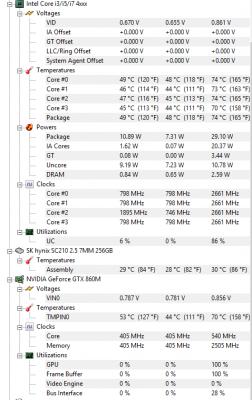
i'm so in love with my Y50, this is my temperature playing Battlefield 4 ultra settings around 2 hrs without any cooler in a/c room around 29'C. rclxms.gif now im wondering why didn't i bought this laptop at the first place. sweat.gif but at least i got to try the v-nitro and also the oven GE60. biggrin.gif people said 3rd time is the charm, haha now i can totally recommend this laptop for anyone who wants to game at a decent temperature with a decent price. rclxms.gif
Attached Image
zuhaili87
post Apr 29 2015, 12:48 AM

Look at all my stars!!
*******
Senior Member
2,094 posts

Joined: Jan 2008
QUOTE(icecreamcake @ Apr 28 2015, 09:41 PM)
superb temp  thumbup.gif

btw my y400 cpu idle temp is same as your cpu max temp  sweat.gif
*
Haha! Thanks bro! Time to clean up / repaste your laptop! Whats your gaming temp bro? biggrin.gif
zuhaili87
post May 20 2015, 04:58 PM

Look at all my stars!!
*******
Senior Member
2,094 posts

Joined: Jan 2008
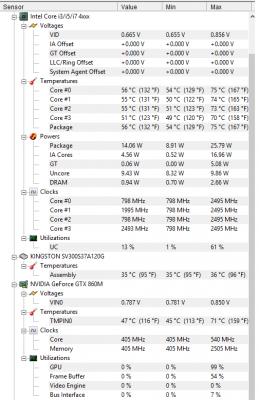
My temp after 4 hours of GTA V, with high + very high settings at 60fps. thumbup.gif

Attached Image
zuhaili87
post Mar 7 2017, 05:55 PM

Look at all my stars!!
*******
Senior Member
2,094 posts

Joined: Jan 2008
Guys anyone here managed to update their warranty base date? I just bought a laptop last friday until now i tried and cannot get the base warranty corrected using this website. https://pcsupport.lenovo.com/my/en/regemail

i got error ##AttachmentsRequired## where as i already attached my invoice pdf. Want to update my warranty to the correct date since the warranty now already started using the factory warranty date.


Change to:
| Lo-Fi Version
0.0506sec    0.36    7 queries    GZIP Disabled
Time is now: 6th December 2025 - 12:23 AM