

guys, how to differentiate original set with AP set?
Lenovo IdeaPad Y Series Thread v3, y510p, where are you?
Lenovo IdeaPad Y Series Thread v3, y510p, where are you?
|
|
 Sep 14 2013, 07:53 PM Sep 14 2013, 07:53 PM
Return to original view | Post
#1
|
 
Junior Member
261 posts Joined: Apr 2012  
|
guys, how to differentiate original set with AP set?
|
|
|
|
|
|
Nov 2 2013, 11:31 PM
Return to original view | Post
#2
|
|
Junior Member
261 posts Joined: Apr 2012
|
any y410p facing the laptop auto turn into sleep mode although the setting change the laptop into sleep mode is "never"....by the way how to solve this problem?
|
|
|
Jan 27 2014, 09:42 AM
Return to original view | Post
#3
|
|
Junior Member
261 posts Joined: Apr 2012
|
i'm y410 user, should i update to win8.1?
|
|
|
Apr 15 2014, 10:23 AM
Return to original view | Post
#4
|
|
Junior Member
261 posts Joined: Apr 2012
|
how to enable USB always on for y410p?
|
|
|
May 10 2014, 08:07 AM
Return to original view | Post
#5
|
|
Junior Member
261 posts Joined: Apr 2012
|
any y410p user experienced slow internet speed? probably driver problem or?
|
|
|
May 11 2014, 08:21 PM
Return to original view | Post
#6
|
|
Junior Member
261 posts Joined: Apr 2012
|
my y410p can't surf any website but I can play online game. What's the problem?
|
|
|
|
|
|
May 12 2014, 12:45 PM
Return to original view | Post
#7
|
|
Junior Member
261 posts Joined: Apr 2012
|
QUOTE(slimfox @ May 11 2014, 10:56 PM) Virus or OS corrupted Virus? I can surf any website now but I can't access websites like facebook, YouTube, twitter. What should I do?Not hardware if that what you thinking  |
|
|
May 12 2014, 12:46 PM
Return to original view | Post
#8
|
|
Junior Member
261 posts Joined: Apr 2012
|
QUOTE(riku2replica @ May 12 2014, 08:59 AM) check for malware that has messed up ur browser setting. I'm using McAfee Internet Security. nothing unusual after I run the full scan. |
|
|
May 12 2014, 05:35 PM
Return to original view | Post
#9
|
|
Junior Member
261 posts Joined: Apr 2012
|
QUOTE(slimfox @ May 12 2014, 12:52 PM) try google "herdprotect portable scanner". Download then just run. Don't uninstall anything its just a scanner. If results are positive, google "malware bytes" and download that. Install and run another scan. You should be ok after. If not then you got serious issues and need to reset windows to default. all the detected malware should i remove? worry that it will delete some important files |
|
|
May 12 2014, 07:37 PM
Return to original view | Post
#10
|
|
Junior Member
261 posts Joined: Apr 2012
|
QUOTE(riku2replica @ May 12 2014, 07:10 PM) a print screen would help picture better, instead of mentioned "all the detected malware". [attachmentid=3968104][attachmentid=3968104][attachmentid=3968104]This post has been edited by raysaw: May 12 2014, 07:39 PM Attached thumbnail(s) 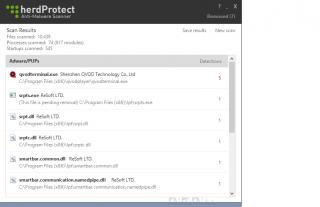
|
| Change to: |  0.0353sec 0.0353sec
 0.57 0.57
 7 queries 7 queries
 GZIP Disabled GZIP Disabled
Time is now: 5th December 2025 - 09:59 AM |
 Quote
Quote