

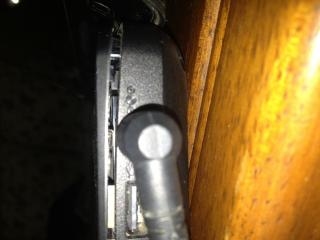
I just notice this.. When i open there nothing when i want to close the laptop there a sound like creek something like that and turns out there a gap or i dunno what to call
What should i do?
Attached thumbnail(s)
Lenovo IdeaPad Y Series Thread v3, y510p, where are you?
|
|
 Jul 12 2013, 08:33 PM Jul 12 2013, 08:33 PM
Return to original view | Post
#1
|
 
Senior Member
1,163 posts Joined: Jul 2012 
|
Guys got a big problem with my y580
I just notice this.. When i open there nothing when i want to close the laptop there a sound like creek something like that and turns out there a gap or i dunno what to call What should i do? Attached thumbnail(s)
|
|
|
|
|
|
Jul 14 2013, 06:59 AM
Return to original view | Post
#2
|
|
Senior Member
1,163 posts Joined: Jul 2012
|
QUOTE(tennytyy @ Jul 13 2013, 09:47 AM) Send it for warranty will they accept it ?since it seems like customer fault.. but their build quality seems not too good.. also i didnt register for warranty yet/..how ? usually it will pop out for me to register warranty but now no more |
|
|
Oct 22 2013, 03:00 AM
Return to original view | Post
#3
|
|
Senior Member
1,163 posts Joined: Jul 2012
|
hello
i just bought WD hdd 1tb my passport ultra external hdd and my lenovo y580 cannot detect it(my computer shows nothing) i did go to disk management,it actually detect but it doesnt show on my computer so i cannot open folder weirdly the hdd works fine for other laptops(acer and toshiba netbook) i did tried all the usb ports, usb 2.0 only show msj that i can transfer faster but still cannot detect.. so i go to lenovo website to update 3.0 usb driver..and updated it but still the same.. help please |
|
|
Oct 22 2013, 11:13 AM
Return to original view | Post
#4
|
|
Senior Member
1,163 posts Joined: Jul 2012
|
QUOTE(king99 @ Oct 22 2013, 11:01 AM) Try right click the drive and assign a letter It shows an errorI need to refresh something like that |
|
|
Oct 22 2013, 11:24 AM
Return to original view | Post
#5
|
|
Senior Member
1,163 posts Joined: Jul 2012
|
QUOTE(king99 @ Oct 22 2013, 11:01 AM) Try right click the drive and assign a letter i try to refresh at action -> refresh still failed..restart many times alreadythe disk 1 i believed is the external hdd This post has been edited by playxboxwii: Oct 22 2013, 11:25 AM Attached thumbnail(s) 

|
|
|
Oct 22 2013, 11:52 AM
Return to original view | Post
#6
|
|
Senior Member
1,163 posts Joined: Jul 2012
|
QUOTE(slimfox @ Oct 22 2013, 11:46 AM) your os corrupted maybe need to format? dont think soother hdd can detect but why not this one i think there something wrong with the usb .. |
|
|
|
|
|
Sep 26 2014, 08:06 AM
Return to original view | Post
#7
|
|
Senior Member
1,163 posts Joined: Jul 2012
|
how do i format laptop lenovo y580?
|
|
|
Feb 2 2015, 05:10 PM
Return to original view | Post
#8
|
|
Senior Member
1,163 posts Joined: Jul 2012
|
QUOTE(Gregyong @ Feb 2 2015, 03:47 PM) Y50, 3USB (USB3.0*2, USB2.0*1) Iinm y580 is 4 usb port..im confirmed its not 3 usb like y50heating issue is not as bad as Y510 and Y580 ada 5 USB slot ke? I don't recall that. personallly, i think at this point, considering waiting for Lenovo to launch Y50-80 (with 5th gen chip and hopefully GT9XX GPU) Anyway i just bought y50 the rm4699 1tb with 8gb ssd/16gb ram but.. the screen is it 4k?? I click screen reso settings..can set higher than 1920x840 or something i cant really remember Screen at windows menu looks sharp but weird google chrome looks so blurry |
|
|
Feb 4 2015, 02:40 PM
Return to original view | Post
#9
|
|
Senior Member
1,163 posts Joined: Jul 2012
|
QUOTE(playxboxwii @ Feb 2 2015, 05:10 PM) Iinm y580 is 4 usb port..im confirmed its not 3 usb like y50 can someone help me plsAnyway i just bought y50 the rm4699 1tb with 8gb ssd/16gb ram but.. the screen is it 4k?? I click screen reso settings..can set higher than 1920x840 or something i cant really remember Screen at windows menu looks sharp but weird google chrome looks so blurry i cannot find any solution yet similar prob - http://www.tomsguide.com/answers/id-222649...ion-issues.html also how to know if my y50 is 4k screen? |
|
|
Feb 4 2015, 11:43 PM
Return to original view | Post
#10
|
|
Senior Member
1,163 posts Joined: Jul 2012
|
QUOTE(mrl @ Feb 4 2015, 05:13 PM) if you can set your display resolution to 4k then you have 4k screen. The 4k resoultion is 3000x2000somethingand you're saying your games run at 30fps max??? I'm betting the screen is 4k 30Hz display, with VSync enabled it will run 30FPS max. Then yes i have it Btw that not me,im just saying that guy have similar problem as me There a problem with 4k resolution on this y50 The chrome and all icon looks sharp but its so small,even the taskbar, and when i open google chrome/steam and other apps/programs, it is so blur, the writing is not sharp at all I tried playing dota on 4k resolution,looks super sharp but make me feel dizzy for some reason, that the only thing look sharp, but my steam friends is blur, evrything is blur..its like its not optimized for 4k So now im using 1980x1080..1080p reso iinm..now the icons is normal size but chrome still hve this blurry writing so does steam Only dota 2 and watching movies seems fine so far.. Also how do i check speaker for left and right?? I feel like my right speaker is bit louder |
| Change to: |  0.0510sec 0.0510sec
 0.70 0.70
 7 queries 7 queries
 GZIP Disabled GZIP Disabled
Time is now: 10th December 2025 - 06:25 AM |
 Quote
Quote