Welcome Guest ( Log In | Register )

Bump Topic Topic Closed RSS Feed

Outline · [ Standard ] · Linear+

 Alcatel One Touch Glory 2S [Official Thread], AKA T'POP

views
     
mastering89
post May 25 2013, 11:06 PM

miao miao
*******
Senior Member
2,546 posts

Joined: Jan 2009
From: Cyberjaya
QUOTE(khairul88hazwan @ May 25 2013, 09:44 PM)
Why i cant upgrade this phone using One Touch Upgrade 2.7.5..... I have selected model One Touch 4010 ....  For step 2 , i plugged in the cable to my PC but it said wrong model selected.... WTF.....  What is the problem actually?? Kinda confused....
*
maybe try the 2.8 version hmm.gif
ZodeHide
post May 26 2013, 01:13 AM

New Member
*
Junior Member
5 posts

Joined: May 2013


QUOTE(mR.hyDE @ Apr 29 2013, 02:13 AM)
to gain superuser at this alcatel 4010x (easier method)
http://www.mgyun.com/
DO THIS AT UR OWN RISK

in my case i have did this twice in 2 sets
-root it in current using state or u in factory reseted state both fine
-installed pdanet for android 4.12
-installed alcatel one touch manager
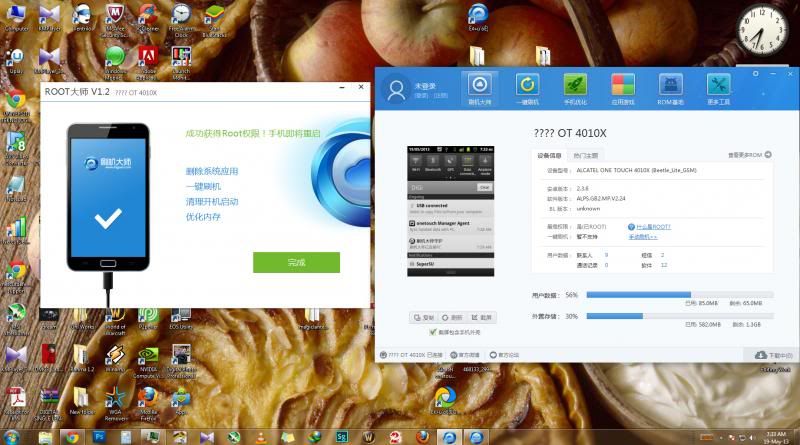
-and the most important root tools->刷机大师

if u cant read chinese/no experince on rooting please refer picture i had uploaded
1st- download the root tool from this website http://www.mgyun.com/
[attachmentid=3415866]
then install it on ur computer

2nd- in the phone pls check/tick the USB DEBUGGING(always check this when u root any phone) under phone setting>application>development

3rd- launch 刷机大师 and connect ur phone
[attachmentid=3415877]
connecting...
[attachmentid=3415870]
this mean box showing current root status=NO(one click root)
so click the red boxed area

4th- confirmation before root>click the red area to confirm root the phone
[attachmentid=3415875]
ps:it tells process will reboot ur phone(of course u can click the cancel right beside if u will lose ur ball when the phone happen sudden reboot)

5th- checking and all bla bla bla rooting process (takes around a minutes in my 2nd gen core i7 )
[attachmentid=3415878]

6th- phone rooted when on the 2nd boot with around 10 usb plugin and out sound around 10times please check the status same as mine means ur phone are ROOTED
[attachmentid=3415879]

for UNROOTING factory reset not working , i used the ONE TOUCH UPGRADE S 2.7.5 to reflash stock rom

beside i have tested the recovery provided by this 刷机大师 software [attachmentid=3415885]
-factory reset
-backup(file store at /sdcard)(takes more than 5 mins)
-restore(choose a file named userdata_xxxxxx_xxxxx.backup)
so,i guess this is the noob proof guide i can provide,any problem on the tutorial pm me to change,goodluck
*
i got this error message..dont know what to do.. user posted image
ZodeHide
post May 26 2013, 01:56 AM

New Member
*
Junior Member
5 posts

Joined: May 2013


nevermind..got it solved..manage to root my alcatel succesfully!!..manage to used the Link2sd apps..credits to mR.hyDE for the guide..many thanks!
by the way,im a pure white user! tongue.gif
ninask
post May 26 2013, 04:43 AM

Getting Started
**
Junior Member
289 posts

Joined: Aug 2009


The su language changing process is driving me up the wall. I tried to update SuperSU's binary over mobile data & wifi, both failed miserably. Not sure what's the problem. Just to be clear, the hp has proper root. I've installed root checker and link2sd, both were asked for permissions from chinese su, and thanks to ntuser88 & bluehaze, at least I know which one means Allow now hehe. But that's the thing, I wish I can live with the su being in chinese, padahal that's the main problem.

With Superuser,
installed successfully
binary updated
but failed to gain root xs (I wish i know where to add or authenticate it in chinese su, major language prob as u can see)

With SuperSU
installed successfully
the second i launch the app, it will prompt me to update the binary, gave me the option of CWM or Normal, if I hit normal, the update wont go thru and stated failed. If i hit CWM, nothing happens. Like yall suggested, go to settings and choose install SuperSU into system, but like I said, the moment I launch the app, it goes straight asking for an update, didnt manage to click anything else. I checked SuperSU's page in Google Play, many users are facing the same prob as mine. Failed to update the binary. So yeah sorry if its tldr.

QUOTE(ComradeZ @ May 19 2013, 07:35 AM)
Guys, would like to know if these means I've rooted my phone

» Click to show Spoiler - click again to hide... «


ps: I've already tried the supersu thing to try and change it to english but... it gives option between a normal update which failed and twrp/cwm update which I'm still hesitant to go for it.
*
Did u manage to change the language to english? If yes, I might just give mgyun another try. Huih.
lowlock
post May 26 2013, 06:33 AM

Getting Started
**
Junior Member
179 posts

Joined: Dec 2009
From: Rumahku syurgaku


hello guys.. how about gaming performance of this phone.. juz some casual games like subway surfer maybe?
OptimusStar
post May 26 2013, 06:41 AM

Enthusiast
*****
Senior Member
801 posts

Joined: Nov 2012
QUOTE(ninask @ May 26 2013, 04:43 AM)
The su language changing process is driving me up the wall. I tried to update SuperSU's binary over mobile data & wifi, both failed miserably. Not sure what's the problem. Just to be clear, the hp has proper root. I've installed root checker and link2sd, both were asked for permissions from chinese su, and thanks to ntuser88 & bluehaze, at least I know which one means Allow now hehe. But that's the thing, I wish I can live with the su being in chinese, padahal that's the main problem.

With Superuser,
installed successfully
binary updated
but failed to gain root xs  (I wish i know where to add or authenticate it in chinese su, major language prob as u can see)

With SuperSU
installed successfully
the second i launch the app, it will prompt me to update the binary, gave me the option of CWM or Normal, if I hit normal, the update wont go thru and stated failed. If i hit CWM, nothing happens. Like yall suggested, go to settings and choose install SuperSU into system, but like I said, the moment I launch the app, it goes straight asking for an update, didnt manage to click anything else. I checked SuperSU's page in Google Play, many users are facing the same prob as mine. Failed to update the binary. So yeah sorry if its tldr.
Did u manage to change the language to english? If yes, I might just give mgyun another try. Huih.
*
You need to give permission to the SuperSu from your Chinese SuperUser. Then hit update and then go settings and install SuperSU into the system.
ComradeZ
post May 26 2013, 06:51 AM

Feelwayoveryourhead
******
Senior Member
1,460 posts

Joined: May 2007
From: Shah Alam


QUOTE(ninask @ May 26 2013, 04:43 AM)
The su language changing process is driving me up the wall. I tried to update SuperSU's binary over mobile data & wifi, both failed miserably. Not sure what's the problem. Just to be clear, the hp has proper root. I've installed root checker and link2sd, both were asked for permissions from chinese su, and thanks to ntuser88 & bluehaze, at least I know which one means Allow now hehe. But that's the thing, I wish I can live with the su being in chinese, padahal that's the main problem.

With Superuser,
installed successfully
binary updated
but failed to gain root xs  (I wish i know where to add or authenticate it in chinese su, major language prob as u can see)

With SuperSU
installed successfully
the second i launch the app, it will prompt me to update the binary, gave me the option of CWM or Normal, if I hit normal, the update wont go thru and stated failed. If i hit CWM, nothing happens. Like yall suggested, go to settings and choose install SuperSU into system, but like I said, the moment I launch the app, it goes straight asking for an update, didnt manage to click anything else. I checked SuperSU's page in Google Play, many users are facing the same prob as mine. Failed to update the binary. So yeah sorry if its tldr.
Did u manage to change the language to english? If yes, I might just give mgyun another try. Huih.
*
what this guy said

QUOTE(OptimusStar @ May 26 2013, 06:41 AM)
You need to give permission to the SuperSu from your Chinese SuperUser. Then hit update and then go settings and install SuperSU into the system.
*
ninask
post May 26 2013, 08:54 AM

Getting Started
**
Junior Member
289 posts

Joined: Aug 2009


QUOTE(OptimusStar @ May 26 2013, 06:41 AM)
You need to give permission to the SuperSu from your Chinese SuperUser. Then hit update and then go settings and install SuperSU into the system.
*
Any guide on how to? It nvr prompted asking permission for both SuperSU & Superuser english. To do it manually, i have no clue boss. Not a single chinese character i faham.
mastering89
post May 26 2013, 09:27 AM

miao miao
*******
Senior Member
2,546 posts

Joined: Jan 2009
From: Cyberjaya
QUOTE(lowlock @ May 26 2013, 06:33 AM)
hello guys.. how about gaming performance of this phone.. juz some casual games like subway surfer maybe?
*
tried install temple run 2, app crash immediately sad.gif
also real racing 3 but lazy to wait for the update to finish, and for sure crash also sweat.gif
bluehaze
post May 26 2013, 11:09 AM

New Member
*
Junior Member
21 posts

Joined: May 2013


QUOTE(ninask @ May 26 2013, 08:54 AM)
Any guide on how to? It nvr prompted asking permission for both SuperSU & Superuser english. To do it manually, i have no clue boss. Not a single chinese character i faham.
*
1st, make sure the SuperSU/Superuser is given su permission, chk at the chinese su manager, make sure it has a green tick beside (see my previous post, pic2).

Steps:
1. Chinese SU manager
2. "root 权限管理" (the last option if I am not mistaken)
3. make sure there is a green tick beside your SuperSU/Superuser

IF NOT:
4. touch and hold the apps name, a prompt bar will appear
5. choose "允许"

After correcting the permission, launch your SuperSU again, if it asked for update binary, allow. Then go to setting, install the SuperSU into your system, after that, your phone should reboot.

I would suggest you all did this without Internet connection, jz for precaution, we never know if the Chinese SU manager will call back home and prevent us from hampering its SU manager.

I would too suggest, unroot the phone and reroot it again so that you can start afresh:

>>Unroot>Root>Install SuperSU>"允许" SuperSU's SU privilege>install/update SuperSU binary (choose Normal)>SuperSU setting tab>install SuperSU into system>phone auto reboot>DONE!
ninask
post May 26 2013, 11:24 AM

Getting Started
**
Junior Member
289 posts

Joined: Aug 2009


QUOTE(bluehaze @ May 26 2013, 11:09 AM)
1st, make sure the SuperSU/Superuser is given su permission, chk at the chinese su manager, make sure it has a green tick beside (see my previous post, pic2).

Steps:
1. Chinese SU manager
2. "root 权限管理" (the last option if I am not mistaken)
3. make sure there is a green tick beside your SuperSU/Superuser

IF NOT:
4. touch and hold the apps name, a prompt bar will appear
5. choose "允许"

After correcting the permission, launch your SuperSU again, if it asked for update binary, allow. Then go to setting, install the SuperSU into your system, after that, your phone should reboot.

I would suggest you all did this without Internet connection, jz for precaution, we never know if the Chinese SU manager will call back home and prevent us from hampering its SU manager.

I would too suggest, unroot the phone and reroot it again so that you can start afresh:

>>Unroot>Root>Install SuperSU>"允许" SuperSU's SU privilege>install/update SuperSU binary (choose Normal)>SuperSU setting tab>install SuperSU into system>phone auto reboot>DONE!
*

Oh my god, thank you very much! You guys helped me so much! So yea since ishuaji root tool was such a b****, I decided to ditch the whole idea and gave mgyun another try, and I guess my mistake the 1st time was I didnt install pdanet+. Did that and voila! Success on 1st try, installed SuperSU, got all the updates and everything is in english now.


Just one thing tho, those last 3 apps in chinese, is it ok if I uninstall them?
Attached Image

bluehaze
post May 26 2013, 11:34 AM

New Member
*
Junior Member
21 posts

Joined: May 2013


QUOTE(ninask @ May 26 2013, 11:24 AM)
Oh my god, thank you very much! You guys helped me so much! So yea since ishuaji root tool was such a b****, I decided to ditch the whole idea and gave mgyun another try, and I guess my mistake the 1st time was I didnt install pdanet+. Did that and voila! Success on 1st try, installed SuperSU, got all the updates and everything is in english now.
Just one thing tho, those last 3 apps in chinese, is it ok if I uninstall them?
Attached Image
*
Of coz you can...
ComradeZ
post May 26 2013, 11:40 AM

Feelwayoveryourhead
******
Senior Member
1,460 posts

Joined: May 2007
From: Shah Alam


To those who were thinking of memory swap...

Can this be done?

Link2Swap


ninask
post May 26 2013, 11:43 AM

Getting Started
**
Junior Member
289 posts

Joined: Aug 2009


QUOTE(bluehaze @ May 26 2013, 11:34 AM)
Of coz you can...
*
Ok thanks, just checking incase I shouldnt remove them. Thanks again! Im so happy everything worked out! rclxm9.gif
!@#$%^
post May 26 2013, 12:05 PM

Safe Trader
********
All Stars
17,497 posts

Joined: Feb 2006
From: KL
QUOTE(mastering89 @ May 26 2013, 09:27 AM)
tried install temple run 2, app crash immediately  sad.gif
also real racing 3 but lazy to wait for the update to finish, and for sure crash also  sweat.gif
*
i think it's quite obvious this tiny phone can support those games with only 30-40mb of ram to spare
lowlock
post May 26 2013, 01:01 PM

Getting Started
**
Junior Member
179 posts

Joined: Dec 2009
From: Rumahku syurgaku


QUOTE(mastering89 @ May 26 2013, 09:27 AM)
tried install temple run 2, app crash immediately  sad.gif
also real racing 3 but lazy to wait for the update to finish, and for sure crash also  sweat.gif
*
huhu.. thnx for the reply man.. well its a RM50 phone right.. what can we expect..

BOTT
post May 26 2013, 01:10 PM

Getting Started
**
Junior Member
70 posts

Joined: Apr 2012
can someone list the app that save to remove.
babienn
post May 26 2013, 02:42 PM

On my way
****
Junior Member
510 posts

Joined: Nov 2011
QUOTE(sa10 @ May 26 2013, 11:11 AM)
any list for safe to remove app?
*
QUOTE(BOTT @ May 26 2013, 01:10 PM)
can someone list the app that save to remove.
*
I found this website, got some description to the apk in the phone. I just refer what is the use of each apk then freeze/delete those that are unimportant.
But it's in chinese.

http://wenku.baidu.com/view/5a925918c5da50e2524d7fcf.html
MrMocha
post May 26 2013, 02:56 PM

Getting Started
**
Junior Member
193 posts

Joined: May 2013
QUOTE(babienn @ May 26 2013, 02:42 PM)
I found this website, got some description to the apk in the phone. I just refer what is the use of each apk then freeze/delete those that are unimportant.
But it's in chinese.

http://wenku.baidu.com/view/5a925918c5da50e2524d7fcf.html
*
With the magic of google translate... cool2.gif
p.s: I think this is for another phone, but good to know what apps is important whatnot.

EDITORIAL: streamlining of risk, need to be cautious deleted, streamlining, we recommend that a backup copy, backup, please refer Forum Other tutorials. Streamline needed a mobile phone for ROOT permissions for other tutorials, please refer to forum.

Program in system / app inside, root later re manager into system / app which is mounted as read-write. Long press to remove. APK with the same name and odex file to be deleted.

Because differences between models, part of the program may be different inside the phone, the paper did not relate to the part, try to keep.
With hisense words, generally Hisense phones customized program, as appropriate deleted.
Browse Program Name Chinese Name delete the proposed

AccountAndSyncSettings.apk account sync settings without Google synchronization service can be deleted
ActivityNetwork.apk network service system class proposal can not delete
AcwfDialog.apk Acwf recommendation dialogue system class can not delete
Angrybirds.apk Angry Birds can be deleted
apkCompassCH.apk electronic compass can be deleted
ApplicationsProvider.apk application support services can not be deleted
Bluetooth.apk Bluetooth can delete unwanted / or replace other similar software
Browser.apk Google browser can not delete / or replace any other similar software
Calculator.apk calculator can delete unwanted / or replace any other similar software
Calendar.apk calendar can delete unwanted / or replace any other similar software
CalendarProvider.apk save deleted calendar, the calendar in question can be deleted
CameraOpen.apk comes with the camera can delete unwanted / or replace any other similar software
CellConnService.apk telephone connection service can not be deleted
CertInstaller.apk certificate installation can not be deleted
Contacts.apk address book / contacts can not be deleted
ContactsProvider.apk address book / contacts data storage services can not be deleted
DataDialog.apk Data dialog box can not be deleted
DefaultContainerService.apk not delete the default Address Book Service
DeskClock.apk alarm clock can delete unwanted / or replace any other similar software
DocumentsToGo.apk office software can delete unwanted / or replace any other similar software
DownloadProvider.apk electronic markets can not delete, delete does not work after the system comes with the download function DownloadProviderUi.apk electronic market interface can be deleted without electronics market
DrmProvider.apk copyright protected data storage services file support, I feel useless can be deleted
Email.apk Email program can be deleted
EngineerMode.apk engineering mode can not be deleted
EngineerModeSim.apk sim card engineering mode can not be deleted
ESFileManager.apk RE File Manager to remove, it is recommended not to delete, delete does not feed into the SD card. ESTaskManager.apk ES Task Manager to delete
Facebook.apk abroad, a social networking and micro-blog service site can be deleted
fc.apk Unknown Unknown
FMRadio.apk radio can be deleted
Gallery3D.apk Gallery recommends not removing
Gmail.apk Gmail mailbox can be deleted
GoogleBackupTransport.apk Google backups can be deleted
GoogleCalendarSyncAdapter.apk Google Calendar Sync adapter can be removed
GoogleContactsSyncAdapter.apk Google contacts sync adapter can be deleted
GoogleFeedback.apk Google feedback can be deleted
GoogleServicesFramework.apk Google Sync Support Services Framework deleted can not synchronize contacts, you can not log in google LatinIME.apk android keyboard input method can be deleted
LiveWallpapers_gles20.apk dynamic wallpaper can be deleted
LiveWallpapersPicker_gles20.apk dynamic wallpaper can be deleted
MagicSmokeWallpapers_gles20.apk magic smoke wallpaper can be deleted
Maps.apk Google Maps to delete
MarketUpdater.apk Google market upgrades, software updates can be deleted using
MATVEM.apk Unknown Unknown
MediaProvider.apk media data storage services can not be deleted
Mms.apk messages can not be deleted
MobileLog.apk move logs can be deleted
ModemLog.apk Modem logs can be deleted
MoreApp.apk HTC launcher attached APK installer can be deleted
MTKAndroidSuiteDaemon.apk unknown can be deleted
MtkBookmarkWidget.apk bookmark plugin can be deleted
MtkBt.apk wireless keyboard can not be deleted, delete the Bluetooth function error
MtkContactWidget.apk contact plug can be deleted
MtkLiveWallpapers.apk dynamic wallpaper selector to delete
MtkMMSWidget.apk SMS plug-ins can be deleted
MtkMusicWidget.apk music plug-in can be deleted
MtkPhotoWidget.apk Image plug-in can delete
MtkSystemClockWidget.apk system time plug-ins can be deleted
MtkWorldClockWidget.apk world clock widget can be deleted
Music.apk music player can be deleted
NetworkLocation.apk network location can be deleted
Omacp.apk configuration information can be deleted
PackageInstaller.apk installation can not be deleted
Phone.apk Phone Dialer can not delete
PicoTts.apk text language translation of speech synthesis engine, set - "Voice input & output" is not needed can be deleted PinyinIME.apk Google input method can be deleted
Provision.apk boot bootloader can not be deleted
SenseLauncherG11.apk HTC sense imitation starter can not be deleted, unless you have a third-party desktop launcher Settings.apk settings can not be deleted
SettingsProvider.apk setting provides not delete
SetupWizard.apk bootstrapping can be deleted
SoundRecorder.apk recorder can be deleted
Stk1.apk card a pack more than one card, and can not be deleted
Stk2.apk card 2 pack more than one card, and can not be deleted
StkSelection.apk Card 1 Card 2 Select more than one card, and can not be deleted
Superuser.apk rights management software is not recommended to delete, break permissions necessary
SystemUI.apk state can not delete the column
Talk2.apk Google talk can be deleted, but deleted it impossible Electronics Market
TelephonyProvider.apk Dial records storage services can not be deleted
Term.apk access terminal can be deleted
Torch.apk flashlight can not be deleted, but very practical ah
TtsService.apk speech database service can be deleted, do not delete the voice need to use
Twitter.apk abroad, a social networking and micro-blog service site can be deleted
UserDictionaryProvider.apk users can delete the data dictionary service
VisualizationWallpapers_gles20.apk dynamic wallpaper selector can be deleted
VpnServices.apk vpn services require VPN services can not be deleted
WriteIMEIApp.apk serial number can not be deleted modification tools
YGPS.apk GPS GPS can not delete related

MrMocha
post May 26 2013, 03:04 PM

Getting Started
**
Junior Member
193 posts

Joined: May 2013
when i want to uninstall certain app,
i met the "Cannot remove system app" "Failed to locate the apk file"

So the other alternative i can choose is to "Freeze!" it.

Is it normal? or there is another way to actually delete it?

72 Pages « < 20 21 22 23 > » Top
Topic ClosedOptions
 

Change to:
| Lo-Fi Version
0.0294sec    0.34    6 queries    GZIP Disabled
Time is now: 2nd December 2025 - 11:43 AM