

 Apr 22 2013, 01:02 PM, updated 12y ago


Introduction
After the launching of Ultrabook concept by Intel, every notebook manufacturers are following the trend to ditch out the traditional bulky design of notebook. Ultrabooks are competitive to Macbook Pro. But due to the pricing, it is not as penetrative as ordinary laptops in third world countries. Because of this, the trichotomy in powerful mobile computing occured : Notebook/Laptop, Ultrabook, Ultrathin laptop. Z400 falls in the Ultrathin catagory - as powerful as laptop, as slim as ultrabook (not quite, but close). The price is appealing as well, it is just as cheap as normal laptops!
Here's the official website : Click
There are 2 different models in this series, namely Z400 and Z400 touch. The main difference is non-touch and touch-enabled, as you can know from their name.
Z400 variances :
i5-3230M + 4GB RAM + Nvidia GT740M + 1TB HDD, RM2099, W8, 2 years warranty
i7-3632QM + 4GB RAM + Nvidia GT645M + 1TB HDD RM2699, W8, 2 years warranty
Z400 Touch variances :
Pentium 2020 + 4GB RAM + Intel HD + 500GB HDD, RM1699, W8
i5-3230M + 4GB RAM + Nvidia GT740M + 1TB HDD, RM2399, W8, 2 years warranty
i7-3630QM + 4GB RAM + Nvidia GT740M + 1TB HDD RM2799, W8, 2 years warranty
Credits to LYN Notebook Pricing thread for the pricing details.
Hardware
Processor : Intel Core i5 3230M
RAM : Stock 4GB DDR3-1600MHz + Transcend 4GB DDR3-1600MHz (My Own Upgrade)
GPU : NVIDIA GT740M 2GB GDDR3 (980MHz Core/Shader, 1800MHz RAM)
HDD : Samsung SpinPoint M8 1TB (Manufactured by Seagate)
ODD : Normal DVD-RW Drive
Monitor : 14" 1366x768 TN panel
OS : Windows 8 Single Language 64bit
Colour : Chocolate exterior, Silver palm rest, Grey monitor bezel.
Fan Amount : 1
Others : Metallic palm rest, USB3.0 x1, USB2.0 x2, Audio jack x1, VGA x1, HDMI x1, LAN x1, backlit keyboard
Gallery
User Experience
I couldn't comment more on the performance - it is decent! Everything (Normal apps) runs without hiccups. The HT granted on i5 is a boost. Even my slightly heavier apps like Photoshop CS6, VirtualBox, MediaCoder are performing good. With NVIDIA Optimus, I'm able to use Intel QuickSync and NVIDIA CUDA. Based on my experiment on MediaCoder (Very slow preset), NVIDIA CUDA > Intel QuickSync > x264 (CPU) in terms of speed. Image quality wise, x264 (CPU) > Intel QuickSync > NVIDIA CUDA. Nevertheless, QuickSync is a good choice if you are planning to encode high bitrate video rapidly. Performance is balanced yet consuming much lower power compared CUDA. x264 (CPU) gives better quality, but the difference in high bitrate is negligible here. GT740M (based on Kepler) is a fast chip. I'm able to play DotA 2 with everything maxed out! It yields 45 FPS averagely. The touchpad gesture did a great job as well. Double finger tap = Right click, double finger swipe = slide, and more! I'm able to enjoy Windows 8 now, at least better than my desktop. I would like to praise Lenovo for the backlit keyboard design as well. It allows me to use the laptop without any alphabet finding issue at low light / no light condition.
 _________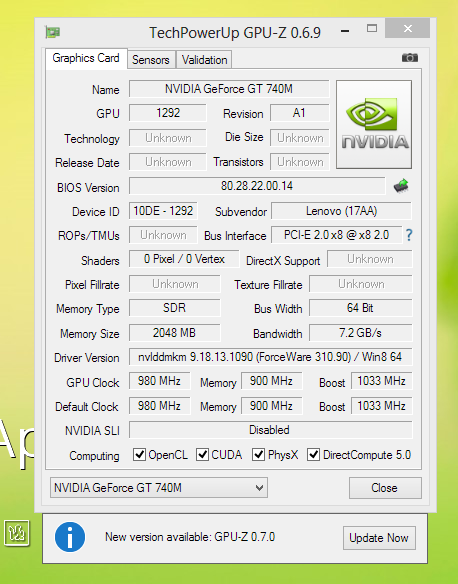
GPU-Z was unable to display the information correctly.
Since the battery is non-detachable, I would concern about the battery life. After playing around with the software, I came across this :
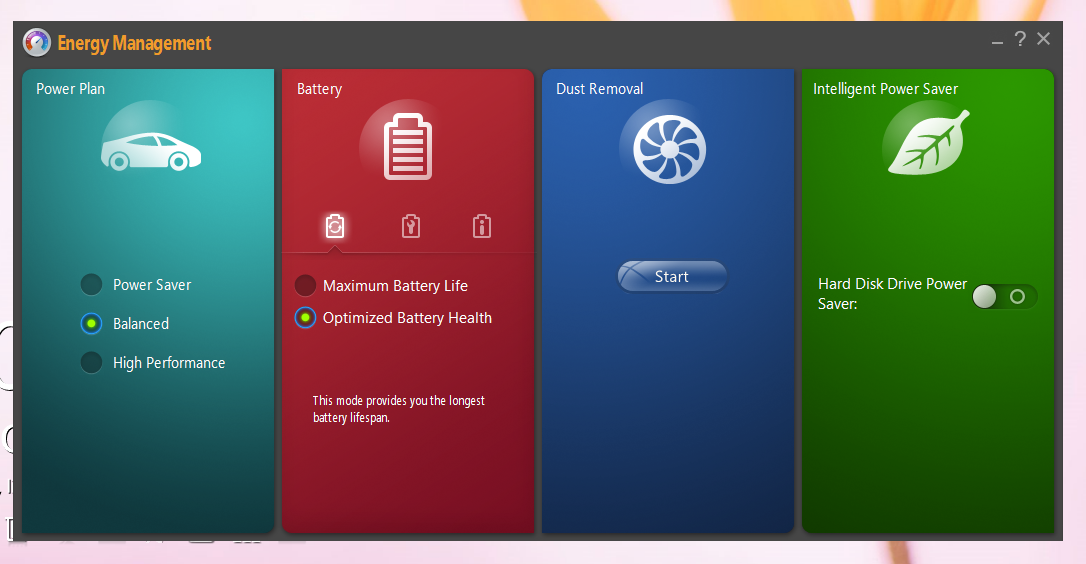
Lenovo Energy Management! The Power Plan is nothing new. You can balance the battery usage and performance with it. Battery part is a bit tricky. With "Maximum Battery Life" mode, it shows the normal situation "Plugged in, Charging" for all the time. But when you switched to "Optimized Battery Health", the laptop will either charge or discharge to ~60% to prevent the aging of battery. This function is lovely, simulating the usage of laptop without battery. So, you will be carefree about battery! The dust removal function is another adorable tool as well. Once you launched it, the fan will spin fast and stop alternatively for several minutes. But I got no idea if it really works. Lastly, the Intelligent Power Saver. I'm not a fan of saving HDD power, so I turned it off.
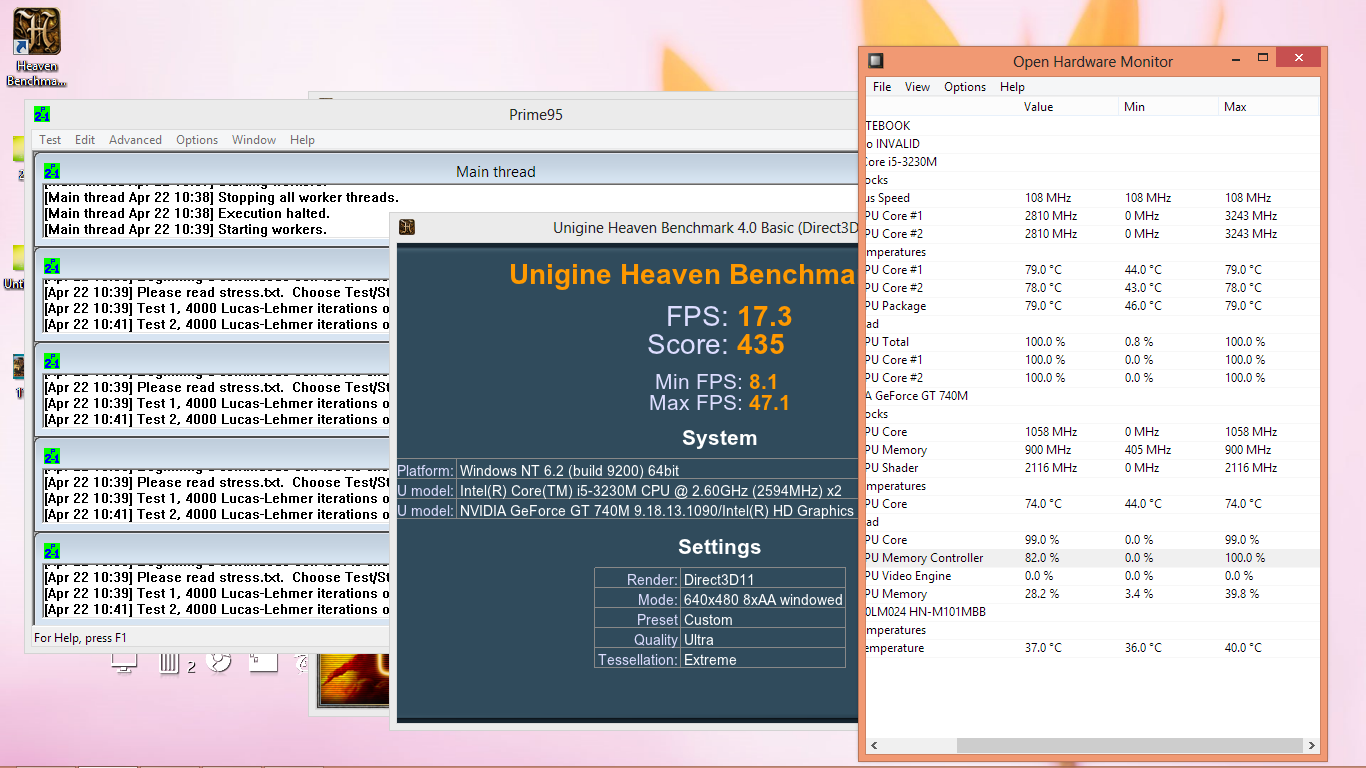
I pay pretty tight attention to cooling when comes into laptop. Lenovo Z400 is never a victim of it. Prime 95 + Unigine was simultaneously done, yet it managed to control the temperature nicely. The fan is the quiet one, too. NOTE : I changed the stock paste to Arctic Cooling MX-4.


Here comes with devil. The screen is sub par and slightly yellowish, but I managed to calibrate it using Intel Control Panel. Viewing angle is terrible, so I can conclude this unit is a TN panel.

My favourite view.
Pros
- Terrific performance per buck.
- Good cooling performance.
- Slim design.
- Windows 8 optimized touchpad gesture control.
- Big capacity HDD.
- Backlit Keyboard
Cons
- Mediocre build quality (Flimsy DVD drive).
- Non-detachable battery.
- Mediocre screen (Bad viewing angle).
- Not-so-impressive battery life even with the latest highly efficient CPU and GPU.
- Touchpad and keyboard get hot easily.
Conclusion
I would say this offering from Lenovo is a good choice for multimedia users and gamer. Consider it's pricing, cost cutting on screen is acceptable to me. If you are just a casual user that do office work and facebook on laptop, this might not be the cup of tea for you.
If so, there are others models that you may like to check out :
Acer V5-471PG, i5-3337U + Nvidia GT710M + (1366x768; touch)@RM2299, 4GB, 500GB, W8
Asus K46CM-WX090H, i5-3317U + Nvidia GT635M@RM2199[2kg], 2GB, 500GB, W8, ODD
Lenovo Inspiron 14R, i5-3337U + Nvidia GT730M + (1366x768;touch)@RM2099[2.33kg], 4GB, 750GB(5400rpm), Linux; W8@RM2399
HP Envy4-1238TX, i5-3337U + AMD HD8750M@RM2099[Beats][1.75kg], 2GB, 500GB(5400rpm), W8
Lenovo S400, i5-3317U + Intel HD4000 + 24GB mSATA + 500GB(5400rpm)@RM1999[1.8kg], 4GB, W7HB; AMD HD7450M/W8@RM2199
Sony Vaio SVE14137CV, i5-3230M + AMD HD7650M@RM2399[2.4kg], 4GB, 750GB, W8; colors: pink/white/black, Vaio backpack
This post has been edited by kingkingyyk: Apr 22 2013, 09:34 PM
 Quote
Quote


 0.0192sec
 0.64
0.64
 5 queries
 GZIP Disabled