Outline ·
[ Standard ] ·
Linear+
Ashampoo Photo Commander 11 [Trial]
|
TScybpsych
|
  Apr 16 2013, 07:38 PM, updated 13y ago Apr 16 2013, 07:38 PM, updated 13y ago
|

|
 Ashampoo Photo Commander 11 v11.0.0 Betahttps://www.ashampoo.com/en/usd/pin/1618/Mu...to-Commander-11 Ashampoo Photo Commander 11 v11.0.0 Betahttps://www.ashampoo.com/en/usd/pin/1618/Mu...to-Commander-11 | https://www.ashampoo.com/lpa/apc11http://ashampoo.downloadcluster.com/ashamp...11.0.0_beta.exeQUOTE The all-in-one software solution for the comfortable organization and optimization of your photo collection combines an easy-to-use interface with several powerful functions and features.
Amazing new features
NEW! Go back in time and reverse image modifications through the integrated backup feature
NEW! Achieve faster results with performance-enhanced viewing and optimization routines
NEW! Apply effects with pixel-precision through the Effect Pen tool and enjoy live previews for instant visual feedback
NEW! Turn your photos into stunning miniature scenes with the Tilt-Shift tool
NEW! Use auto-detection to select and remove unwanted image elements and scratches
NEW! Work with 3D images
NEW! Load, save and view Adobe XMP metadata information
...and many more! Full changelogs (v11.0.0): » Click to show Spoiler - click again to hide... « New Features:
- Automatic Photo Back-Up with History Function:
o Never loose a copy of the original photo again!
o Whenever a photo is saved and overwritten a back-up is made and kept in a hidden back up folder.
o With a single click the user can revert back to the original or even switch between different copies of the same photo stored.
o A simple menu shows all backed up version of a photo sorted by date.
- Quick-Fix-Tools:
o In-Paint technology:
- Easily remove smaller unwanted objects (for example wires).
- Or remove scratches and fill holes for photo restoration.
- Different selection modes like lasso or marker.
- Automatic mode for detecting and removing bright text elements.
o New Tilt-Shift-Tool enabling the user to achieve great miniature effects by adjusting the position and strength.
o New Effect-Center:
- Easily switch between effects with real time preview.
- Supports adjusting effect strength where appropriate.
- More effects (Soft Blend, Motion Blur, Zoom Blur, Noise, Splash, Bulge, Twist, Wave, Glass, Video)
o New Effect-Pen:
- "Draw" any effect right into the photo.
- Adjust strength, size and opacity.
- Allows mixing of different effects thus creating new effects.
o General improvements to other tools (eraser, marker).
- Photo Optimization:
o All new De-noise technology:
- Remove noise and/or improve the general visual quality of photos.
- Different predefined sets for quality versus speed.
o New, faster technology for automatic contrast/color/skin optimization.
- Interface Improvements - Mini-Map:
o Classic scrollbars have been replaced by a modern Mini-Map preview window, easing the scrolling with big photos.
o Zoom-Bar redesigned for easier access and smoother zoom steps.
o Small toolbar giving access to side-by-side dual-view compare mode.
- Adobe XMP / 5 Star Rating:
o Fully loads, saves and preserves XMP Metadata.
o 5 Star Rating is stored in XMP Metadata too (JPG only currently).
o Display of XMP data.
- Improved Wizards:
o All Wizards support adding files recursively by specifying whole directories.
o Whenever appropriate, the output is automatically stored in \My Pictures folder.
- Video MPEG 4 technology:
o Better thumbnail decoding of preview frames on Windows 7.
o General speed up for thumbnail creation.
- 3D Photo Technology:
o Fully supports new MPO and JPS stereo formats.
o Automatically displays those formats in a simple animation trying to fake a 3D experience on a 2D display.
o New Wizard to convert 3D photo to 2D photo. Easily creates common JPG photo or can combine a special SBS (side by side) photo.
- Other Improvements:
o Browser Group View supports sorting by date/time in ascending as well as descending order.
o Greeting Card/Frame Center supports multiple languages.
o Updated RAW Plugin supporting more camera formats.
o Easy-Print uses inch sizes instead of cm sizes on english windows systems.
o Color Picker supports drag-icon to choose any color available on the whole desktop.
Changes:
- Full screen: Tags automatically shown/hidden.
- Browser speed ups when dealing with many files (3000+).
- Option to enable dual-view compare mode after editing change (by default disabled).
Bugs Fixed:
- Photo Import: Changed behavior for "delete after move" operation on Windows 8.
- Batch Process: Wrong default output format. 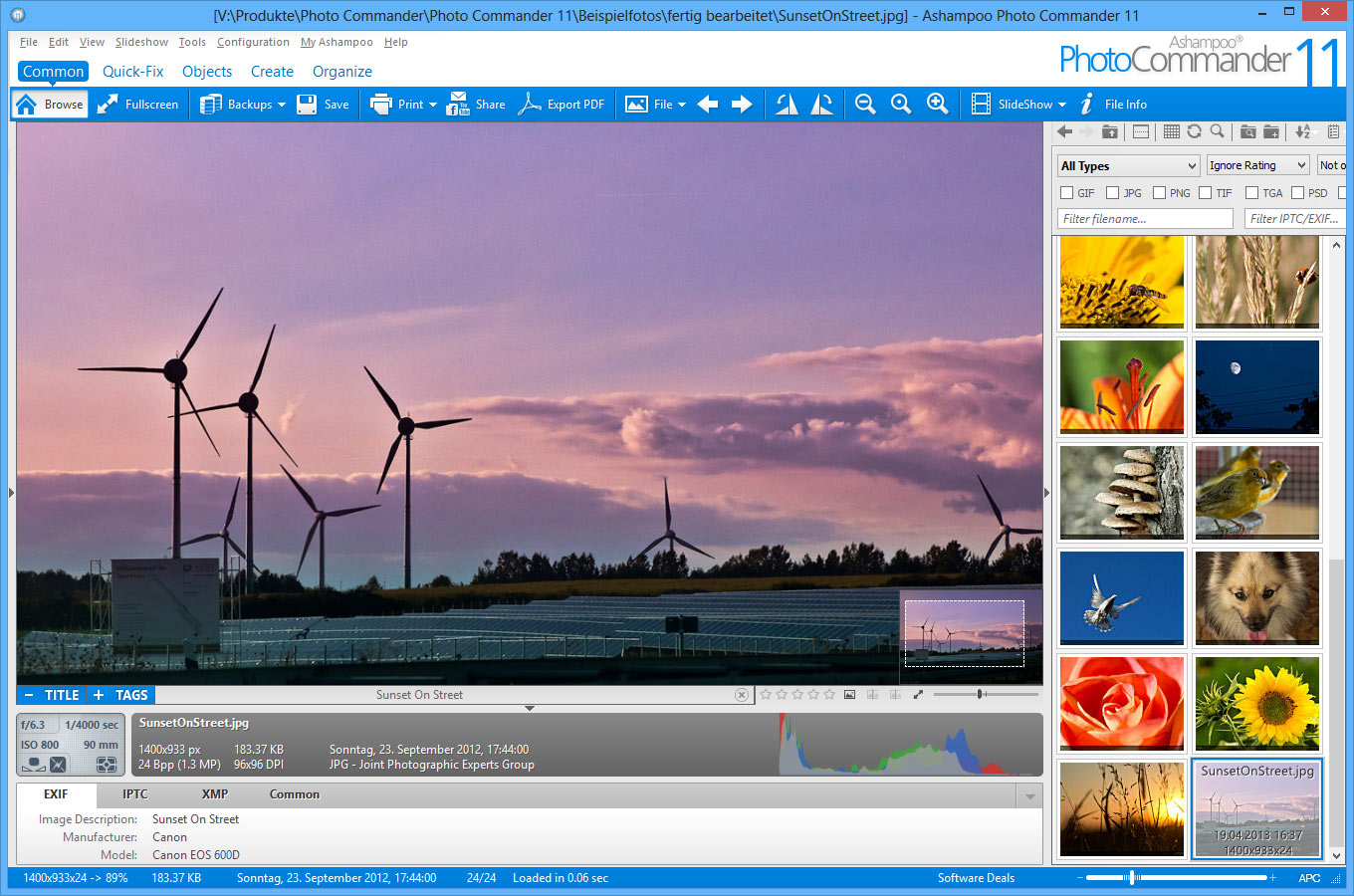 This post has been edited by cybpsych: Apr 24 2013, 09:23 PM This post has been edited by cybpsych: Apr 24 2013, 09:23 PM |
|
|
|
|
|
TScybpsych
|
Apr 23 2013, 11:01 PM
|
|
|
|
|
|
|
|
|
TScybpsych
|
May 2 2013, 05:48 PM
|
|
|
Ashampoo Photo Commander 11 v11.0.2http://ashampoo.downloadcluster.com/ashamp..._e11.0.2_sm.exeUpdate-only http://ashampoo.downloadcluster.com/update...1618_11.0.2.exe» Click to show Spoiler - click again to hide... « New Features:
- None.
Changes:
- RAW PlugIn knows RWL extension.
Bugs Fixed:
- APCDOC handling.
- Browser: Thumbnailwindow may always on top while scanning.
- Browser: Copy file listing to clipboard not working.
- De-noise black pixels.
|
|
|
|
|
|
TScybpsych
|
May 24 2013, 07:53 AM
|
|
|
Ashampoo Photo Commander 11 v11.0.2 --2013-05-23 http://ashampoo.downloadcluster.com/ashamp..._e11.0.2_sm.exeupdated readme and license agreements latest (2013-05-23)Size: 158 MB (166,253,736 bytes) MD5: 7cac7034b05b4360dbfb638144a7b46a previous (2013-05-02)Size: 158 MB (166,051,760 bytes) MD5: adea87e3a11faffeecbe47068d2b6d82
|
|
|
|
|
|
TScybpsych
|
Jun 7 2013, 09:36 PM
|
|
|
Ashampoo Photo Commander 11 v11.0.2 --2013-06-07 http://ashampoo.downloadcluster.com/ashamp..._e11.0.2_sm.exeupdated readme, license agreements, and autoupdate modules latest (2013-06-07)Size: 158 MB (166,261,920 bytes) MD5: f9f1aa61da1e934fe3698f82822235dd previous (2013-05-23)Size: 158 MB (166,253,736 bytes) MD5: 7cac7034b05b4360dbfb638144a7b46a
|
|
|
|
|
|
TScybpsych
|
Jun 20 2013, 07:45 PM
|
|
|
Ashampoo Photo Commander 11 v11.0.3http://ashampoo.downloadcluster.com/ashamp..._e11.0.3_sm.exeUpdate-only http://ashampoo.downloadcluster.com/update...1618_11.0.3.exe- updated RAW plugIn - improved support for Multi-Monitor-Systems - fixed some minor issues Full changelogs » Click to show Spoiler - click again to hide... « New Features:
- Updated RAW PlugIn.
Changes:
- ViewAsTileImage state not saved anymore during program restart.
Bugs Fixed:
- Effect menu not visible in fullscreen mode.
- Effect Seamless Image wrong color.
- Cursor flicker on Intel CPU-GPU.
- Support for Multi-Monitor-Systems with different screen resolutions.
- Fixes to cropping big images.
- EXIF Data display may shown malformed ("internal error" values).
- Removed some outdated menu entries.
- Quick Slideshow: Forward/Backward stopped at second image.
- BatchConvert: Opened one directory up on finish.
Size: 158 MB (166,390,512 bytes) MD5: 13f1b66f3aaebec4eb1ae1b89ddda41c This post has been edited by cybpsych: Jun 20 2013, 07:54 PM
|
|
|
|
|
|
TScybpsych
|
Aug 9 2013, 06:04 PM
|
|
|
Ashampoo Photo Commander 11 v11.0.4http://ashampoo.downloadcluster.com/ashamp..._e11.0.4_sm.exeUpdate-only http://ashampoo.downloadcluster.com/update...1618_11.0.4.exe- Fixes TGA decoding - improved send Email function - fixed some minor issues Full changelogs » Click to show Spoiler - click again to hide... « New Features:
- None.
Changes:
- Updates to send by email function.
Bugs Fixed:
- Restoring BackUp in viewer mode may not refresh correctly.
- APCDOC/DrawText fixes in case font not available.
- BatchConvert: Rename automatically in case destination file exists.
- Fixes TGA decoding.
- Fixes Rotate Buttons for formats where saving is not supported.
- Browser: Deselecting selected files while holding Ctrl works.
- Creating invalid PDF files when started from within viewer mode.
- PhotoBackUp problems with write-protected files. Size: 158 MB (166,405,376 bytes) MD5: 56c9ea3244de9993ea7ccf161eea88dc This post has been edited by cybpsych: Aug 9 2013, 06:05 PM
|
|
|
|
|
|
TScybpsych
|
Aug 23 2013, 07:28 AM
|
|
|
Ashampoo Photo Commander 11 v11.0.4 Rev2 --2013-08-22 http://ashampoo.downloadcluster.com/ashamp..._e11.0.4_sm.exeupdated readme, license agreements, translations Size: 158 MB (166,419,728 bytes) MD5: 390232c61cdfb9b2a489757b097cac00
|
|
|
|
|
|
TScybpsych
|
Oct 17 2013, 08:13 PM
|
|
|
Ashampoo Photo Commander 11 v11.0.5http://ashampoo.downloadcluster.com/ashamp..._e11.0.5_sm.exeUpdate-only http://ashampoo.downloadcluster.com/update...1618_11.0.5.exe- Batchconverter issues fixed - Image cropping optimized - Format JXR RGBA support optimized Full changelogs » Click to show Spoiler - click again to hide... « New Features:
- None.
Changes:
- None.
Bugs Fixed:
- Batchconvert created subdirectory with multiple names.
- Batchconvert did not overwrite files but user choosed to do so.
- Crop et al did not work if selection rectangle created from bottom-right to top-left.
- Format JXR RGBA Saving. Size: 159 MB (166,738,760 bytes) MD5: 12e69f7cc5172a5fd00582fd6487986c This post has been edited by cybpsych: Oct 17 2013, 08:22 PM
|
|
|
|
|



 Quote
Quote
 0.0148sec
 0.86
0.86
 5 queries
 GZIP Disabled