Outline ·
[ Standard ] ·
Linear+
NirSoft JumpListsView [Free]
|
TScybpsych
|
  Mar 26 2013, 01:05 PM, updated 13y ago Mar 26 2013, 01:05 PM, updated 13y ago
|

|
JumpListsView v1.00http://www.nirsoft.net/utils/jumplistsview.ziphttp://www.nirsoft.net/utils/jump_lists_view.htmlQUOTE JumpListsView is a simple tool that displays the information stored by the 'Jump Lists' feature of Windows 7 and Windows 8. For every record found in the Jump Lists, the following information is displayed: The filename that the user opened, the date/time of the file opening event, the ID of the application that was used to open the file, the size/time/attributes of the file on the time that the file was opened, and more...
You can also export the Jump Lists records to csv/tab-delimited/xml/html file. 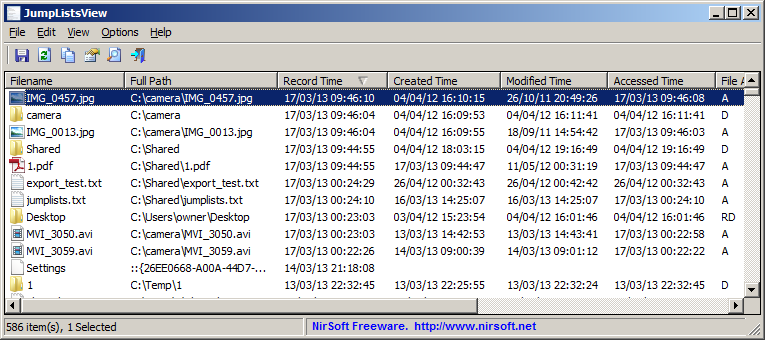
|
|
|
|
|
|
TScybpsych
|
May 27 2013, 01:38 PM
|
|
|
JumpListsView v1.01http://www.nirsoft.net/utils/jumplistsview.zipFixed the flickering while scrolling the 'Jump Lists' items.
|
|
|
|
|
|
stasio
|
Jun 14 2013, 06:28 AM
|
|
|
JumpListsView v1.02http://www.nirsoft.net/utils/jumplistsview.zip Added /UseRecentFolder and /RecentFolder command-line options to set the Recent folder from command-line, for example: JumpListsView.exe /UseRecentFolder 1 /RecentFolder "d:\Users\admin1\AppData\Roaming\Microsoft\Windows\Recent" /shtml f:\temp\jl.html
|
|
|
|
|
|
TScybpsych
|
Jul 13 2013, 05:41 PM
|
|
|
JumpListsView v1.03http://www.nirsoft.net/utils/jumplistsview.zipAdded 'Google Search - Application ID' option.
|
|
|
|
|



 Quote
Quote

 0.0163sec
 0.82
0.82
 5 queries
 GZIP Disabled