Welcome Guest ( Log In | Register )

Bump Topic Topic Closed RSS Feed
3 Pages  1 2 3 >Bottom

Outline · [ Standard ] · Linear+

 Sony Xperia Z & Xperia ZL offcial thread V4, now selling

views
     
psyeo
post Mar 19 2013, 10:49 PM

Look at all my stars!!
*******
Senior Member
2,605 posts

Joined: Jan 2003
QUOTE(kezman @ Mar 19 2013, 08:43 PM)
just come back from Summit USJ to try the demo unit of Xperia ZL, quite nice phone, and totally loving it. but i didnt buy yet as i have no SP now, afraid will scratch the shatter proof sheet and also the camera lense...

so please yeelin04 fast2 bring the SP, so i can buy the phone!!!!!!!!.... hahaha....
*
http://www.lelong.com.my/sony-xperia-zl-l3...7-01-Sale-I.htm

This should do the job for now, while waiting for better sp for ZL. Bought 1 clear an 1 matte. Waiting for both phone and sp to arrive.

Btw, I have 2 set of xz front and back Xtreme guard sp, if anyone is interested. Have some watermark on it, not sure if it is defect or will go away after a couple of wash

This post has been edited by psyeo: Mar 19 2013, 10:52 PM
psyeo
post Mar 20 2013, 03:40 PM

Look at all my stars!!
*******
Senior Member
2,605 posts

Joined: Jan 2003
junsheng new ZL user
psyeo C6502 Black
psyeo
post Mar 21 2013, 11:35 AM

Look at all my stars!!
*******
Senior Member
2,605 posts

Joined: Jan 2003
Anyone with rooted ZL can upload the systemUI.apk file located in the system/app folder? I screwed up mine. Pls help thx
psyeo
post Mar 21 2013, 12:53 PM

Look at all my stars!!
*******
Senior Member
2,605 posts

Joined: Jan 2003
QUOTE(SteadyPana @ Mar 21 2013, 12:47 PM)
Just applied my SP for ZL @ MV roadshow but expensive :-(
*
SteadyPana rooted ur ZL?
psyeo
post Mar 21 2013, 03:20 PM

Look at all my stars!!
*******
Senior Member
2,605 posts

Joined: Jan 2003
QUOTE(SteadyPana @ Mar 21 2013, 03:02 PM)
Later...getting the case first.  smile.gif

You ??  hmm.gif
*
Rooted and screw up the systemUI.apk file in the system/app now Looking the file from other rooted ZL user..

psyeo
post Mar 25 2013, 04:11 PM

Look at all my stars!!
*******
Senior Member
2,605 posts

Joined: Jan 2003
QUOTE(mcchin @ Mar 24 2013, 12:25 PM)
btw
anyone tested power bank with the sony own suppplied cable
today found out it cant charge
with the power bank cable is okay

summary for charging with power bank
powerbank cable = okay
Sony cable = NG
Samsung Cable = NG
*
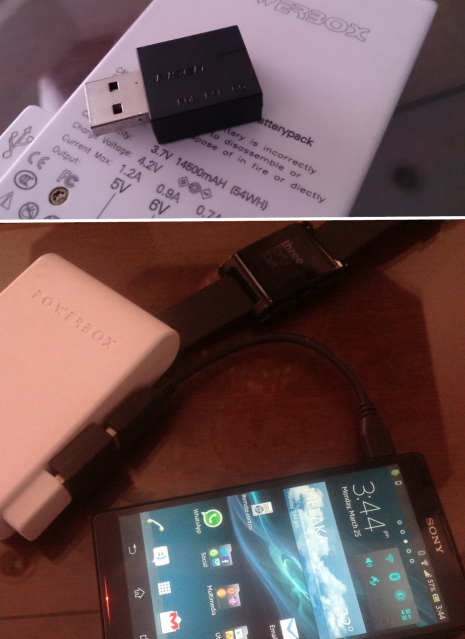
same here, plugging straight to my powerbox won't charge the phone. However I manage to get it to charge using the usb adapter I bought for charging ps vita.
user posted image

I suppose the powerbox I use, doesn't transmit the same signal as the charger or computer USB

This post has been edited by psyeo: Mar 25 2013, 04:14 PM
psyeo
post Mar 26 2013, 10:17 AM

Look at all my stars!!
*******
Senior Member
2,605 posts

Joined: Jan 2003
QUOTE(lonelywolf90 @ Mar 25 2013, 11:49 PM)
I had the same issue but mine is worse, I can't even charge at all using any USB cable.

The XZ just won't charge. I tested the powerbank with other devices such iPad3 and HTC One X, it works with them but not the XZ, I just don't understand why either. =/
*
It is a form of control implemented by Sony, you can try the usb charging adapter for PS Vita/ PSP go
psyeo
post Mar 26 2013, 10:47 AM

Look at all my stars!!
*******
Senior Member
2,605 posts

Joined: Jan 2003
QUOTE(benny888 @ Mar 26 2013, 10:32 AM)
I have absolutely no problems charging it using both my Yoobao YB602 ( 4800mAh) and YB 642 ( 11200mAh) . And I use different cables too ( i have so many types ) - sometimes HTC, Sony, Samsung and Motorola
I have another generic unit ( Slim Powerbank 20000 mAh - this one I do have problems at times - I can only use HTC, Samsung cables  and it supplied cables to charge the phone. Anyway this is one lousy powerbank - it discharges off much faster than Yoobao and I doubt is listed 20000 mAh specs,. But no complains since is very much cheaper than the Yoobao
*
yup, I think it also depends on the battery pack (powerbank etc) you use (if it is able to transfer the computer signal or produce higher output) , similar control is implemented in all recent sony devices. since psp go.

using that PISEN adapter however will not allows u to transfer data, only purely for charging.

http://www.amazon.com/gp/product/B007Y3L5R...g=snapturtle-20

http://www.dannychoo.com/post/en/26419/PS+Vita+USB+Mod.html
psyeo
post Mar 26 2013, 10:59 AM

Look at all my stars!!
*******
Senior Member
2,605 posts

Joined: Jan 2003
should be the same mod adapter (PISEN looks smaller), basically it cuts off the data transmitting cable within the usb (so you can't use it for data transfer with pc) and joint back so that it seems that the data transmitted by vita/phone is received by the PC, which in fact is vita/phone transmitting the check data to itself.

this is what i think the adapter and mod is all about.

This post has been edited by psyeo: Mar 26 2013, 11:05 AM
psyeo
post Mar 26 2013, 11:01 AM

Look at all my stars!!
*******
Senior Member
2,605 posts

Joined: Jan 2003
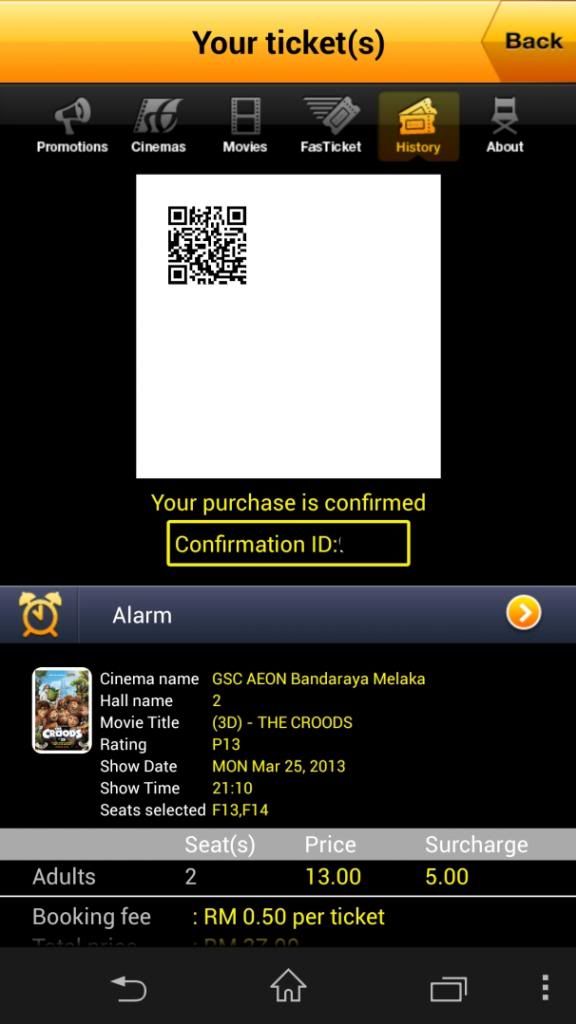
btw GSC hvnt update the app to support higher reso screen

user posted image

This post has been edited by psyeo: Mar 26 2013, 11:02 AM
psyeo
post Mar 27 2013, 09:21 AM

Look at all my stars!!
*******
Senior Member
2,605 posts

Joined: Jan 2003
QUOTE(lonelywolf90 @ Mar 27 2013, 08:47 AM)
So the problem is the cable and not the power bank?

*
Problem is more on the Battery pack not transmitting the needed PC signal or sufficient output.
psyeo
post Mar 27 2013, 11:12 AM

Look at all my stars!!
*******
Senior Member
2,605 posts

Joined: Jan 2003
QUOTE(lonelywolf90 @ Mar 27 2013, 09:24 AM)
Owh man, looks like I gotta ditch my Vivis power bank then.. I was hoping there was an alternative so I don't have to spend another hundred or hundreds on another power bank, sigh..

Btw, you guys played Asphalt 7?

It didn't work for me(cracked version), I wonder what happened..
*
just get the PISEN adapter, it will most probably make your power bank compatible with the phone

http://forum.lowyat.net/index.php?showtopic=2597355&hl=pisen

This post has been edited by psyeo: Mar 27 2013, 11:15 AM
psyeo
post Mar 27 2013, 04:01 PM

Look at all my stars!!
*******
Senior Member
2,605 posts

Joined: Jan 2003
QUOTE(hakka_jin @ Mar 27 2013, 03:58 PM)
New ZL user here.... it's freaking hard to get the SP for Xperia ZL here in Kota Kinabalu, Sabah... anyone knows any link for a good one? looking for a case also...
*
Nilkin SP
http://forum.lowyat.net/index.php?showtopic=2750787&hl=

Case..
Hardly any for ZL atm
psyeo
post Mar 28 2013, 10:11 AM

Look at all my stars!!
*******
Senior Member
2,605 posts

Joined: Jan 2003
you ain't suppose to tear off anti shattered film, it is meant to protect the screen from cracking. something sony use to compete with Gorilla glass. Take it as a part of a phone, and stick your on sp on top if you wish.

This post has been edited by psyeo: Mar 28 2013, 10:21 AM
psyeo
post Mar 28 2013, 11:54 AM

Look at all my stars!!
*******
Senior Member
2,605 posts

Joined: Jan 2003
QUOTE(Najmods @ Mar 28 2013, 11:24 AM)
There is a couple of custom ROM available for ZL now on xda forum for anyone interested, AOKP and CM10.1.

On the other note, ZL remote control app is pretty cool. At first I thought it only supports Sony devices but there is tons of supported devices there. I have yet to find the right one to control Astro
*
for Astro B.yond choose STB> Manufacturer=Pace > if not mistaken is around type 46.
psyeo
post Mar 28 2013, 12:03 PM

Look at all my stars!!
*******
Senior Member
2,605 posts

Joined: Jan 2003
QUOTE(mengsuan @ Mar 28 2013, 11:54 AM)
The anti shatter film does not add integrity to the glass, if the impact will break the glass, having the film will break as well. The film can avoid injuring the user when the glass is already broken.
*
nicely explained. But IMO with the anti shatter film on I believe it does help spread and reduce the impact across the bare glass, it that sense I believe it will help on the integrity of the glass as well. similar to those car security film. you are correct on saying that it helps user from injuring if glass broken.

just my opinion
psyeo
post Mar 28 2013, 05:36 PM

Look at all my stars!!
*******
Senior Member
2,605 posts

Joined: Jan 2003
QUOTE(funguss @ Mar 28 2013, 03:59 PM)
Guys,

I just bought the ZL and I have been using the Galaxy S2 for some time before that. Thus my brief comparison of The ZL is done against theĀ  S2 :

1) Sad to say Sony's screen still not as good as Samsung's Amoled. Colors are not punchy and contrast is very low. Somehow, the ZL performs OK with pics and video (perhaps due to Bravia 2 engine) but generally the screen is disappointing.

2) The ZL has a nice form factor and design with good quality materials being used. Nicely engineered. Physical camera button is a plus point.

3) As far as the UI is concerned, there is still a lot of room for improvement. Fortunately one can down load other apps from Play Store to change it some aspects of it.

4) The ZL tends to get very hot when playing games and watching videos.

5) Camera is mediocre - nothing to shout about.

6) Listening to music from the speaker is OK and loud enough.

7) LED notification light available. Use the app Light Flow to configure for missed calls, notifications, low batt warning etc.

8) Speed is good. There is some lag at times but nothing serious.

On the whole, I think Sony still has some distance to go before truly being able to go head to head with Samsung. I hope Sony can improve on the points above with future models.

This is just my humble opinion. Thanks for reading.
*
IMHO comparing to S3 (cant compare it to S4 yet) it smokes S3 in everyway. AMOLED is subjective, suitable for those who like high contrast and non realistic colour type of display. Although I agree that sony display is not class leading, but it is much more accurate than AMOLED. Class leading display with the most accurate colour have to go to iPhone 5. The only downside I believe is viewing angle (didn't affect me as I don't look at my screen sideway)

UI and button wise, it is one of the easier phone to use. S3 UI is horrible to me. perhaps I prefer the experience closer to stock android hmm.gif

If you're comparing with S2, I have serious doubt on your comparison. The best way to compare in terms of speed, camera, UI and display is try and use back your S2 after using ZL for 2 or 3 days.

Just my opinion on your opinion biggrin.gif

This post has been edited by psyeo: Mar 28 2013, 05:49 PM

psyeo
post Mar 29 2013, 09:44 PM

Look at all my stars!!
*******
Senior Member
2,605 posts

Joined: Jan 2003
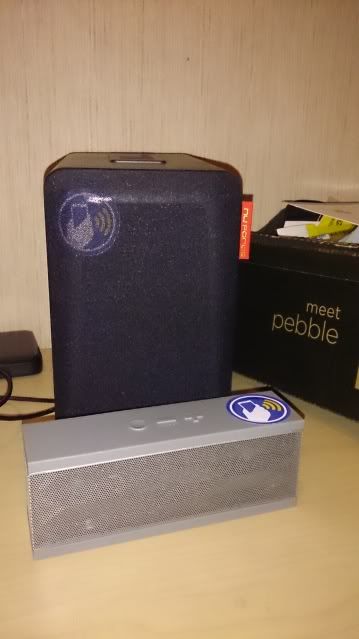
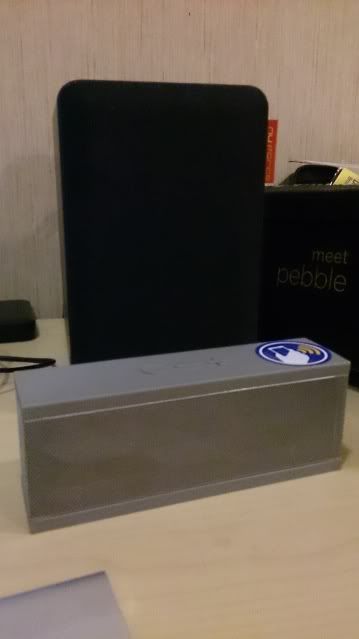
too bad, ZL didn't come bundle with the sony SRS-BTV5 NFC speaker sad.gif ...

Oh well just have to settle with the next best thing .....
» Click to show Spoiler - click again to hide... «


icon_rolleyes.gif

This post has been edited by psyeo: Mar 29 2013, 09:53 PM
psyeo
post Mar 30 2013, 02:12 PM

Look at all my stars!!
*******
Senior Member
2,605 posts

Joined: Jan 2003
It is call "estimated" standby hours for a reason.... It will all still depends on your usage. 3~4 hours screen on time is normal regardless of stamina mode or not.
psyeo
post Mar 30 2013, 04:17 PM

Look at all my stars!!
*******
Senior Member
2,605 posts

Joined: Jan 2003
QUOTE(3antz @ Mar 30 2013, 03:57 PM)
Hi, I saw a number of threads in xda to root my ZL but I can't specifically determine which is the best way. Can anyone advise? Im on build 10.1.A.1434 on C6502. Thanks.
*
Root method for locked bootloader. Use mode 3

http://forum.xda-developers.com/showthread.php?p=31545627

3 Pages  1 2 3 >Top
Topic ClosedOptions
 

Change to:
| Lo-Fi Version
0.9932sec    0.46    7 queries    GZIP Disabled
Time is now: 13th December 2025 - 07:31 AM