


juz cod nilikin sp and usb otg cable from this seller http://forum.lowyat.net/topic/2733540
fyi usb otg works well in XZ, pendrive, mouse, keyboard, gamepad, even 2TB WD hdd

Sony Xperia Z & Xperia ZL offcial thread V4, now selling
|
|
 Mar 20 2013, 07:50 AM Mar 20 2013, 07:50 AM
Return to original view | Post
#1
|
 
Senior Member
668 posts Joined: Jan 2006 
|
wah... nearly 20 pages from v3 to v4 in a day, took me a long time to go through it
juz cod nilikin sp and usb otg cable from this seller http://forum.lowyat.net/topic/2733540 fyi usb otg works well in XZ, pendrive, mouse, keyboard, gamepad, even 2TB WD hdd |
|
|
|
|
|
Mar 21 2013, 01:15 AM
Return to original view | Post
#2
|
|
Senior Member
668 posts Joined: Jan 2006
|
QUOTE(mohdisa91 @ Mar 21 2013, 12:40 AM) Any1 here bought an xperia at mid valley... i bought it at mv and register on spot, didn't receive any news from them yetThem said 1st 500 cutomer will get nfc speaker free.. Can I know how can I know I got or not..?  |
|
|
Mar 21 2013, 04:04 AM
Return to original view | Post
#3
|
|
Senior Member
668 posts Joined: Jan 2006
|
uncle benny888
u mentioned before that u managed to keep the battery 100% after standby overnight what setting you used for the stamina mode ya? did you turn off wifi and mobile data? any whitelist apps in stamina mode? realized that the standby hours estimation had changed after few days of usage (from 4-5 days to 1-2 days), is it a bug or the phone is calibrating the battery according to the battery usage? thanks  |
|
|
Mar 21 2013, 11:54 AM
Return to original view | Post
#4
|
|
Senior Member
668 posts Joined: Jan 2006
|
QUOTE(benny888 @ Mar 21 2013, 06:29 AM) Only wifi is off. 3g always on. Whitelist app only whatsapp thanks for the info, will give it a try tonight Example lastnite record over 9 hours My maximum standby hours always around 4 hours 20+ hours n consistently so . Have been using phone 3 weeks. This standby time will drop accordingly with battery level drop [attachmentid=3356575][attachmentid=3356576][attachmentid=3356577] |
|
|
Mar 22 2013, 03:19 AM
Return to original view | Post
#5
|
|
Senior Member
668 posts Joined: Jan 2006
|
QUOTE(kucuboy @ Mar 21 2013, 09:01 PM) Tested Maxis LTE near Sri Hartamas Finnegan's pub. Full network bar - download speed 32.97 Mb / upload 20.56mb / ping 111ms. i drove around ttdi juz now to try the LTE, but can't detect it Repeated the test again at same spot with same signal level and got diff results as follows - dl 20.17mb / upload 19.23mb / 59ms. When I drove near the entrance of Bukit Aman police headquarters I saw 1 bar of LTE. When I checked with speedtest.net it said I was connected to tmnet cyberjaya server. Well anyways here is the test results - dl 14.37mb / upload 0.96mb / ping 150ms.  i went to klcc last week to ask bout lte activation, they say no nid activation or change sim card, it will automatic switch to it when detected, my sim card 4-5 years d, can use hsdpa confirmed that the setting is "LTE (preferred)/WCDMA/GSM" d so i need to call maxis customer service to ask them activate lte for me? or maybe change sim? |
|
|
Mar 22 2013, 07:14 AM
Return to original view | Post
#6
|
|
Senior Member
668 posts Joined: Jan 2006
|
QUOTE(kucuboy @ Mar 22 2013, 04:55 AM) If you have an old Maxis sim card, lets say more than 6 months old, chances are that it cannot use the LTE network and in this case you MUST change your sim card. When I changed my sim from the big chip to the small micro sim yesterday at TTDI Maxis center, the cust svc never even ask for LTE or etc. Its auto detect. No extra forms, call cust svc or etc. Im using the 5Gb data plan. Maxis counter staff said once I exceed 5Gb my speed will be throttled down but wont incur additional cost. Hope that helps thanks for the info bro, will check with the customer service to confirm bout the sim compatibility with lte |
|
|
|
|
|
Mar 22 2013, 07:20 AM
Return to original view | Post
#7
|
|
Senior Member
668 posts Joined: Jan 2006
|
finally manage to summon the courage to dip my phone in water, damn kancheong when the phone touched the water and trying to on the phone the nilikin sp is cleaned after the dip  |
|
|
Mar 22 2013, 04:51 PM
Return to original view | Post
#8
|
|
Senior Member
668 posts Joined: Jan 2006
|
sony pc companion detected the 434 update, after finish downloading the update, my phone shut down to install the update then sony companion became non-responsive and i'm unable to on phone normally
need to: Volume Up + POWER (for additional 5 seconds, total 15 seconds) -> will power off hard, device will power down [device will vibrate thrice] then can start normally d, damn kancheong it will brick, luckily still ok phone still not updated though This post has been edited by nasiayam: Mar 22 2013, 04:55 PM |
|
|
Mar 22 2013, 04:58 PM
Return to original view | Post
#9
|
|
Senior Member
668 posts Joined: Jan 2006
|
QUOTE(ledoci @ Mar 22 2013, 04:55 PM) brick then get new phone ma... i temp unroot d beforehand unless u root haha  xda forumners says apparently the update is sony bloatwares and mcafees, and no fix to the stamina mode bugs |
|
|
Mar 23 2013, 03:46 PM
Return to original view | Post
#10
|
|
Senior Member
668 posts Joined: Jan 2006
|
wta, if use the sony update service, will it wipe the internal storage?
|
|
|
Mar 24 2013, 02:44 AM
Return to original view | Post
#11
|
|
Senior Member
668 posts Joined: Jan 2006
|
drove around ttdi yesterday to try the lte, can't detect the lte, when i manual search can see the lte, but got error message when try to connect to it
i ask the customer service they say if so need to bring it to maxis ttdi/sunway to have it checked last pic is the place with lte coverage that i took from maxis 


|
|
|
Mar 24 2013, 02:54 AM
Return to original view | Post
#12
|
|
Senior Member
668 posts Joined: Jan 2006
|
tried the stamina mode and manage to maintain 100% battery overnight
i turned off the location-based wifi, off the mobile data and keep the wifi on only whatsapp is under the stamina mode whitelist twitter and weather widget refresh set to every 1 hour got few whatsapp notification when i woke up and took a call before i screenshot this the stamina mode is pretty impressive 


This post has been edited by nasiayam: Mar 24 2013, 02:55 AM |
|
|
Mar 24 2013, 03:57 AM
Return to original view | Post
#13
|
|
Senior Member
668 posts Joined: Jan 2006
|
QUOTE(kucuboy @ Mar 24 2013, 03:35 AM) How old is your SIM card? U can search my earlier posts where I discussed about LTE Maxis network more than 4 years d, the maxis center i went and the customer rep i spoke to all insist the sim card is fine to run lteseems like to know whose the culprit need to test a sim card that is proven can run lte on my phone and trying my sim card on a phone that confirm can run lte, to see which is the problem |
|
|
|
|
|
Mar 24 2013, 08:26 PM
Return to original view | Post
#14
|
|
Senior Member
668 posts Joined: Jan 2006
|
QUOTE(fx_53_xt @ Mar 24 2013, 04:49 AM) Maxis staffs knowledge on LTE is laughable. I went to get the LTE activated in TTDI and its an frustrating hour spent. On the phone: CS1 - LTE only works on phone purchased from Maxis (false) CS2 - LTE activates automatically when you're in LTE coverage using a phone with LTE band 7 (partially false) Over at TTDI: TTDI Staff 1 - Your phone doesn't support Maxis LTE. Me - It does, and I think it has something to do with my SIM TTDI Staff 1 - So you wanna change your SIM card, go look for staff no.2? (giving me a SIM damaged replacement form with RM25 charges) TTDI Staff 2 - fill up the form please Me - My SIM card is not damaged, I just want LTE activated on my phone. TTDI Staff 2 - Ohh, no SIM card change is needed. Just go to 1st floor and look for the technical staff, they will help you to configure your phone to use LTE. Me - ok TTDI Staff 3 - You need a new SIM card for LTE, and we need to configure from our end too. Me - I do? TTDI Staff 2 - Ya kah? !@#$%+_)(*&^%$ TTDI Staff 3 - Issue a new Micro SIM, LTE works right away. From what i gather, your old SIM card, manually cut out Micro SIM, will not be able to register onto Maxis LTE. You'll need the NEW wholly white color Micro SIM for LTE to work. And if you already has that but still can't hop onto LTE, you'll need to inform customer service for technical department to configure from their end. After getting it done, i did approximately 10 speed tests with speed hovering around 20Mbps to 30Mbps for both upload and download, with excellent ping of <50ms. Quite impressive i must say. But a total of 280MB of my data was sucked by speedtest.net just to perform these speed test which was done in less than 5 minutes. Battery wise its draining faster than 3G/HSPA, but definitely not 20% drop in 5 minutes. i had problems with chrome doing HTML5 too. Chrome keeps crashing when i load iCloud. It was find on Nexus 4. ARM v7 is the instruction set used by the processor, not processor version. QUOTE(EdEd @ Mar 24 2013, 01:40 PM) For people still trying to get LTE, last week i went to Maxis TTDI and they insist that LTE is not ready for any devices other than their own HTC One XL and Nokia Lumia 920, so i argued abit and said other people already using it but they show me bullshit face. seems like the sim card could be the problem then, thanks for the info guys 123 customer service say its imposible to get LTE because:- 1.) Im not using their "4G Phones" 2.) Im on iValue plan, which does not support 4G This week i went there again and instead of asking them to activate my LTE, i asked for a sim replacement. After waiting for 1 hour, i finally got my turn. while waiting for the guy to get my new sim i asked one more time, and this guy also said LTE wont support other phone. As soon as i got my new microsim, I poped it in and LTE Shows up. Then i went to show it on the guy's face. However while trying to upload a picture on facebook it says "LTE is not supported on your device" other than that everything is smooth and fast. Speedtest @ 34mbps  |
|
|
Mar 26 2013, 01:17 AM
Return to original view | Post
#15
|
|
Senior Member
668 posts Joined: Jan 2006
|
QUOTE(soitsuagain @ Mar 25 2013, 07:53 PM) The microsd flap of the white xperia Z demo in KLCC looks like it has loosen a bit. It is still close but not sure it can stops water from going in. Anyone else getting this? mine quite loose already compared to other flaps, a slight pick then it comes off d, i posted a video of putting it in water few pages back, that time oso quite loose already but the waterseal still working |
|
|
Mar 26 2013, 08:40 PM
Return to original view | Post
#16
|
|
Senior Member
668 posts Joined: Jan 2006
|
QUOTE(matt3773 @ Mar 25 2013, 11:39 AM) After updated to .434 the wifi signal sometimes dropped and sometimes been disconnected did u guys also have this problem? QUOTE(jeff10012003 @ Mar 26 2013, 10:25 AM) I had this problem without updating the firmware.. i switch to wifi during overnight standby, but when i woke up the next day its always connected to mobile datai use tasker to track it, the wifi connection will drop after half an hour of standby it seems like using mobile data is more battery efficient for XZ as compared to wifi google search show that wifi uses less power than mobile data, but that doesn't seems to be the case for XZ |
|
|
Mar 26 2013, 08:43 PM
Return to original view | Post
#17
|
|
Senior Member
668 posts Joined: Jan 2006
|
QUOTE(TerryZeroX @ Mar 26 2013, 08:41 PM) Goto your Wi-Fi Settings -> Advanced. There's option to keep your Wi-Fi on when your phone's on standby tried already, still connected to mobile data when i woke up the next day |
|
|
Mar 26 2013, 09:19 PM
Return to original view | Post
#18
|
|
Senior Member
668 posts Joined: Jan 2006
|
QUOTE(TerryZeroX @ Mar 26 2013, 09:10 PM) That's weird, you set it to "Always" right? Did you install any other battery management software that could cause such problem? only install betterbatterystat and gsam battery to monitor the usagei'll try again tonite with the always on wifi setting to re-confirm this |
|
|
Mar 27 2013, 01:26 PM
Return to original view | Post
#19
|
|
Senior Member
668 posts Joined: Jan 2006
|
QUOTE(philip42 @ Mar 27 2013, 01:17 PM) My sp arrived as well IMHO better post this at yeelin's sale thread, if not later she kena ban la btw do I need to apply the sp to the camera lens behind? on a side note i manage to get 9 hours standby time overnight and still 100% on wifi overnight and the wifi setting turned to always on 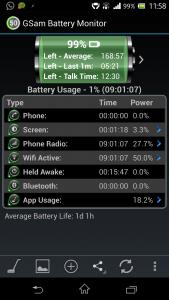
|
|
|
Mar 29 2013, 01:51 AM
Return to original view | Post
#20
|
|
Senior Member
668 posts Joined: Jan 2006
|
QUOTE(eugenetwh @ Mar 29 2013, 01:42 AM) i jz realised 1 thing.... at first i think i gt the sharp panel... mine is jdc and the display looks great! now im worried that i might get a JDC. |
|
Topic ClosedOptions
|
| Change to: |  0.0483sec 0.0483sec
 0.61 0.61
 7 queries 7 queries
 GZIP Disabled GZIP Disabled
Time is now: 12th December 2025 - 02:04 AM |
 Quote
Quote