Welcome Guest ( Log In | Register )

Bump Topic Topic Closed RSS Feed
121 Pages « < 87 88 89 90 91 > » Bottom

Outline · [ Standard ] · Linear+

 [WTS/Bulk] ▲★ CAL-LAB Lightning Isolators ★▲, Authorised Seller@Performance Guarantee

views
     
ashly
post Jul 7 2014, 03:31 PM

Getting Started
**
Junior Member
121 posts

Joined: Apr 2007
Hi,

Can you advise which product to get for the below:
1) LED TV, aerial antenna, dvd player, may be will have sound system later on

2) Home phone and wifi modem

3) Desktop pc + printer + fax

Thank you.
TSgkl83
post Jul 8 2014, 08:50 AM

Look at all my stars!!
*******
Senior Member
8,377 posts

Joined: Nov 2004
QUOTE(ashly @ Jul 7 2014, 03:31 PM)
Hi,

Can you advise which product to get for the below:
1) LED TV, aerial antenna, dvd player, may be will have sound system later on

2) Home phone and wifi modem

3) Desktop pc + printer + fax

Thank you.
*
1) you can use SFTV9622FC for power, aerial protection IF dont have LAN cable doing into your equipments
2) you can use MDSC0039, SP9201DAF IF dont have LAN cable connected to your modem for networking purpose
3) you can use SF9512ARD IF dont have LAN cable connected to your PC / printer / fax
smile.gif
norhairy
post Jul 9 2014, 12:24 PM

New Member
*
Junior Member
23 posts

Joined: Aug 2007


hi could you suggest and pm me powerline ace price that compatible with aztech home plug
TSgkl83
post Jul 10 2014, 04:31 PM

Look at all my stars!!
*******
Senior Member
8,377 posts

Joined: Nov 2004
QUOTE(norhairy @ Jul 9 2014, 12:24 PM)
hi could you suggest and pm me powerline ace price that compatible with aztech home plug
*
Anything with the [PLA] label smile.gif
http://site.callab2u.com/main/3000/index.a...&t=online-store
ashly
post Jul 11 2014, 10:37 AM

Getting Started
**
Junior Member
121 posts

Joined: Apr 2007
QUOTE(gkl83 @ Jul 8 2014, 08:50 AM)
1) you can use SFTV9622FC for power, aerial protection IF dont have LAN cable doing into your equipments
2) you can use MDSC0039, SP9201DAF IF dont have LAN cable connected to your modem for networking purpose
3) you can use SF9512ARD IF dont have LAN cable connected to your PC / printer / fax
smile.gif
*
Hi,

For the SFTV9622FC, I noticed that there is only 1 socket for power. So I need to plug in another extension?

Thank you.
andy0212
post Jul 12 2014, 03:50 PM

Getting Started
**
Junior Member
132 posts

Joined: Jun 2005


Hi, this is my ADSL setup : http://i.imgur.com/koxMgmH.jpg

It's a simplified version of various stuff at my living room, but don't worry I understand the concept of "safe island".

I want to protect my ADSL modem from lightning strike. So the green background is the area that I believe I need to protect.

So can you suggest to me which product should I get?
G0046
post Jul 13 2014, 12:06 AM

New Member
*
Junior Member
44 posts

Joined: Jun 2009


i need for
1) TV, astro, astro Satelite Dish and radio

2) fridge

3) air cond (round pin)

cod at damansara uptown available?

This post has been edited by G0046: Jul 13 2014, 12:06 AM
TSgkl83
post Jul 14 2014, 04:52 PM

Look at all my stars!!
*******
Senior Member
8,377 posts

Joined: Nov 2004
QUOTE(andy0212 @ Jul 12 2014, 03:50 PM)
Hi, this is my ADSL setup : http://i.imgur.com/koxMgmH.jpg

It's a simplified version of various stuff at my living room, but don't worry I understand the concept of "safe island".

I want to protect my ADSL modem from lightning strike. So the green background is the area that I believe I need to protect.

So can you suggest to me which product should I get?
*

you can use MDSC0039 + SP9201DAF smile.gif

QUOTE(G0046 @ Jul 13 2014, 12:06 AM)
i need for
1) TV, astro, astro Satelite Dish and radio

2) fridge

3) air cond (round pin)

cod at damansara uptown available?
*

1. MDSC0039FC if dont have aerial antenna connected
2. NILI9920F
3. Cal-Lab doesn't support high horse power air con especially those round pin power socket

smile.gif
andy0212
post Jul 15 2014, 02:50 AM

Getting Started
**
Junior Member
132 posts

Joined: Jun 2005


QUOTE(gkl83 @ Jul 14 2014, 04:52 PM)
you can use MDSC0039 + SP9201DAF  smile.gif
*
SP9201DAF will replace my current DSL splitter?
And the green wire will be connected into that small hole at the side of MDSC0039?
Hmm, I think I still have extra MDSC0039 that I've purchased from you 4 years ago~~

So let say the lightning struck from my phone line, I believe MDSC0039 need to be replaced. But how about SP9201DAF ?
TSgkl83
post Jul 15 2014, 09:42 AM

Look at all my stars!!
*******
Senior Member
8,377 posts

Joined: Nov 2004
QUOTE(andy0212 @ Jul 15 2014, 02:50 AM)
SP9201DAF will replace my current DSL splitter?
And the green wire will be connected into that small hole at the side of MDSC0039?
Hmm, I think I still have extra MDSC0039 that I've purchased from you 4 years ago~~

So let say the lightning struck from my phone line, I believe MDSC0039 need to be replaced. But how about SP9201DAF ?
*
Yes, SP9201DAF will replace the existing DSL splitter...
green wire to the small hole of MDSC0039

the lightning strucked from tel cable, 90% only SP9201DAF will effected / damaged... MDSC0039 just doing the surge rerouting to earth only... smile.gif
andy0212
post Jul 15 2014, 01:02 PM

Getting Started
**
Junior Member
132 posts

Joined: Jun 2005


QUOTE(gkl83 @ Jul 15 2014, 09:42 AM)
Yes, SP9201DAF will replace the existing DSL splitter...
green wire to the small hole of MDSC0039

the lightning strucked from tel cable, 90% only SP9201DAF will effected / damaged... MDSC0039 just doing the surge rerouting to earth only... smile.gif
*
Oh, so no need to replace MDSC0039.
Okay the, please PM me best price for 2x SP9201DAF + 1x MDSC0039 + postage to JB.
Khai62
post Jul 20 2014, 03:07 AM

New Member
*
Junior Member
16 posts

Joined: Dec 2011
From: Perak


I have this setup in my room:

PC -600w, using wifi for internet
Monitor
2 desk lamp

I currently using TrickleStar surge protector extension socket, will it cause conflict ? I assume that MDSC0039 should be enough for this set up ?
TSgkl83
post Jul 23 2014, 05:37 PM

Look at all my stars!!
*******
Senior Member
8,377 posts

Joined: Nov 2004
QUOTE(Khai62 @ Jul 20 2014, 03:07 AM)
I have this setup in my room:

PC -600w, using wifi for internet
Monitor
2 desk lamp

I currently using TrickleStar surge protector extension socket, will it cause conflict ? I assume that MDSC0039 should be enough for this set up ?
*

if ur PC doesn't connected with any Wired LAN cable...
and around your PC setup doesn't covered with any external sources such as tel cable, aerial cable, etc...
you can use MDSC0039 for power protection and there have no conflict with existing surge protector... smile.gif
andrew9292
post Jul 29 2014, 09:34 PM

-/Livin' On A Prayer/-
*****
Senior Member
955 posts

Joined: Sep 2008
From: Petaling Jaya


Hi, I currently have a SL9802PM (8A) Trinity pack with the following setup which i know is incomplete as it violate the safe island principle (i think). Need some clarification...

Power outlet = Trinity > Wireless Router + Fiber BTU + USB wall adapter for router cooler + Cordless phone charger + Electric Kettle
<Fibre BTU has LAN cable to Router, phone cable to cordless phone>
<Router has a LAN cable to Laptop on power outlet 2>

Power outlet 2 = Laptop + Stand fan + Speaker + Desk light + 2 x USB wall adapters.

Is my Trinity genuine? As i have never encounter this model before
From what i read in the manual, both these outlet need protection right?
Can i get another Trinity-TP or simillar? (prefer to trail a long socket after isolator on outlet 2).

Also is LAN protection needed? Cause if it already isolates at both the power outlet, no reason for extra LAN isolation right? Unless you're saying lightning strikes the router antenna or fiber cable can carry a lightning surge?

The only way to isolate outlet 1 is by disconnecting the LAN cable & use wifi right?

Recommend and correct me if wrong ya =)

This post has been edited by andrew9292: Jul 30 2014, 02:09 AM
andrew9292
post Jul 30 2014, 09:07 PM

-/Livin' On A Prayer/-
*****
Senior Member
955 posts

Joined: Sep 2008
From: Petaling Jaya


-

This post has been edited by andrew9292: Jul 30 2014, 09:08 PM
TSgkl83
post Jul 31 2014, 07:07 PM

Look at all my stars!!
*******
Senior Member
8,377 posts

Joined: Nov 2004
QUOTE(andrew9292 @ Jul 29 2014, 09:34 PM)
Hi, I currently have a SL9802PM (8A) Trinity pack with the following setup which i know is incomplete as it violate the safe island principle (i think). Need some clarification...

Power outlet = Trinity > Wireless Router + Fiber BTU + USB wall adapter for router cooler + Cordless phone charger + Electric Kettle
<Fibre BTU has LAN cable to Router, phone cable to cordless phone>
<Router has a LAN cable to Laptop on power outlet 2>

Power outlet 2 = Laptop + Stand fan + Speaker + Desk light + 2 x USB wall adapters.

Is my Trinity genuine? As i have never encounter this model before
From what i read in the manual, both these outlet need protection right?
Can i get another Trinity-TP or simillar? (prefer to trail a long socket after isolator on outlet 2).

Also is LAN protection needed? Cause if it already isolates at both the power outlet, no reason for extra LAN isolation right? Unless you're saying lightning strikes the router antenna or fiber cable can carry a lightning surge?

The only way to isolate outlet 1 is by disconnecting the LAN cable & use wifi right?

Recommend and correct me if wrong ya =)
*

i have no idea about SL9802PM as it should pretty very old model as i can recall.

is the power outlet 1 and power outlet 2 side by side along with fiber BTU and laptop?

The LAN cable needed to protect if extended to other areas / islands for other PCs and laptops.

andrew9292
post Jul 31 2014, 11:06 PM

-/Livin' On A Prayer/-
*****
Senior Member
955 posts

Joined: Sep 2008
From: Petaling Jaya


QUOTE(gkl83 @ Jul 31 2014, 07:07 PM)
i have no idea about SL9802PM as it should pretty very old model as i can recall.

is the power outlet 1 and power outlet 2 side by side along with fiber BTU and laptop?

The LAN cable needed to protect if extended to other areas / islands for other PCs and laptops.
*
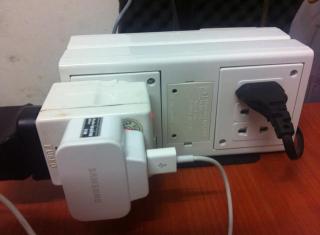
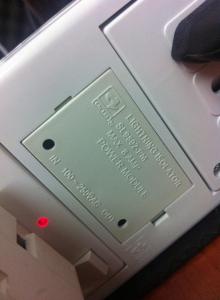
I actually got it from a hardware store at the ground floor of your PJ HQ... Here r some picts.
Attached Image Attached Image
» Click to show Spoiler - click again to hide... «


Nope, power outlet 1 & 2 is about 7 meters apart, separated by open wall.
Okei, since LAN needs protection & i prefer to trail a socket from power outlet 2, can recommend me some products?

This post has been edited by andrew9292: Aug 1 2014, 12:33 PM
TSgkl83
post Aug 1 2014, 08:19 AM

Look at all my stars!!
*******
Senior Member
8,377 posts

Joined: Nov 2004
QUOTE(andrew9292 @ Jul 31 2014, 11:06 PM)
I actually got it from a hardware store at the ground floor of your PJ HQ... Here r some picts.
Attached Image Attached Image

Is it a fake unit? Or some dealer specific customized unit? Or something a few years old which they preserved really well?
The packing and product looks extremely new, clean & excellent tho.
It only has 6 ports (3 x 3pin + 3 x 2pin).
If I bring to HQ, can you check?
If this model is was produced and genuine.. what is the shelf life of an isolator like this? How long has it been since stopped production?
(I'm assuming you are from CAL LAB / closely related, if you are just another trader let me know & pls ignore those question & skip to next, will remove the questions later)  notworthy.gif

Nope, power outlet 1 & 2 is about 7 meters apart, separated by open wall.
Okei, since LAN needs protection & i prefer to trail a socket from power outlet 2, can recommend me some products?
*

that is just a cover only. Please refer to the label stick on the side for the model name, 5 digits numeric and QC signatory.
i assumed that is IT pack come with 3x3pin, 2x2pin and RJ11 for modem protection

u may use extension cable before plug on cal-lab...
On top of than, for both BTU and laptop side u may use SD-4C for power and lan protection...
andrew9292
post Aug 1 2014, 12:28 PM

-/Livin' On A Prayer/-
*****
Senior Member
955 posts

Joined: Sep 2008
From: Petaling Jaya


QUOTE(gkl83 @ Aug 1 2014, 08:19 AM)
that is just a cover only. Please refer to the label stick on the side for the model name, 5 digits numeric and QC signatory.
i assumed that is IT pack come with 3x3pin, 2x2pin and RJ11 for modem protection

u may use extension cable before plug on cal-lab...
On top of than, for both BTU and laptop side u may use SD-4C for power and lan protection...
*
Model name: Twin Power Pack
5 digits: 11344
QC sign: Yes, got

No RJ11. Just 3 x 3pin + 3 x 2pin (total 6 socket).

PM me price for SD-4C, COD Centerpoint notworthy.gif
bad_heroes86
post Aug 4 2014, 01:08 AM

Getting Started
**
Junior Member
66 posts

Joined: Apr 2009

Hi,

Kindly advise which product to get for the below:

1) LED TV, astro decoder and modem router

2) av receiver+speaker, ps3 and HTPC

3) Desktop PC with LAN connected

4) Refrigerator

Can COD cyberjaya? Thank you.

121 Pages « < 87 88 89 90 91 > » Top
Topic ClosedOptions
 

Change to:
| Lo-Fi Version
0.0383sec    0.47    6 queries    GZIP Disabled
Time is now: 3rd December 2025 - 07:04 AM