or any panorama apps recommended?

This post has been edited by navilink: Apr 20 2013, 05:42 PM
○ Galaxy Nexus V22 ○, Stock Android Master Race
|
|
 Apr 20 2013, 05:41 PM Apr 20 2013, 05:41 PM
Return to original view | Post
#1
|
 
All Stars
10,783 posts Joined: Jan 2003   
|
can someone teach how to use the Photo Sphere.. sometimes always the centre part is out of place..
or any panorama apps recommended? This post has been edited by navilink: Apr 20 2013, 05:42 PM |
|
|
|
|
|
Apr 21 2013, 10:51 AM
Return to original view | Post
#2
|
|
All Stars
10,783 posts Joined: Jan 2003
|
QUOTE(IwanAGP @ Apr 20 2013, 06:44 PM) You shot the photosphere in Portrait orientation right? This is one of the issue I found with Galaxy Nexus's photosphere. Same problem does not exist in Nexus 4 (or it does? Not so sure) i took it in landacape mode.. so there's a bug la.. haizzz.. cool feature but when stitched up is crap output.. i'll try the sphereshare then..Description of problem: 1) Take photosphere in portrait mode. Notice that after the first shot, keep you hand steady (don't move), the view will "automatically" moves up. Something like that gyroscope is moving up on its own. 2) Even after stitch, photosphere taken in portrait mode will always have the centre part misaligned. Tested N-times. Once in a blue moon the gyroscope will behave and give a nicely stitched pic. Maybe 1 out of 100. Got myself only few acceptable photosphere taken in portrait orientation 3) Problem with taking photosphere in landscape orientation -- you can't create a FULL sphere. It'll always get chopped off the top and bottom. If a photosphere is taken in portrait orientation, 5 pictures taken vertically from top to bottom will cover 180 degree from the sky to the ground. Landscape orientation will chop off, leaving a black "hole" at top and bottom even if you take 5 photos vertically I got no idea how to fix this thing. Another problem with 4.2's camera is that viewfinder is not 100%. This problem exists in both Galaxy Nexus and also Nexus 4. Picture viewed on the display is just a fraction of the picture taken. Two side at the longer ends (left and right of the phone) got chopped off in the viewfinder, shows up in final picture. No idea how to solve. But you can try to take pictures in landscape orientation instead. http://sphereshare.net/#!/s/0e8620fd9f...0be82358e7e45f4 Taken by me, at Pavilion at 8.30++ pm. Imperfections here and there but it's fun to take a picture like this  Oh... And this is sphereshare. It's an app by itself in playstore. You guys can try it out. I uploaded anonymously  Note that taking photosphere at night is MUCH harder as you need to "pause" at each location for the picture to be taken. In daylight, you can basically rotate your phone without stopping as the shutter speed required is must shorter. ______________________________________________________________________________________ Now on Bigfoot 1.1.3 + Lean 6.4 On WiFi with PGM 1.1%/hour  Greenified most of the apps. Only social apps still allowed to run are facebook/fb messenger and whatsapp. Hehe... But 1.1% not that good actually Oh crap... 1.1%/hr is with 512MHz GPU  Forgot to change back Forgot to change back  |
|
|
Apr 21 2013, 01:10 PM
Return to original view | Post
#3
|
|
All Stars
10,783 posts Joined: Jan 2003
|
QUOTE(IwanAGP @ Apr 21 2013, 12:41 PM) Sphere share is just an app or platform for sharing photosphere. It is not an alternative to photosphere. ya just found out it's a sharing platform.. no other apps recommended to take panorama photos?I can take in landscape mode without problem. Try few times before giving up on it. I experimented a lot before getting some descent photosphere, not without flaws but usable. Enjoy the process more. |
|
|
Apr 21 2013, 08:11 PM
Return to original view | Post
#4
|
|
All Stars
10,783 posts Joined: Jan 2003
|
QUOTE(springfall @ Apr 21 2013, 01:14 PM) stock does it quite well. SO TRUE.. i captured a sphere photo in a nice location but my friend's heads are gone only proplem is headless man/women or bodyless people in the picture. will probably draw an illustration later on how to photosphere better from experience. but ya gota w8 a while cuz im going out soon.  QUOTE(IwanAGP @ Apr 21 2013, 03:16 PM) Anyway, this way of taking photosphere gives me very usable result for 360 degree. If you want just to do 180 degree or less, you can just move your phone without moving body. The thing is... Don't move your arm up and down. Arm is fixed, What's rotating up and down is just the phone. thanks for the tips of not moving arms too much.. i'll try that!My "tips" |
|
|
Apr 28 2013, 12:58 AM
Return to original view | Post
#5
|
|
All Stars
10,783 posts Joined: Jan 2003
|
Installed Lean Kernel 6.4.. yeah.. bit too late into the scene..
I'm playing around and quite interested with the Color Multiplier option.. as in the link, he suggested Red-229, Green-262, Blue-307.. but i read somewhere that setting colors about 200 may spoilt your screen.. is it true? http://rootzwiki.com/topic/20135-kernel-color-tweaks/ |
|
|
May 1 2013, 05:33 PM
Return to original view | Post
#6
|
|
All Stars
10,783 posts Joined: Jan 2003
|
also thinking of getting a USB OTG.. solves the 16GB storage.. i tend to install a lots of apps and games.. 200+
i can't install A Bard's Tale which costs 3GB+++!!! |
|
|
|
|
|
May 1 2013, 11:19 PM
Return to original view | Post
#7
|
|
All Stars
10,783 posts Joined: Jan 2003
|
QUOTE(IwanAGP @ May 1 2013, 08:06 PM) I tried playing 22GB Full HD video straight from HDD. No problem. I normally transfer large files through pen drive. ROM too, sometimes. Since TWRP can straight flash from OTG. i mean my gnex sd contain just games and apps.. all medias and others realted can put the usb.. now trying hard to squeeze in just 1 movie.. I don't see how USB OTG can solve your issue, I mean to install game. OTG helped me by letting me to do nandroid straight to pen drive and let me keep some ROM to flash in pen drive. I do keep Titanium Backup file to my pen drive once in a while. What else? Hmm... Unless you sort of like mapping your OTG in USB Storage to local directory then possibly will work. I know ppl do this for lower internal memory phone to map external SD and use as internal SD so that all data can be stored on that SD card even though it's external SD. |
|
|
May 2 2013, 05:59 PM
Return to original view | Post
#8
|
|
All Stars
10,783 posts Joined: Jan 2003
|
QUOTE(nickcct @ May 2 2013, 10:50 AM) Lean Kernel 6.5 is up, for those who using Lean Kernel. noob question.. should i uninstall previous Lean Kernel version, or just flash onto it? |
|
|
May 2 2013, 06:02 PM
Return to original view | Post
#9
|
|
All Stars
10,783 posts Joined: Jan 2003
|
QUOTE(IwanAGP @ May 2 2013, 05:59 PM) I just flash over it. How to uninstall? Flash stock kernel? that's why it's a noob question  so even let say i want to use franco kernel suddenly, i just overwrite it on top of lean kernel currently i'm using? so even let say i want to use franco kernel suddenly, i just overwrite it on top of lean kernel currently i'm using? |
|
|
May 3 2013, 06:17 PM
Return to original view | Post
#10
|
|
All Stars
10,783 posts Joined: Jan 2003
|
QUOTE(shirley_andy @ May 3 2013, 05:13 PM) Any interesting apps to play with? lol finding new stuff to do on my gnex, done with playing freq and voltage, done with playing with customisable launchers, done with custom widget with UCCW.. Anyway does PGM work with stock rom franco kernel? Anyway bump into a weird problem recently, was using setcpu, using a profile which limit 195~384Mhz when screen off, but everytime I have it back on, it still remain limited to 384, only when I open setcpu apps again then it'll audotmatically disable the limiter as it should be. Tried reinstalling the apps didn't work, so now switched to other CPU management apps. QUOTE(springfall @ May 3 2013, 06:02 PM) i tot nexus as galaxy nexus.. but too bad... and springfall posted it |
|
|
May 4 2013, 10:42 AM
Return to original view | Post
#11
|
|
All Stars
10,783 posts Joined: Jan 2003
|
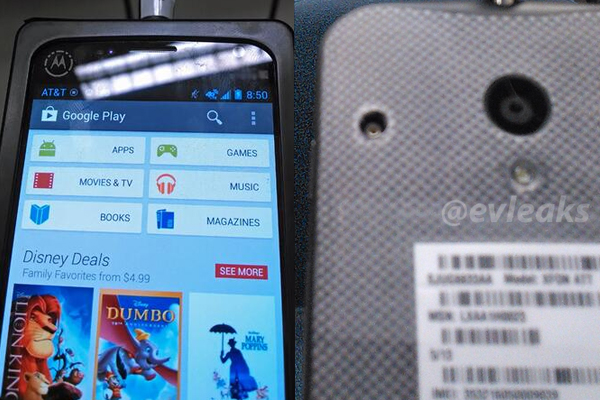
QUOTE(djlah @ May 4 2013, 08:36 AM) on... no. not so nice if true. they actually put it in some casing.. i saw another picture leak, it's almost feel like another nexus.. nexus-y Motorola X Phone pics leaked » Click to show Spoiler - click again to hide... «  waiting for Motorola Nexus 5 waiting for Motorola Nexus 5   |
|
|
May 4 2013, 10:48 AM
Return to original view | Post
#12
|
|
All Stars
10,783 posts Joined: Jan 2003
|
QUOTE(IwanAGP @ May 4 2013, 02:12 AM) TWRP!!!! damn.. and i just flashed CWM recently.. now need to figure how to flash TWRP over CWM.. Nandroid to OTG and direct flash from OTG is very awesome!! |
|
|
May 5 2013, 03:25 PM
Return to original view | Post
#13
|
|
All Stars
10,783 posts Joined: Jan 2003
|
QUOTE(djlah @ May 5 2013, 11:17 AM) 10days count down to Google I/O. 4.3 pls fix the photosphere bug pls.. really nice to use but can't stitched up correctly no surprise, gnex included for Android 4.3 update, found in server log updated. |
| Change to: |  0.0520sec 0.0520sec
 0.67 0.67
 7 queries 7 queries
 GZIP Disabled GZIP Disabled
Time is now: 16th December 2025 - 08:17 AM |
 Quote
Quote