Outline ·
[ Standard ] ·
Linear+
Samsung Galaxy Note II LYN's Official Thread V18, FEB OTA 4.1.2 XXDMB4 - NO CHANGELOGS
|
maswan86
|
 Mar 6 2013, 05:52 PM Mar 6 2013, 05:52 PM
|
Getting Started


|
Guys need some advice, got this issue about the "Choose input method-Samsung keyboard".Im quite heavy on sms and after sometime time this issue will appear at my status bar and after choosing>samsung keyboard-set up input methods>untik google voice typing, the keyboard icon at status bar will gone and after sometime this issue will appear again. Any advice?? happen after 1st update 4.1.2.
|
|
|
|
|
|
maswan86
|
Mar 6 2013, 06:06 PM
|
Getting Started
|
QUOTE(antt00 @ Mar 6 2013, 05:58 PM) The keyboard icon gone is because u got no keyboard install and when u untick google voice ONLY the samsung keyboard is left. So no point having that icon. Im just using android own keyboard only. So there nothing i can do to solve this issue? Edit: the pic as i attach This post has been edited by maswan86: Mar 6 2013, 06:16 PM Attached thumbnail(s)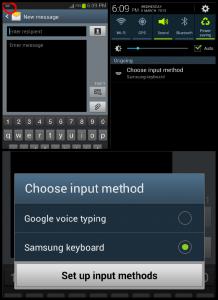
|
|
|
|
|
|
maswan86
|
Mar 6 2013, 06:30 PM
|
Getting Started
|
QUOTE(mtgh @ Mar 6 2013, 06:26 PM) Any bros know what is Latest price for sme unit Can view here Mudah.my good price and good reputation selling Ori set  beware of many so call "KOREA set" out there |
|
|
|
|
|
maswan86
|
Mar 6 2013, 06:40 PM
|
Getting Started
|
QUOTE(fruitie @ Mar 6 2013, 06:33 PM) I never trust Mudah.my, too many con cases. Anyway, directd is also on LYN. i also not quite trusted ppl at mudah.my but just recommended Directd shop by mudah.my coz quite easy to view all the model and price anyway any 1 can help with my issue?? quite annoying each time need to untick the google voice |
|
|
|
|
|
maswan86
|
Mar 6 2013, 06:47 PM
|
Getting Started
|
QUOTE(fruitie @ Mar 6 2013, 06:43 PM) I don't understand what you were trying to explain...  Make your Samsung keyboard default? Then untick Google Voice? Nope the issue is keep repeating after i untick the "google voice typing" and the icon will gone..after sometime using sms or other app by using the keyboard the icon (red color) will appear again at my notification bar and agane will do the same thing  This post has been edited by maswan86: Mar 6 2013, 06:48 PM Attached thumbnail(s) This post has been edited by maswan86: Mar 6 2013, 06:48 PM Attached thumbnail(s)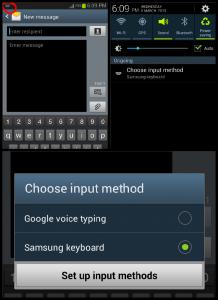
|
|
|
|
|
|
maswan86
|
Mar 6 2013, 06:58 PM
|
Getting Started
|
QUOTE(fruitie @ Mar 6 2013, 06:52 PM) Please screenshot your language and input settings page here. If this issue happen again the "Google voice typing" will tick by it self again Attached thumbnail(s)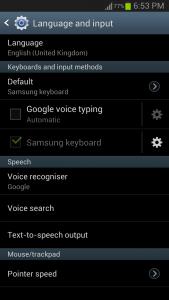
|
|
|
|
|
|
maswan86
|
Mar 6 2013, 07:31 PM
|
Getting Started
|
QUOTE(fruitie @ Mar 6 2013, 07:06 PM) He meant, the issue will persist after a while and Google Voice will be auto-ticked again without him ticking. Did I get it correctly, maswan86? Yerp 100% correct !!! hehe im abit cerewet  if got many icon on my notification bar, that why need advice from you guys regard this issue  sorry for my bad English |
|
|
|
|
|
maswan86
|
Mar 6 2013, 07:43 PM
|
Getting Started
|
QUOTE(fruitie @ Mar 6 2013, 07:41 PM) To be honest, it didn't happen to me even when I was on 4.1.1 or 4.1.2 now. yerp not happen to me also when on 4.1.1 but after updated to 4.1.2 this issue come up, that why need to share here to check if this issue is normal or not |
|
|
|
|
|
maswan86
|
Mar 6 2013, 07:50 PM
|
Getting Started
|
QUOTE(fruitie @ Mar 6 2013, 07:48 PM) Not normal, at least to me. Ayakk  just for info mine is SME set, always hoping last couple of update will fix this issue but still the same sorry for the trouble make you guys hehe |
|
|
|
|
|
maswan86
|
Mar 6 2013, 07:56 PM
|
Getting Started
|
QUOTE(fruitie @ Mar 6 2013, 07:52 PM) Then just flash 4.1.2 from PC Odin. So need to download from malaysia sammy 4.1.2? Im now using DMB4 Feb 12 version |
|
|
|
|
|
maswan86
|
Mar 6 2013, 08:00 PM
|
Getting Started
|
QUOTE(fruitie @ Mar 6 2013, 07:57 PM) I'm not sure if that is updated in Sam Mobile or you can simply flash to other country's 4.1.2 Sorry been on custom ROM for some time, didn't bother about official update unless it is 4.2.1  Haha DMB4 is for newbie right??haha anybody want to Racun me to change to custom rom? but so lazy to flash to custom rom like my old SGS  |
|
|
|
|
|
maswan86
|
Mar 6 2013, 08:49 PM
|
Getting Started
|
QUOTE(antt00 @ Mar 6 2013, 08:34 PM) Home screen sharing time [attachmentid=3334020] Nice +1  |
|
|
|
|
|
maswan86
|
Mar 7 2013, 12:32 AM
|
Getting Started
|
QUOTE(fruitie @ Mar 7 2013, 12:29 AM) Yeay 10 more minutes for latest Du@lNote.  wow that sure 1 fast transfer rate...using Unifi?package?  |
|
|
|
|



 Quote
Quote

 0.0472sec
 0.52
0.52
 7 queries
 GZIP Disabled