Welcome Guest ( Log In | Register )

Bump Topic Topic Closed RSS Feed
132 Pages « < 38 39 40 41 42 > » Bottom

Outline · [ Standard ] · Linear+

 Samsung Galaxy Note II LYN's Official Thread V18, FEB OTA 4.1.2 XXDMB4 - NO CHANGELOGS

views
     
benny888
post Feb 24 2013, 02:20 PM

Gadget Freak
Group Icon
Elite
27,801 posts

Joined: Jun 2007
From: Johor


QUOTE(off_shore @ Feb 24 2013, 11:40 AM)
Ok sure.

Firstly, I installed all the necessary drivers. Got it detected in Odin via download mode. I tried 3 custom recovery so far:

i) recovery-cwm-6.0.1.9-N7100
ii) philz_touch_4.35-n7100.tar
iii) recovery-twrp-2.3.2.3-N7100

I also used three different version of Odin (3.04, 3.07 and lastly 1.85) I followed the instructions clearly stated in the website. Only Auto Boot and F.Reset Time are checked. I put the recovery image through PDA option and click start. It went well and said successfully, the bar turned to green and the phone auto restart. However, it didn't directly boot into recovery. Just went straight to Android and I checked through download mode, after I power it off for the first time after I flashed the recovery, the flash counter increased. System binary and status turned to "Custom". Sounds good. So I manually boot into recovery by volume up + home + power. Here, it will either flash and flicker the normal SGN N7100 boot screen and then turned off, OR.. It will boot to stock recovery where it stated Android Recovery 3e. I tried so many times with various methods and recoveries.

I even tried Galaxy N7100 toolkit. It's still the same. My current build number is XDMA6 (Malaysia) and I did enabled USB debugging via developer mode.   icon_question.gif  icon_question.gif
*
Why so leceh ???
Just do ONE only - start it off with CWM : Easiest use Chenglu method to flash it - read post #5 my blog post - GUARANTEED will work. ANY Odin version can be used and just stick to any one version
After you flash it , it will not auto boot to recovery mode but instead it will reboot phone. Check your recobvery status by pressing volup+power+home button
After you have successfully install CWM, than you can flash the TWRP zip under recovery mode to change to TWRP recovery

This post has been edited by benny888: Feb 24 2013, 02:22 PM
ckming21
post Feb 24 2013, 02:22 PM

Life Is Boring
*****
Senior Member
805 posts

Joined: Feb 2005


Any bro can introduce casing for note 2 . Prefer flip type with good quality
benny888
post Feb 24 2013, 02:28 PM

Gadget Freak
Group Icon
Elite
27,801 posts

Joined: Jun 2007
From: Johor


QUOTE(ckming21 @ Feb 24 2013, 02:22 PM)
Any bro can introduce casing for note 2 . Prefer flip type with good quality
*
I highly recommend MELKO . Buy GENUINE one as my first purchase was a fake from lelong.com !!!
Highly recommended seller : http://www.carrymobile.com/smartphone-cell...te-2-n7100.html


aspire2oo6
post Feb 24 2013, 02:52 PM

Banned
*********
All Stars
35,468 posts

Joined: Oct 2006

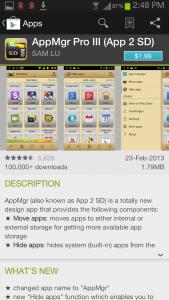
Guys anyone tried this app before does it work?


Attached thumbnail(s)
Attached Image
TSjoytest
post Feb 24 2013, 03:06 PM

Vox populi vox dei? Quot homines,tot sententiae
********
All Stars
13,188 posts

Joined: Dec 2011
From: 127.0.0.1


For an objective test of SDcard speeds used in cameras

http://www.pcpro.co.uk/features/380167/doe...-a-fast-sd-card

It should also provide an indicative performance for smartphone use in the last paragraph.

This post has been edited by joytest: Feb 24 2013, 03:10 PM
kevintth
post Feb 24 2013, 03:22 PM

Regular
******
Senior Member
1,618 posts

Joined: Jun 2008


QUOTE(aspire2oo6 @ Feb 24 2013, 02:52 PM)
Guys anyone tried this app before does it work?
*
tried before Apps2SD... not working on samsung galaxy phone.. .

Replied by the dev

QUOTE
Sam Lu replied on February 16, 2013
Note II device removes the function of moving apps to SD from Android system so the moving app function cannot be supported. Please read FAQ 9 from http://android.a0soft.com/?url=App2SD.htm for details. This is configured by manufacture. Nothing developers can do about this.


stupid sammy... sad.gif

This post has been edited by kevintth: Feb 24 2013, 03:25 PM
klmc
post Feb 24 2013, 03:30 PM

On my way
****
Senior Member
663 posts

Joined: Apr 2005


looks like note 3 is too big for me ...
might be good as an ebook reader replacement though.

http://www.engadget.com/2013/02/23/samsung...note-8-preview/
fruitie
post Feb 24 2013, 03:34 PM

Rise and Shine
Group Icon
Staff
72,820 posts

Joined: Sep 2005
From: KUL

QUOTE(klmc @ Feb 24 2013, 03:30 PM)
looks like note 3 is too big for me ...
might be good as an ebook reader replacement though.

http://www.engadget.com/2013/02/23/samsung...note-8-preview/
*
This is not Note 3.
This is Note 8.
antt00
post Feb 24 2013, 03:38 PM

RescuE
********
All Stars
10,873 posts

Joined: Apr 2009
New simplistic battery are released.
kevintth
post Feb 24 2013, 03:46 PM

Regular
******
Senior Member
1,618 posts

Joined: Jun 2008


QUOTE(klmc @ Feb 24 2013, 03:30 PM)
looks like note 3 is too big for me ...
might be good as an ebook reader replacement though.

http://www.engadget.com/2013/02/23/samsung...note-8-preview/
*
hhahaha.... this is enlarged version of Note 2 ... not note 3 .. it is note 8 ... samsung samsung why put the same series name la... should stick with the name of NOTE for phablet and tab for any model bigger than 7'
tot31
post Feb 24 2013, 03:52 PM

I DON'T GIVE A DAMN
*******
Senior Member
2,451 posts

Joined: Jan 2003
From: GOD's Land


kevintth, about your 31% battery status bug...seems mine is ok


Attached Image
rammsteind
post Feb 24 2013, 03:59 PM

New Member
*
Junior Member
28 posts

Joined: Feb 2010
QUOTE(rammsteind @ Feb 24 2013, 12:32 PM)
Quote

"RESET_BY_SYSTEM

Please get ril log

/data/log/dumpstate_RESET_BY_SYSTEM_date.log "

After I rebooted,, the message above appeared. Anybody knows what it means? It did not appear after I rebooted again. Thanx in advance.
*
what does it mean?
klmc
post Feb 24 2013, 04:19 PM

On my way
****
Senior Member
663 posts

Joined: Apr 2005


hehh ok ... not note 3 then
aspire2oo6
post Feb 24 2013, 04:27 PM

Banned
*********
All Stars
35,468 posts

Joined: Oct 2006

QUOTE(kevintth @ Feb 24 2013, 03:46 PM)
hhahaha.... this is enlarged version of Note 2 ... not note 3 .. it is note 8 ... samsung samsung why put the same series name la... should stick with the name of NOTE for phablet and tab for any model bigger than 7'
*
I think samsung did well with the names just they dont educate people well at first i was confuse but after some research

tab are all tablets without s-pen

Note are series from phone to tablet with s-pen but they mess up with the names they should just put note 5 since note 2 is 5.5"

This post has been edited by aspire2oo6: Feb 24 2013, 05:01 PM
aspire2oo6
post Feb 24 2013, 04:27 PM

Banned
*********
All Stars
35,468 posts

Joined: Oct 2006

QUOTE(kevintth @ Feb 24 2013, 03:22 PM)
tried before Apps2SD... not working on samsung galaxy phone.. .

Replied by the dev
stupid sammy...  sad.gif
*
thank you ill wait then
kevintth
post Feb 24 2013, 04:49 PM

Regular
******
Senior Member
1,618 posts

Joined: Jun 2008


QUOTE(aspire2oo6 @ Feb 24 2013, 04:27 PM)
I think samsung did well with the names just they dont educate people well at first i was confuse but after search research

tab are all tablets without s-pen

Note are series from phone to tablet with s-pen but they mess up with the names they should just put note 5 since note 2 is 5.5"
*
yea first I was so confuse too with the Tab 10.1 because of the S-Pen they named it the Note, 10.1 ...

I wonder after this.. Note 1,2,3,4,5, ... what they are gonna name their new product after this.
honamd77
post Feb 24 2013, 05:07 PM

Enjoy Your Life Before You Die
******
Senior Member
1,008 posts

Joined: Oct 2007
From: Capital Square Kuantan


QUOTE(tot31 @ Feb 24 2013, 03:52 PM)
kevintth, about your 31% battery status bug...seems mine is ok
» Click to show Spoiler - click again to hide... «

*
» Click to show Spoiler - click again to hide... «

what application ?.screen lock off ? & what launcher using ?.

This post has been edited by honamd77: Feb 24 2013, 05:07 PM
Jmnote
post Feb 24 2013, 05:12 PM

Getting Started
**
Junior Member
76 posts

Joined: Dec 2012


QUOTE(kevintth @ Feb 24 2013, 04:49 PM)
yea  first I was so confuse too with the Tab 10.1  because of the S-Pen they named it the Note, 10.1 ...

I wonder after this.. Note 1,2,3,4,5, ... what they are gonna name their new product after this.
*
You may argue but I think Samsung naming scheme differentiate Roman with Arabic.

We are using Galaxy Note series, for the second generation it is Galaxy Note II. So for the eight generation, it will be Galaxy Note VIII. Look into Galaxy S series, the latest rumours indicated the new one will be Galaxy S IV.
XeactorZ
post Feb 24 2013, 05:35 PM

♥ PandaDog ♥
*********
All Stars
31,608 posts

Joined: Aug 2010
QUOTE(kevintth @ Feb 24 2013, 03:22 PM)
tried before Apps2SD... not working on samsung galaxy phone.. .

Replied by the dev
stupid sammy...  sad.gif
*
is for phone which running 4.0 and above not working laugh.gif
waveweaver
post Feb 24 2013, 05:44 PM

★★Android & Apple★★
********
All Stars
13,192 posts

Joined: Jul 2011
From: Middle of Avalon
QUOTE(kevintth @ Feb 24 2013, 03:46 PM)
hhahaha.... this is enlarged version of Note 2 ... not note 3 .. it is note 8 ... samsung samsung why put the same series name la... should stick with the name of NOTE for phablet and tab for any model bigger than 7'
*
Once it has an SPen then it's Note Series no matter how small or big. But yes..Samsung should call it Note 8"..same like Note 10"..instead of Note 3 doh.gif

132 Pages « < 38 39 40 41 42 > » Top
Topic ClosedOptions
 

Change to:
| Lo-Fi Version
0.0350sec    0.62    6 queries    GZIP Disabled
Time is now: 10th December 2025 - 02:14 AM