Outline ·
[ Standard ] ·
Linear+
LTE for iPhone 5 , 1800MHz band is supported in Malaysia!
|
Heero Yuy
|
 Apr 9 2013, 07:42 PM Apr 9 2013, 07:42 PM
|

|
QUOTE(christcwl9 @ Apr 9 2013, 07:19 PM) Now after updated to Maxis 14.1 , our phone keep on be on 3G mode even though you turn off your cellular data. For those who are in a low 3G coverage area, you might see an increase in battery consumption as well as lower quality of call  Really hope Maxis update a new carrier setting to enable us to toggle between 2g and 3g/4g What? Really? Anyone else having this issue? |
|
|
|
|
|
Heero Yuy
|
Apr 9 2013, 08:35 PM
|
|
|
QUOTE(christcwl9 @ Apr 9 2013, 07:46 PM) Yea ... You will not notice if you are in a strong 3G coverage area. If for me, my 3G bar is always around 3 bars. So i know im on 3G network because even when i turn off cellular data, it shows 3 bars instead of full bars. Previously before updating to 14.1, it will auto turn back to 2g What about the battery life? Because 3G network consumes, like, 5x more than when the phone is on 2G network. As long as it doesn't affect battery life, I'm fine with it. |
|
|
|
|
|
Heero Yuy
|
Apr 10 2013, 01:20 AM
|
|
|
QUOTE(ronnie @ Apr 9 2013, 10:31 PM) Do we need to upgrade to iOS 6.1.3 to get the 14.1 Carrier Update ? Dont need, I am running 6.1.2 and i got the prompt for the carrier update as well. |
|
|
|
|
|
Heero Yuy
|
Apr 10 2013, 09:46 AM
|
|
|
Tested in Kota Damansara, SEGi University. Pretty impressive, considering almost can't get any Internet connection here prior to this.
|
|
|
|
|
|
Heero Yuy
|
Apr 10 2013, 09:48 AM
|
|
|
Tested in Kota Damansara, SEGi University. Pretty impressive, considering almost can't get any Internet connection here prior to this. This post has been edited by Heero Yuy: Apr 10 2013, 09:49 AM Attached thumbnail(s)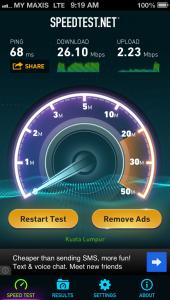
|
|
|
|
|
|
Heero Yuy
|
Apr 10 2013, 10:29 AM
|
|
|
For people who wants to switch back to 2G, here's how (only can work if your device is jailbroken)
1. Download the Cydia tweak "NCSettings"
2. Go to Settings > NCSettings > Data and select 3G
3. Now go to Settings > General > Cellular and turn of LTE. Your phone will enter 3G mode now
4. Now slide down you notification center to reveal NCSettings. And tap on the 3G toggle to turn 3G off. Now you phone will enter 2G mode and you will see the "E" sign beside your Carrier logo.
This post has been edited by Heero Yuy: Apr 10 2013, 10:29 AM
|
|
|
|
|



 Quote
Quote
 0.0298sec
 0.51
0.51
 7 queries
 GZIP Disabled