

 Mar 30 2006, 01:47 PM, updated 19y ago


This guide tested on Yahoo! Messenger With Voice version 7.0
Some of you may wonder how to delete this custom message.Whenever you type the new message, the old one will be replaced.But, there is no option from messenger itself to remove it.Example like this one :
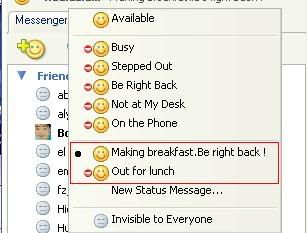
Well, there is a solution for this.
1. Go to Start menu, click Run.Type Regedit
2. Next browse the registry hive.It's should be located here :
HKEY_CURRENT_USER\Software\yahoo\pager\profiles\<YM_id>\Custom Msgs
Note: YM id is your messenger id
As you can see from the registry itself.We want to get rid of the underline msg
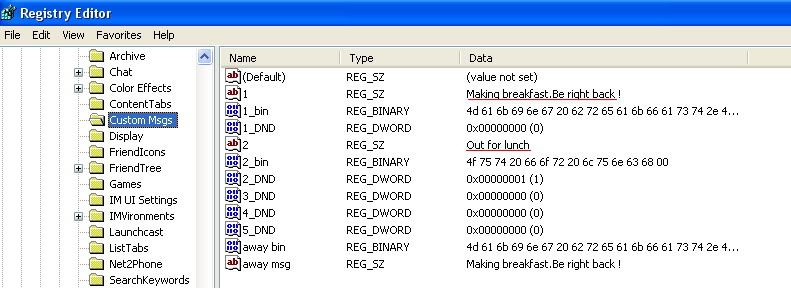
But wait ! Simply delete that key won't be enough.You NEED to DELETE ALL KEYS as per image below.If you failed to comply, the custom message will be gone but leaving A BLANK SPACE.Proceed to delete the keys :
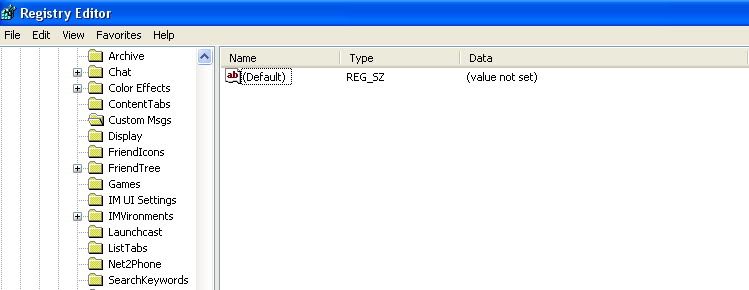
After you delete the key, launch the messenger back to verify the deletion :
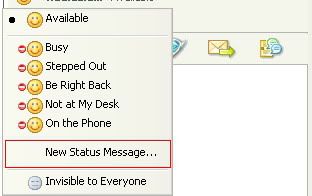
Tadaa !Look ma, no more custom message.
UPDATE !!
Tired to launch regedit & browse the tree to delete those key ?There is a simple way.By creting a *.REG file or *.INF file.I'll show you how to create *.REG file :
1. Launch Notepad
2. Copy these code into the Notepad
CODE
Windows Registry Editor Version 5.00
[-HKEY_CURRENT_USER\Software\yahoo\pager\profiles\<put_your_YM_id_here>\Custom Msgs]
[-HKEY_CURRENT_USER\Software\yahoo\pager\profiles\<put_your_YM_id_here>\Custom Msgs]
Note: Tested for WindowsXP.Remember to replace <put_your_YM_id_here> with your own YM id.
3. Save with any filename you like.E.g : "Delete YM custom msg.reg".Remember to select "All Files". (It is important to add .REG after the filename)
4. Just import that *.REG file each time you want to delete the YM custom msg :
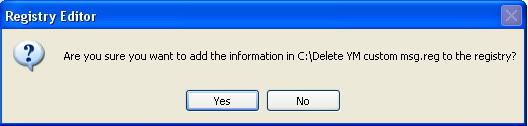
5. Click "Yes" & that key will be deleted
This post has been edited by keyz: Jan 8 2007, 07:47 PM
 Quote
Quote
 0.0174sec
 0.76
0.76
 5 queries
 GZIP Disabled