Outline ·
[ Standard ] ·
Linear+
Samsung Galaxy Note II LYN's Official Thread V17, FEB OTA 4.1.2 XXDMB2 - NO CHANGELOGS
|
nehalem176
|
 Feb 14 2013, 07:13 PM Feb 14 2013, 07:13 PM
|

|
QUOTE(fruitie @ Feb 14 2013, 07:08 PM) Sorry but what's GM? I read through the page, the steps are crazily detailed!  . Yes, it is clearly state for SGS3/i9300 but this app also compatible with Note2/N7100. Im not sure latest perseus support this FD toggle because last time I use perseus shown that 'incompatible'  |
|
|
|
|
|
nehalem176
|
Feb 15 2013, 10:17 AM
|
|
|
QUOTE(alexng2208 @ Feb 15 2013, 08:55 AM) could you please help me out again.. i'm suffering from 15% loss overnight https://www.dropbox.com/s/uc9m47kv1d984tx/B...4_180605060.txtHi there, can you provide IDLE dumpfile around 4 hours. Easy fo me to identify the 'culprit'. From this current dumpfile roughly i can see » Click to show Spoiler - click again to hide... « MediaScannerService (Media): 56 m 41 s (3401 s) Count:49 5.1%
AudioOut_2 (1013): 31 m 42 s (1902 s) Count:70 2.9%
*sync*_com.android.contacts_Account {name=EM, type=com.google} (Google Services): 31 m 24 s (1884 s) Count:1150 2.8%
EM/android_talkb14196c56e7b (Google Services): 15 m 9 s (909 s) Count:278 1.4%
StartingAlertService (Calendar): 14 m 50 s (890 s) Count:218 1.3%
GTALK_ASYNC_CONN_com.google.android.gsf.gtalkservice.AndroidEndpoint (Google Services): 14 m 8 s (848 s) Count:643 1.3%
jp.naver.line.android (jp.naver.line.android.LINE): 8 m 13 s (493 s) Count:1309 0.7%
Mediascanner
- Delete your corrupted thumbnails in /sdcard/android/data/com.sec.android.gallery3d, /sdcard/android/data/com.android.providers.media, /sdcard/DCIM/.thumnails. In extcard as well, delete if applicable.
*sync*_com.android.contacts_Account {name=EM, type=com.google} (Google Services): 31 m 24 s (1884 s)
- never had this wakelock. did you sync your contact?
AudioOut_2 (1013): 31 m 42 s (1902 s) Count:70 2.9%
- disable any touch/beep sound which you think unnecessary
EM/android_talkb14196c56e7b
- I think related to talkback service. disable/remove it
StartingAlertService (Calendar): 14 m 50 s (890 s) Count:218 1.3%
- any calendar apps? disable in startup with autostarts app or any similar apps.
GTALK_ASYNC_CONN_com.google.android.gsf.gtalkservice.AndroidEndpoint (Google Services): 14 m 8 s (848 s) Count:643 1.3%
- sign out your talk and i dont think you can 100% disable this app since it's related to gsf (google service framework) have to use autostarts app for more details to disable it.
jp.naver.line.android (jp.naver.line.android.LINE): 8 m 13 s (493 s) Count:1309 0.7%
- line... can't help if you preferred this service. I know got fancy emoticon and stickers but if you want reduce wakelock, disable/remove it
|
|
|
|
|
|
nehalem176
|
Feb 15 2013, 12:02 PM
|
|
|
QUOTE(fruitie @ Feb 15 2013, 11:49 AM) nehalem176Based on your recommendation yesterday, i have reinstalled again Fast Dormancy Toggle and I have disabled it. Am I doing the right thing? And I checked my settings>battery, my phone is still awake quite frequent despite my screen was off... Based from my previous reply, I did mentioned to enable network Stats in BBS>Setting>Dumpfile>Please check Network stats. If possible, alarm stats as well. need to analyze your fresh IDLE dumpfile. I recommend full charged your phone then leave around 4 hours (Don't Touch it  ) then hit dumpfile and stick it here. from idle status, easily to find the 'culprit' which running background  |
|
|
|
|
|
nehalem176
|
Feb 15 2013, 03:13 PM
|
|
|
QUOTE(chteh0721 @ Feb 15 2013, 12:40 PM) i have this issue after the dlk7 firmware, happened across all the custom rom, flash to stock rom and it appears back to normal. after further checking, find out the media scanner keep on running at the background, google it found out that memory card might be one of the problem. i reformat my memory card and now keep on flash different rom every 2-3 days and the problem seems dissapeared. I just provide the fastest way to fix mediascanner instead of reformat the whole content in memory card |
|
|
|
|
|
nehalem176
|
Feb 15 2013, 05:33 PM
|
|
|
QUOTE(suntzulee @ Feb 15 2013, 05:27 PM) tot31 YOU ARE THE MAN!!!! splendid awesome guide & patient...wanna hug you if you r in frontbof me. Tq, tq bro.....I did it...woohoo....!!! You're too happy. now the world can see your imei and serial number This post has been edited by nehalem176: Feb 15 2013, 05:35 PM |
|
|
|
|
|
nehalem176
|
Feb 16 2013, 11:55 AM
|
|
|
QUOTE(fruitie @ Feb 16 2013, 11:29 AM) nehalem176 Please help to check out this BBS file. My phone woke up so many times.  (com.facebook.katana.Facebook): 234.0 KBytes 61.5% Will you consider on Friendcaster or Fast for Facebook Beta as an alternative app?
uninstall current facebook and install alternative facebook app and see how it's influence your battery lifeAlarms: 178, Intent: android.intent.action.TIME_TICK Other apps use it to wake up on specific times or intervals,
for instance you have a 'weather widget' that needs updating every 30 min or an application that checks your location every x min etc.com.google.android.gsf (): Wakeups: 51 Alarms: 2, Intent: com.google.android.intent.action.GTALK_RECONNECT Alarms: 1, Intent: com.google.android.intent.action.SEND_IDLE Alarms: 32, Intent: com.google.android.intent.action.MCS_HEARTBEAT Signout from talk and disable this app. After you disable this app,
gsf (google service framework) will still trigger this alarm and you might need 3rd party apps to completely disable this 'unwanted' alarm wakeupcom.google.android.apps.maps (): Wakeups: 32 Can't help much since google map really annoying with 'unwanted'
alarm wake unless you follow this step to 'silence' the map HERE |
|
|
|
|
|
nehalem176
|
Feb 16 2013, 12:04 PM
|
|
|
QUOTE(fruitie @ Feb 16 2013, 12:00 PM) Thanks for the analysis. Actually I noticed l2 hsic that drains my battery the most. I'm actually reading on some discussions now. As for Google Talk, I don't even have this app installed. Already deselected it when I installed this app as it came as an optional. that's mean gsf which intact with talk that triggered your alarm. sending this nonsense to their server. disable this gsf using 3rd party app such autostarts or gemini app. personally i preferred autostarts Intent: com.google.android.intent.action.MCS_HEARTBEAT |
|
|
|
|
|
nehalem176
|
Feb 16 2013, 12:29 PM
|
|
|
QUOTE(fruitie @ Feb 16 2013, 12:23 PM) Autostarts is a paid app, so I tried with Gemini App first.... Do you know how to stop that GSF?  worth to buy it. Even other app like viber, whatsapp, line and other app got it's own 'unwanted running' process. Since you wanted to try and error then gemini app will do. disable this 'unwanted' gsf: In autostarts: com.google.android.gsf.checkin.CheckinService In Gemini as per below screen: Menu>More>Expert Mode>Find Google Service Framework This post has been edited by nehalem176: Feb 16 2013, 12:50 PM Attached thumbnail(s)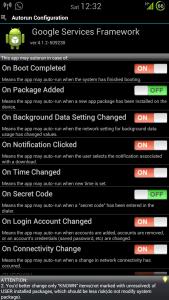

|
|
|
|
|
|
nehalem176
|
Feb 16 2013, 01:24 PM
|
|
|
QUOTE(fruitie @ Feb 16 2013, 01:16 PM) Thanks. I have followed and disabled the settings based on your screenshot.  today or tomorrow (up to you) stick your dumpfile here again and compare from previous result. to be honest, I don't think gemini app is reliable to disabling autorun process. not sure after a few update since i don't use that app. I installed that app for your reference only. hehe |
|
|
|
|
|
nehalem176
|
Feb 16 2013, 01:32 PM
|
|
|
QUOTE(fruitie @ Feb 16 2013, 01:25 PM) Which modem has better battery life? I'm currently using UBDMA3, does anyone know how to flash to another modem considering I could find a zip file. Using CWM, is that possible? It seems L2_HSIC issue could happen because of modem... hyg, http://forum.xda-developers.com/showpost.p...152&postcount=2from wicked rom thread. only 3 flashable zip modem |
|
|
|
|
|
nehalem176
|
Feb 16 2013, 10:35 PM
|
|
|
QUOTE(fruitie @ Feb 16 2013, 09:45 PM) nehalem176 Just to let you know I have flashed to dlk7 modem and was using the method you suggested by deactivating some of the options in Gemini but the phone still woke up. In the end, I changed back to default in Gemini and it solves the constant awake issue.  Looks like it's modem issue. Actually I don't trust in gemini app. the screenshot just for sake for your reference since it's free and after that I uninstalled it. Everything 'unwanted' process for certain app I disable in autostarts does not reflected at gemini app  I disable service checkin for GSF and disable FD, now my phone got better deep sleep overnight. I'll post my dump tomorrow morning to show you my result  It is a good news that you figured it out to minimize your awake time |
|
|
|
|
|
nehalem176
|
Feb 17 2013, 11:59 AM
|
|
|
fruitietwo battery stats result attached 8:58am and 10:51am. both since my last charged. Overnight 2% drop and 10:51am still 98%. 8:58am10:51amI don't have secril kwl, only l2_hsic kwl. In alarm, none Google Service Framework triggered.
|
|
|
|
|
|
nehalem176
|
Feb 17 2013, 01:09 PM
|
|
|
QUOTE(fruitie @ Feb 17 2013, 12:58 PM) Good. L2_HSIC, I really think it is caused by modem. known issue. I'm not so paranoid hunting down every single wakelock. Got another 'unwanted' battery drain from your device, anytime just stick your idle dumpfile again |
|
|
|
|
|
nehalem176
|
Feb 17 2013, 01:28 PM
|
|
|
QUOTE(fruitie @ Feb 17 2013, 01:15 PM) Sure, thanks to you! I left my phone charged overnight and only unplugged it just now. Am I right to say when the phone is charged, I shouldn't be seeing anything "awake" that period? It's blank when I charged the phone. I checked this via Settings>Battery you got that right  Phone always awake and no such thing phone will go into deep sleep while charging |
|
|
|
|
|
nehalem176
|
Feb 17 2013, 03:05 PM
|
|
|
QUOTE(Superman7 @ Feb 17 2013, 02:48 PM) Find the apps that you had previously uninstall. Usually found in your internal memory. Those that were uninstalled, manually delete the folder ("residuals") and then reboot. The deleted_wakelocks should then be gone. deleted wakelocks is when your wifi was on and after some time you disable wifi then bbs name that wifi connection you had before you turn wifi off "deleted wakelocks" sos |
|
|
|
|
|
nehalem176
|
Feb 17 2013, 03:25 PM
|
|
|
QUOTE(Superman7 @ Feb 17 2013, 03:09 PM) what I read was different. » Click to show Spoiler - click again to hide... « CODE deleted_wake_locks: Remember what I said above about force-stopping an app and deleting its cache and data before uninstalling it? This wakelock is why. It's the PowerManagerService for deleted apps. Once the app is gone, the wakelocks it caused suddenly become unknown to the system, so they get lumped in here. This number can also go up as the system "looks for" deleted apps and/or finds more wakelocks associated with them, but not dramatically.
To fix: Make sure to force close apps and wipe their cache and data before deleting. A reboot should eliminate the wakelock entirely. If it's still showing up, wipe phone cache and Dalvik. It may be vary If your deleted_wakelock trigger again then it may be cause by wifi. |
|
|
|
|
|
nehalem176
|
Feb 19 2013, 10:42 AM
|
|
|
QUOTE(fruitie @ Feb 19 2013, 09:12 AM) Exactly, they could get so many ideas from NDSL.  Anyway, new wakelock for me after I'm back to my PJ house... WLAN_RX_WAKE... nehalem137, any professional advice? Try and error by these method. disable ipv6 at your router then assign ip to your phone according to your phone mac address. Give feedback after done? |
|
|
|
|



 Quote
Quote
 0.0488sec
 0.19
0.19
 7 queries
 GZIP Disabled