Welcome Guest ( Log In | Register )

Bump Topic Topic Closed RSS Feed

Outline · [ Standard ] · Linear+

Unifi Official TM UniFi High Speed Broadband Thread V17

views
     
andrew9292
post Apr 29 2013, 10:46 PM

-/Livin' On A Prayer/-
*****
Senior Member
955 posts

Joined: Sep 2008
From: Petaling Jaya


QUOTE(harryfoo @ Apr 29 2013, 10:34 PM)
I might need a switch to split the connection to my PC and my NAS. Can I use my current ADSL router to get the job done without buying a new switch?
*
If your ADSL router can only use the telephone socket RJ-45 as it's WAN input then high probability that it will not work...

If your ADSL router can be configured to use a LAN Port / has a LAN Port for WAN input, and it can be set to recieve WAN as DHCP or Static IP Client other than the standard PPPoE, then it's possible...

After all your switch needs to be connected by ethernet cable right? Same goes with the ADSL router, if it can only use 'telephone socket' as it's input, then it's not possible.

This post has been edited by andrew9292: Apr 29 2013, 10:50 PM
andrew9292
post May 2 2013, 02:06 AM

-/Livin' On A Prayer/-
*****
Senior Member
955 posts

Joined: Sep 2008
From: Petaling Jaya


QUOTE(estara @ Apr 30 2013, 10:30 PM)
It's happening to all devices. My family members use Samsung phone, iPhone, iPad...all with the same result. I thought it could be because my neighbor renovated his house so the design of the house might block wifi reception but then I see the signal's strong as ever so it couldn't be that. I'm really baffled...I downloaded network analyzer but don't really know how to use it...
*
Hmm, using the network analyzer check which wireless network it can detect around you that is conflicting in frequency (channel), and change the channel in your router if possible. If all our devices support wireless N; change your router to N-only mode; then use WPA2-PSK with AES cipher only for best speed and stability... all else fails, reset the router to factory and reconfigure it from scratch if possible, if problem persists it's probably time for a new router
notworthy.gif
andrew9292
post Aug 21 2013, 01:55 AM

-/Livin' On A Prayer/-
*****
Senior Member
955 posts

Joined: Sep 2008
From: Petaling Jaya


Blocking ads at router level.
Just a quick tip for those whom are running OpenWrt or custom firmware on their routers.
If you managed to mod your firmware, you have almost no problems with this.

Basically it will pull an online blacklist and save it to the router. Any traffic to/from blacklist will then be denied.

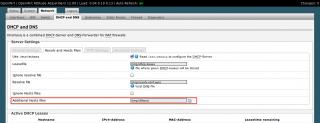
1. Go to Network > DHCP and DNS > Resolv and Host Files
2. Input "/tmp/dlhosts" without quotes under Additional Host Files. Save and apply changes.
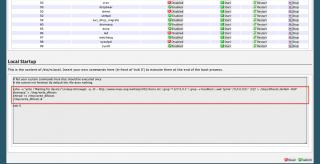
3. Go to System > Startup, paste the following code into the script somewhere before the default placed "exit 0"
4. Save or submit the changes again.
5. Reboot the router from System > Reboot
6. Wait for router to boot up; settings should take effect within 1-5mins. Patience cool2.gif
6a. If it doesn't, double check all required inputs are there, re-save and reboot.
*Optional last step: Power cycle the router (switch off/unplug for 30secs) and start back up & wait a few minutes
*Recommended: Clear browser cache, history etc

CODE
echo -e "echo \"Waiting for device\"\nsleep 60\nwget -q -O - http://www.mvps.org/winhelp2002/hosts.txt | grep "^127.0.0.1" | grep -v localhost | awk '{print \"0.0.0.0\t\" \$2}' > /tmp/dlhosts\nkillall -HUP dnsmasq" > /tmp/write_dlhosts
chmod +x /tmp/write_dlhosts
/tmp/write_dlhosts &

Note: Due to the router pulling the online sourced blacklist, this will work as long as the list is still there.
Should you find later one day this no longer works after a reboot and after double-checking everything, you will have to find and point a new source for the blacklist. Just replace portion [http://www.mvps.org/winhelp2002/hosts.txt] in the code above with another source of our 'blacklist text file'

Example of config
Attached Image Attached Image

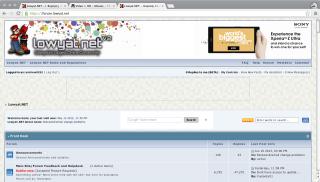
Example of how pages will look like (sorry had to censor some stuff) tongue.gif
Attached Image Attached Image

There is basically no performance hit on the router, latency and throughput stays the same.
There is a huge performance increase especially on animated gifs or flash-based ads, browser does not draw those nonsense hence u will have more cpu and gpu power, less memory consumption.
That's my experience, your mileage may vary.

Credit:https://forum.openwrt.org/viewtopic.php?id=30760

This post has been edited by andrew9292: Aug 21 2013, 02:14 AM
andrew9292
post Aug 29 2013, 01:38 PM

-/Livin' On A Prayer/-
*****
Senior Member
955 posts

Joined: Sep 2008
From: Petaling Jaya


QUOTE(stasio @ Aug 29 2013, 12:25 PM)
Broadband Sifus.....need advise.
Thinking to upgrade my original TM Router with Dual-Band  thumbup.gif :

TP-Link TL-WDR4300

Any opinion......hmm.gif
*
What's the purpose of the upgrade & what's your setup like? How many ethernet / wifi clients it's serving and their locations?

From my experience, dual-band will not improve wireless range. Infact the higher band (5G) has LESS range than the lower band (2.4G) because higher frequencies have a shorter wavelength.

A real life example is bass vs treble. When you close your room's door while blasting music, you will find the bass will bleed thru the door and walls but the treble might get shut off completely. Same goes when u turn on the radio in the car loudly and close the doors, you only get the 'boom'.

So, if u got a good position for the router to serve... your house i assume? Then you can try using dual band. It will at least give u better performance on the same floor.
Good position meaning, not in some forsaken corner, not in a 'computer room'.

If your current position already giving you poor range, dont expect the 5G band to do better. Altho the 2.4G band will in theory perform much better than TM's stock router.
andrew9292
post Aug 29 2013, 01:40 PM

-/Livin' On A Prayer/-
*****
Senior Member
955 posts

Joined: Sep 2008
From: Petaling Jaya


QUOTE(simonyee @ Aug 29 2013, 09:27 AM)
Hello
You memasak nasi atau masak data with kepanasan.
All the things you d/l will corrupt over time.

use la a bit sense and sensibility la.
apa la!?? rclxub.gif

*
doh.gif
Get what u mean, but the way u put it makes it kinda hard to trust.

Heat will affect to an extent because circuit boards and it's printed circuits are a poor conductor of heat.
When heat rises, conductivity will drops.
If the heat rises so much to the point whereby there is too much electrical leakage/resistance, the components may operate out/near their max tolerance and that will give you problems short term. Long term, hardware failure.

Even if so, one should at least try to test where the problem/congestion is before replacing the router.
Make sure all test are done with only 1 client connected to router, be it LAN or WLAN.

Ping 192.168.1.1/0.1 and get the average latency over 50 pings, it should be
Less than 2ms if test is done thru LAN cable/ethernet ; anything more the problem is at network card/router/OS
Less than 20ms thru wifi ; anything more problem is with wifi signal be it congestion, collision with other wifi's operating around the router and user, or just poor range.

If here is where it failed, try correcting by restarting the system, testing with other system, make configuration changes or tweaks, change router position, or get another router to replace/test if it improves etc etc...

If that passes or if you make some adjustments and now it's better, but speed results are the same then

Ping a public IP like 8.8.8.8 or even forum.lowyat.net to get WAN latency.
8.8.8.8 is GoogleDNS which resides in Malaysia and the latency should be

Less than 20ms under normal conditions altho up to 40ms is acceptable
Anything more means congestion in router's WAN interface due to high traffic or high request rate (eg. torrent/malware).

If there is no known client utilizing WAN to that extent, problem is most likely due to ISP routing configuration or hardware at ISP side.

Again, exhaust all troubleshooting steps until you can confirm it IS the router or it ISNT the router.

unless of course, you just want to get rid of that TM router and don't mind opening your wallet then skip all above and get it

This post has been edited by andrew9292: Aug 29 2013, 02:15 PM

andrew9292
post Aug 31 2013, 06:47 PM

-/Livin' On A Prayer/-
*****
Senior Member
955 posts

Joined: Sep 2008
From: Petaling Jaya


QUOTE(simonyee @ Aug 30 2013, 09:24 AM)
Try this on for size.
A modem ADSL Cisco with the NAS
Protection : Cal-Lab Lightning protector, APC,
Timing : NAS built in and Tenben timer.
Cooling Fan : Coolermaster with modified power adaptor
*
Try what on for what size?
U mean your rig is 'big' u lazy try toubleshoot?

Incase you didnt understand or you lazy read what i said

tldr=
i was telling u the right way to troubleshoot cuz all u say is
'do not stack modem on router' & 'masak nasi masak data = corrupt data'

This post has been edited by andrew9292: Aug 31 2013, 07:05 PM

Topic ClosedOptions
 

Change to:
| Lo-Fi Version
0.0401sec    0.33    7 queries    GZIP Disabled
Time is now: 7th December 2025 - 12:56 PM