Welcome Guest ( Log In | Register )

Bump Topic Topic Closed RSS Feed

Outline · [ Standard ] · Linear+

Streamyx streamyx 8mbps club V1, double the speed double the fun

views
     
LCP
post May 16 2013, 11:33 PM

Getting Started
**
Junior Member
61 posts

Joined: Sep 2008
Same here (am also an 8mbps user).

I was also one of those selected for the guinea pig trial a year ago (around March-May 2012), they provided an Android OS IPTV box (made by Huawei, customised model for Telekom), the test was for about a month, after which we had to complete a survey and return the IPTV box. They also provided a D-Link ADSL modem (same model as for those on 4mbps package then) which we got to keep for free, together with RM150 Aeon voucher, if we completed the survey and returned the IPTV box.

QUOTE(komag @ May 16 2013, 09:45 PM)
user posted image
Just received this today(8MB user)    rclxm9.gif
*
LCP
post May 16 2013, 11:47 PM

Getting Started
**
Junior Member
61 posts

Joined: Sep 2008
The IPTV service worked quite well when I did the trial last year and that time I was only on Streamyx 4mbps. The only problem is there could be slight stuttering of the IPTV if you are downloading files from fast servers. Also, for the trial, there were no HD channels (any HD channels were downconverted to SD first).

QUOTE(pakji @ May 16 2013, 11:42 PM)
streamyx 8mbps will get IPTV ??
if no unifi how can use iptv ????
*
LCP
post May 16 2013, 11:52 PM

Getting Started
**
Junior Member
61 posts

Joined: Sep 2008
For the trial, the IPTV box used our existing bandwidth, can be hooked via LAN or wifi to the ADSL modem. I think there's not much bandwidth to spare in an ADSL connection. Also, for the trial, IPTV is enabled (via some login access control) for both the IPTV box and also for web access from a PC. I remembered having the IPTV box tuned to one channel while my laptop was viewing another channel, both ran smoothly but I suspect (from the picture quality) the one for web streaming has lower bitrate.

QUOTE(blacktubi @ May 16 2013, 11:47 PM)
The IPTV box use our existing bandwidth or they do have separate VLAN tagging or etc just like unifi
*
LCP
post May 17 2013, 12:11 AM

Getting Started
**
Junior Member
61 posts

Joined: Sep 2008
Not sure whether this Hypp TV roll out this time will be different from the trial. Well, I will also find out in a few days' time when I go get the box.

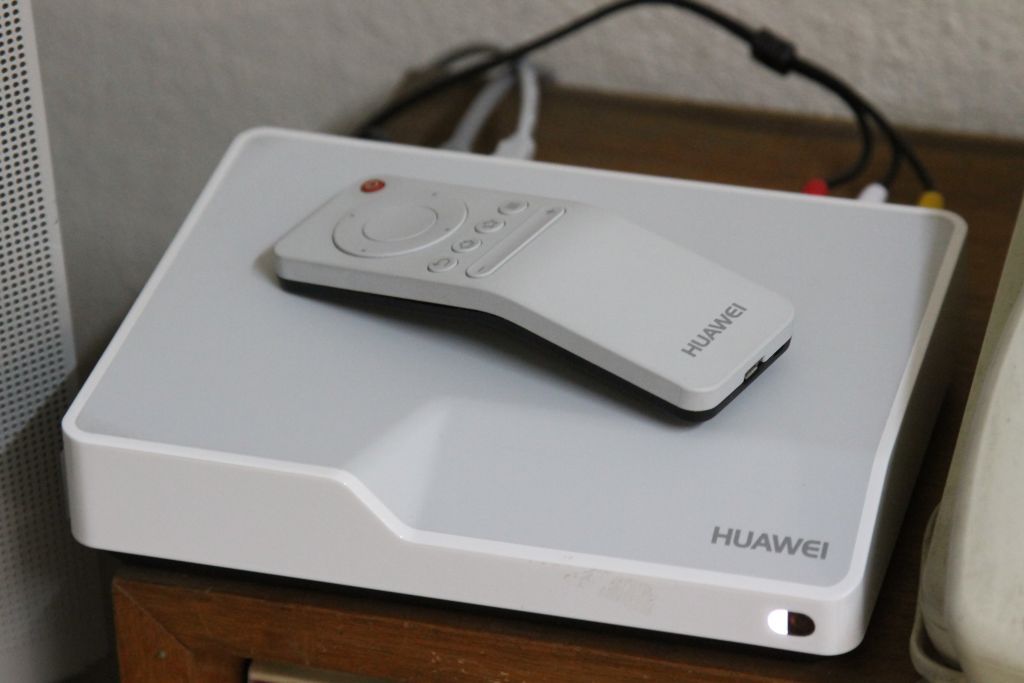
Picture below is the Huawei IPTV box which I got for the guinea pig trial last year, with the remote that has an "air mouse" function. Only problem is I have no idea how to hack the Android OS to accept apps installation, I think they locked it.

user posted image

QUOTE(blacktubi @ May 16 2013, 11:56 PM)
This looks very interesting, if time allows gonna get mine next week laugh.gif

Not sure if the quota still sufficient
*
LCP
post May 17 2013, 12:26 AM

Getting Started
**
Junior Member
61 posts

Joined: Sep 2008
Yep, it has HDMI (cable was provided also), but I did not try that since I only have that prehistoric TV next to it. If they give out the same set again this time, it will be good!

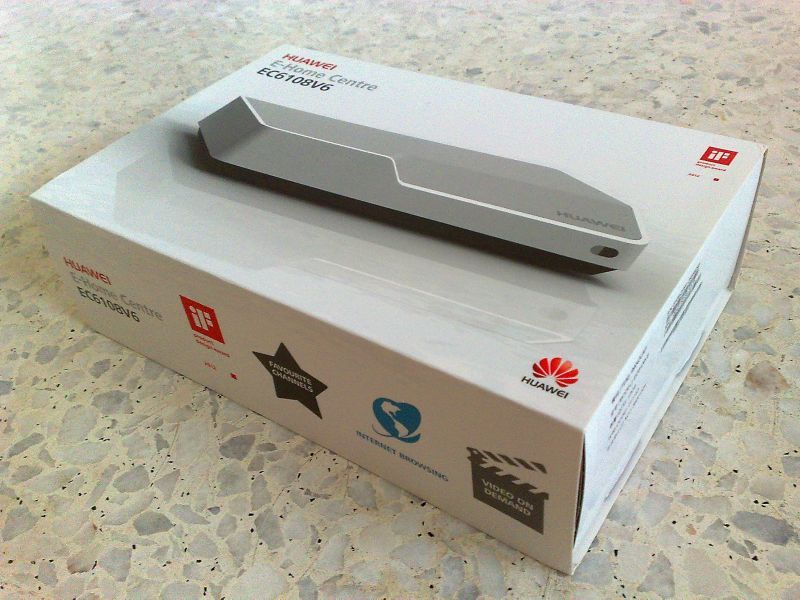
A picture of the carton...

user posted image

QUOTE(blacktubi @ May 17 2013, 12:16 AM)
If this is the device, it is very premium and even premium than Unifi's.

Anyway, I saw RCA, it did support HDMI right
*
LCP
post May 18 2013, 09:37 PM

Getting Started
**
Junior Member
61 posts

Joined: Sep 2008
Got the HyppTV set today, but as mentioned by @hanny562, no password given yet for access the IPTV service, will need to wait for TM to contact me with the access information in a few days' time. I saw that the list of names at TM Point Jalan Burma (Penang) is a few pages long, looks like everyone on 8mbps (and maybe 4mbps also) will get this HyppTV service.

Meanwhile, this Huawei EC6106V5 set is also an Android box, and so far, it has been able to play whatever video formats that I threw into it, but for files containing Dolby Digital or DTS audio, no decoding will be done and have to be streamed via HDMI or SPDIF optical to something that can decode the audio (AV receiver, etc). Also, need to make sure the filename does not have characters like "$", "'" (apostrophe), etc., or else the player app will crash.

Attached Image
Attached Image
LCP
post May 24 2013, 03:15 PM

Getting Started
**
Junior Member
61 posts

Joined: Sep 2008
Btw, on your question earlier on what file format this box can play via the USB, the answer is basically almost everything. I tried avi, mpg, mkv, mp4, m4v, ts, m2ts, semua sapu... all worked. But just be careful, this box will not decode Dolby Digital and DTS audio, it will stream out the audio undecoded through HDMI or SPDIF, so it's up to the user to connect to an equipment that can decode the audio format. HD audio formats like DTS-HD Master Audio and Dolby TrueHD are not supported.

I have even gotten it to stream via network from my laptop (the PC's network name will appear under My Media on the box), just need to enable media sharing/streaming (if Windows 7) and select the folder to share (under Libraries-->Video). There's a problem though, it won't play mkv files this way, I think it will only play formats supported by Windows Media Player if streaming through network.

Although the IPTV quality sucks, this box is okay as a media player (especially via USB).

QUOTE(G K Lai @ May 22 2013, 09:33 PM)
Yes sir, I entered exactly what they sent me... 
I got the error code of 201008  sad.gif
I see...... this is too low class service...  shocking.gif  sweat.gif

By the way, thanks khan and komag.  notworthy.gif

__________________________________________________________________

EDIT:
Is TM really need so much time to activate an account?
It has been over 24 hours since I receive the ID/Password SMS, but still unable to login to it! Called the help center and they said their system indicate my account still in "processing"!
Really fed up with this lousy service!
shakehead.gif
*
LCP
post May 24 2013, 03:38 PM

Getting Started
**
Junior Member
61 posts

Joined: Sep 2008
Did some network speed test with speedtest.net, with and without the IPTV running, here's the results:

Without the IPTV running, this is my typical results:
user posted image

With the IPTV running (tuned to Travel Channel "HD"), I am still getting over 7mbps for my internet:
user posted image

My Streamyx ADSL is connected in ADSL2+ mode at 10236kbps download and 636kbps upload, typical for 8mbps users.

Which means the bandwidth used by the HyppTV is only 1+mbps, that's low even for SD channels, this should explain the super soft/blur pictures.

For a proper HD broadcast channel, even 5mbps may result in soft pictures already, bitrate above 10mbps are common. I believe Astro's HD channels (via the satellite) are at least 8-9mbps each, possibly up to 12mbps.
LCP
post May 27 2013, 01:59 AM

Getting Started
**
Junior Member
61 posts

Joined: Sep 2008
QUOTE(G K Lai @ May 27 2013, 01:29 AM)
Good finding LCP!  thumbup.gif
No wonder when I play an MKV file with AC-3, I can't hear sound.  laugh.gif

I tried "My Media" then point to my computer's shared folder and don't know why it only list out certain movies and some movies simply hidden from view, can't find it.

I also tried look for my Network share (other shared folder on my PC's  D: drive), this HyppTV box just can't list out this share. I was playing movies from my PC this way using WD TV Live, but it's ok, this is not important.

*
You are right, only some files get displayed when streaming from network even though the files that do not get displayed are supported formats, no idea why, the media player software on the box is not the best around, still have some bugs.
LCP
post Jun 1 2013, 10:36 AM

Getting Started
**
Junior Member
61 posts

Joined: Sep 2008
Oh no... with the Hypp TV now they have started selective "traffic shaping" again, my torrent speed is now throttled down to 20-30kbyte/sec only, from the unthrottled speed of 850-950kbyte/sec previously. Speed of other items are okay.

Topic ClosedOptions
 

Change to:
| Lo-Fi Version
0.0194sec    0.69    7 queries    GZIP Disabled
Time is now: 9th December 2025 - 02:19 PM