

Anyone want i9400_PR_ninetology_F4_V16?
[OFFICIAL] Ninetology Black Pearl II i9400, Value for money dual core phone
[OFFICIAL] Ninetology Black Pearl II i9400, Value for money dual core phone
|
|
 Jan 18 2013, 05:47 PM Jan 18 2013, 05:47 PM
Return to original view | Post
#1
|
 
Junior Member
60 posts Joined: May 2012  
|
Anyone want i9400_PR_ninetology_F4_V16?
|
|
|
|
|
|
Jan 18 2013, 06:14 PM
Return to original view | Post
#2
|
|
Junior Member
60 posts Joined: May 2012
|
|
|
|
Jan 18 2013, 08:30 PM
Return to original view | Post
#3
|
|
Junior Member
60 posts Joined: May 2012
|
here is the v16.
http://www.sendspace.com/file/xnk52z flashtool and usb vcom driver is here: http://www.sendspace.com/file/izj32g as for steps... later i update here. EDIT: before you do anything, remember that you do this at your own risk. I recommend you to do a backup of your current rom in case something happen like stuck in boot. to do a backup of your current rom, 1st you need to download MTKdroidtools here. next you need to go to your phone under settings>developer options>enable usb debugging. when you connect your phone to your pc the driver for android phone will most likely fail to install. you need to manually install it. Here is how. Press your windows button. right click on computer and click manage. on your left hand side choose device manager. you will see the android phone with exclamation mark there. right click on it and choose update driver software. then choose browse my computer for driver software. After that choose the option > let me pick from a list of device on my computer. Click show all devices. then Have disk. Browse to your mtkdroidtools there is a usb_driver folder inside. Choose the android_winusb.inf then click Android ADB Interface and choose next. There will be an update driver warning window. Just ignore it and click yes. Phew.. Ok next launch the mtkdroidtool via the MTKdroidTools.exe with your phone connected and click root. 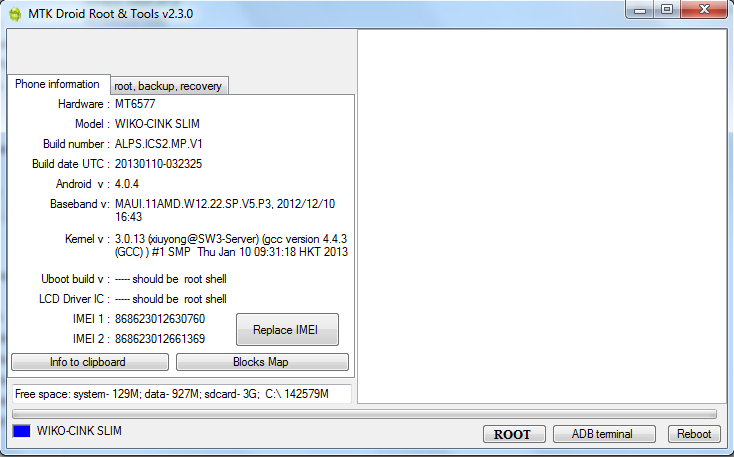 look at your phone and click the restore button at the bottom right corner of your screen. Wait for it to do its thing and reconnect your phone. Then when it say it is necessary to keep rom click no.  When it asks to install supersu, busybox if you want your phone to remain unrooted then click no. After that click on the root, backup, recovery tab. click on backup userdata and cache. then click backup. wait for it to finish. this takes about 10 mins to complete. 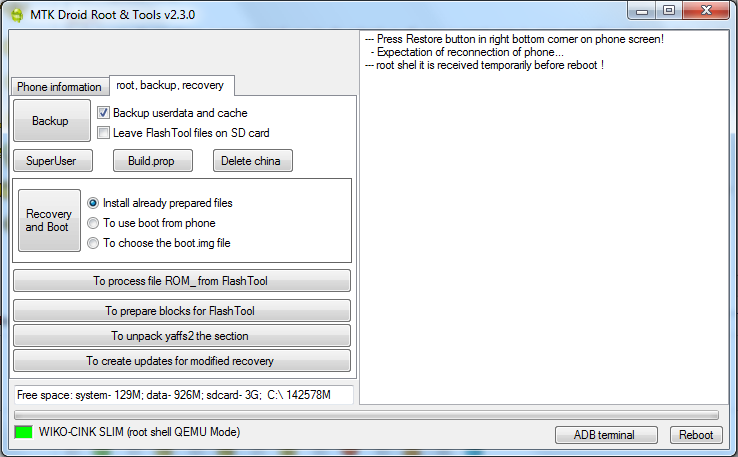 when it is finished it will ask weather you want to pack the backup or not. choose whatever you want.  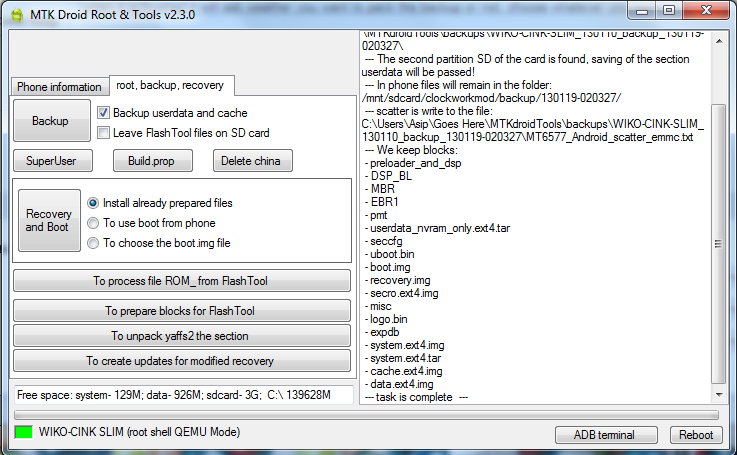 then click to prepare blocks for flash tool. navigate to your mtkdroidtools folder>backup>your backup just now and choose the files.md5. the tool will do some voodoo magic and place all the files that you need to flash your phone back into the folder !Files_to_FlashTool. 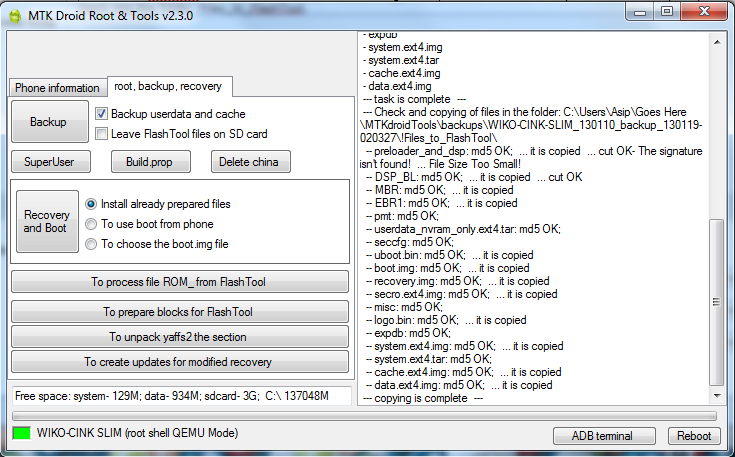 Click reboot and choose reboot. Congratulations, you have successfully made a copy of your rom. This is really long and we're only halfway done. How? UPDATE: To flash your rom you need to install the usb_vcom driver that is inside the driver folder that comes with the flashtool. When you run flashtool make sure your phone is not connected to the pc then click on the scatter-loading button. 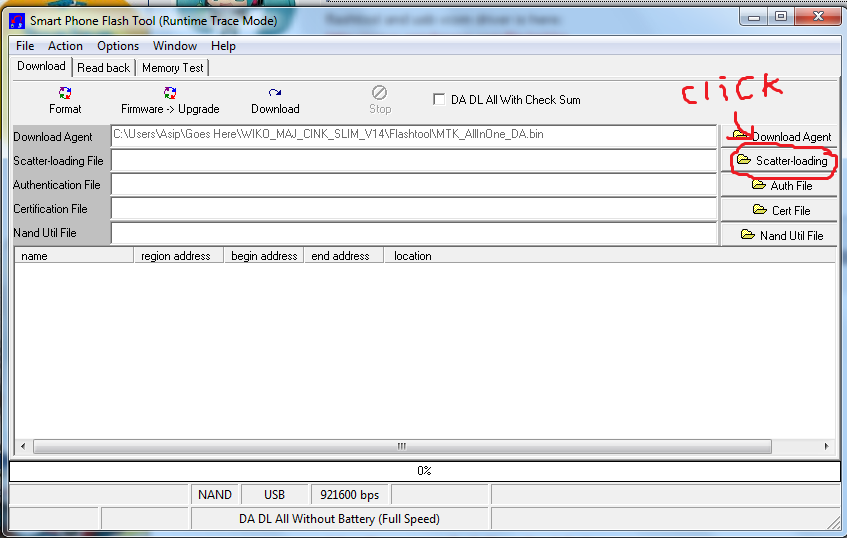 navigate to the folder your backup rom is in and choose the MT6577_Android_scatter_emmc.txt 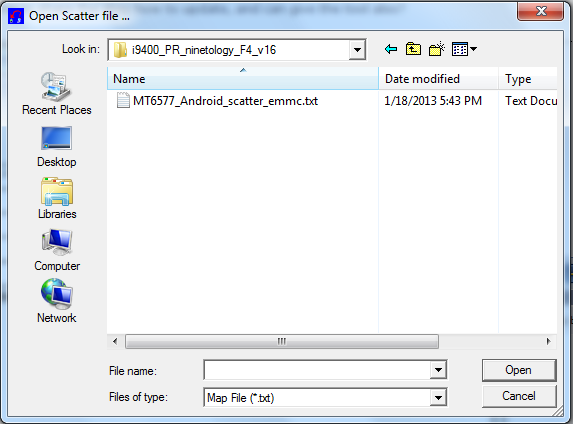 After that click on the download button. 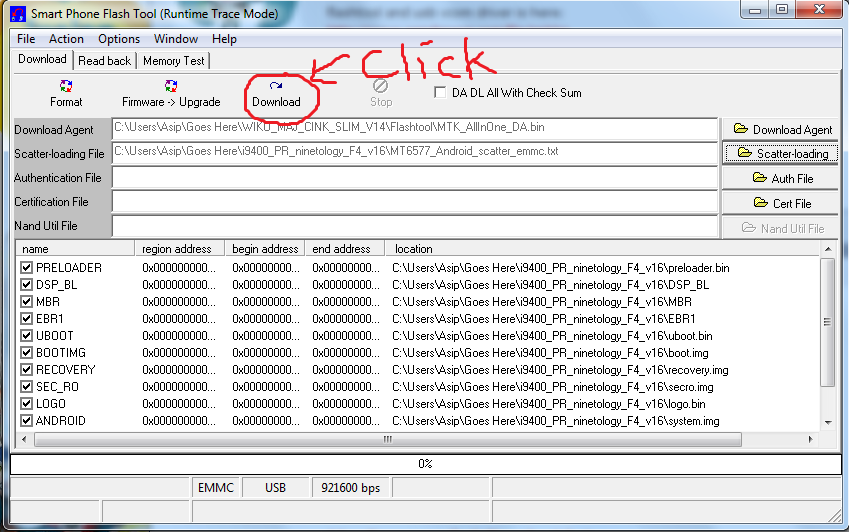 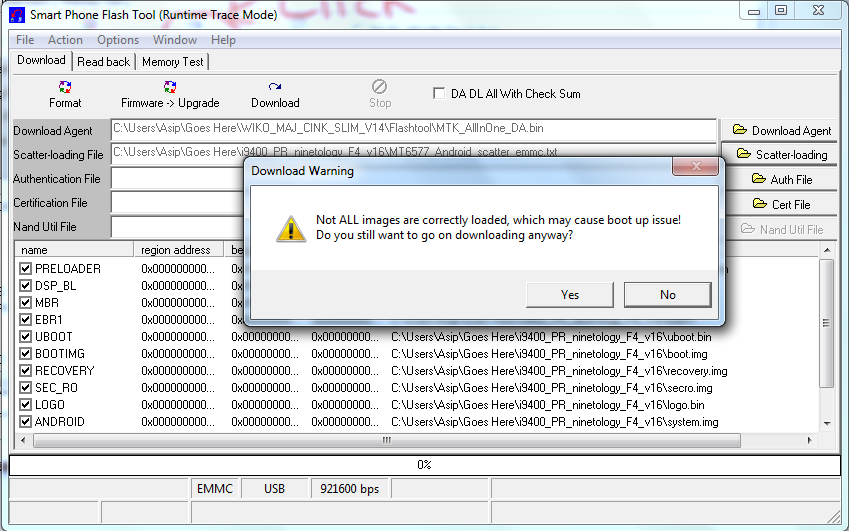 Ignore this popup and click yes. Then turn off your phone. Take out the battery for a couple of seconds then put it back in without turning it on. NOW plug your usb cable to your pc and wait for it to recognize your device. If all goes well it will start to flash your phone. Wait for it to finish and you're done. If it doesnt recognize your device on your 1st try then you can try again. Good luck guys. This post has been edited by stupidomen: Jan 19 2013, 05:26 PM |
|
|
Jan 18 2013, 09:28 PM
Return to original view | Post
#4
|
|
Junior Member
60 posts Joined: May 2012
|
QUOTE(JJKTP @ Jan 18 2013, 09:20 PM) Is that mean you can choose which SIM can do 3G without having to physically switch the SIM from one slot to another? yes. |
|
|
Jan 18 2013, 11:18 PM
Return to original view | Post
#5
|
|
Junior Member
60 posts Joined: May 2012
|
QUOTE(calvin_kenni @ Jan 18 2013, 10:52 PM) bro need ur help to write a guide for this v16 firmware upgrade.. well.. the steps are really quite complicated. stupid melaka SC @ melaka mall dun want help me update say tarak new firmware  im still trying to make it as easy to understand as i can. Sorry guys for the delay. |
|
|
Jan 19 2013, 02:18 AM
Return to original view | Post
#6
|
|
Junior Member
60 posts Joined: May 2012
|
QUOTE(fitzhex @ Jan 19 2013, 02:10 AM) so, winko or v16 better? im making the guide now. personally i think wiko rom is better solely because the internal storage for your apps is 1.5gb compared to 512mb on the 9tology rom. plus the wiko rom can do OTA update. |
|
|
|
|
|
Jan 19 2013, 02:37 AM
Return to original view | Post
#7
|
|
Junior Member
60 posts Joined: May 2012
|
QUOTE(fitzhex @ Jan 19 2013, 02:31 AM) battery and gps? yeah, wiko got OTA already.. battery is no problem. i already put custom gps.conf inside my phone. whenever i go someplace new the first lock will take about 5-10 mins because the phone is learning the satellite position. after that it gets faster but if i leave the place for one day and come back then it takes 5-10 mins again. so i really dont know what to say lol. |
|
|
Jan 19 2013, 02:20 PM
Return to original view | Post
#8
|
|
Junior Member
60 posts Joined: May 2012
|
QUOTE(ericmaxman @ Jan 19 2013, 09:57 AM) Bro, can you host the pics on imgur or photobucket? I cant seem to post the pics u posted sure. later i update again.  |
|
|
Jan 19 2013, 02:23 PM
Return to original view | Post
#9
|
|
Junior Member
60 posts Joined: May 2012
|
QUOTE(poringkien @ Jan 19 2013, 10:52 AM) can backup rom without root it ? and the way to restore ? you need the root privileges when making a backup because otherwise the tool cant make a complete backup of your system. I will post the way to restore later.  thanks.. thanks..   |
|
|
Jan 19 2013, 04:08 PM
Return to original view | Post
#10
|
|
Junior Member
60 posts Joined: May 2012
|
QUOTE(renabada @ Jan 19 2013, 04:00 PM) thk for the files, i had updated to the latest version now you used the file there to update or go service centre? |
|
|
Jan 19 2013, 04:19 PM
Return to original view | Post
#11
|
|
Junior Member
60 posts Joined: May 2012
|
QUOTE(renabada @ Jan 19 2013, 04:15 PM) i use your uploaded to flash~~ haha why u no change the wiko language to english?1st i flash with wiko cink rom, totally cannot read the language ,but the best thing is memory 1.5gb compare with 512mb of ninetology rom then 2nd i flash with ur rom,now is testing progress and it look great |
|
|
Jan 19 2013, 05:42 PM
Return to original view | Post
#12
|
|
Junior Member
60 posts Joined: May 2012
|
QUOTE(fadzliezsix @ Jan 19 2013, 05:32 PM) How to Update how to update how to update go page 5 i updated already.LISTEn listen listen need tutorial LOL http://forum.lowyat.net/index.php?showtopi...post&p=57671732 This post has been edited by stupidomen: Jan 19 2013, 05:52 PM |
|
|
Jan 19 2013, 05:53 PM
Return to original view | Post
#13
|
|
Junior Member
60 posts Joined: May 2012
|
QUOTE(fadzliezsix @ Jan 19 2013, 05:52 PM) This one os for V16 update? it is v16 from ninetology. as for the battery performance i cant really say because im not using the rom.original from ninetology with good baterry performance? |
|
|
|
|
|
Jan 19 2013, 05:57 PM
Return to original view | Post
#14
|
|
Junior Member
60 posts Joined: May 2012
|
QUOTE(matyan @ Jan 19 2013, 05:54 PM) with v2.2.8 install ADB driver and enable usb debugging mode.go read the guide carefully. This post has been edited by stupidomen: Jan 19 2013, 05:57 PM |
|
|
Jan 19 2013, 06:03 PM
Return to original view | Post
#15
|
|
Junior Member
60 posts Joined: May 2012
|
QUOTE(matyan @ Jan 19 2013, 06:01 PM) ADB driver installed, usb debugging enabled why it say samsung android phone |
|
|
Jan 19 2013, 06:03 PM
Return to original view | Post
#16
|
|
Junior Member
60 posts Joined: May 2012
|
QUOTE(fadzliezsix @ Jan 19 2013, 06:01 PM) owh you use which ROM?? using wiko cink slim rom v15is it different from us? |
|
|
Jan 19 2013, 06:06 PM
Return to original view | Post
#17
|
|
Junior Member
60 posts Joined: May 2012
|
QUOTE(matyan @ Jan 19 2013, 06:03 PM) |
|
|
Jan 19 2013, 06:07 PM
Return to original view | Post
#18
|
|
Junior Member
60 posts Joined: May 2012
|
QUOTE(matyan @ Jan 19 2013, 06:04 PM) before this I mod SGSA. same driver appear try uninstall that driver then reinstall new one. |
|
|
Jan 19 2013, 06:08 PM
Return to original view | Post
#19
|
|
Junior Member
60 posts Joined: May 2012
|
QUOTE(poringkien @ Jan 19 2013, 06:06 PM) how is the gps with this rom ? still bad. like meh.QUOTE(renabada @ Jan 19 2013, 06:06 PM) currently at wiko 14,how to upgrade to v15??? go to settings>about phone>system updates. |
|
|
Jan 19 2013, 07:24 PM
Return to original view | Post
#20
|
|
Junior Member
60 posts Joined: May 2012
|
QUOTE(renabada @ Jan 19 2013, 06:40 PM) dunno why it status downloading but there is no progress at all~~ haha need stronk wifi for the update. |
|
Topic ClosedOptions
|
| Change to: |  0.0384sec 0.0384sec
 0.78 0.78
 7 queries 7 queries
 GZIP Disabled GZIP Disabled
Time is now: 21st December 2025 - 10:31 PM |
 Quote
Quote