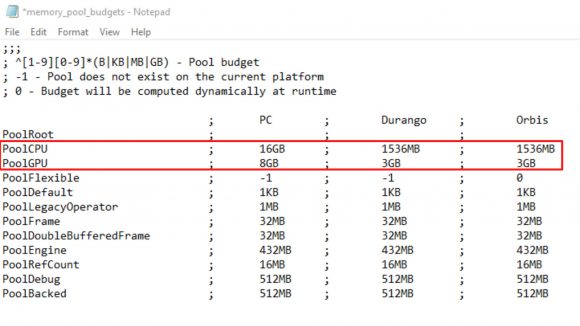
The pathway to the Memory Pool Budgets config file you’re looking for will differ slightly depending on what platform you bought Cyberpunk 2077 on, but it should always be within the game’s engine and config subfolders. Let’s use Steam as an example here:
Steam\steamapps\common\Cyberpunk2077\engine\config\memory_pool_budgets.csv
Open the file using any text editor, such as Notepad. What you’ll notice when you first enter is that ‘PoolCPU’ has 1,536MB allocated to it, which is a fraction of the 8GB needed to meet the minimum requirements. ‘PoolGPU’ is also 3GB across the board, making it the same as Durango and Orbis, which is what the Xbox One and PlayStation 4 run on respectively.
Ideally, you’d prefer your PoolCPU to equal half of what your total RAM capacity is – if you have 16GB, then you’ll want to bump the ‘1,536MB’ figure up to ‘8GB’ instead, for example. The PoolGPU, however, should be the full VRAM your graphics card can offer. It’s best to search for your exact model, but an example of this would be switching the ‘3GB’ up to ‘8GB’ if you own an RTX 2080. Once you’ve entered your desired values, save the document and then boot up your game.
https://www.pcgamesn.com/cyberpunk-2077/con...Z9dev8rCDY7Pf6U 

 Jun 10 2019, 05:52 PM


 (godbless it doesn't have RTX)
 Quote
Quote



 0.0307sec
 0.34
0.34
 7 queries
 GZIP Disabled