Outline ·
[ Standard ] ·
Linear+
Samsung Galaxy Note II LYN's Official Thread V14, Selling hotcakes worldwide! 4.1.2 OTA!
|
remonx
|
 Jan 10 2013, 02:06 PM Jan 10 2013, 02:06 PM
|

|
I have a very dumb question. Let's say whenever i download an app from playstore, it consumes a certain storage. Then, After i install/extract it out it consumes even larger space on phone. But where is the .apk file that i downloaded from the playstore stored? Can i find it and delete the file so that i can conserve more space in my phone? Another question, how does the storage work if i update the app to the latest version. Will it overwrite the previous version and hence occupy the newly updated version space only?
|
|
|
|
|
|
remonx
|
Jan 10 2013, 03:12 PM
|
|
|
I have a very dumb question. Let's say whenever i download an app from playstore, it consumes a certain storage. Then, After i install/extract it out it consumes even larger space on phone. But where is the .apk file that i downloaded from the playstore stored? Can i find it and delete the file so that i can conserve more space in my phone? Another question, how does the storage work if i update the app to the latest version. Will it overwrite the previous version and hence occupy the newly updated version space only?
|
|
|
|
|
|
remonx
|
Jan 10 2013, 03:31 PM
|
|
|
QUOTE(antt00 @ Jan 10 2013, 03:27 PM) App will be install to /data/app. There is no temp folder (i remember there use to be long ago dunno which android version but now i dun see it anymore) Updated app will replace previous one. Exception is system app. As the system partition cannot be written without root, updating of system apps will take additional place in /data/app. Subsequent updating of system apps will take the same place and no additional space will be taken (unless the app itself is growing in size). Additional app/game data downloaded from the app after launching are stored separately in the internal storage. Thanks completely answered my doubt!  |
|
|
|
|
|
remonx
|
Jan 11 2013, 12:15 PM
|
|
|
Is the version for 4.1.2 perform the same rooting method as 4.1.1?
|
|
|
|
|
|
remonx
|
Jan 11 2013, 07:38 PM
|
|
|
Other than the default app S-note, any other more useful apps similar?
|
|
|
|
|
|
remonx
|
Jan 11 2013, 10:52 PM
|
|
|
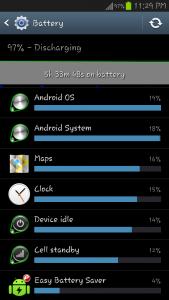
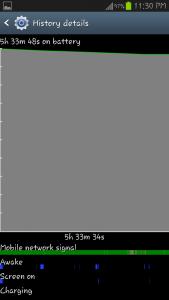
5 hours standby mode. deep sleep set in "EASY BATTERY SAVER". WIFI, 3G, ALARM all off... battery reduce 3%.. comment on this battery life pls.. ^^
|
|
|
|
|
|
remonx
|
Jan 11 2013, 11:38 PM
|
|
|
i think SOT is just 10min... mostly all idle...
|
|
|
|
|
|
remonx
|
Jan 11 2013, 11:42 PM
|
|
|
What im trying to say is when i put into deep sleep mode.. It only consume 1% per 2 hour for idle mode..
|
|
|
|
|
|
remonx
|
Jan 12 2013, 12:06 AM
|
|
|
2 hours idle time consumes 1% on unrooted phone.. good or bad?
|
|
|
|
|
|
remonx
|
Jan 13 2013, 06:51 PM
|
|
|
Guys, other than the stock camera, what camera apps is highly recommend to use and what is the tips or setting to capture nice and sharp image inside note 2?
|
|
|
|
|
|
remonx
|
Jan 13 2013, 09:42 PM
|
|
|
QUOTE(zerohunter @ Jan 13 2013, 07:35 PM) QUOTE(aspire2oo6 @ Jan 13 2013, 07:37 PM) lol yes instagram and steady hand are right to get the best of it QUOTE(kevintth @ Jan 13 2013, 07:57 PM) Like other say Instragram, effect is super nice, but resolution is low and ratio is 1:1. Try Camera 360, lots of effect to play around. Also try after focus, dslr blur effect to edit your photo. Other nice camea apps are Pudding camera, Fotor, Editor apps are "Mei Tu Xiu Xiu", Pixlr-o-matic, Photo viva Ok. will try it out! |
|
|
|
|
|
remonx
|
Jan 14 2013, 01:55 PM
|
|
|
Hmm, how to make the background image to be blur while focusing the part in the picture u want? like the photos taken by the nokia N8.
|
|
|
|
|
|
remonx
|
Jan 14 2013, 02:03 PM
|
|
|
@aspire2oo6 The images of N8 taken is totally on par with some DSLR. frankly speaking.. Im not sure Note 2 is capable of capturing the iamage as nokia N8 like the technique "BOKEH".
|
|
|
|
|
|
remonx
|
Jan 14 2013, 02:10 PM
|
|
|
As u type and send your questions here, u can get your answer from the google already. ;D
|
|
|
|
|
|
remonx
|
Jan 14 2013, 02:20 PM
|
|
|
I have tested note 2 default camera with macro setting. I put my lens as near as the object as possible. But still cannot capture with the blurry effect. Now i only know the reason existence of DSLR. ;D
|
|
|
|
|
|
remonx
|
Jan 14 2013, 02:25 PM
|
|
|
What apps is that?
|
|
|
|
|
|
remonx
|
Jan 14 2013, 02:27 PM
|
|
|
QUOTE(antt00 @ Jan 14 2013, 02:21 PM) There are apps in the market to make your photo background blur.  What apps is that? |
|
|
|
|
|
remonx
|
Jan 14 2013, 02:32 PM
|
|
|
QUOTE(aspire2oo6 @ Jan 14 2013, 02:28 PM) I N S T A G R A M and M O L O M E QUOTE(antt00 @ Jan 14 2013, 02:29 PM) I just tried with instagram. From the "water droplet" icon (noob definiton ), i just switch to "o" or "-". |
|
|
|
|
|
remonx
|
Jan 14 2013, 02:40 PM
|
|
|
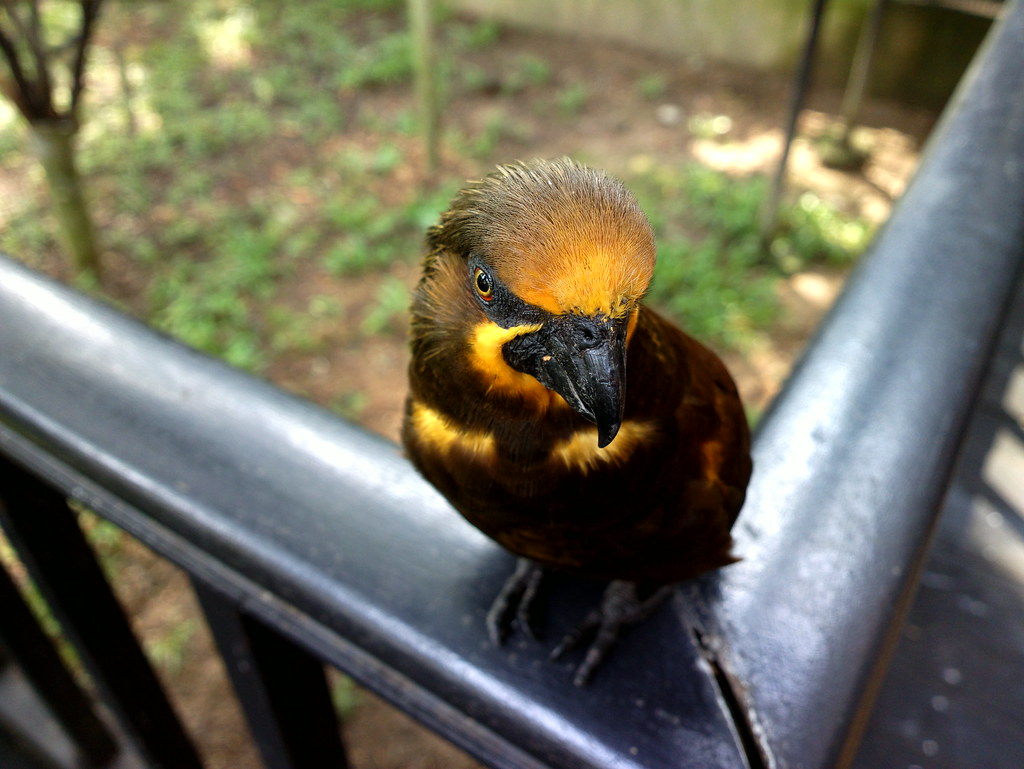
QUOTE(aspire2oo6 @ Jan 14 2013, 02:35 PM) This one my my favourite shot taken by nokia 808 pureview its not easy to take. I cant take 10 shot to choose its either I move or the bird move + one shot at a time » Click to show Spoiler - click again to hide... « Zero post processing. Very nice photo indeed with nokia Carl Zeiss lens. Can capture such a shot with mobile phone really once in a million shot? This post has been edited by remonx: Jan 14 2013, 02:40 PM |
|
|
|
|



 Quote
Quote

 0.0445sec
 0.35
0.35
 7 queries
 GZIP Disabled