Outline ·
[ Standard ] ·
Linear+
Tp LInk TL-MR3420 Owner CLub V2.5, need a pro here
|
rootlinux
|
 Jan 9 2013, 04:02 PM Jan 9 2013, 04:02 PM
|

|
QUOTE(apersaje @ Jan 9 2013, 02:58 PM) I'm trying to flash my MR3420 with openwrt to be used with my E367. Succeeded flashing my router but still having problem to install 3G dongle. Anybody know what packages should I install or should I just install all packages listed at openwrt 3g dongle recipe site? U can install all packages listed if space doesnt limit. Can u SSH to the OpenWrt and run this ls /etc/modules.d Thank you. |
|
|
|
|
|
rootlinux
|
Jan 11 2013, 10:40 AM
|
|
|
Good news...MR3420 v2 is now supported by OpenWrt Attitude Adjustment 12.09-rc1 You can read more at http://forum.openwrt-id.org/viewtopic.php?pid=1340#p1340Please share if you success with this. Remember, at your own risk  |
|
|
|
|
|
rootlinux
|
Jan 11 2013, 08:54 PM
|
|
|
QUOTE(greenlp_87 @ Jan 11 2013, 05:07 PM) i dun hav v2. sorry... going to get one soon  |
|
|
|
|
|
rootlinux
|
Jan 11 2013, 08:55 PM
|
|
|
QUOTE(Vista-X @ Jan 11 2013, 06:01 PM) Flashed, working with e-398  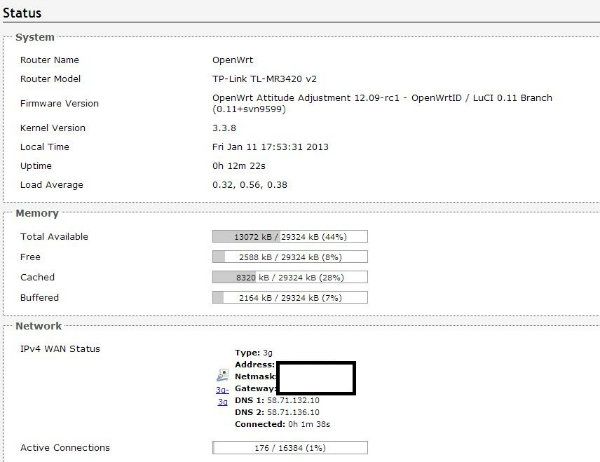 can u share with us the free space after flashing this openwrt? thank you. |
|
|
|
|
|
rootlinux
|
Jan 12 2013, 04:47 PM
|
|
|
QUOTE(yewfatt @ Jan 12 2013, 11:10 AM) just flash to openwrt too for 3420 v2  May I know ur hardware ver? Is it v2 or v2.1? Thanks. |
|
|
|
|
|
rootlinux
|
Jan 14 2013, 09:54 AM
|
|
|
QUOTE(yewfatt @ Jan 13 2013, 12:17 AM) Cool. I guess all the stock now is v2.1 and would like to know anyone has tried the OpenWrt on MR3420 v2.1? |
|
|
|
|
|
rootlinux
|
Jan 14 2013, 09:55 AM
|
|
|
QUOTE(Vista-X @ Jan 13 2013, 11:48 PM) There u go.  thanks. hav u try installing QoS? |
|
|
|
|
|
rootlinux
|
Feb 7 2013, 11:24 PM
|
|
|
Below is my output: -
root@OpenWrt:~# cat /sys/bus/usb/devices/1-1/version
2.00
root@OpenWrt:~# cat /sys/bus/usb/devices/1-1/product
DT 101 G2
root@OpenWrt:~# cat /sys/bus/usb/devices/1-1/speed
480
root@OpenWrt:~# cat /sys/bus/usb/devices/1-1/manufacturer
Kingston
|
|
|
|
|
|
rootlinux
|
Feb 21 2013, 03:54 PM
|
|
|
QUOTE(MaGNiFiCo @ Feb 21 2013, 02:43 PM) err guys how to reset my router? it seems when using openwrt the reset button wont react  done some reading it has something to do with qss button + reset button for certain model. mostly suggest using winscp to overwrite the firmware file. as currently i cant login to admin panel anyone can post a guide? or an alternative?  How about below cmd after u telnet/ssh to your router? mtd -r erase rootfs_data |
|
|
|
|
|
rootlinux
|
Apr 18 2013, 01:32 PM
|
|
|
is the USB port issue remain 11Mbps? bcoz i can only get average max 10~11Mbps when downloading.
thanks.
|
|
|
|
|
|
rootlinux
|
Apr 29 2013, 10:29 PM
|
|
|
OpenWRT Attitude Adjustment (12.09 final) ~ http://bit.ly/14HBDvU |
|
|
|
|
|
rootlinux
|
Apr 29 2013, 11:02 PM
|
|
|
QUOTE(renishi @ Apr 29 2013, 10:38 PM) how to find our router's fw ? the link is there... This post has been edited by rootlinux: Apr 29 2013, 11:12 PM |
|
|
|
|
|
rootlinux
|
Aug 13 2013, 01:23 AM
|
|
|
QUOTE(digilife @ Aug 13 2013, 12:31 AM) You dare try on it ? If fried your 1043ND. pls dun blame me  yes, usb cable 3.0 can settle it, i am using it now , 3 meter long too , too bad i cant find ferrite core to wrap round both ends of the cable, if can lagi syok wor !! and this ferrite core is damn expensive, one set cost rm5 each, so both ends will cost me rm10 and i have to buy them in sets of 10 at one go, anyone want to share share buy ?  @digilife, may I know which Hunstman ver you using with 1043ND? thanks. |
|
|
|
|
|
rootlinux
|
Aug 16 2013, 02:20 PM
|
|
|
QUOTE(digilife @ Aug 13 2013, 05:24 PM) there you go bro, its a stable and a fast FW, so much so , i dun bother to upgrade anymore [attachmentid=3580201] Awesome, it is fast   |
|
|
|
|
|
rootlinux
|
Aug 22 2013, 10:26 AM
|
|
|
Does ROOter Hunstman come with VLAN support? Thank you.
|
|
|
|
|
|
rootlinux
|
Aug 22 2013, 10:49 PM
|
|
|
QUOTE(blacktubi @ Aug 22 2013, 10:03 PM) Able to bring up the switch config but not sure if it work. Nothing to test right now. Do let me know if you able to get it work @blacktubi Thank you. I will flash my TL-WR1043ND with ROOter later and share the screen shot. Want to try ROOter with Maxis Fiber  |
|
|
|
|
|
rootlinux
|
Sep 18 2013, 01:05 PM
|
|
|
QUOTE(chuahcs79 @ Sep 18 2013, 01:00 PM) bandwidth control function only works for 3G connection,.. it wont work for 4G, already tested  hi chuahcs79, have u test on assigning only 1Mbps download to a particular IP address for all protocol? thanks. |
|
|
|
|
|
rootlinux
|
Sep 18 2013, 01:16 PM
|
|
|
Below is my setup of TP-Link TL-WR1043ND v1.10 with Huntsman 2013-07-21 connecting to Celcom 3G: - Modem Connection Information» Click to show Spoiler - click again to hide... «  http://i.imgur.com/JiCcARV.png » Click to show Spoiler - click again to hide... « Interfaces» Click to show Spoiler - click again to hide... « Interfaces - WAN» Click to show Spoiler - click again to hide... « Bandwidth Monitoring» Click to show Spoiler - click again to hide... « Status» Click to show Spoiler - click again to hide... « |
|
|
|
|
|
rootlinux
|
Sep 18 2013, 02:39 PM
|
|
|
QUOTE(chuahcs79 @ Sep 18 2013, 01:14 PM) yes that will work if you refer to 3G,.. Thanks...I will try it |
|
|
|
|
|
rootlinux
|
Sep 20 2013, 11:04 AM
|
|
|
I am trying to connect Sierra Wireless 753S to Huntsman 2013-07-21 running on TL-WR1043ND but I am getting this message below from kernel log and can't get an Internet connection: -
[ 308.410000] usb 1-1: USB disconnect, device number 2
[ 308.410000] sierra ttyUSB0: Sierra USB modem converter now disconnected from ttyUSB0
[ 308.420000] sierra 1-1:1.0: device disconnected
[ 308.430000] sierra ttyUSB1: Sierra USB modem converter now disconnected from ttyUSB1
[ 308.440000] sierra 1-1:1.1: device disconnected
[ 308.440000] sierra ttyUSB2: Sierra USB modem converter now disconnected from ttyUSB2
[ 308.450000] sierra 1-1:1.2: device disconnected
[ 308.450000] sierra ttyUSB3: Sierra USB modem converter now disconnected from ttyUSB3
[ 308.460000] sierra 1-1:1.3: device disconnected
[ 308.490000] sierra_net 1-1:1.7 wwan0: unregister 'sierra_net' usb-ehci-platform-1, Sierra Wireless USB-to-WWAN Modem
[ 308.520000] sierra_net 1-1:1.7 (unregistered net_device): usb_control_msg failed, status -19
[ 329.730000] usb 1-1: new high-speed USB device number 3 using ehci-platform
[ 329.880000] usb 1-1: config 1 has an invalid interface number: 9 but max is 5
[ 329.880000] usb 1-1: config 1 has an invalid interface number: 7 but max is 5
[ 329.890000] usb 1-1: config 1 has no interface number 4
[ 329.900000] usb 1-1: config 1 has no interface number 5
|
|
|
|
|



 Quote
Quote


 0.0522sec
 0.97
0.97
 7 queries
 GZIP Disabled