Welcome Guest ( Log In | Register )

Bump Topic Topic Closed RSS Feed
6 Pages  1 2 3 > » Bottom

Outline · [ Standard ] · Linear+

 Tp LInk TL-MR3420 Owner CLub V2.5, need a pro here

views
     
TStanpanama
post Jan 6 2013, 11:20 PM, updated 13y ago

Getting Started
**
Junior Member
152 posts

Joined: Jan 2005


just want cont the thread that already close from mr chuah79

V1: Firmware

V2: Firmware


GUIDE FOR INSTALLATION openWRT in Tp Link TL-MR3420 V1 AND V2

Open Wrt for TL-MR3420 V1 ~ V1.3 BY khairilyazit & ibnuasad

» Click to show Spoiler - click again to hide... «


for TP LINK MR-3420 V2

» Click to show Spoiler - click again to hide... «


SETTING AUTO PING TO PREVENT CONNECTION IDLE - openWRT in Tp Link TL-MR3420


» Click to show Spoiler - click again to hide... «


Credit to mr chuahcs79 our starter this thread rclxms.gif rclxms.gif


How to Setup your Tp LINK TL-MR3420
» Click to show Spoiler - click again to hide... «

Tweak for TL-MR3420 on Bandwidth control with TP LINK Stock Firmware
» Click to show Spoiler - click again to hide... «

Step on How to check signal % of usb modem when plug in Openwrt TL-MR3420 BY KIZWAN
» Click to show Spoiler - click again to hide... «

Checking MR3420 log to know your modem Device of Wan Setting on Open WRT BY KIZWAN
» Click to show Spoiler - click again to hide... «

how to flash back to TP LINK Stock firmware from Open wrt

» Click to show Spoiler - click again to hide... «


USB sniffer tool to make bin files for your modem in case your modem dont recognize by TL-MR3420 router

» Click to show Spoiler - click again to hide... «

How to use DNSMasq on openwrt by Ibnuasad ( to watch US based hulu.com/pandora/netflix/etc etc

» Click to show Spoiler - click again to hide... «
kaisam
post Jan 7 2013, 12:41 AM

Getting Started
**
Junior Member
257 posts

Joined: Dec 2007
QUOTE(tanpanama @ Jan 6 2013, 11:20 PM)
just want cont the thread that already close from mr chuah79..
rugi la kalo tak share kan....
*
yes,.. all can sharing here....

Thank you. biggrin.gif
TStanpanama
post Jan 8 2013, 10:51 PM

Getting Started
**
Junior Member
152 posts

Joined: Jan 2005


currently using MR3420 + ZTE mf190 + maxis unlimited = got stable connection, but speed not exceed 3mbps.

can anybody recommend what modem can give stable connection like MF190?
apersaje
post Jan 9 2013, 02:12 PM

Getting Started
**
Junior Member
116 posts

Joined: Aug 2007


I suggest TS paste the tips/tricks for this modem from previous threads.

It'll be good to have:

1 - Support modem list.
2 - Website for firmware update.
3 - Guide for installing openwrt on this router.
greenlp_87
post Jan 9 2013, 02:51 PM

Look at all my stars!!
*******
Senior Member
3,150 posts

Joined: Feb 2011
From: Shah Alam, Subang, PJ


QUOTE(apersaje @ Jan 9 2013, 02:12 PM)
I suggest TS paste the tips/tricks for this modem from previous threads.

It'll be good to have:

1 - Support modem list.
2 - Website for firmware update.
3 - Guide for installing openwrt on this router.
*
yup, if anyone have save the list of these things in ur notepad or docs kindly share it here..easier for the others to read and find solution.. thumbup.gif
apersaje
post Jan 9 2013, 02:58 PM

Getting Started
**
Junior Member
116 posts

Joined: Aug 2007


I'm trying to flash my MR3420 with openwrt to be used with my E367.
Succeeded flashing my router but still having problem to install 3G dongle.

Anybody know what packages should I install or should I just install all packages listed at openwrt 3g dongle recipe site?
greenlp_87
post Jan 9 2013, 03:18 PM

Look at all my stars!!
*******
Senior Member
3,150 posts

Joined: Feb 2011
From: Shah Alam, Subang, PJ


QUOTE(apersaje @ Jan 9 2013, 02:58 PM)
I'm trying to flash my MR3420 with openwrt to be used with my E367.
Succeeded flashing my router but still having problem to install 3G dongle.

Anybody know what packages should I install or should I just install all packages listed at openwrt 3g dongle recipe site?
*
try to download n install all package and see can detect ur modem or not.. hmm.gif
rootlinux
post Jan 9 2013, 04:02 PM

Enthusiast
*****
Senior Member
898 posts

Joined: Jan 2003
From: ph/sbj/slgr
QUOTE(apersaje @ Jan 9 2013, 02:58 PM)
I'm trying to flash my MR3420 with openwrt to be used with my E367.
Succeeded flashing my router but still having problem to install 3G dongle.

Anybody know what packages should I install or should I just install all packages listed at openwrt 3g dongle recipe site?
*
U can install all packages listed if space doesnt limit. Can u SSH to the OpenWrt and run this

ls /etc/modules.d

Thank you.

TStanpanama
post Jan 9 2013, 04:13 PM

Getting Started
**
Junior Member
152 posts

Joined: Jan 2005


unfortunately i also dont have tip/trick from previos, must ask "topic founder" ....
greenlp_87
post Jan 9 2013, 04:15 PM

Look at all my stars!!
*******
Senior Member
3,150 posts

Joined: Feb 2011
From: Shah Alam, Subang, PJ


QUOTE(tanpanama @ Jan 9 2013, 04:13 PM)
unfortunately i also dont have tip/trick from previos, must ask "topic founder" ....
*
i will post it here after i balik kerja later around 6.. smile.gif
apersaje
post Jan 9 2013, 04:46 PM

Getting Started
**
Junior Member
116 posts

Joined: Aug 2007


QUOTE(greenlp_87 @ Jan 9 2013, 03:18 PM)
try to download n install all package and see can detect ur modem or not..  hmm.gif
*
QUOTE(rootlinux @ Jan 9 2013, 04:02 PM)
U can install all packages listed if space doesnt limit. Can u SSH to the OpenWrt and run this

ls /etc/modules.d

Thank you.
*
I'll make sure to do that once I get home today.
Will be posting the results here.
apersaje
post Jan 9 2013, 04:51 PM

Getting Started
**
Junior Member
116 posts

Joined: Aug 2007


I believe some of us here has succesfully flash their MR3420 with openwrt.
Why don't we post it here and have TS put it on first post.

We can also include Internet Connection Sharing howto to make updating opkg easier.
TStanpanama
post Jan 9 2013, 05:26 PM

Getting Started
**
Junior Member
152 posts

Joined: Jan 2005


QUOTE(greenlp_87 @ Jan 9 2013, 04:15 PM)
i will post it here after i balik kerja later around 6.. smile.gif
*
ok..and also will be put at first post like before... tqtqtqtq rclxms.gif rclxms.gif rclxms.gif

greenlp_87
post Jan 9 2013, 06:42 PM

Look at all my stars!!
*******
Senior Member
3,150 posts

Joined: Feb 2011
From: Shah Alam, Subang, PJ


Open Wrt for TL-MR3420 V1 ~ V1.3 BY khairilyazit & ibnuasad

» Click to show Spoiler - click again to hide... «

First Download this Openwrt image ( compile by khairilyazit & Ibnuasad )
-> openwrt-ar71xx-generic-tl-mr3420-V1-squashfs-factory.bin!
( http://www.mediafire.com/?2kfwsxglm54xucs#)

now follow all these step below with LAN CABLE CONNECTION ONLY:

- go to your browser login 192.168.1.1
- sign in
- go to system
- firmware upgrade
- click browse ( find the openwrt firmware u download just now )
- click upload
- wait for uploading firmware finish and it will auto reboot ( make sure dont power off the router when this period because it will brick the router )
- once update % finish, try to close your browser and clear your browser cache
- then login 192.168.1.1 ( you will see LuCI Gui interface )
- click login
- go to System
- go to Administration
- key in your new password ( For web Gui )
- re key in your same password again
- click save and apply
- go to Network
- click Edit on Wan ( 3G wan )
- select UMTS/GPRS/ED-VO protocol
- click switch protocol
- select UMTS/GPRS/ED-VO on protocol again
- Modem device ( zte mf680 = /dev/ttyUSB1 , E372 = /dev/ttyUSB0 <- last is zero )
- service type : select UMTS only or UMTS/GPRS
- Key in your ISP APN , ( Unet, Maxisbb, bbnet, celcom3g, u3g, my3g and so on )
- Go to ADvance setting
- Modem init time out: 5 ( key in )
- Use gateway Metric : 0
- Tick the box of : if uncheck, No default route is configure
- Use custom DNS server : 8.8.8.8 click the icon at the end
- second roll: 8.8.4.4
- LCP echo failed Threshold : 0
- LCP echo interval : 5
- Inactivity timeout: 0
- select Wifi
- click Edit
- select your wifi prefer channel 1~11
- enter your wifi name in ESSID
- go to Wireless security
- encryption : WPA2-PSK
- key : wifi password
- click save and apply
- then click enable to on your wifi ( if u need it )
- now go to System
- Reboot
- click Performs reboot
- plug in your Usb modem after
- wait for reboot finish and enjoy

hope this tutor helps u all... notworthy.gif

kaisam
post Jan 9 2013, 07:21 PM

Getting Started
**
Junior Member
257 posts

Joined: Dec 2007
QUOTE(greenlp_87 @ Jan 9 2013, 06:42 PM)
Open Wrt for TL-MR3420 V1 ~ V1.3 BY khairilyazit & ibnuasad

» Click to show Spoiler - click again to hide... «

First Download this Openwrt image ( compile by khairilyazit & Ibnuasad )
-> openwrt-ar71xx-generic-tl-mr3420-V1-squashfs-factory.bin!
( http://www.mediafire.com/?2kfwsxglm54xucs#)

now follow all these step below with LAN CABLE CONNECTION ONLY:

- go to your browser login 192.168.1.1
- sign in
- go to system
- firmware upgrade
- click browse ( find the openwrt firmware u download just now )
- click upload
- wait for uploading firmware finish and it will auto reboot ( make sure dont power off the router when this period because it will brick the router )
- once update % finish, try to close your browser and clear your browser cache
- then login 192.168.1.1 ( you will see LuCI Gui interface )
- click login
- go to System
- go to Administration
- key in your new password ( For web Gui )
- re key in your same password again
- click save and apply
- go to Network
- click Edit on Wan ( 3G wan )
- select UMTS/GPRS/ED-VO protocol
- click switch protocol
- select UMTS/GPRS/ED-VO on protocol again
- Modem device ( zte mf680 = /dev/ttyUSB1 , E372 = /dev/ttyUSB0 <- last is zero )
- service type : select UMTS only or UMTS/GPRS
- Key in your ISP APN , ( Unet, Maxisbb, bbnet, celcom3g, u3g, my3g and so on )
- Go to ADvance setting
- Modem init time out: 5 ( key in )
- Use gateway Metric : 0
- Tick the box of : if uncheck, No default route is configure
- Use custom DNS server : 8.8.8.8 click the icon at the end
- second roll: 8.8.4.4
- LCP echo failed Threshold : 0
- LCP echo interval : 5
- Inactivity timeout: 0
- select Wifi
- click Edit
- select your wifi prefer channel 1~11
- enter your wifi name in ESSID
- go to Wireless security
- encryption : WPA2-PSK
- key : wifi password
- click save and apply
- then click enable to on your wifi ( if u need it )
- now go to System
- Reboot
- click Performs reboot
- plug in your Usb modem after
- wait for reboot finish and enjoy

hope this tutor helps u all...  notworthy.gif
*
This is version RC1 ?

Thank you. biggrin.gif

apersaje
post Jan 9 2013, 08:20 PM

Getting Started
**
Junior Member
116 posts

Joined: Aug 2007


Finally, I've been able to flash openwrt trunk, install luci and use it with my e367.

Thanks to all of you guys.
greenlp_87
post Jan 9 2013, 08:55 PM

Look at all my stars!!
*******
Senior Member
3,150 posts

Joined: Feb 2011
From: Shah Alam, Subang, PJ


QUOTE(kaisam @ Jan 9 2013, 07:21 PM)
This is version RC1  ?

Thank you.  biggrin.gif
*
yup, for v1... smile.gif
kaisam
post Jan 9 2013, 09:29 PM

Getting Started
**
Junior Member
257 posts

Joined: Dec 2007
QUOTE(greenlp_87 @ Jan 9 2013, 08:55 PM)
yup, for v1... smile.gif
*
Thank you. biggrin.gif
TStanpanama
post Jan 9 2013, 11:32 PM

Getting Started
**
Junior Member
152 posts

Joined: Jan 2005


anybody hav ping command to put in openWRT? it very efficient
greenlp_87
post Jan 10 2013, 05:19 PM

Look at all my stars!!
*******
Senior Member
3,150 posts

Joined: Feb 2011
From: Shah Alam, Subang, PJ


QUOTE(tanpanama @ Jan 9 2013, 11:32 PM)
anybody hav ping command to put in openWRT? it very efficient
*
manage to get the commane..here's the command

It's under System > Scheduled Task.

Example command:
* * * * * /bin/ping -q -s 1 -c 60 8.8.8.8 & > /dev/null

That command will ping Google DNS 60 times every minute.

reboot and enjoy thumbup.gif
apersaje
post Jan 10 2013, 06:57 PM

Getting Started
**
Junior Member
116 posts

Joined: Aug 2007


QUOTE(greenlp_87 @ Jan 10 2013, 05:19 PM)
manage to get the commane..here's the command

It's under System > Scheduled Task.

Example command:
* * * * * /bin/ping -q -s 1 -c 60 8.8.8.8 & > /dev/null

That command will ping Google DNS 60 times every minute.

reboot and enjoy  thumbup.gif
*
Can I know why we do this?
Sorry noob question.
greenlp_87
post Jan 10 2013, 07:31 PM

Look at all my stars!!
*******
Senior Member
3,150 posts

Joined: Feb 2011
From: Shah Alam, Subang, PJ


QUOTE(apersaje @ Jan 10 2013, 06:57 PM)
Can I know why we do this?
Sorry noob question.
*
to prevent the modem went to idle. thumbup.gif
rootlinux
post Jan 11 2013, 10:40 AM

Enthusiast
*****
Senior Member
898 posts

Joined: Jan 2003
From: ph/sbj/slgr
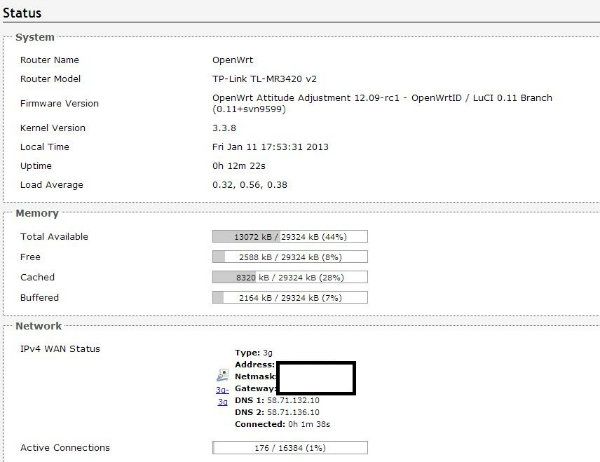
Good news...MR3420 v2 is now supported by OpenWrt Attitude Adjustment 12.09-rc1

You can read more at http://forum.openwrt-id.org/viewtopic.php?pid=1340#p1340

Please share if you success with this. Remember, at your own risk smile.gif
apersaje
post Jan 11 2013, 03:24 PM

Getting Started
**
Junior Member
116 posts

Joined: Aug 2007


Is is normal for my modem to be warm?
Seems that my E367 is warmer after I flashed my MR3420 compared from before.
Vista-X
post Jan 11 2013, 05:06 PM

Getting Started
**
Junior Member
161 posts

Joined: Mar 2008
From: areca nut island


QUOTE(rootlinux @ Jan 11 2013, 10:40 AM)
Good news...MR3420 v2 is now supported by OpenWrt Attitude Adjustment 12.09-rc1

You can read more at http://forum.openwrt-id.org/viewtopic.php?pid=1340#p1340

Please share if you success with this. Remember, at your own risk smile.gif
*
Nice this is good news, time to play with it. Hope wont brick it.
greenlp_87
post Jan 11 2013, 05:07 PM

Look at all my stars!!
*******
Senior Member
3,150 posts

Joined: Feb 2011
From: Shah Alam, Subang, PJ


QUOTE(rootlinux @ Jan 11 2013, 10:40 AM)
Good news...MR3420 v2 is now supported by OpenWrt Attitude Adjustment 12.09-rc1

You can read more at http://forum.openwrt-id.org/viewtopic.php?pid=1340#p1340

Please share if you success with this. Remember, at your own risk smile.gif
*
have u try it??
Vista-X
post Jan 11 2013, 06:01 PM

Getting Started
**
Junior Member
161 posts

Joined: Mar 2008
From: areca nut island


QUOTE(rootlinux @ Jan 11 2013, 10:40 AM)
Good news...MR3420 v2 is now supported by OpenWrt Attitude Adjustment 12.09-rc1

You can read more at http://forum.openwrt-id.org/viewtopic.php?pid=1340#p1340

Please share if you success with this. Remember, at your own risk smile.gif
*
Flashed, working with e-398 thumbup.gif
user posted image
greenlp_87
post Jan 11 2013, 08:22 PM

Look at all my stars!!
*******
Senior Member
3,150 posts

Joined: Feb 2011
From: Shah Alam, Subang, PJ


QUOTE(Vista-X @ Jan 11 2013, 06:01 PM)
Flashed, working with e-398  thumbup.gif
user posted image
*
nice!!!have set the command to ping to google??
greenlp_87
post Jan 11 2013, 08:43 PM

Look at all my stars!!
*******
Senior Member
3,150 posts

Joined: Feb 2011
From: Shah Alam, Subang, PJ


anyone have try latest openwrt fw on v1 router with e398?
rootlinux
post Jan 11 2013, 08:54 PM

Enthusiast
*****
Senior Member
898 posts

Joined: Jan 2003
From: ph/sbj/slgr
QUOTE(greenlp_87 @ Jan 11 2013, 05:07 PM)
have u try it??
*
i dun hav v2. sorry... going to get one soon rclxm9.gif
rootlinux
post Jan 11 2013, 08:55 PM

Enthusiast
*****
Senior Member
898 posts

Joined: Jan 2003
From: ph/sbj/slgr
QUOTE(Vista-X @ Jan 11 2013, 06:01 PM)
Flashed, working with e-398  thumbup.gif
user posted image
*
can u share with us the free space after flashing this openwrt? thank you.
Vista-X
post Jan 11 2013, 11:05 PM

Getting Started
**
Junior Member
161 posts

Joined: Mar 2008
From: areca nut island


QUOTE(greenlp_87 @ Jan 11 2013, 08:22 PM)
nice!!!have set the command to ping to google??
*
Nope. it's back to sleeping mode, back to store room. using my other router. tongue.gif
Vista-X
post Jan 11 2013, 11:07 PM

Getting Started
**
Junior Member
161 posts

Joined: Mar 2008
From: areca nut island


QUOTE(rootlinux @ Jan 11 2013, 08:55 PM)
can u share with us the free space after flashing this openwrt? thank you.
*
will check when i play with it when free.
TStanpanama
post Jan 11 2013, 11:30 PM

Getting Started
**
Junior Member
152 posts

Joined: Jan 2005


already put stock firmware for v1 and v2 and quote from mr root linux about openWRT for V2


tq everyone
yewfatt
post Jan 12 2013, 11:10 AM

Regular
******
Senior Member
1,468 posts

Joined: Sep 2004


just flash to openwrt too for 3420 v2 biggrin.gif
rootlinux
post Jan 12 2013, 04:47 PM

Enthusiast
*****
Senior Member
898 posts

Joined: Jan 2003
From: ph/sbj/slgr
QUOTE(yewfatt @ Jan 12 2013, 11:10 AM)
just flash to openwrt too for 3420 v2 biggrin.gif
*
May I know ur hardware ver? Is it v2 or v2.1? Thanks.
yewfatt
post Jan 13 2013, 12:17 AM

Regular
******
Senior Member
1,468 posts

Joined: Sep 2004


QUOTE(rootlinux @ Jan 12 2013, 04:47 PM)
May I know ur hardware ver? Is it v2 or v2.1? Thanks.
*
v2.
ks98
post Jan 13 2013, 02:12 AM

Casual
***
Junior Member
460 posts

Joined: Jan 2009


btw, i tried OpenWrt Attitude Adjustment 12.09-rc1 on my MR3420 v1.2 and it works!
Vista-X
post Jan 13 2013, 11:48 PM

Getting Started
**
Junior Member
161 posts

Joined: Mar 2008
From: areca nut island


QUOTE(rootlinux @ Jan 11 2013, 08:55 PM)
can u share with us the free space after flashing this openwrt? thank you.
*
There u go.
user posted image
rootlinux
post Jan 14 2013, 09:54 AM

Enthusiast
*****
Senior Member
898 posts

Joined: Jan 2003
From: ph/sbj/slgr
QUOTE(yewfatt @ Jan 13 2013, 12:17 AM)
v2.
*
Cool. I guess all the stock now is v2.1 and would like to know anyone has tried the OpenWrt on MR3420 v2.1?
rootlinux
post Jan 14 2013, 09:55 AM

Enthusiast
*****
Senior Member
898 posts

Joined: Jan 2003
From: ph/sbj/slgr
QUOTE(Vista-X @ Jan 13 2013, 11:48 PM)
There u go.
user posted image
*
thanks. hav u try installing QoS?
ShinjiShen
post Jan 14 2013, 11:12 AM

New Member
*
Junior Member
43 posts

Joined: Mar 2009
From: Penang


Hi guys I just brought an TL-MR3420 V2.1, i am using E372 modem. But the router will keep disconnected and unable to reconnect back! firmware also been update to the latest one still the problem exist. Any user facing the same problems too? any solving method ?
jlyek
post Jan 14 2013, 06:05 PM

New Member
*
Junior Member
8 posts

Joined: Nov 2012


QUOTE(ShinjiShen @ Jan 14 2013, 11:12 AM)
Hi guys I just brought an TL-MR3420 V2.1, i am using E372 modem. But the router will keep disconnected and unable to reconnect back! firmware also been update to the latest one still the problem exist. Any user facing the same problems too? any solving method ?
*
Did you supercharge yr E372? I noticed if I tweak some NV value to too extreme value, it has the similar issue on my 3420 v1. Although it can work if direct plugin to my pc.
ShinjiShen
post Jan 14 2013, 06:15 PM

New Member
*
Junior Member
43 posts

Joined: Mar 2009
From: Penang


QUOTE(jlyek @ Jan 14 2013, 06:05 PM)
Did you supercharge yr E372? I noticed if I tweak some NV value to too extreme value, it has the similar issue on my 3420 v1. Although it can work if direct plugin to my pc.
*
No all origin setting by maxis ~
Vista-X
post Jan 14 2013, 07:22 PM

Getting Started
**
Junior Member
161 posts

Joined: Mar 2008
From: areca nut island


QUOTE(rootlinux @ Jan 14 2013, 09:55 AM)
thanks. hav u try installing QoS?
*
Nope bro, flashed back to ori fw. Open wrt seems not so smooth with 3420v2, or maybe just me. I like tomato firmware much more than open wrt/dd wrt.
kaisam
post Jan 14 2013, 10:39 PM

Getting Started
**
Junior Member
257 posts

Joined: Dec 2007
QUOTE(Vista-X @ Jan 14 2013, 07:22 PM)
Nope bro, flashed back to ori fw. Open wrt seems not so smooth with 3420v2, or maybe just me. I like tomato firmware much more than open wrt/dd wrt.
*
so u got try LINKSYS—WRT300N on tomato b4 ?

Thank you. smile.gif
Erehwon
post Jan 14 2013, 11:22 PM

Getting Started
**
Junior Member
77 posts

Joined: May 2008


I have the V1.2 and V2.1
One interesting observation I have is that using E398 a cable connection and wifi disabled, the V1 actually gives better speeds than the V2 on stock firmware

V2 wins on modem identification speed though
mushashi87
post Jan 15 2013, 01:31 AM

Getting Started
**
Junior Member
223 posts

Joined: Nov 2008


Hi guys anyone still remember how to set an internet connection from PC to Modem to download OpenWRT Package? I am stuck at the command that i should type in PUTTY
Vista-X
post Jan 15 2013, 02:12 AM

Getting Started
**
Junior Member
161 posts

Joined: Mar 2008
From: areca nut island


QUOTE(kaisam @ Jan 14 2013, 10:39 PM)
so u got try LINKSYS—WRT300N on tomato b4 ?

Thank you.  smile.gif
*
Dont have wrt300n
kaisam
post Jan 15 2013, 10:31 AM

Getting Started
**
Junior Member
257 posts

Joined: Dec 2007
QUOTE(Vista-X @ Jan 15 2013, 02:12 AM)
Dont have wrt300n
*
so got try other brand or model b4 on tomato ?

Thank you. smile.gif
Zelmel
post Jan 15 2013, 11:12 AM

Casual
***
Junior Member
495 posts

Joined: Nov 2007
From: Sarawak (Now in PJ)


Can anyone tell me why we need to flash the open wrt?
Vista-X
post Jan 15 2013, 04:27 PM

Getting Started
**
Junior Member
161 posts

Joined: Mar 2008
From: areca nut island


QUOTE(kaisam @ Jan 15 2013, 10:31 AM)
so got try other brand or model b4 on tomato ?

Thank you.  smile.gif
*
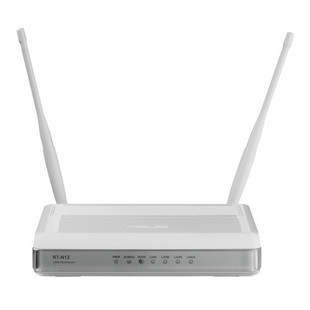
yes bro currently using rt-n12

user posted image


Vista-X
post Jan 15 2013, 04:28 PM

Getting Started
**
Junior Member
161 posts

Joined: Mar 2008
From: areca nut island


QUOTE(Zelmel @ Jan 15 2013, 11:12 AM)
Can anyone tell me why we need to flash the open wrt?
*
This is 1 of my reason
user posted image

user posted image
apersaje
post Jan 15 2013, 06:55 PM

Getting Started
**
Junior Member
116 posts

Joined: Aug 2007


QUOTE(mushashi87 @ Jan 15 2013, 01:31 AM)
Hi guys anyone still remember how to set an internet connection from PC to Modem to download OpenWRT Package? I am stuck at the command that i should type in PUTTY
*
Refer this post: http://forum.lowyat.net/index.php?showtopi...post&p=55622714

TS maybe can put this at first post.

Zelmel
post Jan 15 2013, 08:11 PM

Casual
***
Junior Member
495 posts

Joined: Nov 2007
From: Sarawak (Now in PJ)


QUOTE(Vista-X @ Jan 15 2013, 04:28 PM)
This is 1 of my reason
user posted image

user posted image
*
Sorry bro, I still can't understand. Sorry for being noobs.
kaisam
post Jan 15 2013, 08:49 PM

Getting Started
**
Junior Member
257 posts

Joined: Dec 2007
QUOTE(Vista-X @ Jan 15 2013, 04:28 PM)
This is 1 of my reason
user posted image

user posted image
*
u use unifi ?

urs 1 is white colour or black colour ?

Thank you. biggrin.gif

This post has been edited by kaisam: Jan 15 2013, 09:09 PM
Vista-X
post Jan 15 2013, 10:09 PM

Getting Started
**
Junior Member
161 posts

Joined: Mar 2008
From: areca nut island


QUOTE(Zelmel @ Jan 15 2013, 08:11 PM)
Sorry bro, I still can't understand. Sorry for being noobs.
*
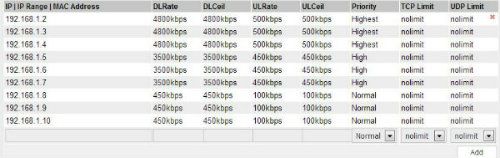
thats is QOS ( quality if services ) and bandwith control. Control which pc get how much maximum bandwith. it's like housemate downloading 24/7 then use this bandwith control to cap it's speed so others can enjoy the internet.

This post has been edited by Vista-X: Jan 15 2013, 10:15 PM
Vista-X
post Jan 15 2013, 10:13 PM

Getting Started
**
Junior Member
161 posts

Joined: Mar 2008
From: areca nut island


double post

This post has been edited by Vista-X: Jan 15 2013, 10:14 PM
kaisam
post Jan 16 2013, 12:01 PM

Getting Started
**
Junior Member
257 posts

Joined: Dec 2007
QUOTE(Vista-X @ Jan 15 2013, 10:13 PM)
double post
*
Can i know which Asus rt-n12u use for tamato firmware ? is black colour or white colour ?

user posted image

or

user posted image

Thank you. biggrin.gif

This post has been edited by kaisam: Jan 16 2013, 01:53 PM
Vista-X
post Jan 16 2013, 02:26 PM

Getting Started
**
Junior Member
161 posts

Joined: Mar 2008
From: areca nut island


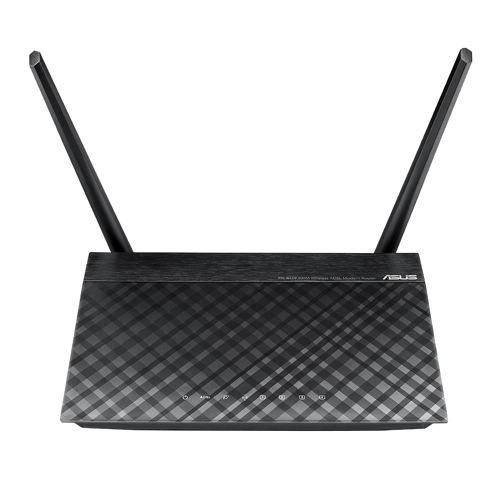
My is rt-n12 c1. Black diamond.
kaisam
post Jan 16 2013, 07:10 PM

Getting Started
**
Junior Member
257 posts

Joined: Dec 2007
QUOTE(Vista-X @ Jan 16 2013, 02:26 PM)
My is rt-n12 c1. Black diamond.
*
oic, u use which 1 version of tomato firmware ? can i know ?

Thank you. biggrin.gif
ibnuasad
post Jan 20 2013, 11:12 PM

A screw is not a screw until you screw it!
****
Senior Member
558 posts

Joined: Jun 2006
From: Lowyat.Net


Reporting in notworthy.gif
nickcct
post Jan 25 2013, 09:51 AM

Une Vie Fantastique
*******
Senior Member
2,847 posts

Joined: Sep 2010
May i know this router can use with Streamyx as Wifi router? Streamyx without wifi. Thanks.
blacktubi
post Jan 25 2013, 01:34 PM

-
Group Icon
Elite
8,409 posts

Joined: Jul 2008

QUOTE(nickcct @ Jan 25 2013, 09:51 AM)
May i know this router can use with Streamyx as Wifi router? Streamyx without wifi. Thanks.
*
Setup your streamyx modem as bridge mode and set MR3420 to dial PPPOE smile.gif

Else just PPPOE at modem and DHCP at MR3420
nickcct
post Jan 25 2013, 04:22 PM

Une Vie Fantastique
*******
Senior Member
2,847 posts

Joined: Sep 2010
QUOTE(blacktubi @ Jan 25 2013, 01:34 PM)
Setup your streamyx modem as bridge mode and set MR3420 to dial PPPOE smile.gif

Else just PPPOE at modem and DHCP at MR3420
*
Cozs mine one is V1.

There only have this option on WAN.

PPPoE/Russia PPPoE

Then username and password i should put what?
blacktubi
post Jan 25 2013, 04:23 PM

-
Group Icon
Elite
8,409 posts

Joined: Jul 2008

QUOTE(nickcct @ Jan 25 2013, 04:22 PM)
Cozs mine one is V1.

There only have this option on WAN.

PPPoE/Russia PPPoE

Then username and password i should put what?
*
Use Bridge mode at your modem

Set to PPPOE and use your streamyx login
blacktubi
post Jan 25 2013, 04:23 PM

-
Group Icon
Elite
8,409 posts

Joined: Jul 2008

QUOTE(nickcct @ Jan 25 2013, 04:22 PM)
Cozs mine one is V1.

There only have this option on WAN.

PPPoE/Russia PPPoE

Then username and password i should put what?
*
Use Bridge mode at your modem

Set to PPPOE and use your streamyx login
goldsteel
post Jan 26 2013, 10:27 AM

New Member
*
Newbie
6 posts

Joined: Jun 2010
From: Penang


Hi anyone know how to edit this for me so that I can reset my MR3420 V2 from openwrt to TP-Link firmware?

QUOTE
Download firmware: http://www.tp-link.com/Resources/software/...0_V2_121206.zip (the filename contains "boot" & the size=4063744)
So
Cut the first 0x20200 (that is 131,584 = 257*512) Bytes from original firmware
Linux: dd if=orig.bin of=tplink.bin skip=257 bs=512 (source: http://wiki.openwrt.org/toh/tp-link/tl-wr1043nd )
Win: Hexedit will do.
Flash the stripped file (size=3932160)


link : https://forum.openwrt.org/viewtopic.php?pid=189581#p189581

This post has been edited by goldsteel: Jan 26 2013, 10:29 AM
BladeRider88
post Jan 28 2013, 09:14 AM

On my way
****
Junior Member
554 posts

Joined: Nov 2006


Hi TS, i managed to flash OpenWRT to TP-Link TL-MR3020, the portable 3G router, and hereby i attach the tutorial guide for everyone @ here. Credits goes to Chuah and others sifus that share their posts/documentation in the internet.


Attached File(s)
Attached File  TP_Link_TL_MR3020_OpenWRT_tutorial.pdf ( 367.25k ) Number of downloads: 215
texas5
post Feb 3 2013, 12:55 AM

Getting Started
**
Junior Member
222 posts

Joined: Aug 2008
From: Ipoh Perak


why everyone talked about install openWRT in TL-MR3420? what is it for? openWRT? sweat.gif

i plan to use this TL-MR3420 with my E398..do i need to install openWRT also?

and how to identify the modem is v1 or v2?
blacktubi
post Feb 3 2013, 11:13 AM

-
Group Icon
Elite
8,409 posts

Joined: Jul 2008

QUOTE(texas5 @ Feb 3 2013, 12:55 AM)
why everyone talked about install openWRT in TL-MR3420? what is it for? openWRT?  sweat.gif

i plan to use this TL-MR3420 with my E398..do i need to install openWRT also?

and how to identify the modem is v1 or v2?
*
OpenWRT is about to perform extra performance, stability

It won't show significant improvement on speed and etc. If you is someone who like to DIY go for it laugh.gif
ibnuasad
post Feb 3 2013, 02:54 PM

A screw is not a screw until you screw it!
****
Senior Member
558 posts

Joined: Jun 2006
From: Lowyat.Net


QUOTE(texas5 @ Feb 3 2013, 12:55 AM)
why everyone talked about install openWRT in TL-MR3420? what is it for? openWRT?  sweat.gif

i plan to use this TL-MR3420 with my E398..do i need to install openWRT also?

and how to identify the modem is v1 or v2?
*
OpenWRT just has more advanced functions than the stock firmware thumbup.gif It's up to your personal preference. icon_rolleyes.gif

I personally use the DNSMasq function in OpenWRT to access Hulu laugh.gif

I'm also now trying to use the Multiwan feature to load balance my Streamyx + USB 3G Internet...still haven't figured out how to use it sweat.gif

chuahcs79
post Feb 3 2013, 08:40 PM

Look at all my stars!!
Group Icon
Elite
6,931 posts

Joined: Apr 2011
From: Bolehland for sure ^_^


QUOTE(tanpanama @ Jan 6 2013, 11:20 PM)
just want cont the thread that already close from mr chuah79

V1: Firmware

V2: Firmware


GUIDE FOR INSTALLATION openWRT in Tp Link TL-MR3420 V1 AND V2

Open Wrt for TL-MR3420 V1 ~ V1.3 BY khairilyazit & ibnuasad

» Click to show Spoiler - click again to hide... «


for TP LINK MR-3420 V2

» Click to show Spoiler - click again to hide... «


SETTING AUTO PING TO PREVENT CONNECTION IDLE -  openWRT in Tp Link TL-MR3420


» Click to show Spoiler - click again to hide... «

*
tanpanama
u can add all these to your first post : notworthy.gif


How to Setup your Tp LINK TL-MR3420
» Click to show Spoiler - click again to hide... «


Tweak for TL-MR3420 on Bandwidth control with TP LINK Stock Firmware


» Click to show Spoiler - click again to hide... «


Step on How to check signal % of usb modem when plug in Openwrt TL-MR3420 BY KIZWAN
» Click to show Spoiler - click again to hide... «


Checking MR3420 log to know your modem Device of Wan Setting on Open WRT BY KIZWAN


» Click to show Spoiler - click again to hide... «


how to flash back to TP LINK Stock firmware from Open wrt

» Click to show Spoiler - click again to hide... «


USB sniffer tool to make bin files for your modem in case your modem dont recognize by TL-MR3420 router

» Click to show Spoiler - click again to hide... «


How to use DNSMasq on openwrt by Ibnuasad ( to watch US based hulu.com/pandora/netflix/etc etc

» Click to show Spoiler - click again to hide... «
khairilyazit
post Feb 3 2013, 10:07 PM

Casual
***
Junior Member
406 posts

Joined: Sep 2010
From: Papar, Sabah


hey guys, didnt't know that this thread was up..
i was thinking about setting up a thread for OpenWRT for all atheros ar71xx chipset as thats what were all interested in..
cause i can just compile the images from a single build source..
lemme know if any of u guys are interested..
blacktubi
post Feb 3 2013, 10:09 PM

-
Group Icon
Elite
8,409 posts

Joined: Jul 2008

QUOTE(khairilyazit @ Feb 3 2013, 10:07 PM)
hey guys, didnt't know that this thread was up..
i was thinking about setting up a thread for OpenWRT for all atheros ar71xx chipset as thats what were all interested in..
cause i can just compile the images from a single build source..
lemme know if any of u guys are interested..
*
I would prefer 3G for OpenWRT thread smile.gif

Since after you got OpenWRT up and running, the steps are general nod.gif
khairilyazit
post Feb 3 2013, 10:13 PM

Casual
***
Junior Member
406 posts

Joined: Sep 2010
From: Papar, Sabah


QUOTE(blacktubi @ Feb 3 2013, 10:09 PM)
I would prefer 3G for OpenWRT thread smile.gif

Since after you got OpenWRT up and running, the steps are general nod.gif
*
3G for openwrt? what do u mean by that? notworthy.gif
ibnuasad
post Feb 4 2013, 01:08 PM

A screw is not a screw until you screw it!
****
Senior Member
558 posts

Joined: Jun 2006
From: Lowyat.Net


QUOTE(khairilyazit @ Feb 3 2013, 10:07 PM)
hey guys, didnt't know that this thread was up..
i was thinking about setting up a thread for OpenWRT for all atheros ar71xx chipset as thats what were all interested in..
cause i can just compile the images from a single build source..
lemme know if any of u guys are interested..
*
Nice idea smile.gif I would love to join biggrin.gif

QUOTE(khairilyazit @ Feb 3 2013, 10:13 PM)
3G for openwrt? what do u mean by that? notworthy.gif
*
He probably mean compiled images for 3g capable routers would include 3g usb packages by default notworthy.gif

khairilyazit
post Feb 4 2013, 03:21 PM

Casual
***
Junior Member
406 posts

Joined: Sep 2010
From: Papar, Sabah


QUOTE(ibnuasad @ Feb 4 2013, 01:08 PM)
Nice idea smile.gif I would love to join biggrin.gif
He probably mean compiled images for 3g capable routers would include 3g usb packages by default  notworthy.gif
*
ur welcomed to.. so far i have images for tl-MR3420 v1 n tl-MR3020.. both with usb support oob...thinking of snatching a tl-wdr4300 or tl-wdr3600 for experiment..

TStanpanama
post Feb 4 2013, 10:12 PM

Getting Started
**
Junior Member
152 posts

Joined: Jan 2005


QUOTE(chuahcs79 @ Feb 3 2013, 08:40 PM)
tanpanama
u can add all these to your first post :  notworthy.gif
ok...already put it
chuahcs79
post Feb 4 2013, 10:17 PM

Look at all my stars!!
Group Icon
Elite
6,931 posts

Joined: Apr 2011
From: Bolehland for sure ^_^


QUOTE(tanpanama @ Feb 4 2013, 10:12 PM)
ok...already put it
*
the credit is not mine,

it is belong to those original founder/user who share,.. notworthy.gif
ibnuasad
post Feb 4 2013, 11:20 PM

A screw is not a screw until you screw it!
****
Senior Member
558 posts

Joined: Jun 2006
From: Lowyat.Net


Just did a 1 to 1 warranty exchange for my bricked MR3420 smile.gif Decided not to buy the soldering iron, resistor, stubs, etc to manually fix it sweat.gif
blacktubi
post Feb 4 2013, 11:21 PM

-
Group Icon
Elite
8,409 posts

Joined: Jul 2008

QUOTE(ibnuasad @ Feb 4 2013, 11:20 PM)
Just did a 1 to 1 warranty exchange for my bricked MR3420 smile.gif  Decided not to buy the soldering iron, resistor, stubs, etc to manually fix it sweat.gif
*
You resturn to your reseller?

Who is your reseller
ibnuasad
post Feb 4 2013, 11:24 PM

A screw is not a screw until you screw it!
****
Senior Member
558 posts

Joined: Jun 2006
From: Lowyat.Net


QUOTE(blacktubi @ Feb 4 2013, 11:21 PM)
You resturn to your reseller?

Who is your reseller
*
Direct return to Lowyat icon_rolleyes.gif
blacktubi
post Feb 4 2013, 11:25 PM

-
Group Icon
Elite
8,409 posts

Joined: Jul 2008

QUOTE(ibnuasad @ Feb 4 2013, 11:24 PM)
Direct return to Lowyat  icon_rolleyes.gif
*
How you tell them? brows.gif

I might wanna RMA mine
ibnuasad
post Feb 4 2013, 11:29 PM

A screw is not a screw until you screw it!
****
Senior Member
558 posts

Joined: Jun 2006
From: Lowyat.Net


QUOTE(blacktubi @ Feb 4 2013, 11:25 PM)
How you tell them? brows.gif

I might wanna RMA mine
*
I'll tell you in the *other* channel whistling.gif

At first I called the 03 number, nobody pickup. Then called the 1 800 number...CS asked me from which country...I hear the slang, confirm CS not Malaysian...speaks english but I can barely understand doh.gif

Decided to direct go to LYP but when arrive nobody there, office locked doh.gif Waited for about 20mins to open sweat.gif
blacktubi
post Feb 4 2013, 11:34 PM

-
Group Icon
Elite
8,409 posts

Joined: Jul 2008

QUOTE(ibnuasad @ Feb 4 2013, 11:29 PM)
I'll tell you in the *other* channel  whistling.gif

At first I called the 03 number, nobody pickup. Then called the 1 800 number...CS asked me from which country...I hear the slang, confirm CS not Malaysian...speaks english but I can barely understand  doh.gif

Decided to direct go to LYP but when arrive nobody there, office locked  doh.gif Waited for about 20mins to open sweat.gif
*
Guess I should Phone the 03 number tomorrow then to arrange for my postage RMA laugh.gif
khairilyazit
post Feb 4 2013, 11:53 PM

Casual
***
Junior Member
406 posts

Joined: Sep 2010
From: Papar, Sabah


i think my 3420 usb is spoiled.. left it out in the rain the other day.. my naked k3250 modem survived though... gonna try with stock fw 1st..
dodobird23
post Feb 4 2013, 11:59 PM

New Member
*
Junior Member
18 posts

Joined: Oct 2012


how to install openwrt in mr3420v2?
khairilyazit
post Feb 5 2013, 12:02 AM

Casual
***
Junior Member
406 posts

Joined: Sep 2010
From: Papar, Sabah


QUOTE(dodobird23 @ Feb 4 2013, 11:59 PM)
how to install openwrt in mr3420v2?
*
that one i havent got any idea as i dont have v2 with me.. just crippled v1 n MR3020
chuahcs79
post Feb 5 2013, 06:12 AM

Look at all my stars!!
Group Icon
Elite
6,931 posts

Joined: Apr 2011
From: Bolehland for sure ^_^


QUOTE(dodobird23 @ Feb 4 2013, 11:59 PM)
how to install openwrt in mr3420v2?
*
first of all u need to download the V2 openwrt firmware from here :openwrt-ar71xx-generic-tl-mr3420-v2-squashfs-factory.bin (3.8MB)

make sure u plug in Lan cable to your V2 connection, then follow the video tutor below :
( credit to Original creator : Cindy Wijaya )


This post has been edited by chuahcs79: Feb 5 2013, 06:14 AM
dodobird23
post Feb 5 2013, 12:09 PM

New Member
*
Junior Member
18 posts

Joined: Oct 2012


thx

This post has been edited by dodobird23: Feb 5 2013, 12:37 PM
chuahcs79
post Feb 5 2013, 05:40 PM

Look at all my stars!!
Group Icon
Elite
6,931 posts

Joined: Apr 2011
From: Bolehland for sure ^_^


QUOTE(dodobird23 @ Feb 5 2013, 12:09 PM)
thx
*
u can consult the Creator "Cindy Wijaya" in the forum if u have any question, link is in first post,..

so far i did flash before, not much issue,.. and it is ready to use after flash,. only a few setup in setting,.. notworthy.gif
bosouman
post Feb 5 2013, 07:17 PM

Casual
***
Junior Member
393 posts

Joined: Apr 2010
anyone have the setting for bandwith control?
i remember chuachcs79 posted it earlier.
but i cant remember
chuahcs79
post Feb 5 2013, 07:52 PM

Look at all my stars!!
Group Icon
Elite
6,931 posts

Joined: Apr 2011
From: Bolehland for sure ^_^


QUOTE(bosouman @ Feb 5 2013, 07:17 PM)
anyone have the setting for bandwith control?
i remember chuachcs79 posted it earlier.
but i cant remember
*
Tweak for TL-MR3420 on Bandwidth control with TP LINK Stock Firmware


» Click to show Spoiler - click again to hide... «

hairul
post Feb 5 2013, 09:18 PM

** Learn From The Mistake **
*****
Senior Member
944 posts

Joined: Jan 2003
From: SHAH ALAM


QUOTE(chuahcs79 @ Feb 5 2013, 06:12 AM)
first of all u need to download the V2 openwrt firmware from here :openwrt-ar71xx-generic-tl-mr3420-v2-squashfs-factory.bin (3.8MB)

make sure u plug in Lan cable to your V2 connection, then follow the video tutor below :
( credit to Original creator : Cindy Wijaya )

*
Any improvement compare to stock firmware? Maxis line much stable since 2 weeks ago.
Now Celcom (1Malaysia -Sim Card From Sabah) line not stable compare to maxis.

This post has been edited by hairul: Feb 5 2013, 09:18 PM
chuahcs79
post Feb 5 2013, 09:35 PM

Look at all my stars!!
Group Icon
Elite
6,931 posts

Joined: Apr 2011
From: Bolehland for sure ^_^


QUOTE(hairul @ Feb 5 2013, 09:18 PM)
Any improvement compare to stock firmware? Maxis line much stable since 2 weeks ago.
Now Celcom (1Malaysia -Sim Card From Sabah) line not stable compare to maxis.
*
well depends though,

since i am no longer using V1 or V2, so can't tell much whether it is superb or not,.

but of course the openwrt will have some perks that stock firmware dont have notworthy.gif
blacktubi
post Feb 5 2013, 10:19 PM

-
Group Icon
Elite
8,409 posts

Joined: Jul 2008

QUOTE(chuahcs79 @ Feb 5 2013, 07:52 PM)
Tweak for TL-MR3420 on Bandwidth control with TP LINK Stock Firmware
» Click to show Spoiler - click again to hide... «

*
Finally Chuah Sifu come back to help out notworthy.gif

chuahcs79
post Feb 5 2013, 10:21 PM

Look at all my stars!!
Group Icon
Elite
6,931 posts

Joined: Apr 2011
From: Bolehland for sure ^_^


QUOTE(blacktubi @ Feb 5 2013, 10:19 PM)
Finally Chuah Sifu come back to help out notworthy.gif
*
that's the last few post i can help,

as i no longer using maxis , V1 or V2,.. notworthy.gif
schwalbe
post Feb 6 2013, 01:28 AM

New Member
*
Newbie
3 posts

Joined: Sep 2010
Guys, i'm using TL-MR3420 v2 mated with Sierra 320U maxis unlimited.
when I connect the modem directly to my laptop I get ~24Mbps, but with this router max I can get is 11Mbps, tried the enable Bandwith control trick, but didn't work, any ideas guys, thanks.
ibnuasad
post Feb 6 2013, 01:56 PM

A screw is not a screw until you screw it!
****
Senior Member
558 posts

Joined: Jun 2006
From: Lowyat.Net


QUOTE(schwalbe @ Feb 6 2013, 01:28 AM)
Guys, i'm using TL-MR3420 v2 mated with Sierra 320U maxis unlimited.
when I connect the modem directly to my laptop I get ~24Mbps, but with this router max I can get is 11Mbps, tried the enable Bandwith control trick, but didn't work, any ideas guys, thanks.
*
Firstly check your firmware version whether it's the latest one..if got new version, try upgrading...
http://www.tp-link.com.my/support/download...3420&version=V2
kaisam
post Feb 6 2013, 05:48 PM

Getting Started
**
Junior Member
257 posts

Joined: Dec 2007
QUOTE(chuahcs79 @ Feb 5 2013, 10:21 PM)
that's the last few post i can help,

as i no longer using maxis , V1 or V2,..  notworthy.gif
*
so now u use what ISP ?

Thank you. biggrin.gif
evit
post Feb 6 2013, 06:03 PM

Getting Started
**
Junior Member
147 posts

Joined: Sep 2007
From: Johor


Already install Open Wrt for MR3420v2, can use my modem well. Is there anyway to make a schedule code to restart the modem daily?
khairilyazit
post Feb 6 2013, 06:12 PM

Casual
***
Junior Member
406 posts

Joined: Sep 2010
From: Papar, Sabah


QUOTE(schwalbe @ Feb 6 2013, 01:28 AM)
Guys, i'm using TL-MR3420 v2 mated with Sierra 320U maxis unlimited.
when I connect the modem directly to my laptop I get ~24Mbps, but with this router max I can get is 11Mbps, tried the enable Bandwith control trick, but didn't work, any ideas guys, thanks.
*
QUOTE(ibnuasad @ Feb 6 2013, 01:56 PM)
Firstly check your firmware version whether it's the latest one..if got new version, try upgrading...
http://www.tp-link.com.my/support/download...3420&version=V2
*
i have a weird idea abt it.. do u guys know how usb speed is rated at 1.5Mbps, 12Mbps, 480Mbps, and 5Gbps.
what if something is amiss with our usb driver on the router or our modem signalling itself as a usb 1.1 device, the speed would be limited to 12Mbps.. minus with bus overhead, it could well return 10~11Mbps..

how does my theory sound?
ibnuasad
post Feb 6 2013, 06:26 PM

A screw is not a screw until you screw it!
****
Senior Member
558 posts

Joined: Jun 2006
From: Lowyat.Net


QUOTE(khairilyazit @ Feb 6 2013, 06:12 PM)
i have a weird idea abt it.. do u guys know how usb speed is rated at 1.5Mbps, 12Mbps, 480Mbps, and 5Gbps.
what if something is amiss with our usb driver on the router or our modem signalling itself as a usb 1.1 device, the speed would be limited to 12Mbps.. minus with bus overhead, it could well return 10~11Mbps..

how does my theory sound?
*
Now that you've mentioned it, this may be plausible hmm.gif

But with my e353, I did 1.5 MBps briefly last night (a few short seconds...maybe Networx delay?) hmm.gif

chuahcs79, did you ever get > 12 Mbps with MR3420 Stock or OpenWRT?
ibnuasad
post Feb 6 2013, 06:31 PM

A screw is not a screw until you screw it!
****
Senior Member
558 posts

Joined: Jun 2006
From: Lowyat.Net


evit, Paste the following code @ System > Scheduled Tasks
CODE
* 12 * * * reboot

The above code will reboot router everyday at 12pm.

If you want to set a more specific time, can use

Crontab Code Generator icon_rolleyes.gif

This post has been edited by ibnuasad: Feb 6 2013, 06:32 PM
khairilyazit
post Feb 6 2013, 06:51 PM

Casual
***
Junior Member
406 posts

Joined: Sep 2010
From: Papar, Sabah


QUOTE(ibnuasad @ Feb 6 2013, 06:26 PM)
Now that you've mentioned it, this may be plausible  hmm.gif

But with my e353, I did 1.5 MBps briefly last night (a few short seconds...maybe Networx delay?)  hmm.gif

chuahcs79, did you ever get > 12 Mbps with MR3420 Stock or OpenWRT?
*
network delay is also plausible.. chuahcs79 always get >12Mbps.. i think its like 16Mbps avg for him... for me, other than network, i would say that our modem is signalling itself as a 12Mbps or Full Speed usb device, cause, if u notice, sometimes, the modem would do that even on a PC.. i think its got something to do with the CD-ROM emulator on the modems.. just my thoughts.. dont have the time to dug up evidence for my blabbering..
chuahcs79
post Feb 6 2013, 06:59 PM

Look at all my stars!!
Group Icon
Elite
6,931 posts

Joined: Apr 2011
From: Bolehland for sure ^_^


QUOTE(ibnuasad @ Feb 6 2013, 06:26 PM)
Now that you've mentioned it, this may be plausible  hmm.gif

But with my e353, I did 1.5 MBps briefly last night (a few short seconds...maybe Networx delay?)  hmm.gif

chuahcs79, did you ever get > 12 Mbps with MR3420 Stock or OpenWRT?
*
i manage to get 12-15Mbps with openwrt before with v1 or v2.
hairul
post Feb 6 2013, 07:02 PM

** Learn From The Mistake **
*****
Senior Member
944 posts

Joined: Jan 2003
From: SHAH ALAM


QUOTE(khairilyazit @ Feb 6 2013, 06:12 PM)
i have a weird idea abt it.. do u guys know how usb speed is rated at 1.5Mbps, 12Mbps, 480Mbps, and 5Gbps.
what if something is amiss with our usb driver on the router or our modem signalling itself as a usb 1.1 device, the speed would be limited to 12Mbps.. minus with bus overhead, it could well return 10~11Mbps..

how does my theory sound?
*
V1/V2 is USB 2.0.
http://www.tp-link.com.my/products/details...=TL-MR3420#spec

This post has been edited by hairul: Feb 6 2013, 07:04 PM
evit
post Feb 6 2013, 07:15 PM

Getting Started
**
Junior Member
147 posts

Joined: Sep 2007
From: Johor


QUOTE(ibnuasad @ Feb 6 2013, 06:31 PM)
evit, Paste the following code @ System > Scheduled Tasks
CODE
* 12 * * * reboot

The above code will reboot router everyday at 12pm.

If you want to set a more specific time, can use

Crontab Code Generator  icon_rolleyes.gif
*
Thanks for the link bro, it really help, but how do i write the code/ need semicolon (wink.gif or just write it below the first code like this?

CODE
* * * * * /bin/ping -q -s 1 -c 60 8.8.8.8 & > /dev/null
* 12 * * * reboot

chuahcs79
post Feb 6 2013, 07:31 PM

Look at all my stars!!
Group Icon
Elite
6,931 posts

Joined: Apr 2011
From: Bolehland for sure ^_^


QUOTE(hairul @ Feb 6 2013, 07:02 PM)
yea it is USB2.0 but then they wonder that whether the openwrt firmware dialing them in usb2.0 or usb1.1 ?

since he never get more than 12Mbps,.. hmm.gif
ibnuasad
post Feb 6 2013, 08:16 PM

A screw is not a screw until you screw it!
****
Senior Member
558 posts

Joined: Jun 2006
From: Lowyat.Net


QUOTE(evit @ Feb 6 2013, 07:15 PM)
Thanks for the link bro, it really help, but how do i write the code/ need semicolon (wink.gif or just write it below the first code like this?

CODE
* * * * * /bin/ping -q -s 1 -c 60 8.8.8.8 & > /dev/null
* 12 * * * reboot

*
Can write just like that. Semicolon not needed icon_rolleyes.gif
khairilyazit
post Feb 6 2013, 08:17 PM

Casual
***
Junior Member
406 posts

Joined: Sep 2010
From: Papar, Sabah


QUOTE(hairul @ Feb 6 2013, 07:02 PM)
yes i know its USB 2.0, but remember, every USB spec released, it needs to be backward-compatible.. even USB 1.0 device will still work with usb 3.0 port.. the difference is in the signalling, power delivery, etc..

QUOTE(chuahcs79 @ Feb 6 2013, 07:31 PM)
yea it is USB2.0 but then they wonder that whether the openwrt firmware dialing them in usb2.0 or usb1.1 ?

since he never get more than 12Mbps,..  hmm.gif
*
anyone have ssd external hdd? maybe they can test the real throughput.. so as to asses whats the problem.. drool.gif brows.gif
chuahcs79
post Feb 6 2013, 08:19 PM

Look at all my stars!!
Group Icon
Elite
6,931 posts

Joined: Apr 2011
From: Bolehland for sure ^_^


QUOTE(khairilyazit @ Feb 6 2013, 08:17 PM)
yes i know its USB 2.0, but remember, every USB spec released, it needs to be backward-compatible.. even USB 1.0 device will still work with usb 3.0 port.. the difference is in the signalling, power delivery, etc..
anyone have ssd external hdd? maybe they can test the real throughput.. so as to asses whats the problem..  drool.gif  brows.gif
*
external SSD test it is great idea for sure, thumbup.gif
khairilyazit
post Feb 6 2013, 08:43 PM

Casual
***
Junior Member
406 posts

Joined: Sep 2010
From: Papar, Sabah


QUOTE(chuahcs79 @ Feb 6 2013, 08:19 PM)
external SSD test it is great idea for sure,  thumbup.gif
*
yeah, it would eliminate the router as the problem..
blacktubi
post Feb 6 2013, 08:48 PM

-
Group Icon
Elite
8,409 posts

Joined: Jul 2008

I got a Sandisk CZ80 64GB

You can google about the speed of this pendrive

Will try a CP -R later
khairilyazit
post Feb 6 2013, 08:52 PM

Casual
***
Junior Member
406 posts

Joined: Sep 2010
From: Papar, Sabah


great! post results yeah.. brows.gif
chuahcs79
post Feb 6 2013, 09:13 PM

Look at all my stars!!
Group Icon
Elite
6,931 posts

Joined: Apr 2011
From: Bolehland for sure ^_^


QUOTE(blacktubi @ Feb 6 2013, 08:48 PM)
I got a Sandisk CZ80 64GB

You can google about the speed of this pendrive

Will try a CP -R later
*
wow,

can't wait for the result,
will stay tune for it,. thumbup.gif notworthy.gif notworthy.gif
ibnuasad
post Feb 6 2013, 09:24 PM

A screw is not a screw until you screw it!
****
Senior Member
558 posts

Joined: Jun 2006
From: Lowyat.Net


QUOTE(blacktubi @ Feb 6 2013, 08:48 PM)
I got a Sandisk CZ80 64GB

You can google about the speed of this pendrive

Will try a CP -R later
*
That's a very fast flash drive! drool.gif
chuahcs79
post Feb 6 2013, 10:30 PM

Look at all my stars!!
Group Icon
Elite
6,931 posts

Joined: Apr 2011
From: Bolehland for sure ^_^


QUOTE(ibnuasad @ Feb 6 2013, 09:24 PM)
That's a very fast flash drive!  drool.gif
*
yeah that's why i mention i'll stay tune for his result,. drool.gif drool.gif
blacktubi
post Feb 6 2013, 10:37 PM

-
Group Icon
Elite
8,409 posts

Joined: Jul 2008

Wait, I can't seem able to mount it properly doh.gif


chuahcs79
post Feb 6 2013, 10:49 PM

Look at all my stars!!
Group Icon
Elite
6,931 posts

Joined: Apr 2011
From: Bolehland for sure ^_^


QUOTE(blacktubi @ Feb 6 2013, 10:37 PM)
Wait, I can't seem able to mount it properly doh.gif
*
oh my oh my doh.gif

better becareful then sorry later,..
blacktubi
post Feb 6 2013, 10:52 PM

-
Group Icon
Elite
8,409 posts

Joined: Jul 2008

QUOTE(chuahcs79 @ Feb 6 2013, 10:49 PM)
oh my oh my  doh.gif

better becareful then sorry later,..
*
No worries, this won't brick the router

Need to figure out a bit tomorrow

CNY coming everyday is busy sweat.gif
chuahcs79
post Feb 6 2013, 10:55 PM

Look at all my stars!!
Group Icon
Elite
6,931 posts

Joined: Apr 2011
From: Bolehland for sure ^_^


QUOTE(blacktubi @ Feb 6 2013, 10:52 PM)
No worries, this won't brick the router

Need to figure out  a bit tomorrow

CNY coming everyday is busy sweat.gif
*
yeah, if anyone else have the external SSD,

please dont mind to test the result too notworthy.gif notworthy.gif
blacktubi
post Feb 6 2013, 11:23 PM

-
Group Icon
Elite
8,409 posts

Joined: Jul 2008

QUOTE(chuahcs79 @ Feb 6 2013, 10:55 PM)
yeah, if anyone else have the external SSD,

please dont mind to test the result too  notworthy.gif  notworthy.gif
*
Mine is not external HDD

Is an ultrafast USB disk laugh.gif
chuahcs79
post Feb 6 2013, 11:51 PM

Look at all my stars!!
Group Icon
Elite
6,931 posts

Joined: Apr 2011
From: Bolehland for sure ^_^


QUOTE(blacktubi @ Feb 6 2013, 11:23 PM)
Mine is not external HDD

Is an ultrafast USB disk laugh.gif
*
external or not is ok,

just to test the USB port in V1 or V2 to see whether how fast is the USB port support,.. hmm.gif
khairilyazit
post Feb 7 2013, 12:04 AM

Casual
***
Junior Member
406 posts

Joined: Sep 2010
From: Papar, Sabah


finally!!! found the clue i was looking for usb..
QUOTE
[   10.640000] ehci_hcd: USB 2.0 'Enhanced' Host Controller (EHCI) Driver
[   10.650000] ehci-platform ehci-platform: Generic Platform EHCI Controller
[   10.660000] ehci-platform ehci-platform: new USB bus registered, assigned bus number 1
[   10.690000] ehci-platform ehci-platform: irq 3, io mem 0x1b000000
[   10.710000] ehci-platform ehci-platform: USB 2.0 started, EHCI 1.00
[   10.710000] hub 1-0:1.0: USB hub found
[   10.710000] hub 1-0:1.0: 1 port detected
[   10.740000] nf_conntrack version 0.5.0 (453 buckets, 1812 max)
[   11.180000] usb 1-1: new full-speed USB device number 2 using ehci-platform
[   11.210000] usbcore: registered new interface driver usbserial
[   11.220000] usbcore: registered new interface driver usbserial_generic
[   11.220000] usbserial: USB Serial support registered for generic
[   11.260000] usbcore: registered new interface driver option
[   11.270000] usbserial: USB Serial support registered for GSM modem (1-port)
kernel log for my MR3020 + K3250 usb modem.. suppose to be usb 2.0...

Full-Speed USB = USB 1.x = 1.5Mbps/12Mbps

_______________________________________________________________________________________________

can u guys please run this command through ssh and report back the numbers thats given...

CODE

cat /sys/bus/usb/devices/1-1/speed


This post has been edited by khairilyazit: Feb 7 2013, 12:30 AM
chuahcs79
post Feb 7 2013, 12:35 AM

Look at all my stars!!
Group Icon
Elite
6,931 posts

Joined: Apr 2011
From: Bolehland for sure ^_^


QUOTE(khairilyazit @ Feb 7 2013, 12:04 AM)
finally!!! found the clue i was looking for usb..

kernel log for my MR3020 + K3250 usb modem.. suppose to be usb 2.0...

Full-Speed USB = USB 1.x = 1.5Mbps/12Mbps

_______________________________________________________________________________________________

can u guys please run this command through ssh and report back the numbers thats given...

CODE

cat /sys/bus/usb/devices/1-1/speed

*
from that kernel log,

it is stated full speed in 1.1 instead of full speed in 2.0 though hmm.gif
ibnuasad
post Feb 7 2013, 12:49 AM

A screw is not a screw until you screw it!
****
Senior Member
558 posts

Joined: Jun 2006
From: Lowyat.Net


QUOTE(khairilyazit @ Feb 7 2013, 12:04 AM)
finally!!! found the clue i was looking for usb..

kernel log for my MR3020 + K3250 usb modem.. suppose to be usb 2.0...

Full-Speed USB = USB 1.x = 1.5Mbps/12Mbps

_______________________________________________________________________________________________

can u guys please run this command through ssh and report back the numbers thats given...

CODE

cat /sys/bus/usb/devices/1-1/speed

*
Kernel Log:
» Click to show Spoiler - click again to hide... «


Ran the following command
CODE
cat /sys/bus/usb/devices/1-1/speed
...and the result: 480

QUOTE(chuahcs79 @ Feb 7 2013, 12:35 AM)
from that kernel log,

it is stated full speed in 1.1 instead of full speed in 2.0 though  hmm.gif
*
1-1 means 1.1 hmm.gif
chuahcs79
post Feb 7 2013, 12:54 AM

Look at all my stars!!
Group Icon
Elite
6,931 posts

Joined: Apr 2011
From: Bolehland for sure ^_^


QUOTE(ibnuasad @ Feb 7 2013, 12:49 AM)
Kernel Log:
» Click to show Spoiler - click again to hide... «


Ran the following command
CODE
cat /sys/bus/usb/devices/1-1/speed
...and the result: 480
1-1 means 1.1  hmm.gif
*
but so far even V2 also written as 1-1 usb device,.. never see 2-0 though yet hmm.gif
ibnuasad
post Feb 7 2013, 12:58 AM

A screw is not a screw until you screw it!
****
Senior Member
558 posts

Joined: Jun 2006
From: Lowyat.Net


Try this command:
CODE
cat /sys/bus/usb/devices/1-1/version

I get 2.00

source
chuahcs79
post Feb 7 2013, 01:03 AM

Look at all my stars!!
Group Icon
Elite
6,931 posts

Joined: Apr 2011
From: Bolehland for sure ^_^


QUOTE(ibnuasad @ Feb 7 2013, 12:58 AM)
Try this command:
CODE
cat /sys/bus/usb/devices/1-1/version

I get 2.00

source
*
then meaning our usb device is detect 1-1 = 1.1 all along these time ? doh.gif
ibnuasad
post Feb 7 2013, 01:22 AM

A screw is not a screw until you screw it!
****
Senior Member
558 posts

Joined: Jun 2006
From: Lowyat.Net


QUOTE(chuahcs79 @ Feb 7 2013, 01:03 AM)
then meaning our usb device is detect 1-1 = 1.1 all along these time ?  doh.gif
*
The 1-1 should just be the bus id.

If cat /sys/bus/usb/devices/1-1/version shows 2.00, then the device connected at 1-1 is a 2.0 device.

Maybe khairilyazit can reconfirm? notworthy.gif

This post has been edited by ibnuasad: Feb 7 2013, 01:24 AM
chuahcs79
post Feb 7 2013, 01:40 AM

Look at all my stars!!
Group Icon
Elite
6,931 posts

Joined: Apr 2011
From: Bolehland for sure ^_^


QUOTE(ibnuasad @ Feb 7 2013, 01:22 AM)
The 1-1 should just be the bus id.

If cat /sys/bus/usb/devices/1-1/version shows 2.00, then the device connected at 1-1 is a 2.0 device.

Maybe khairilyazit can reconfirm?  notworthy.gif
*
khairilyazit
yeah, can you confirm this ?

so 1-1 just the bus ID after all ? looks like it is panic attack biggrin.gif
khairilyazit
post Feb 7 2013, 08:03 AM

Casual
***
Junior Member
406 posts

Joined: Sep 2010
From: Papar, Sabah


QUOTE(ibnuasad @ Feb 7 2013, 12:49 AM)
Kernel Log:
» Click to show Spoiler - click again to hide... «


Ran the following command
CODE
cat /sys/bus/usb/devices/1-1/speed
...and the result: 480
1-1 means 1.1  hmm.gif
*
1-1 is just bus id. Usb hub 1-usb device 1..
U can explore the usb folder, theres hub speed, port speed n many more.. got a meeting this morning.. deliberate more later on..
chuahcs79
post Feb 7 2013, 04:59 PM

Look at all my stars!!
Group Icon
Elite
6,931 posts

Joined: Apr 2011
From: Bolehland for sure ^_^


QUOTE(khairilyazit @ Feb 7 2013, 08:03 AM)
1-1 is just bus id. Usb hub 1-usb device 1..
U can explore the usb folder, theres hub speed, port speed n many more.. got a meeting this morning.. deliberate more later on..
*
will wait patiencely for more of your explaination icon_rolleyes.gif
aliex87
post Feb 7 2013, 08:34 PM

Casual
***
Junior Member
376 posts

Joined: Nov 2005


so far my openwrt v1 had been up for more than 20 days non stop, and still very2 stable.....using it with e367, no fan at all and temp is very2 good.....this is the longest up time ive ever achieved..... thumbup.gif thumbup.gif
chuahcs79
post Feb 7 2013, 09:50 PM

Look at all my stars!!
Group Icon
Elite
6,931 posts

Joined: Apr 2011
From: Bolehland for sure ^_^


QUOTE(aliex87 @ Feb 7 2013, 08:34 PM)
so far my openwrt v1 had been up for more than 20 days non stop, and still very2 stable.....using it with e367, no fan at all and temp is very2 good.....this is the longest up time ive ever achieved..... thumbup.gif  thumbup.gif
*
only openwrt able to do so, the stock firmware wise u DC for around 7~10 times at least in 20 days sweat.gif

to keep your router fresh, minimum reboot once /week,..

there is command to set in scedule task to do so,.

This post has been edited by chuahcs79: Feb 7 2013, 09:52 PM
dodobird23
post Feb 7 2013, 10:14 PM

New Member
*
Junior Member
18 posts

Joined: Oct 2012


QUOTE(chuahcs79 @ Feb 7 2013, 09:50 PM)
only openwrt able to do so, the stock firmware wise u DC for around 7~10 times at least in 20 days  sweat.gif

to keep your router fresh, minimum reboot once /week,..

there is command to set in scedule task to do so,.
*
i dc more than ten times a day with stock firmware....
chuahcs79
post Feb 7 2013, 10:41 PM

Look at all my stars!!
Group Icon
Elite
6,931 posts

Joined: Apr 2011
From: Bolehland for sure ^_^


QUOTE(dodobird23 @ Feb 7 2013, 10:14 PM)
i dc more than ten times a day with stock firmware....
*
that's one of the main reason u need openwrt icon_rolleyes.gif
rootlinux
post Feb 7 2013, 11:24 PM

Enthusiast
*****
Senior Member
898 posts

Joined: Jan 2003
From: ph/sbj/slgr
Below is my output: -

root@OpenWrt:~# cat /sys/bus/usb/devices/1-1/version
2.00
root@OpenWrt:~# cat /sys/bus/usb/devices/1-1/product
DT 101 G2
root@OpenWrt:~# cat /sys/bus/usb/devices/1-1/speed
480
root@OpenWrt:~# cat /sys/bus/usb/devices/1-1/manufacturer
Kingston

chuahcs79
post Feb 7 2013, 11:25 PM

Look at all my stars!!
Group Icon
Elite
6,931 posts

Joined: Apr 2011
From: Bolehland for sure ^_^


QUOTE(rootlinux @ Feb 7 2013, 11:24 PM)
Below is my output: -

root@OpenWrt:~# cat /sys/bus/usb/devices/1-1/version
2.00
root@OpenWrt:~# cat /sys/bus/usb/devices/1-1/product
DT 101 G2
root@OpenWrt:~# cat /sys/bus/usb/devices/1-1/speed
480
root@OpenWrt:~# cat /sys/bus/usb/devices/1-1/manufacturer
Kingston
*
guess after all the usb reading from USB2.0 speed is totally fine hmm.gif
aliex87
post Feb 8 2013, 07:38 AM

Casual
***
Junior Member
376 posts

Joined: Nov 2005


QUOTE(chuahcs79 @ Feb 7 2013, 09:50 PM)
only openwrt able to do so, the stock firmware wise u DC for around 7~10 times at least in 20 days  sweat.gif

to keep your router fresh, minimum reboot once /week,..

there is command to set in scedule task to do so,.
*
yeah, im one super satisfied openwrt user rclxm9.gif

will wait until dc only ill set cron to do weekly/daily reboot....wanna see how long i can keep this ip....hehehehe flex.gif
khairilyazit
post Feb 8 2013, 11:24 AM

Casual
***
Junior Member
406 posts

Joined: Sep 2010
From: Papar, Sabah


QUOTE(ibnuasad @ Feb 7 2013, 12:49 AM)
Kernel Log:
» Click to show Spoiler - click again to hide... «


Ran the following command
CODE
cat /sys/bus/usb/devices/1-1/speed
...and the result: 480
1-1 means 1.1  hmm.gif
*
See, ur kernel log states new high-speed USB device.. High-Speed USB = USB 2.0 = 480Mbps..


QUOTE(rootlinux @ Feb 7 2013, 11:24 PM)
Below is my output: -

root@OpenWrt:~# cat /sys/bus/usb/devices/1-1/version
2.00
root@OpenWrt:~# cat /sys/bus/usb/devices/1-1/product
DT 101 G2
root@OpenWrt:~# cat /sys/bus/usb/devices/1-1/speed
480
root@OpenWrt:~# cat /sys/bus/usb/devices/1-1/manufacturer
Kingston
*
Ur running a Kingston DT 101 G2 USB Drive on that particular usb port.. using extroot to entend ur root_fs i presume?

______________________________________________________________________________________________

with most users reporting a 480 bus speed, we can only assume that it its our modems that are signalling to the router that it is running at 12Mbps.. now we only need to figure why it happen and how to overcome it..
chuahcs79
post Feb 8 2013, 04:32 PM

Look at all my stars!!
Group Icon
Elite
6,931 posts

Joined: Apr 2011
From: Bolehland for sure ^_^


QUOTE(khairilyazit @ Feb 8 2013, 11:24 AM)
See, ur kernel log states new high-speed USB device.. High-Speed USB = USB 2.0 = 480Mbps..
Ur running a Kingston DT 101 G2 USB Drive on that particular usb port.. using extroot to entend ur root_fs i presume?

______________________________________________________________________________________________

with most users reporting a 480 bus speed, we can only assume that it its our modems that are signalling to the router that it is running at 12Mbps.. now we only need to figure why it happen and how to overcome it..
*
many user reporting this issue when using with router , speed become slower,. hmm.gif
blacktubi
post Feb 8 2013, 04:36 PM

-
Group Icon
Elite
8,409 posts

Joined: Jul 2008

QUOTE(chuahcs79 @ Feb 8 2013, 04:32 PM)
many user reporting this issue when using with router , speed become slower,.  hmm.gif
*
Wait, I do able to get my usual lightning speed with my Umobile with MR3420 openwrt
chuahcs79
post Feb 8 2013, 04:42 PM

Look at all my stars!!
Group Icon
Elite
6,931 posts

Joined: Apr 2011
From: Bolehland for sure ^_^


QUOTE(blacktubi @ Feb 8 2013, 04:36 PM)
Wait, I do able to get my usual lightning speed with my Umobile with MR3420 openwrt
*
finger cross on that, hope your u mobile speed didnt reduce with openwrt laugh.gif
blacktubi
post Feb 8 2013, 04:52 PM

-
Group Icon
Elite
8,409 posts

Joined: Jul 2008

QUOTE(chuahcs79 @ Feb 8 2013, 04:42 PM)
finger cross on that, hope your u mobile speed didnt reduce with openwrt  laugh.gif
*
Last time long long time ago when on the 10.03.1 it is full speed smile.gif

Now Umobile expired can't test
chuahcs79
post Feb 8 2013, 04:59 PM

Look at all my stars!!
Group Icon
Elite
6,931 posts

Joined: Apr 2011
From: Bolehland for sure ^_^


QUOTE(blacktubi @ Feb 8 2013, 04:52 PM)
Last time long long time ago when on the 10.03.1 it is full speed smile.gif

Now Umobile expired can't test
*
hmm since ur u mobile expired liao, then i guess there is no way to test,.

hmm.gif
hairul
post Feb 8 2013, 08:29 PM

** Learn From The Mistake **
*****
Senior Member
944 posts

Joined: Jan 2003
From: SHAH ALAM


Does OpenWrt have this Driver? Or this is driver that we need?

"ehci_hcd: USB 2.0 'Enhanced' Host Controller (EHCI) Driver "
chuahcs79
post Feb 8 2013, 08:38 PM

Look at all my stars!!
Group Icon
Elite
6,931 posts

Joined: Apr 2011
From: Bolehland for sure ^_^


QUOTE(hairul @ Feb 8 2013, 08:29 PM)
Does OpenWrt have this Driver? Or this is driver that we need?

"ehci_hcd: USB 2.0 'Enhanced' Host Controller (EHCI) Driver "
*
u able to find it in the list ? hmm.gif
khairilyazit
post Feb 8 2013, 10:31 PM

Casual
***
Junior Member
406 posts

Joined: Sep 2010
From: Papar, Sabah


QUOTE(hairul @ Feb 8 2013, 08:29 PM)
Does OpenWrt have this Driver? Or this is driver that we need?

"ehci_hcd: USB 2.0 'Enhanced' Host Controller (EHCI) Driver "
*
QUOTE(chuahcs79 @ Feb 8 2013, 08:38 PM)
u able to find it in the list ?  hmm.gif
*
yes it does have the driver, and yes we do use the driver...
it's from the kmod-usb2 package..
chuahcs79
post Feb 8 2013, 10:53 PM

Look at all my stars!!
Group Icon
Elite
6,931 posts

Joined: Apr 2011
From: Bolehland for sure ^_^


QUOTE(khairilyazit @ Feb 8 2013, 10:31 PM)
yes it does have the driver, and yes we do use the driver...
it's from the kmod-usb2 package..
*
but it never show in system log though ? hmm.gif
khairilyazit
post Feb 8 2013, 11:06 PM

Casual
***
Junior Member
406 posts

Joined: Sep 2010
From: Papar, Sabah


yes it does.. reboot ur router then straight open system log..
Wahroonga Farm
post Feb 9 2013, 07:28 AM

Getting Started
**
Junior Member
97 posts

Joined: Feb 2013


Hi guys n gals from sunny Australia.

Just stumbled across all your hard work with the MR3420 V1 and V2.

There are a small band of TPLINK fans down under, however we have met a major stumbling block with the so called 3G/4G versions of the TPLINK MR series.

The problem is that the TPLINK drivers for the fast 4G modems do not work at the speed of the modem (100Mbs or higher).

The V2 limits the available network 4G speed dramatically.

Rather than a lot of words; if you are interested, read our V2 thread, which focus's on the speed problem.

http://forums.whirlpool.net.au/forum-replies.cfm?t=2043588

We have developed an Open WRT solution for our 4G modems. One that works at full speed on the MR series.

Best place to start is the WIKI.

http://whirlpool.net.au/wiki/router_openwrt

In addition this version of Open WRT supports a windows based 'Modem GUI'. This wonderful 'add on' reports and controls lots of interesting modem information real time.

user posted image

Developments are ongoing.

Please feel free to join our development thread here:

http://forums.whirlpool.net.au/forum-repli...6176&p=68#r1356

khairilyazit
post Feb 9 2013, 11:09 AM

Casual
***
Junior Member
406 posts

Joined: Sep 2010
From: Papar, Sabah


QUOTE(Wahroonga Farm @ Feb 9 2013, 07:28 AM)
Hi guys n gals from sunny Australia.

Just stumbled across all your hard work with the MR3420 V1 and V2.

There are a small band of TPLINK fans down under, however we have met a major stumbling block with the so called 3G/4G versions of the TPLINK MR series.

The problem is that the TPLINK drivers for the fast 4G modems do not work at the speed of the modem (100Mbs or higher).

The V2 limits the available network 4G speed dramatically.

Rather than a lot of words; if you are interested, read our V2 thread, which focus's on the speed problem.

http://forums.whirlpool.net.au/forum-replies.cfm?t=2043588

We have developed an Open WRT solution for our 4G modems. One that works at full speed on the MR series.

Best place to start is the WIKI.

http://whirlpool.net.au/wiki/router_openwrt

In addition this version of Open WRT supports a windows based 'Modem GUI'. This wonderful 'add on' reports and controls lots of interesting modem information real time.

user posted image

Developments are ongoing.

Please feel free to join our development thread here:

http://forums.whirlpool.net.au/forum-repli...6176&p=68#r1356
*
i've read some of the post.. seems like ur suggesting that the ppp protocol used by openwrt is the limiting factor in its speed? or is it the router own hardware thats limiting it?
Wahroonga Farm
post Feb 9 2013, 11:34 AM

Getting Started
**
Junior Member
97 posts

Joined: Feb 2013


QUOTE(khairilyazit @ Feb 9 2013, 02:09 PM)
i've read some of the post.. seems like ur suggesting that the ppp protocol used by openwrt is the limiting factor in its speed? or is it the router own hardware thats limiting it?
*
There is no problem with any of the TPLINK router hardwares and we've seen 4G speeds up to 70Mbps using the 4G image on the very tiny 703n.

The primary problem is the PPP protocol that is routinely implemented by router suppliers (in this case TPLINK). TPLINK have indicated in correspondence that some modems are supported at full speed; but we haven't found any yet!

Fast 3G (HSPA+ DC etc) will also be speed limited by PPP.

For PPP, 25Mps is the maximum down speed and it is considerably less on the up side. The best that I have measured on the uplink is in the 2Mbps area. PPP is likely to be the cause of some of the speed issues you appear to be having? As far as I know, Open Wrt only uses PPP drivers at this time (except for our images).

All this information is available on the WIKI. Start there for what is hopefully a background description of the project and the key players. I'm simply a user.

One of the many challenges was to fit 'all this', into 4Mb.

Our programming wiz Dairyman managed this not inconsiderable feat, with space to spare.

So as we speak, we are light years ahead of the official TPLINK firmware in terms of speed/ throughput performance (and everything else for that matter).

Adding additional (unsupported) modems is basic process and Dairyman is keen to upgrade the images as required.

The current images are 100% tested, so safe to flash, with the normal provisos. ohmy.gif
maxcheam
post Feb 9 2013, 01:28 PM

Casual
***
Junior Member
384 posts

Joined: Jan 2006
From: Penang


QUOTE(Wahroonga Farm @ Feb 9 2013, 11:34 AM)
There is no problem with any of the TPLINK router hardwares and we've seen 4G speeds up to 70Mbps using the 4G image on the very tiny 703n.

The primary problem is the PPP protocol that is routinely implemented by router suppliers (in this case TPLINK). TPLINK have indicated in correspondence that some modems are supported at full speed; but we haven't found any yet!

Fast 3G (HSPA+ DC etc) will also be speed limited by PPP.

For PPP, 25Mps is the maximum down speed and it is considerably less on the up side. The best that I have measured on the uplink is in the 2Mbps area. PPP is likely to be the cause of some of the speed issues you appear to be having? As far as I know, Open Wrt only uses PPP drivers at this time (except for our images).

All this information is available on the WIKI. Start there for what is hopefully a background description of the project and the key players. I'm simply a user.

One of the many challenges was to fit 'all this', into 4Mb.

Our programming wiz Dairyman managed this not inconsiderable feat, with space to spare.

So as we speak, we are light years ahead of the official TPLINK firmware in terms of speed/ throughput performance (and everything else for that matter).

Adding additional (unsupported) modems is basic process and Dairyman is keen to upgrade the images as required.

The current images are 100% tested, so safe to flash, with the normal provisos.  ohmy.gif
*
Thanks for sharing, Wahroonga Farm! notworthy.gif
I will try it the OpenWRT firmware and the ModemGUI on my MR3020.
texas5
post Feb 9 2013, 01:32 PM

Getting Started
**
Junior Member
222 posts

Joined: Aug 2008
From: Ipoh Perak


hi,

can someone share the bin file for huawei E367? my MR3420 did not recognize it?

thanks.
chuahcs79
post Feb 9 2013, 02:03 PM

Look at all my stars!!
Group Icon
Elite
6,931 posts

Joined: Apr 2011
From: Bolehland for sure ^_^


QUOTE(texas5 @ Feb 9 2013, 01:32 PM)
hi,

can someone share the bin file for huawei E367? my MR3420 did not recognize it?

thanks.
*
just make sure u upgrade your MR3420 V1 or V2 to latest TPLink stock firmware,

it will auto recognize it after notworthy.gif
Wahroonga Farm
post Feb 9 2013, 02:10 PM

Getting Started
**
Junior Member
97 posts

Joined: Feb 2013


QUOTE(maxcheam @ Feb 9 2013, 04:28 PM)
I will try it the OpenWRT firmware and the ModemGUI on my MR3020.
*
Hi,

Your welcome.

Just be aware that it has not been tested with many modems, so there may be a few problems.

But nothing that cannot be sorted quickly we hope. smile.gif

If you have a problem, pop up in the 'development thread' and we should be able to sort it out.

Most of us are in Australia, but our key programmer Dairyman is Canadian, so time zones slow things down a bit. flex.gif
chuahcs79
post Feb 9 2013, 02:12 PM

Look at all my stars!!
Group Icon
Elite
6,931 posts

Joined: Apr 2011
From: Bolehland for sure ^_^


QUOTE(Wahroonga Farm @ Feb 9 2013, 07:28 AM)
Hi guys n gals from sunny Australia.

Just stumbled across all your hard work with the MR3420 V1 and V2.

There are a small band of TPLINK fans down under, however we have met a major stumbling block with the so called 3G/4G versions of the TPLINK MR series.

The problem is that the TPLINK drivers for the fast 4G modems do not work at the speed of the modem (100Mbs or higher).

The V2 limits the available network 4G speed dramatically.

Rather than a lot of words; if you are interested, read our V2 thread, which focus's on the speed problem.

http://forums.whirlpool.net.au/forum-replies.cfm?t=2043588

We have developed an Open WRT solution for our 4G modems. One that works at full speed on the MR series.

Best place to start is the WIKI.

http://whirlpool.net.au/wiki/router_openwrt

In addition this version of Open WRT supports a windows based 'Modem GUI'. This wonderful 'add on' reports and controls lots of interesting modem information real time.

user posted image

Developments are ongoing.

Please feel free to join our development thread here:

http://forums.whirlpool.net.au/forum-repli...6176&p=68#r1356
*
Amazing work credit detail , thanks for share notworthy.gif
maxcheam
post Feb 9 2013, 03:10 PM

Casual
***
Junior Member
384 posts

Joined: Jan 2006
From: Penang


QUOTE(Wahroonga Farm @ Feb 9 2013, 02:10 PM)
Hi,

Your welcome.

Just be aware that it has not been tested with many modems, so there may be a few problems.

But nothing that cannot be sorted quickly we hope. smile.gif

If you have a problem, pop up in the 'development thread' and we should be able to sort it out.

Most of us are in Australia, but our key programmer Dairyman is Canadian, so time zones slow things down a bit.  flex.gif
*
I'm having difficulty getting my Huawei E398 to use qmi instead ppp. I'm not familiar to the whirlpool forum and don't know how to do a search. Have you seen anything tested it successfully? Thanks in advance!
Wahroonga Farm
post Feb 9 2013, 03:19 PM

Getting Started
**
Junior Member
97 posts

Joined: Feb 2013


QUOTE(maxcheam @ Feb 9 2013, 06:10 PM)
I'm having difficulty getting my Huawei E398 to use qmi instead ppp. I'm not familiar to the whirlpool forum and don't know how to do a search. Have you seen anything tested it successfully? Thanks in advance!
*
Thanks for trying

Best to join Whirlpool and raise the matter re the Huawei E398 in the 4G Open WRT developers thread.

http://forums.whirlpool.net.au/forum-repli...76&p=-1&#bottom

It's not very formal and just bumbles along until we get someone like you with a new challenge. tongue.gif

Just pop up and say something like"Hi from Malaysia. I cannot get my E398 to run with QMI etc ..."

Cheers

John k

This post has been edited by Wahroonga Farm: Feb 9 2013, 03:20 PM
texas5
post Feb 9 2013, 07:12 PM

Getting Started
**
Junior Member
222 posts

Joined: Aug 2008
From: Ipoh Perak


QUOTE(chuahcs79 @ Feb 9 2013, 02:03 PM)
just make sure u upgrade your MR3420 V1 or V2 to latest TPLink stock firmware,

it will auto recognize it after  notworthy.gif
*
thanks sifuuu.. notworthy.gif
azim61
post Feb 9 2013, 07:43 PM

Casual
***
Junior Member
480 posts

Joined: Jan 2007


QUOTE(Wahroonga Farm @ Feb 9 2013, 03:19 PM)
Thanks for trying

Best to join Whirlpool and raise the matter re the Huawei E398 in the 4G Open WRT developers thread.

http://forums.whirlpool.net.au/forum-repli...76&p=-1&#bottom

It's not very formal and just bumbles along until we get someone like you with a new challenge. tongue.gif

Just pop up and say something  like"Hi from Malaysia. I cannot get my E398 to run with QMI etc ..."

Cheers

John k
*
hi
eager to try ur firmware
does it already has installed qos?
or do i need to install it myself?
going to pair it with my ZTE MF680

EDIT
my MF680 and Huawei E353 can be use straight and browse the internet
Before this i use AA rc1, then straight upgrade to ur openwrt firmware and the ModemGUI, only detect ZTE MF680, not Huawei E353, well not bad as i rarely use E353, consider good already MF680 can see signal
The prob now, i cant seem to install "luci-app-qos"
Pls help, i really need qos, cant you guys include the qos in the image?
It shows
» Click to show Spoiler - click again to hide... «


This post has been edited by azim61: Feb 9 2013, 11:40 PM
texas5
post Feb 10 2013, 04:31 AM

Getting Started
**
Junior Member
222 posts

Joined: Aug 2008
From: Ipoh Perak


QUOTE(chuahcs79 @ Feb 9 2013, 02:03 PM)
just make sure u upgrade your MR3420 V1 or V2 to latest TPLink stock firmware,

it will auto recognize it after  notworthy.gif
*
my MR3420 V2 frequently DC..already upgrade to latest firmware..is it my E367 problem? try to flash to openwrt and sucssesful..but have no idea how to connect to 3G.. sweat.gif does it auto connect or we need to manually setting the openwrt?
chuahcs79
post Feb 10 2013, 05:31 AM

Look at all my stars!!
Group Icon
Elite
6,931 posts

Joined: Apr 2011
From: Bolehland for sure ^_^


QUOTE(texas5 @ Feb 10 2013, 04:31 AM)
my MR3420 V2 frequently DC..already upgrade to latest firmware..is it my E367 problem? try to flash to openwrt and sucssesful..but have no idea how to connect to 3G.. sweat.gif  does it auto connect or we need to manually setting the openwrt?
*
on your V2 original TPLINK stock firmware,

under the 3G/4G in network setting, IDLE timeout: 0 <-- need to set zero

so it wont DC

if u did V2 openwrt : just follow below to setup

- login 192.168.1.1 ( you will see LuCI Gui interface )
- click login
- go to System
- go to Administration
- key in your new password ( For web Gui )
- re key in your same password again
- click save and apply
- go to Network
- click Edit on Wan ( 3G wan )
- select UMTS/GPRS/ED-VO protocol
- click switch protocol
- Modem device ( ZTE modem = /dev/ttyUSB1 , Huawei modem = /dev/ttyUSB0 <- last is zero )
- service type : select UMTS only or UMTS/GPRS
- Key in your ISP APN , ( Unet, Maxisbb, bbnet, celcom3g, u3g, my3g and so on )
- Go to ADvance setting
- Modem init time out: 5 ( key in )
- Use gateway Metric : 0
- Tick the box of : if uncheck, No default route is configure
- Use custom DNS server : 8.8.8.8 click the icon at the end
- second roll: 8.8.4.4
- LCP echo failed Threshold : 0
- LCP echo interval : 5
- Inactivity timeout: 0
- select Wifi
- click Edit
- select your wifi prefer channel 1~11
- enter your wifi name in ESSID
- go to Wireless security
- encryption : WPA2-PSK
- key : wifi password
- click save and apply
- then click enable to on your wifi ( if u need it )
- now go to System
- Reboot
- click Performs reboot
- plug in your Usb modem after
- wait for reboot finish and enjoy
texas5
post Feb 10 2013, 10:14 AM

Getting Started
**
Junior Member
222 posts

Joined: Aug 2008
From: Ipoh Perak


thanks mr. chuah for the reply..
on my V2, i need to select "connect manually" or "connect on demand" in order to be able to set the idle timeout..if i select connect automatically, this idle timeout function cannot be key in..

and my MR3420 seem difficult to identify my E367..sometimes it identify successfully, sometimes it will keep to identifying... and sometimes it show "unknown modem model..."
chuahcs79
post Feb 10 2013, 04:46 PM

Look at all my stars!!
Group Icon
Elite
6,931 posts

Joined: Apr 2011
From: Bolehland for sure ^_^


QUOTE(texas5 @ Feb 10 2013, 10:14 AM)
thanks mr. chuah for the reply..
on my V2, i need to select "connect manually" or "connect on demand" in order to be able to set the idle timeout..if i select connect automatically, this idle timeout function cannot be key in..

and my MR3420 seem difficult to identify my E367..sometimes it identify successfully, sometimes it will keep to identifying... and sometimes it show "unknown modem model..."
*
set to connect manually first -> then set IDLE timeout = zero /0 -> then set back to connect automatically notworthy.gif
xplayxtreme
post Feb 10 2013, 07:27 PM

New Member
*
Junior Member
43 posts

Joined: Dec 2012
Guys, why when i try to click "save and apply" in openwrt, my router keep disconnecting and the webui does not responding. I also tried to restore to factory default and rebooting multiple times, but the same problem still occurs. Even when i restore to original stock firmware and flashing back to openwrt, my router keep disconnecting when i clicked "save and apply". Please help me. sad.gif
khairilyazit
post Feb 10 2013, 07:28 PM

Casual
***
Junior Member
406 posts

Joined: Sep 2010
From: Papar, Sabah


QUOTE(xplayxtreme @ Feb 10 2013, 07:27 PM)
Guys, why when i try to click "save and apply" in openwrt, my router keep disconnecting and the webui does not responding. I also tried to restore to factory default and rebooting multiple times, but the same problem still occurs. Even when i restore to original stock firmware and flashing back to openwrt, my router keep disconnecting when i clicked "save and apply". Please help me. sad.gif
*
lan or wlan connection? if ur editing ur wireless setting.. of course it will dc if ur using wlan..
xplayxtreme
post Feb 10 2013, 07:34 PM

New Member
*
Junior Member
43 posts

Joined: Dec 2012
Im connecting my pc to mr3420 v2 using lan cable, but other devices in my house just use wifi to connect to the internet. I look at the guide chuahcs posted, but it says i need to configure the 3g wan. But when i look at the openwrt network interface, only LAN section is available, WAN and 3g are not. So i edited the LAN section (i tried to edit in the WAN section, but it wont connect to the internet)
xplayxtreme
post Feb 10 2013, 07:38 PM

New Member
*
Junior Member
43 posts

Joined: Dec 2012
i also have plugged in the lan cable into WAN slot on my router, but i cant open the openwrt WebUI after that.
khairilyazit
post Feb 10 2013, 08:00 PM

Casual
***
Junior Member
406 posts

Joined: Sep 2010
From: Papar, Sabah


QUOTE(xplayxtreme @ Feb 10 2013, 07:34 PM)
Im connecting my pc to mr3420 v2 using lan cable, but other devices in my house just use wifi to connect to the internet. I look at the guide chuahcs posted, but it says i need to configure the 3g wan. But when i look at the openwrt network interface, only LAN section is available, WAN and 3g are not. So i edited the LAN section (i tried to edit in the WAN section, but it wont connect to the internet)
*
QUOTE(xplayxtreme @ Feb 10 2013, 07:38 PM)
i also have plugged in the lan cable into WAN slot on my router, but i cant open the openwrt WebUI after that.
*
can u do a reset?
then edit only the wan section.. ur lan cable must be plugged into the lan port.. not wan port..
xplayxtreme
post Feb 10 2013, 09:59 PM

New Member
*
Junior Member
43 posts

Joined: Dec 2012
finally can..need to wait awhile for the uptime to be shown..its a bit faster than stock firmware..thanks!
chuahcs79
post Feb 10 2013, 10:14 PM

Look at all my stars!!
Group Icon
Elite
6,931 posts

Joined: Apr 2011
From: Bolehland for sure ^_^


QUOTE(xplayxtreme @ Feb 10 2013, 09:59 PM)
finally can..need to wait awhile for the uptime to be shown..its a bit faster than stock firmware..thanks!
*
if u put 5 second in setting, then dialing will be done in 5 second ,..
xplayxtreme
post Feb 10 2013, 10:16 PM

New Member
*
Junior Member
43 posts

Joined: Dec 2012
is it modem init timeout? yeah i did put 5 in there...dunno whats the problem that make it slow to connect to internet.
texas5
post Feb 11 2013, 10:28 AM

Getting Started
**
Junior Member
222 posts

Joined: Aug 2008
From: Ipoh Perak


QUOTE(chuahcs79 @ Feb 10 2013, 04:46 PM)
set to connect manually first -> then set IDLE timeout = zero /0 -> then set back to connect automatically  notworthy.gif
*
Thanks mr. Chuah, i flashed to openwrt and now my modem uptime is10hours ++..and my connection also stable until now..very nice..i ama happy with my both modem..what if i change to e398? Any improvement?

And guys, how to set dns in openwrt? First i key in 8.8.8.8, then i click the small icon with the plus sign..nothing happen..just the green plus sign become red cross sign..
khairilyazit
post Feb 11 2013, 02:16 PM

Casual
***
Junior Member
406 posts

Joined: Sep 2010
From: Papar, Sabah


dont forget to save and apply.. then reboot ur router, relaunch ur browser...
texas5
post Feb 11 2013, 11:50 PM

Getting Started
**
Junior Member
222 posts

Joined: Aug 2008
From: Ipoh Perak


QUOTE(khairilyazit @ Feb 11 2013, 02:16 PM)
dont forget to save and apply.. then reboot ur router, relaunch ur browser...
*
thank you bro..it won't work in IE..i manage to set the DNS in firefox.. sweat.gif
khairilyazit
post Feb 12 2013, 12:42 PM

Casual
***
Junior Member
406 posts

Joined: Sep 2010
From: Papar, Sabah


really?
usually its the other way around..
Wahroonga Farm
post Feb 12 2013, 03:34 PM

Getting Started
**
Junior Member
97 posts

Joined: Feb 2013


QUOTE(Wahroonga Farm @ Feb 9 2013, 10:28 AM)
Hi guys n gals from sunny Australia.

Just stumbled across all your hard work with the MR3420 V1 and V2.

There are a small band of TPLINK fans down under, however we have met a major stumbling block with the so called 3G/4G versions of the TPLINK MR series.

The problem is that the TPLINK drivers for the fast 4G modems do not work at the speed of the modem (100Mbs or higher).

The V2 limits the available network 4G speed dramatically.

Rather than a lot of words; if you are interested, read our V2 thread, which focus's on the speed problem.

http://forums.whirlpool.net.au/forum-replies.cfm?t=2043588

We have developed an Open WRT solution for our 4G modems. One that works at full speed on the MR series.

Best place to start is the WIKI.

http://whirlpool.net.au/wiki/router_openwrt

In addition this version of Open WRT supports a windows based 'Modem GUI'. This wonderful 'add on' reports and controls lots of interesting modem information real time.

user posted image

Developments are ongoing.

Please feel free to join our development thread here:

http://forums.whirlpool.net.au/forum-repli...6176&p=68#r1356
*
Dropping in again to say that things have moved a little; with the good help of members here.

1. QoS versions are available to test.

2. Support for E353 (tested) and the E398 (4G - not tested) is added.

The WIKI for the project is HERE.

The latest image downloads are HERE.

dodobird23
post Feb 12 2013, 03:44 PM

New Member
*
Junior Member
18 posts

Joined: Oct 2012


QUOTE(Wahroonga Farm @ Feb 12 2013, 03:34 PM)
Dropping in again to say that things have moved a little; with the good help of members here.

1. QoS versions are available to test.

2. Support for E353 (tested) and the E398 (4G - not tested) is added.

The WIKI for the project is HERE.

The latest image downloads are HERE.
*
support tp-link mr3420v2?
Wahroonga Farm
post Feb 12 2013, 04:37 PM

Getting Started
**
Junior Member
97 posts

Joined: Feb 2013


QUOTE(dodobird23 @ Feb 12 2013, 06:44 PM)
support tp-link mr3420v2?
*
Per the WIKI, it is currently under development, awaiting an official OpenWRT image. icon_idea.gif

Soon we hope. smile.gif

This is the current list of working images

QUOTE
TP-Link MR3420 V1 3/ 3.75G – The old faithful

TP-Link MR3420 V2 3/ 4G – TBA, awaiting an official OpenWrt image

TP-Link WR703n V1.6 and V1.7 – This bargain basement, tiny, Chinese market travel router is available for around A$20 delivered. It has a single lan/wan port, 150n wifi and plays just as hard as it's big brothers.

TP-Link MR3020 V1 – Travel router

TP-Link WR703n V1.6 – English & Chinese MR3020 TPLINK firmware for the 703n V1.6 is HERE. There's no updates available, but if you want a a 703n with English TPLINK 3020 features, then this pack is for you.


Cheers

John k

This post has been edited by Wahroonga Farm: Feb 12 2013, 05:41 PM
khairilyazit
post Feb 12 2013, 11:32 PM

Casual
***
Junior Member
406 posts

Joined: Sep 2010
From: Papar, Sabah


how to make sure that its not dialed into ppp connection?
chuahcs79
post Feb 13 2013, 09:01 PM

Look at all my stars!!
Group Icon
Elite
6,931 posts

Joined: Apr 2011
From: Bolehland for sure ^_^


QUOTE(dodobird23 @ Feb 12 2013, 03:44 PM)
support tp-link mr3420v2?
*
if u see the post above yours, u will see it is written V1 and V2 notworthy.gif
Wahroonga Farm
post Feb 14 2013, 07:02 AM

Getting Started
**
Junior Member
97 posts

Joined: Feb 2013


QUOTE(khairilyazit @ Feb 13 2013, 02:32 AM)
how to make sure that its not dialed into ppp connection?
*
Hi,

On which firmware?

Cheers

khairilyazit
post Feb 14 2013, 09:34 AM

Casual
***
Junior Member
406 posts

Joined: Sep 2010
From: Papar, Sabah


on urs.. the MR3020..
i'm trying to make it work with ZTE MF680..
Wahroonga Farm
post Feb 14 2013, 02:05 PM

Getting Started
**
Junior Member
97 posts

Joined: Feb 2013


QUOTE(khairilyazit @ Feb 14 2013, 12:34 PM)
on urs.. the MR3020..
i'm trying to make it work with ZTE MF680..
*
I asked the same question smile.gif

Here is the answer.

Me: What identifies that (use of PPP) from the system log?

Dairyman: The fact that it used AT Commands to connect to the network. The ATD *99 command is used for PPP only.

For QMI you'll see other stuff like ===Starting QMIhelp and various things QMI related.

For the Sierra it uses AT Commands but the key one is AT!SCACT which does the Direct IP thing.

So I can tell by looking what protocol is being used. Makes me look brilliant to the unwitting.
smile.gif

-----

So check your System log.

Is it successfully connecting to the network?
maxcheam
post Feb 14 2013, 03:35 PM

Casual
***
Junior Member
384 posts

Joined: Jan 2006
From: Penang


QUOTE(Wahroonga Farm @ Feb 14 2013, 02:05 PM)
I asked the same question smile.gif

Here is the answer.

Me: What identifies that (use of PPP) from the system log?

Dairyman: The fact that it used AT Commands to connect to the network. The ATD *99 command is used for PPP only.

For QMI you'll see other stuff like ===Starting QMIhelp and various things QMI related.

For the Sierra it uses AT Commands but the key one is AT!SCACT which does the Direct IP thing.

So I can tell by looking what protocol is being used. Makes me look brilliant to the unwitting.
smile.gif

-----

So check your System log.

Is it successfully connecting to the network?
*
one thing that's a bit annoying for the firmware is the auto trigger/script that keeps overwriting my 3G config. This made my 3G connection unreliable. I've given up on using QMI for E398, will probably try again when QMI is available for mainstream since Barrier Breaker is still in development stage.

anyhow, I learned a lot and it's fun to experiment all these stuff. Keep up the good work, it's very beneficial to the rest of us! notworthy.gif
Wahroonga Farm
post Feb 15 2013, 04:30 AM

Getting Started
**
Junior Member
97 posts

Joined: Feb 2013


QUOTE(maxcheam @ Feb 14 2013, 06:35 PM)
one thing that's a bit annoying for the firmware is the auto trigger/script that keeps overwriting my 3G config. ...
*
Yes it will.

The script is necessary to start the 'fast drivers'.

Your ISP/ 3G details (APN, user-name password) must go in the rc.local script (System -> Start Up), and not via the normal openwrt WAN interface.

By using the normal interface it will only use PPP and the information will be lost at restart etc.

The necessary 'how to' is HERE. Please follow it precisely for good results. drool.gif

It is very stable.

Yes it is different, but this is the only way the additional driver information could be incorporated in the limited 4Mb of ram. As you can see there is still plenty of space with our package, for ongoing developments. tongue.gif
khairilyazit
post Feb 15 2013, 09:29 AM

Casual
***
Junior Member
406 posts

Joined: Sep 2010
From: Papar, Sabah


QUOTE(Wahroonga Farm @ Feb 14 2013, 02:05 PM)
I asked the same question smile.gif

Here is the answer.

Me: What identifies that (use of PPP) from the system log?

Dairyman: The fact that it used AT Commands to connect to the network. The ATD *99 command is used for PPP only.

For QMI you'll see other stuff like ===Starting QMIhelp and various things QMI related.

For the Sierra it uses AT Commands but the key one is AT!SCACT which does the Direct IP thing.

So I can tell by looking what protocol is being used. Makes me look brilliant to the unwitting.
smile.gif

-----

So check your System log.

Is it successfully connecting to the network?
*
i've managed to get it to work.. is the wwan1 interface should show an ip address or not?
gonna delve in more later..
maxcheam
post Feb 15 2013, 10:04 AM

Casual
***
Junior Member
384 posts

Joined: Jan 2006
From: Penang


QUOTE(Wahroonga Farm @ Feb 15 2013, 04:30 AM)
Yes it will.

The script is necessary to start the 'fast drivers'.

Your ISP/ 3G details (APN, user-name password) must go in the rc.local script (System -> Start Up), and not via the normal openwrt WAN interface.

By using the normal interface it will only use PPP and the information will be lost at restart etc.

The necessary 'how to' is HERE. Please follow it precisely for good results.  drool.gif

It is very stable.

Yes it is different, but this is the only way the additional driver information could be incorporated in the limited 4Mb of ram. As you can see there is still plenty of space with our package, for ongoing developments.  tongue.gif
*
Thanks for pointing me towards the right direction and for becoming the medium for us to get help on the firmware! sweat.gif

I'll try again with the latest release. icon_rolleyes.gif
xplayxtreme
post Feb 16 2013, 02:04 AM

New Member
*
Junior Member
43 posts

Joined: Dec 2012
hi, how can i check my RSSI without unplugging the modem in my router? I used putty and it's only gave me value like 6,99.. Thanks
Wahroonga Farm
post Feb 16 2013, 05:17 AM

Getting Started
**
Junior Member
97 posts

Joined: Feb 2013


There's a table at the end of this document (pdf) that both explains and converts the 6,99 result. smile.gif

This post has been edited by Wahroonga Farm: Feb 16 2013, 05:18 AM
Wahroonga Farm
post Feb 16 2013, 06:23 AM

Getting Started
**
Junior Member
97 posts

Joined: Feb 2013


QUOTE(khairilyazit @ Feb 15 2013, 12:29 PM)
i've managed to get it to work.. is the wwan1 interface should show an ip address or not?
gonna delve in more later..
*
Sorry, not currently in a reception area and my memory has failed me. blink.gif

The wwan1 interface will look odd, but as long as it shows connection it's good. nod.gif
xplayxtreme
post Feb 16 2013, 10:56 AM

New Member
*
Junior Member
43 posts

Joined: Dec 2012
thanks. smile.gif
calvin_gsc
post Feb 16 2013, 12:20 PM

10k Club
********
All Stars
10,261 posts

Joined: Jan 2003


Been using the E1762 with the TL-MR3420 running umobile broadband.

Firmware Version: 3.13.24 Build 120703 Rel.55807n
Hardware Version: MR3420 v2 00000000.

Recently always connection timeout. Don't know if it's the modem/router/network issue. Very annoying.

texas5
post Feb 16 2013, 09:25 PM

Getting Started
**
Junior Member
222 posts

Joined: Aug 2008
From: Ipoh Perak


Can huawei e355 be pair with this mr3420?
chuahcs79
post Feb 16 2013, 09:50 PM

Look at all my stars!!
Group Icon
Elite
6,931 posts

Joined: Apr 2011
From: Bolehland for sure ^_^


QUOTE(texas5 @ Feb 16 2013, 09:25 PM)
Can huawei e355 be pair with this mr3420?
*
huawei E355 is a wireless router it self,

so the answer is no,. notworthy.gif
texas5
post Feb 16 2013, 10:55 PM

Getting Started
**
Junior Member
222 posts

Joined: Aug 2008
From: Ipoh Perak


QUOTE(chuahcs79 @ Feb 16 2013, 09:50 PM)
huawei E355 is a wireless router it self,

so the answer is no,.  notworthy.gif
*
Ok boss..noted..thanks..tomoro plan to go to lowyat..wanna lookin for E398..hehehe..have idea which shop got sell it?
dodobird23
post Feb 16 2013, 11:07 PM

New Member
*
Junior Member
18 posts

Joined: Oct 2012


QUOTE(texas5 @ Feb 16 2013, 10:55 PM)
Ok boss..noted..thanks..tomoro plan to go to lowyat..wanna lookin for E398..hehehe..have idea which shop got sell it?
*
https://forum.lowyat.net/index.php?act=ST&f=155&t=2605886

Wahroonga Farm
post Feb 17 2013, 05:33 AM

Getting Started
**
Junior Member
97 posts

Joined: Feb 2013


Hi guys,

Our 4G fast OpenWRT version has been updated to include:

* more modems
* QoS
* ISP details are now entered via the routers modem GUI, rather than rc.local and the ISP DNS servers can be modified.

Details are HERE.

Make sure you use the new set-up procedure.

Note: There are currently two versions; QoS and non-QoS for each router. This was done due to concerns of RAM space. The QoS version makes almost no difference to RAM (still ~65% free), so please use the QoS version. The non-QoS will be removed at the next upgrade.

Cheers

John k
lifestyle1326
post Feb 17 2013, 04:55 PM

New Member
*
Junior Member
46 posts

Joined: Apr 2012
Hey guys , i'v a question
Can this router-Tp LInk TL-MR3420 run for unifi and IPTV instead of dlink router provided by TM ?

blacktubi
post Feb 17 2013, 05:39 PM

-
Group Icon
Elite
8,409 posts

Joined: Jul 2008

QUOTE(lifestyle1326 @ Feb 17 2013, 04:55 PM)
Hey guys , i'v a  question
Can this router-Tp LInk TL-MR3420 run for unifi and IPTV instead of dlink router provided by TM ?
*
Support Unifi but doesn't support IPTV VLAN tagging
SUSAmeiN
post Feb 17 2013, 11:44 PM

★★★★★★★
*******
Senior Member
4,735 posts

Joined: Feb 2010
From: ★~Starlight~★
This router got ability to block ip..?

some ppl already know my wifi..yes, already change p/w..just incase they have password. can i block their ip to deny access? hmm.gif
dodobird23
post Feb 17 2013, 11:57 PM

New Member
*
Junior Member
18 posts

Joined: Oct 2012


QUOTE(AmeiN @ Feb 17 2013, 11:44 PM)
This router got ability to block ip..?

some ppl already know my wifi..yes, already change p/w..just incase they have password. can i block their ip to deny access?  hmm.gif
*
mac filter biggrin.gif
SUSAmeiN
post Feb 17 2013, 11:59 PM

★★★★★★★
*******
Senior Member
4,735 posts

Joined: Feb 2010
From: ★~Starlight~★
QUOTE(dodobird23 @ Feb 17 2013, 11:57 PM)
mac filter biggrin.gif
*
how? biggrin.gif
dodobird23
post Feb 18 2013, 12:03 AM

New Member
*
Junior Member
18 posts

Joined: Oct 2012


QUOTE(AmeiN @ Feb 17 2013, 11:59 PM)
how?  biggrin.gif
*
go 192.168.1.1/192.168.0.1 find mac filter
key in the mac address you want to allow or deny done~
SUSAmeiN
post Feb 18 2013, 12:04 AM

★★★★★★★
*******
Senior Member
4,735 posts

Joined: Feb 2010
From: ★~Starlight~★
QUOTE(dodobird23 @ Feb 18 2013, 12:03 AM)
go 192.168.1.1/192.168.0.1 find mac filter
key in the mac address you want to allow or deny done~
*
thanks.. icon_rolleyes.gif will try later.. biggrin.gif
xplayxtreme
post Feb 18 2013, 12:37 AM

New Member
*
Junior Member
43 posts

Joined: Dec 2012
QUOTE(blacktubi @ Feb 17 2013, 05:39 PM)
Support Unifi but doesn't support IPTV VLAN tagging
*
bro, i pm u about the panel antenna u selling? interested to buy it..haha..have been waiting for 2 days for your reply.
maxcheam
post Feb 18 2013, 10:58 AM

Casual
***
Junior Member
384 posts

Joined: Jan 2006
From: Penang


QUOTE(Wahroonga Farm @ Feb 17 2013, 05:33 AM)
Hi guys,

Our 4G fast OpenWRT version has been updated to include:

* more modems
* QoS 
* ISP details are now entered via the routers modem GUI, rather than rc.local and the ISP DNS servers can be modified.

Details are HERE.

Make sure you use the new set-up procedure.

Note: There are currently two versions; QoS and non-QoS for each router. This was done due to concerns of RAM space. The QoS version makes almost no difference to RAM (still ~65% free), so please use the QoS version. The non-QoS will be removed at the next upgrade.

Cheers

John k
*
Thanks again, John! I've tried the latest version and my E398 can use QMI without manual config. thumbup.gif
Wahroonga Farm
post Feb 18 2013, 11:16 AM

Getting Started
**
Junior Member
97 posts

Joined: Feb 2013


QUOTE(maxcheam @ Feb 18 2013, 01:58 PM)
Thanks again, John! I've tried the latest version and my E398 can use QMI without manual config.  thumbup.gif
*
Thanks Maxcheam. rclxms.gif

Feed-back much appreciated. You guys are crash test dummy's. rclxub.gif

Cheers

John k

This post has been edited by Wahroonga Farm: Feb 18 2013, 11:23 AM
Ji3MOON
post Feb 19 2013, 12:21 AM

Eat Sleep Dive Repeat
******
Senior Member
1,633 posts

Joined: Oct 2008

hye there..i just get a umobile broadband 5GB data plan n today bought this TL -MR3420 to make a wifi hotspot..i also just upgrade to the latest software v2 for my router but i notice sometimes it show limited coverage to my lappy and i need to restart the router =,= what is the problem ya..sorry for asking newbie here.. and any tips to make my connection fast coz i got abit lagging when do video calling =/
dodobird23
post Feb 19 2013, 12:57 AM

New Member
*
Junior Member
18 posts

Joined: Oct 2012


QUOTE(Ji3MOON @ Feb 19 2013, 12:21 AM)
hye there..i just get a umobile broadband 5GB data plan n today bought this TL -MR3420 to make a wifi hotspot..i also just upgrade to the latest software v2 for my router but i notice sometimes it show limited coverage to my lappy and i need to restart the router =,= what is the problem ya..sorry for asking newbie here.. and any tips to make my connection fast coz i got abit lagging when do video calling =/
*
limited coverage?
chuahcs79
post Feb 19 2013, 02:25 AM

Look at all my stars!!
Group Icon
Elite
6,931 posts

Joined: Apr 2011
From: Bolehland for sure ^_^


QUOTE(Ji3MOON @ Feb 19 2013, 12:21 AM)
hye there..i just get a umobile broadband 5GB data plan n today bought this TL -MR3420 to make a wifi hotspot..i also just upgrade to the latest software v2 for my router but i notice sometimes it show limited coverage to my lappy and i need to restart the router =,= what is the problem ya..sorry for asking newbie here.. and any tips to make my connection fast coz i got abit lagging when do video calling =/
*
is it your lappy show Limited Access instead of limited coverages ? hmm.gif
Ji3MOON
post Feb 19 2013, 07:06 AM

Eat Sleep Dive Repeat
******
Senior Member
1,633 posts

Joined: Oct 2008

QUOTE(chuahcs79 @ Feb 19 2013, 02:25 AM)
is it your lappy show Limited Access   instead of limited coverages ?  hmm.gif
*
ya its Limited Access..sorry wrong type =,= why ya?
lifestyle1326
post Feb 19 2013, 08:39 AM

New Member
*
Junior Member
46 posts

Joined: Apr 2012
QUOTE(blacktubi @ Feb 17 2013, 05:39 PM)
Support Unifi but doesn't support IPTV VLAN tagging
*
okie, do some search via google but still confusing how to set Qos/ bandwitch on then Wifi

add on - already flash to openwrt , my tp-link mr3420 is v2 version

This post has been edited by lifestyle1326: Feb 19 2013, 08:41 AM
chuahcs79
post Feb 19 2013, 04:07 PM

Look at all my stars!!
Group Icon
Elite
6,931 posts

Joined: Apr 2011
From: Bolehland for sure ^_^


QUOTE(Ji3MOON @ Feb 19 2013, 07:06 AM)
ya its Limited Access..sorry wrong type =,= why ya?
*
u might want to dianogse your wireless or Local area connection under your network in your window,.

notworthy.gif
Wahroonga Farm
post Feb 19 2013, 04:51 PM

Getting Started
**
Junior Member
97 posts

Joined: Feb 2013


Possibly a poor/ intermittent 3G connection?
blacktubi
post Feb 19 2013, 05:10 PM

-
Group Icon
Elite
8,409 posts

Joined: Jul 2008

QUOTE(Ji3MOON @ Feb 19 2013, 12:21 AM)
hye there..i just get a umobile broadband 5GB data plan n today bought this TL -MR3420 to make a wifi hotspot..i also just upgrade to the latest software v2 for my router but i notice sometimes it show limited coverage to my lappy and i need to restart the router =,= what is the problem ya..sorry for asking newbie here.. and any tips to make my connection fast coz i got abit lagging when do video calling =/
*
What modem + what speed if using the modem on the PC only and how was the signal
lifestyle1326
post Feb 20 2013, 02:20 PM

New Member
*
Junior Member
46 posts

Joined: Apr 2012
can the mr3420 v2 flash to v1 firmware?
Abit diffrence between unifi v1 and v2 refer from klseet.com

need more info about this , hope someone help on this, may thanks all sifu's
dodobird23
post Feb 20 2013, 02:26 PM

New Member
*
Junior Member
18 posts

Joined: Oct 2012


QUOTE(lifestyle1326 @ Feb 20 2013, 02:20 PM)
can the mr3420 v2 flash to v1 firmware?
Abit diffrence between unifi v1 and v2 refer from klseet.com

need more info about this , hope someone help on this, may thanks all sifu's
*
v2 need v2 firmware
lifestyle1326
post Feb 20 2013, 02:33 PM

New Member
*
Junior Member
46 posts

Joined: Apr 2012
QUOTE(dodobird23 @ Feb 20 2013, 02:26 PM)
v2 need v2 firmware
*
iCIC, that mean no tutorial to teach how to config on this v2 on unifi
i followed on the tutorial given by klseet.com for v1 but it's not working.

seem like need buy a new router for Qos Setting
Wahroonga Farm
post Feb 21 2013, 05:47 AM

Getting Started
**
Junior Member
97 posts

Joined: Feb 2013


There is a new firmware release for our V1 OpenWRT image.

20/2/13 - A modem data page for capture of modem information. Include QoS package. Additional modems support. Fixed Custom DNS server order. Added the Script Version number to the Modem Connection page to identify the version. Include the 'relayed package' to support Client & Repeater mode.

Modem Gui is the icing on the cake with our version.

Details HERE.
MaGNiFiCo
post Feb 21 2013, 02:43 PM

weeeeeeeeeeeee
******
Senior Member
1,604 posts

Joined: Oct 2005
From: Penang


err guys how to reset my router? it seems when using openwrt the reset button wont react hmm.gif

done some reading it has something to do with qss button + reset button for certain model. mostly suggest using winscp to overwrite the firmware file. as currently i cant login to admin panel

anyone can post a guide? or an alternative? sweat.gif
rootlinux
post Feb 21 2013, 03:54 PM

Enthusiast
*****
Senior Member
898 posts

Joined: Jan 2003
From: ph/sbj/slgr
QUOTE(MaGNiFiCo @ Feb 21 2013, 02:43 PM)
err guys how to reset my router? it seems when using openwrt the reset button wont react  hmm.gif

done some reading it has something to do with qss button + reset button for certain model. mostly suggest using winscp to overwrite the firmware file. as currently i cant login to admin panel

anyone can post a guide? or an alternative?  sweat.gif
*
How about below cmd after u telnet/ssh to your router?

mtd -r erase rootfs_data

chuahcs79
post Feb 21 2013, 04:02 PM

Look at all my stars!!
Group Icon
Elite
6,931 posts

Joined: Apr 2011
From: Bolehland for sure ^_^


QUOTE(Wahroonga Farm @ Feb 21 2013, 05:47 AM)
There is a new firmware release for our V1 OpenWRT image.

20/2/13 - A modem data page for capture of modem information. Include QoS package. Additional modems support. Fixed Custom DNS server order. Added the Script Version number to the Modem Connection page to identify the version. Include the 'relayed package' to support Client & Repeater mode.

Modem Gui is the icing on the cake with our version.

Details HERE.
*
the QoS pakcages is a thrill rclxms.gif
garytey
post Feb 21 2013, 05:35 PM

Enthusiast
*****
Senior Member
948 posts

Joined: Jan 2003


QUOTE(chuahcs79 @ Feb 5 2013, 06:12 AM)
first of all u need to download the V2 openwrt firmware from here :openwrt-ar71xx-generic-tl-mr3420-v2-squashfs-factory.bin (3.8MB)

make sure u plug in Lan cable to your V2 connection, then follow the video tutor below :
( credit to Original creator : Cindy Wijaya )


*
anyone share the bin file again? the link from box has ran out of bandwidth.

btw, does this openwrt support e398?
chuahcs79
post Feb 21 2013, 05:52 PM

Look at all my stars!!
Group Icon
Elite
6,931 posts

Joined: Apr 2011
From: Bolehland for sure ^_^


QUOTE(garytey @ Feb 21 2013, 05:35 PM)
anyone share the bin file again? the link from box has ran out of bandwidth.

btw, does this openwrt support e398?
*
here -> http://www.mediafire.com/?gr9p7d6ydrrk79u
hansapkuay
post Feb 22 2013, 09:02 AM

Casual
***
Junior Member
300 posts

Joined: Sep 2006


Hi,
sorry for noob question here.
Does yes wimax dongle works with this device?
thank u
garytey
post Feb 22 2013, 09:06 AM

Enthusiast
*****
Senior Member
948 posts

Joined: Jan 2003


QUOTE(chuahcs79 @ Feb 21 2013, 05:52 PM)
thanks..it works, i've managed to establish internet with e398, however, i'm connecting through WAN interface instead of 3g interface, is this correct.

and my device behind this router cannot ping like google.com and the rest.. firewall setting issue?
chuahcs79
post Feb 22 2013, 04:08 PM

Look at all my stars!!
Group Icon
Elite
6,931 posts

Joined: Apr 2011
From: Bolehland for sure ^_^


QUOTE(garytey @ Feb 22 2013, 09:06 AM)
thanks..it works, i've managed to establish internet with e398, however, i'm connecting through WAN interface instead of 3g interface, is this correct.

and my device behind this router cannot ping like google.com and the rest.. firewall setting issue?
*
either wan or 3G interface is fine,.


chuahcs79
post Feb 22 2013, 04:08 PM

Look at all my stars!!
Group Icon
Elite
6,931 posts

Joined: Apr 2011
From: Bolehland for sure ^_^


QUOTE(hansapkuay @ Feb 22 2013, 09:02 AM)
Hi,
sorry for noob question here.
Does yes wimax dongle works with this device?
thank u
*
hi there

sorry yes go dongle doesn't work with V2 notworthy.gif
maxcheam
post Feb 22 2013, 05:33 PM

Casual
***
Junior Member
384 posts

Joined: Jan 2006
From: Penang


QUOTE(Wahroonga Farm @ Feb 21 2013, 05:47 AM)
There is a new firmware release for our V1 OpenWRT image.

20/2/13 - A modem data page for capture of modem information. Include QoS package. Additional modems support. Fixed Custom DNS server order. Added the Script Version number to the Modem Connection page to identify the version. Include the 'relayed package' to support Client & Repeater mode.

Modem Gui is the icing on the cake with our version.

Details HERE.
*
Can we request a feature? Say, the capability force the modem on a certain band like 3G/HSPA only, 900MHz/2100MHz only, etc.
Wahroonga Farm
post Feb 22 2013, 06:57 PM

Getting Started
**
Junior Member
97 posts

Joined: Feb 2013


QUOTE(maxcheam @ Feb 22 2013, 08:33 PM)
Can we request a feature? Say, the capability force the modem on a certain band like 3G/HSPA only, 900MHz/2100MHz only, etc.
*
Most certainly! tongue.gif

But it depends on the capabilities of the modem. hmm.gif

Control is achieved via Modem GUI; which works exclusively with our Openwrt version.

Read the Modem GUI Tutorial and the addendum on Custom commands.

It's best to have a play with it and then come back with any specific questions.

Sierra and Huawei modems have the best control.

Caution: If you set a band via Modem Gui; it will immediately send the appropriate AT command to the modem and that state will be set. So if you set '3G only', on a 3G/4G modem, then it won't receive 4G, even if it is removed and put in another device.

You can even select channels within a band (if they are known) via specific AT commands. This was one of the features that initially drove the project.

dodobird23
post Feb 22 2013, 07:21 PM

New Member
*
Junior Member
18 posts

Joined: Oct 2012


QUOTE(Fimox @ Feb 22 2013, 07:14 PM)
reply me
*
reply what?
dodobird23
post Feb 22 2013, 07:27 PM

New Member
*
Junior Member
18 posts

Joined: Oct 2012


QUOTE(Fimox @ Feb 22 2013, 07:26 PM)
price
*
????
maxcheam
post Feb 22 2013, 10:25 PM

Casual
***
Junior Member
384 posts

Joined: Jan 2006
From: Penang


QUOTE(Wahroonga Farm @ Feb 22 2013, 06:57 PM)
Most certainly!  tongue.gif 

But it depends on the capabilities of the modem.  hmm.gif

Control is achieved via Modem GUI; which works exclusively with our Openwrt version.

Read the Modem GUI Tutorial and the addendum on Custom commands.

It's best to have a play with it and then come back with any specific questions.

Sierra and Huawei modems have the best control.

Caution: If you set a band via Modem Gui; it will immediately send the appropriate AT command to the modem and that state will be set. So if you set '3G only', on a 3G/4G modem, then it won't receive 4G, even if it is removed and put in another device.

You can even select channels within a band (if they are known) via specific AT commands. This was one of the features that initially drove the project.
*
Thanks! I shall give it a try. notworthy.gif
Wahroonga Farm
post Feb 23 2013, 04:21 AM

Getting Started
**
Junior Member
97 posts

Joined: Feb 2013


QUOTE(maxcheam @ Feb 23 2013, 01:25 AM)
Thanks! I shall give it a try.  notworthy.gif
*
It's like using the usb modem with a connection manager and a PC ... but the router connection manager is more powerful.

user posted image

SMS facilities for Modem Gui are coming soon.

PS Make sure that you disconnect and then exit.

Don't close with the red X as it leaves the modem in an unknown state.

PPS You may have to experiment with usb port numbers to find your modems connection port. Usually 1 or 2.

This post has been edited by Wahroonga Farm: Feb 23 2013, 05:57 AM
hansapkuay
post Feb 23 2013, 08:19 PM

Casual
***
Junior Member
300 posts

Joined: Sep 2006


Thank u chuahcs
chuahcs79
post Feb 23 2013, 09:21 PM

Look at all my stars!!
Group Icon
Elite
6,931 posts

Joined: Apr 2011
From: Bolehland for sure ^_^


QUOTE(Wahroonga Farm @ Feb 23 2013, 04:21 AM)
It's like using the usb modem with a connection manager and a PC ... but the router connection manager is more powerful.

user posted image

SMS facilities for Modem Gui are coming soon.

PS Make sure that you disconnect and then exit.

Don't close with the red X as it leaves the modem in an unknown state.

PPS You may have to experiment with usb port numbers to find your modems connection port. Usually 1 or 2.
*
that's a good one, very convenien for a lot of user for sure,. notworthy.gif
texas5
post Feb 23 2013, 10:49 PM

Getting Started
**
Junior Member
222 posts

Joined: Aug 2008
From: Ipoh Perak


QUOTE(Wahroonga Farm @ Feb 23 2013, 04:21 AM)
It's like using the usb modem with a connection manager and a PC ... but the router connection manager is more powerful.

user posted image

SMS facilities for Modem Gui are coming soon.

PS Make sure that you disconnect and then exit.

Don't close with the red X as it leaves the modem in an unknown state.

PPS You may have to experiment with usb port numbers to find your modems connection port. Usually 1 or 2.
*
wow..great..but i'm using MR3420 V2, so cannot try lor...
texas5
post Feb 23 2013, 10:52 PM

Getting Started
**
Junior Member
222 posts

Joined: Aug 2008
From: Ipoh Perak


do we really need to set the DNS 8.8.8.8, 8.8.4.4?

what are the purpose? and what actually DNS for? smile.gif

thanks..
Wahroonga Farm
post Feb 24 2013, 04:27 AM

Getting Started
**
Junior Member
97 posts

Joined: Feb 2013


QUOTE(texas5 @ Feb 24 2013, 01:52 AM)
Do we really need to set the DNS 8.8.8.8, 8.8.4.4?

what are the purpose? and what actually DNS for?  smile.gif

thanks..
*
Hi,

The DNS is the Domain Name Server e.g As an example it converts www.google.com to 74.125.237.16.

Leave it blank ... and your sim card will automatically set appropriate DNS from your ISP on the router. rclxms.gif

Some folk like to play with these things?

I'm not sure why. doh.gif
Wahroonga Farm
post Feb 24 2013, 04:28 AM

Getting Started
**
Junior Member
97 posts

Joined: Feb 2013


QUOTE(texas5 @ Feb 24 2013, 01:49 AM)
wow..great..but i'm using MR3420 V2, so cannot try lor...
*
V2 is coming. tongue.gif

maxcheam
post Feb 25 2013, 01:37 PM

Casual
***
Junior Member
384 posts

Joined: Jan 2006
From: Penang


QUOTE(Wahroonga Farm @ Feb 23 2013, 04:21 AM)
It's like using the usb modem with a connection manager and a PC ... but the router connection manager is more powerful.

user posted image

SMS facilities for Modem Gui are coming soon.

PS Make sure that you disconnect and then exit.

Don't close with the red X as it leaves the modem in an unknown state.

PPS You may have to experiment with usb port numbers to find your modems connection port. Usually 1 or 2.
*
Doesn't seem to work with E398 very well. I don't have any options at the band selection, only Automatic. cry.gif
Wahroonga Farm
post Feb 25 2013, 01:49 PM

Getting Started
**
Junior Member
97 posts

Joined: Feb 2013


QUOTE(maxcheam @ Feb 25 2013, 04:37 PM)
Doesn't seem to work with E398 very well. I don't have any options at the band selection, only Automatic.  cry.gif
*
Are 'mode' selections shown for the E398?

Modem Gui updates at about 10sec intervals, so as not to interfere with the router operations.

Order of Mode/ band selection:

Select 'mode' ... wait for choices, make selection ... select 'band' ... wait for choices, make selection.

At each step, Modem Gui must send an AT command to the modem and wait for a response.

Let us know if there is still a problem and I'll take the question to the designer.

This post has been edited by Wahroonga Farm: Feb 25 2013, 01:52 PM
maxcheam
post Feb 25 2013, 02:10 PM

Casual
***
Junior Member
384 posts

Joined: Jan 2006
From: Penang


QUOTE(Wahroonga Farm @ Feb 25 2013, 01:49 PM)
Are 'mode' selections shown for the E398?

Modem Gui updates at about 10sec intervals, so as not to interfere with the router operations.

Order of Mode/ band selection:

Select 'mode' ... wait for choices, make selection ... select 'band' ... wait for choices, make selection.

At each step, Modem Gui must send an AT command to the modem and wait for a response.

Let us know if there is still a problem and I'll take the question to the designer.
*
Yes, I get Auto/3G only/2G only for mode selection. Waited long enough for band selection but nothing comes up.
Wahroonga Farm
post Feb 25 2013, 02:13 PM

Getting Started
**
Junior Member
97 posts

Joined: Feb 2013


Ok, I'll ask.
maxcheam
post Feb 25 2013, 02:16 PM

Casual
***
Junior Member
384 posts

Joined: Jan 2006
From: Penang


QUOTE(Wahroonga Farm @ Feb 25 2013, 02:13 PM)
Ok, I'll ask.
*
thanks a lot! By the way, how do we check if the modem has been set to the mode that I've selected?

I selected 3G only in mode selection, waited long enough to let the background scripts to be executed. I then disconnected the modem from the GUI and then reconnect it. It shows Auto instead of 3G only in mode selection. Is this expected?
Wahroonga Farm
post Feb 25 2013, 02:21 PM

Getting Started
**
Junior Member
97 posts

Joined: Feb 2013


It may be a good idea; if you are using the latest firmware, to post the modem information. notworthy.gif

user posted image

This post has been edited by Wahroonga Farm: Feb 25 2013, 02:22 PM
Wahroonga Farm
post Feb 25 2013, 02:26 PM

Getting Started
**
Junior Member
97 posts

Joined: Feb 2013


QUOTE(maxcheam @ Feb 25 2013, 05:16 PM)
thanks a lot! By the way, how do we check if the modem has been set to the mode that I've selected?

I selected 3G only in mode selection, waited long enough to let the background scripts to be executed. I then disconnected the modem from the GUI and then reconnect it. It shows Auto instead of 3G only in mode selection.

Is this expected?
*
I don't think so; but not 100% sure.

The ensuing AT command should permanently set the modem in that mode until set back to auto etc.

There may be a problem with the E398 protocol?

Drop a copy of the modem info ... nod.gif

PS Remember that you guys are helping test modems ... we don't have. rclxms.gif

PPS If you read the latest 'A Work In Progress -> tba' on the WIKI, you'll see that dairyman has not been idle. smile.gif

PPPS I've asked the question HERE.

This post has been edited by Wahroonga Farm: Feb 25 2013, 03:48 PM
maxcheam
post Feb 25 2013, 02:32 PM

Casual
***
Junior Member
384 posts

Joined: Jan 2006
From: Penang


QUOTE(Wahroonga Farm @ Feb 25 2013, 02:26 PM)
I don't think so, but not sure.

There may be a problem with the E398 protocol?

Drop a copy of the modem info ...  nod.gif
*
I'll update with a screenshot tonight when I get home. Thanks!
maxcheam
post Feb 25 2013, 05:47 PM

Casual
***
Junior Member
384 posts

Joined: Jan 2006
From: Penang


QUOTE(maxcheam @ Feb 25 2013, 02:32 PM)
I'll update with a screenshot tonight when I get home. Thanks!
*
Here's what I have on my Modem information page:
Attached Image
Wahroonga Farm
post Feb 25 2013, 06:17 PM

Getting Started
**
Junior Member
97 posts

Joined: Feb 2013


Thanks.

I've posted the info so we'll need to await Dairymans answer. notworthy.gif

Cheere
DairymanCanada
post Feb 26 2013, 03:38 AM

New Member
*
Junior Member
17 posts

Joined: Feb 2013
QUOTE(maxcheam @ Feb 24 2013, 11:16 PM)
thanks a lot! By the way, how do we check if the modem has been set to the mode that I've selected?

I selected 3G only in mode selection, waited long enough to let the background scripts to be executed. I then disconnected the modem from the GUI and then reconnect it. It shows Auto instead of 3G only in mode selection. Is this expected?
*
I finally found the time to register and join the party here. I'm Dairyman from the WP forum and the programmer behind the custom OpenWRT firmware. I live in Canada so I'm in a totally different time zone than everyone else here and my replies may be a bit slow.

The problem you are experiencing with the E398 stem from the fact that there is no support in ModemGUI for a 4G Huawei modem. Didn't have an example to work with at the time and never added it.

The program checks the modem for the mode and band it currently is set for and adjusts the dropboxes accordingly. It is being confused by a 4G setting when it doesn't know what that is. So what the dropboxes show is what the modem reports it is using.

Using Auto should allow it to use 4G as the modems seem to connect to the fastest mode available.

I will fix this problem in ModemGUI in the next release, as I get time.

A new version of the firmware is being created right now and will be available very soon. It adds a feature that will allow you to add a modem that is currently not supported and have it remain supported even after upgrading the firmware again. Simple to do and it is all through the web interface.
Wahroonga Farm
post Feb 26 2013, 03:48 AM

Getting Started
**
Junior Member
97 posts

Joined: Feb 2013


Ah Ha.

Thanks DM. smile.gif
Wahroonga Farm
post Feb 26 2013, 04:47 AM

Getting Started
**
Junior Member
97 posts

Joined: Feb 2013


I guess once when we understand the Huawei 4G AT band commands, as a temporary measure, these could be 'fired off' via the Modem GUI custom command feature? rclxms.gif

This post has been edited by Wahroonga Farm: Feb 26 2013, 04:49 AM
DairymanCanada
post Feb 26 2013, 09:26 AM

New Member
*
Junior Member
17 posts

Joined: Feb 2013
QUOTE(Wahroonga Farm @ Feb 25 2013, 01:47 PM)
I guess once when we understand the Huawei 4G AT band commands, as a temporary measure, these could be 'fired off' via the Modem GUI custom command feature?  rclxms.gif
*
That is a good way to do it until I fix the program. You can set mode and band in one command. I just have to find out what the values in the command are for 4G.
maxcheam
post Feb 26 2013, 10:12 AM

Casual
***
Junior Member
384 posts

Joined: Jan 2006
From: Penang


QUOTE(DairymanCanada @ Feb 26 2013, 03:38 AM)
I finally found the time to register and join the party here. I'm Dairyman from the WP forum and the programmer behind the custom OpenWRT firmware. I live in Canada so I'm in a totally different time zone than everyone else here and my replies may be a bit slow.

The problem you are experiencing with the E398 stem from the fact that there is no support in ModemGUI for a 4G Huawei modem. Didn't have an example to work with at the time and never added it.

The program checks the modem for the mode and band it currently is set for and adjusts the dropboxes accordingly. It is being confused by a 4G setting when it doesn't know what that is. So what the dropboxes show is what the modem reports it is using.

Using Auto should allow it to use 4G as the modems seem to connect to the fastest mode available.

I will fix this problem in ModemGUI in the next release, as I get time.

A new version of the firmware is being created right now and will be available very soon. It adds a feature that will allow you to add a modem that is currently not supported and have it remain supported even after upgrading the firmware again. Simple to do and it is all through the web interface.
*
Hi Dairyman, thanks for taking the effort to join this forum and provide support for your great initiatives. We're grateful that you and Wahroonga Farm coming here to further enhance our experience with these awesome affordable routers from TP-Link. notworthy.gif

I'm looking forward to having the capability of doing modem related stuff directly from the web interface. thumbup.gif
khairilyazit
post Feb 26 2013, 10:59 AM

Casual
***
Junior Member
406 posts

Joined: Sep 2010
From: Papar, Sabah


hey WF and DM.. u can always count on us as testers... hahaha
DairymanCanada
post Feb 26 2013, 11:05 AM

New Member
*
Junior Member
17 posts

Joined: Feb 2013
QUOTE(maxcheam @ Feb 25 2013, 07:12 PM)
Hi Dairyman, thanks for taking the effort to join this forum and provide support for your great initiatives. We're grateful that you and Wahroonga Farm coming here to further enhance our experience with these awesome affordable routers from TP-Link.  notworthy.gif

I'm looking forward to having the capability of doing modem related stuff directly from the web interface.  thumbup.gif
*
Glad to be here. We have found the TP-Link routers to be cheap and reliable and, with the new firmware, a great piece of hardware for 3G/4G usage.

I have found the AT Command to set a Huawei modem into 4G mode. It is :

AT^SYSCFGEX=03,3FFFFFFF,2,4,7fffffffffffffff,,

This will set it to 4G mode with band selection automatic.

Use ModemGUI in the Custom Command dialog to execute this command.
Wahroonga Farm
post Feb 27 2013, 05:41 AM

Getting Started
**
Junior Member
97 posts

Joined: Feb 2013


A new version of the fast 3G/4G OpenWRT with Modem GUI is available. rclxms.gif

26022013 –
New 'modem support' and 'information' tabs so that the user may add an unsupported modem or modify an old one.
Fixed mismatch of protocol and driver for the MF6XX family.
***New MR3220 V1 and V2 firmware***.
Note: It is safe to 'keep configuration' when updating to this version.


WIKI, Dairymans "Of Modems and Men"
ibnuasad
post Feb 27 2013, 06:53 AM

A screw is not a screw until you screw it!
****
Senior Member
558 posts

Joined: Jun 2006
From: Lowyat.Net


I've been following the last couple of pages silently and I'm very excited with the new firmware. Special thanks to DairymanCanada & Wahroonga Farm smile.gif

Upgraded from 20022013 to 26022013 without a hitch.

I'm using an e353 modem and it works just fine connecting to the internet with the router (MR3420 V1).
Attached Image

...but I couldn't get it to work with ModemGUI. When I click "Connect" the window sometimes goes to "Not Responding" but still connects.

OpenWRT System Log:
CODE
Feb 27 06:33:46 OpenWrt authpriv.info dropbear[6377]: Child connection from 192.168.1.100:54430
Feb 27 06:33:47 OpenWrt authpriv.notice dropbear[6377]: Password auth succeeded for 'root' from 192.168.1.100:54430


ModemGUI seems to connect with the router but I waited for 10 seconds (and longer) but all the info is 'Unknown':
Attached Image
Clicked on 'Disconnect', waited for a while, all the buttons remains disabled (including the Exit button). So I had to quit via the X button.

OpenWRT System Log:
CODE
Feb 27 06:41:15 OpenWrt authpriv.info dropbear[6377]: Exit (root): Error reading: Connection reset by peer


Enabled "Debug Logging" but after exiting (X) Log.txt only shows:
CODE
---------------------------------- Application Starting ----------------------------------
Trying list of devices
Modem manufacturer is Unknown


Wahroonga Farm
post Feb 27 2013, 07:13 AM

Getting Started
**
Junior Member
97 posts

Joined: Feb 2013


From memory the E353 uses Port 1, so try selecting the 'Modem Command port'; rather than auto, which uses Port 2.

Edit: Hmmm.

Just checked a captured image. My E353 ran ok on auto it seems.

user posted image

This post has been edited by Wahroonga Farm: Feb 27 2013, 07:26 AM
ibnuasad
post Feb 27 2013, 07:28 AM

A screw is not a screw until you screw it!
****
Senior Member
558 posts

Joined: Jun 2006
From: Lowyat.Net


QUOTE(Wahroonga Farm @ Feb 27 2013, 07:13 AM)
From memory the E353 uses Port 1, so try selecting the 'Modem Command port'; rather than auto, which uses Port 2.
*
I did try Port 1 previously but it said "Modem Not Found". Nonetheless, tried using Port 1 again, and it works! thumbup.gif notworthy.gif

Attached Image

edit: Tried Automatic again, same thing, no info. Had to force exit (x). Then tried Port 1, error "Modem Not Found". Tried Port 1 again, then it works. hmm.gif

This post has been edited by ibnuasad: Feb 27 2013, 07:35 AM
DairymanCanada
post Feb 27 2013, 09:04 AM

New Member
*
Junior Member
17 posts

Joined: Feb 2013
QUOTE(ibnuasad @ Feb 26 2013, 04:28 PM)
I did try Port 1 previously but it said "Modem Not Found". Nonetheless, tried using Port 1 again, and it works!  thumbup.gif  notworthy.gif

Attached Image

edit: Tried Automatic again, same thing, no info. Had to force exit (x). Then tried Port 1, error "Modem Not Found". Tried Port 1 again, then it works.  hmm.gif
*
One thing you have to make sure of is that the modem has finished connecting before you use ModemGUI. Don't attempt to use it while the modem is still working on the connection or really strange things can happen.

This is caused by several AT Commands being sent to the modem from different sources (connection script and ModemGUI) and they conflict with each other. Guaranteed to cause a program crash.

I have found that for some things, like SMS, you have to stop all other AT Commands from being sent to the modem or the program crashes. Actually it sits waiting for a response that got funneled off to another process and gets locked in a waiting loop.

FYI, Automatic is just ttyUSB1. Long boring story as to why this so I won't relate it.

One other thing that may be happening here. WF was probably using the PPP protocol when his image was taken. That was the original setting for the E353. You are using QMI since the firmware was changed to support this for the E353.

What can happen (it does for ZTE modems) is that using QMI changes the command port from that used in PPP. For the MF668 the command port in PPP is ttyUSB2 and using QMI it is ttyUSB1.

You sometimes have to experiment to find the correct port.

This post has been edited by DairymanCanada: Feb 27 2013, 09:11 AM
AtWork
post Mar 2 2013, 04:31 AM

New Member
*
Junior Member
14 posts

Joined: Mar 2013
Hi.

I need some help.

I need help for the indicator signal 3G/4G.

I downloaded this: http://ecco.selfip.net/attitude_adjustment/ar71xx/packages (3ginfo_20130214_all.ipk)

uci set 3ginfo.@3ginfo[0].language=en
uci commit
3ginfo

or

/etc/init.d/3ginfo start and see http://192.168.1.1:81

Insert the command in Putty above, but without effect.

It's the first time I use OpenWRT firmware. I'm new in these things.

Best Regards
Wahroonga Farm
post Mar 3 2013, 10:19 AM

Getting Started
**
Junior Member
97 posts

Joined: Feb 2013


An update of Dairyman Openwrt package is available. rclxms.gif

02/03/2013 – Minor bug fixes (e.g. script date) plus major features.

+ PAP and CHAP authentication.
+ 'Keep connection alive' (like Dovado) with a choice of 'disabled', 'just ping and report' or 'ping and restart WAN' if disconnected.
+ Additional support for the E3276, (no user added support required).
+ USB (powered) hub support.

Note: The Keep alive function pings 8.8.8.8 every 2 minutes and waits up to 10 seconds for a response. If Enabled then it logs a message stating the connection is down or that it is alive. If Enabled and Restart then it will log a message and restarts the WAN if the connection is down.

user posted image

Whirlpool Thread
WIKI
Dairymans Website

Developments are on going ...


This post has been edited by Wahroonga Farm: Mar 3 2013, 01:48 PM
Wahroonga Farm
post Mar 3 2013, 10:21 AM

Getting Started
**
Junior Member
97 posts

Joined: Feb 2013


QUOTE(AtWork @ Mar 2 2013, 07:31 AM)
Hi.

I need some help.

I need help for the indicator signal 3G/4G.

I downloaded this: http://ecco.selfip.net/attitude_adjustment/ar71xx/packages (3ginfo_20130214_all.ipk) .....

Best Regards
*
Hi,

Dairyman is investigating the possibility of incorporating some of the features of '3ginfo' into his Openwrt package.

Cheers

John k

lwk523
post Mar 4 2013, 10:25 AM

Premium Q Trader
******
Senior Member
1,040 posts

Joined: Mar 2006


Wahroonga Farm DairymanCanada
Thanks alot for your work bro. We are very happy with the firmware. rclxms.gif

Bug report
I figure out that we unable get connect in DC-HSPA+. Is that anyone seen DC-HSPA+ with aircard 320u before ? hmm.gif

user posted image


Regards
SL

This post has been edited by lwk523: Mar 4 2013, 10:50 AM
DairymanCanada
post Mar 4 2013, 12:35 PM

New Member
*
Junior Member
17 posts

Joined: Feb 2013
QUOTE(lwk523 @ Mar 3 2013, 07:25 PM)
Wahroonga Farm DairymanCanada
Thanks alot for your work bro.  We are very happy with the firmware.    rclxms.gif

Bug report
I figure out that we unable get connect in DC-HSPA+. Is that anyone seen DC-HSPA+ with aircard 320u before ? hmm.gif

user posted image
Regards
SL
*
You are probably getting DC-HSPA+ but ModemGUI is not reporting it correctly. If it finds HSPA+ in the network type it assumes it is HSAP+ and not DC-HSPA+.

I'll correct this problem in the code.

Other modems will also have this problem and will need to have it fixed.

Thanks for the bug report.
lwk523
post Mar 4 2013, 02:02 PM

Premium Q Trader
******
Senior Member
1,040 posts

Joined: Mar 2006


QUOTE(DairymanCanada @ Mar 4 2013, 12:35 PM)
You are probably getting DC-HSPA+ but ModemGUI is not reporting it correctly. If it finds HSPA+ in the network type it assumes it is HSAP+ and not DC-HSPA+.

I'll correct this problem in the code.

Other modems will also have this problem and will need to have it fixed.

Thanks for the bug report.
*
HI,
Is that we can check system Log in router there to ensure whether it is DC-HSPA+ or HSPA+ ? Let just me know if you need any info to fix the bugs .


Thanks and have a good days smile.gif
DairymanCanada
post Mar 5 2013, 01:59 AM

New Member
*
Junior Member
17 posts

Joined: Feb 2013
QUOTE(lwk523 @ Mar 3 2013, 11:02 PM)
HI,
Is that we can check system Log in router there to ensure whether it is DC-HSPA+ or HSPA+  ?  Let just me know if you need any info to fix the bugs .
Thanks and have a good days  smile.gif
*
If you have the Signal Log activated (box is checked) in ModemGUI you can look in the Signal.log file (a text file) and see exactly what was returned by the modem. I just seen another log from a 320U that shows a DC-HSPA+ network in the log file.

-------Time-------------RSSI-----RSCP------ECIO------LAC---CELLID---Network-------

Mon Mar 04 20:45:12 : -099 -096:-097 0000:-006 3450 01410298 DC-HSPA+
Mon Mar 04 20:45:24 : -099 -097:0000 0000:0003 3450 01410298 UMTS
Mon Mar 04 20:45:36 : -099 -097:0000 0000:-001 3450 01410298 DC-HSPA+
Mon Mar 04 20:45:48 : -099 -098:0000 0000:0000 3450 01410298 UMTS

Just report any thing that doesn't look right to you and I'll see if it is a bug and will attempt to fix it. I have fixed this for ZTE and Sierra modems and am currently finding a fix for Huawei modems.

This post has been edited by DairymanCanada: Mar 5 2013, 02:02 AM
dodobird23
post Mar 5 2013, 02:14 AM

New Member
*
Junior Member
18 posts

Joined: Oct 2012


DairymanCanada can you make your firmware support mr3420v2?
Wahroonga Farm
post Mar 5 2013, 04:26 AM

Getting Started
**
Junior Member
97 posts

Joined: Feb 2013


Hi DodoBird 23,

Dairyman will provide a V2 image when the OpenWRT official image is available.

It is expected soon (although we've been saying that for a while now). smile.gif

We will test it before release.

Cheers
blackhatnotes
post Mar 5 2013, 07:40 AM

New Member
*
Newbie
1 posts

Joined: Feb 2013
i have 3420 v2,,how to add openvpn,,? without extroot,,ty
kae7
post Mar 6 2013, 01:13 AM

10k VIP Club
********
All Stars
10,950 posts

Joined: Jan 2009
From: Hatton Cross


after flash to open wrt, my tp-link mr3420 unable to detect the correct location already...

before this with the stock firmware, it able to detect the current location.

For example, with stock firmware, in Puchong, my iPod Touch able to detect correct location, mind that iPod Touch doesn't have GPS and it detect location by using the connection that it connect

even in Cameron Highlands also, it can detect the correct location..

but, after flash to open wrt, itmy iPod Touch] unable to detect the exact location, it still stuck at Cameron Highlands[I flash my router at Cameron Highlands]


but when go to free WiFi McD, it able to detect exact location[McD itself]

so, it is the modem/router problem, and not the iPod Touch problem...
so, how to fix this?

This post has been edited by kae7: Mar 6 2013, 07:00 PM
khairilyazit
post Mar 6 2013, 02:36 PM

Casual
***
Junior Member
406 posts

Joined: Sep 2010
From: Papar, Sabah


QUOTE(kae7 @ Mar 6 2013, 01:13 AM)
after flash to open wrt, my tp-link mr3420 unable to detect the correct location already...

before this with the stock firmware, it able to detect the current location.

For example, with stock firmware, in Puchong, my iPod Touch able to detect correct location, mind that iPod Touch doesn't have WiFi and it detect location by using the connection that it connect

even in Cameron Highlands also, it can detect the correct location..

but, after flash to open wrt, itmy iPod Touch] unable to detect the exact location, it still stuck at Cameron Highlands[I flash my router at Cameron Highlands]
but when go to free WiFi McD, it able to detect exact location[McD itself]

so, it is the modem/router problem, and not the iPod Touch problem...
so, how to fix this?
*
dont have gps i think? sweat.gif
kae7
post Mar 6 2013, 07:00 PM

10k VIP Club
********
All Stars
10,950 posts

Joined: Jan 2009
From: Hatton Cross


QUOTE(khairilyazit @ Mar 6 2013, 02:36 PM)
dont have gps i think?  sweat.gif
*
no GPS, but it can detect the location by using the connection/network

because before flashing to openwrt, it can work properly..

even I bring my TP-Link MR3420 to Kelantan also it will work properly[location can be located],


but now, after flashing it didn't worked, I've already reflash to original firmware, and it has no problem[can locate the location], but then, after flashing to openwrt, the problems happen

then, I try to connect to other router, the problems disappear..

So, it is the router[with openwrt] problem...

SO, I want to know whether if there are ways to fix this problems


noobandroid
post Mar 6 2013, 11:49 PM

Audiophile
********
All Stars
11,836 posts

Joined: Mar 2011
From: Kota Kinabalu, Sabah


i cant understand this, on my mf680
Attached Image

signal = NA ? rclxub.gif
but still i can get it in log
CODE
-------Time-------------RSSI-----RSCP------ECIO------LAC---CELLID---Network-------

Wed Mar 06 23:44:22  :  -072  -076:0000  -003:0000    "TURBO 3G+"


DairymanCanada
post Mar 7 2013, 12:51 AM

New Member
*
Junior Member
17 posts

Joined: Feb 2013
QUOTE(noobandroid @ Mar 6 2013, 08:49 AM)
i cant understand this, on my mf680
Attached Image

signal = NA ? rclxub.gif
but still i can get it in log
CODE
-------Time-------------RSSI-----RSCP------ECIO------LAC---CELLID---Network-------

Wed Mar 06 23:44:22  :  -072  -076:0000  -003:0000    "TURBO 3G+"


*
This is the Network Type that you are connected to. It is something like HSPA, WCDMA, EDGE or the like.

The program gets this information from an AT Command and then converts it into a set of standard network types. Different modems give the information in different formats so this conversion is necessary. Some give it in text and some as a number.

The program checks through a list to convert this information and, if the network type isn't in it, returns NA.

The network type that you receive is one I've never see before and the program just rejects it. I'll fix the program so it passes the information on to the display part untouched if it can't recognize it. That will fix this problem.

Thanks for the bug report.
DairymanCanada
post Mar 7 2013, 01:05 AM

New Member
*
Junior Member
17 posts

Joined: Feb 2013
QUOTE(kae7 @ Mar 5 2013, 10:13 AM)
after flash to open wrt, my tp-link mr3420 unable to detect the correct location already...

before this with the stock firmware, it able to detect the current location.

For example, with stock firmware, in Puchong, my iPod Touch able to detect correct location, mind that iPod Touch doesn't have GPS and it detect location by using the connection that it connect

even in Cameron Highlands also, it can detect the correct location..

but, after flash to open wrt, itmy iPod Touch] unable to detect the exact location, it still stuck at Cameron Highlands[I flash my router at Cameron Highlands]
but when go to free WiFi McD, it able to detect exact location[McD itself]

so, it is the modem/router problem, and not the iPod Touch problem...
so, how to fix this?
*
What modem are you using in the router?

Am I correct in assuming you are using the router/modem as a wifi hotspot and connecting the iPod Touch to it?

And from this connection the Touch can determine its location?

There are ways that location can be determined by using the cell tower ID and this appears to be one of them. The Touch gets the ID of the cell tower that the router/modem is connected to and sends it off to a database that returns the tower location.

Exactly why the OpenWRT firmware would block the Touch from getting the tower ID is unknown to me, as this is a first for us. I'll try to see what I can find out about this and report back.
kae7
post Mar 7 2013, 01:07 PM

10k VIP Club
********
All Stars
10,950 posts

Joined: Jan 2009
From: Hatton Cross


QUOTE(DairymanCanada @ Mar 7 2013, 01:05 AM)
What modem are you using in the router?

Am I correct in assuming you are using the router/modem as a wifi hotspot and connecting the iPod Touch to it?

And from this connection the Touch can determine its location?

There are ways that location can be determined by using the cell tower ID and this appears to be one of them. The Touch gets the ID of the cell tower that the router/modem is connected to and sends it off to a database that returns the tower location.

Exactly why the OpenWRT firmware would block the Touch from getting the tower ID is unknown to me, as this is a first for us. I'll try to see what I can find out about this and report back.
*
yes,

I'm using ZTE MF680 with TP Link MR3420[flashed with openwrt] nod.gif
and yes, from this connection, iPod Touch could determine the location[the exact location biggrin.gif ] and yes.. my iPod Touch doesn't has GPS

ok, thanks.
blacktubi
post Mar 7 2013, 01:41 PM

-
Group Icon
Elite
8,409 posts

Joined: Jul 2008

QUOTE(kae7 @ Mar 7 2013, 01:07 PM)
yes,

I'm using ZTE MF680 with TP Link MR3420[flashed with openwrt] nod.gif
and yes, from this connection, iPod Touch could determine the location[the exact location biggrin.gif ] and yes.. my iPod Touch doesn't has GPS

ok, thanks.
*
iPod touch got A-GPS. smile.gif


Wahroonga Farm
post Mar 7 2013, 04:41 PM

Getting Started
**
Junior Member
97 posts

Joined: Feb 2013


Hi,

I'm no expert on wifi location services, but the iPod Touch can only use wifi location service, ie it accesses an on-line database of SSID identity vs location.

Perhaps the answer is simple?

The TPLINKs SSID and location has been recorded on the Apple wifi location database; whilst the 'brand new' Openwrt SSID is not?

How and why and when 'wifi locations', get recorded ... I don't know???

Cheers

John k
noobandroid
post Mar 7 2013, 05:53 PM

Audiophile
********
All Stars
11,836 posts

Joined: Mar 2011
From: Kota Kinabalu, Sabah


is the "turbo 3G+" reported the same as a HSPA+ or is it a DC-HSPA+ ?
noobandroid
post Mar 7 2013, 11:03 PM

Audiophile
********
All Stars
11,836 posts

Joined: Mar 2011
From: Kota Kinabalu, Sabah


another thing, i use a home line router connected to my own tplink, so i change frequently between LAN- dhcp client and the modem, i could switch between each by just using the connect button (that was in another firmware), but cant be done on barrier breaker, hope you can look into it
DairymanCanada
post Mar 8 2013, 01:30 AM

New Member
*
Junior Member
17 posts

Joined: Feb 2013
QUOTE(noobandroid @ Mar 7 2013, 02:53 AM)
is the "turbo 3G+" reported the same as a HSPA+ or is it a DC-HSPA+ ?
*
I've never heard of Turbo 3G+ before so what it actually is is anyone's guess.

Huawei modems return a number rather than a name for the Network Type so one of their modems would tell exactly what this actually is.

Other than that only a good speed test can tell if it is HSPA+ (21Mbs) or DC-HSPA+ (42Mbs).
DairymanCanada
post Mar 8 2013, 01:39 AM

New Member
*
Junior Member
17 posts

Joined: Feb 2013
QUOTE(Wahroonga Farm @ Mar 7 2013, 01:41 AM)
Hi,

I'm no expert on wifi location services, but the iPod Touch can only use wifi location service, ie it accesses an on-line database of SSID identity vs location.

Perhaps the answer is simple?

The TPLINKs SSID and location has been recorded on the Apple wifi location database; whilst the 'brand new' Openwrt SSID is not?

How and why and when 'wifi locations', get recorded ... I don't know???

Cheers

John k
*
This is confirmed by my findings as well. The Touch can only get location from an already recorded wifi location.

Did you try the factory TP-Link in different locations to see if it gave the proper location? Or was it only at one location?

It is possible that the Touch is getting its location from a different wifi in the area, not one you are connected to but one the Touch can see. It doesn't need to connect to a wifi in order to use it for location and it will use multiple wifis if they are available to triangulate your position.

I honestly can't see how the factory TP-Link could know its location to give to the database. It has no GPS and it could only find the tower ID from the modem, something I doubt it does. Something else is at work here.
kae7
post Mar 8 2013, 08:52 AM

10k VIP Club
********
All Stars
10,950 posts

Joined: Jan 2009
From: Hatton Cross


QUOTE(DairymanCanada @ Mar 8 2013, 01:39 AM)
This is confirmed by my findings as well. The Touch can only get location from an already recorded wifi location.

Did you try the factory TP-Link in different locations to see if it gave the proper location? Or was it only at one location?

It is possible that the Touch is getting its location from a different wifi in the area, not one you are connected to but one the Touch can see. It doesn't need to connect to a wifi in order to use it for location and it will use multiple wifis if they are available to triangulate your position.

I honestly can't see how the factory TP-Link could know its location to give to the database. It has no GPS and it could only find the tower ID from the modem, something I doubt it does. Something else is at work here.
*
Hi, as I have said in my few posts above, i have tried with the original firmware, and it is working without a single problem. My iPod Touch able to detect the exact location almost everywhere as long as there are connection available,
I have tried before when I was in Machang, it able to detect my location, and when I am in Puchong, it also able to locate the location too...

But after flash to openwrt, this kind of problems happen..

Edit:(new rules, no combination of post, so i edit my post)

Again, if i connected to McD Wifi, my iPod Touch is able to locate the location, in the Maps/Google Maps application, it will show my location which is very accurate, and it same goes to other wifi connection such as Mydin, KFC, etc...

And TP Link MR3420 original firmware also does the same thing too

This post has been edited by kae7: Mar 8 2013, 08:57 AM
SUSAmeiN
post Mar 8 2013, 09:14 AM

★★★★★★★
*******
Senior Member
4,735 posts

Joined: Feb 2010
From: ★~Starlight~★
Last night setup wifi with mac filter to my friends router..

Just a noob setup, soo that only given mac address able to connect.. else cant.. biggrin.gif

really new to this.. any sifu here wanna add something.. blush.gif
tshin810
post Mar 8 2013, 09:54 AM

Regular
******
Senior Member
1,256 posts

Joined: Dec 2009

QUOTE(AmeiN @ Mar 8 2013, 09:14 AM)
Last night setup wifi with mac filter to my friends router..

Just a noob setup, soo that only given mac address able to connect.. else cant..  biggrin.gif

really new to this.. any sifu here wanna add something..  blush.gif
*
mac address can be changed easily. You can have same mac address as your friend's mac.
SUSAmeiN
post Mar 8 2013, 09:59 AM

★★★★★★★
*******
Senior Member
4,735 posts

Joined: Feb 2010
From: ★~Starlight~★
QUOTE(tshin810 @ Mar 8 2013, 09:54 AM)
mac address can be changed easily. You can have same mac address as your friend's mac.
*
Is it? blink.gif

I dont think normal user know... sweat.gif
caterpiez
post Mar 8 2013, 10:11 AM

Casual
***
Junior Member
334 posts

Joined: Dec 2005


QUOTE(AmeiN @ Mar 8 2013, 09:59 AM)
Is it?  blink.gif

I dont think normal user know...  sweat.gif
*
Google is everyone best friend tongue.gif
SUSAmeiN
post Mar 8 2013, 10:43 AM

★★★★★★★
*******
Senior Member
4,735 posts

Joined: Feb 2010
From: ★~Starlight~★
So any others recommendation?? cry.gif
dodobird23
post Mar 8 2013, 10:48 AM

New Member
*
Junior Member
18 posts

Joined: Oct 2012


QUOTE(AmeiN @ Mar 8 2013, 10:43 AM)
So any others recommendation??  cry.gif
*
Windows7 can't change their Mac address to any Mac address the Mac address must start with 02
SUSAmeiN
post Mar 8 2013, 10:51 AM

★★★★★★★
*******
Senior Member
4,735 posts

Joined: Feb 2010
From: ★~Starlight~★
QUOTE(dodobird23 @ Mar 8 2013, 10:48 AM)
Windows7 can't change their Mac address to any Mac address the Mac address must start with 02
*
ic.. thanks bro..

i hope its ok already after mac filter and ssid broadcast disable...
noobandroid
post Mar 8 2013, 04:08 PM

Audiophile
********
All Stars
11,836 posts

Joined: Mar 2011
From: Kota Kinabalu, Sabah


QUOTE(DairymanCanada @ Mar 8 2013, 01:39 AM)
This is confirmed by my findings as well. The Touch can only get location from an already recorded wifi location.

Did you try the factory TP-Link in different locations to see if it gave the proper location? Or was it only at one location?

It is possible that the Touch is getting its location from a different wifi in the area, not one you are connected to but one the Touch can see. It doesn't need to connect to a wifi in order to use it for location and it will use multiple wifis if they are available to triangulate your position.

I honestly can't see how the factory TP-Link could know its location to give to the database. It has no GPS and it could only find the tower ID from the modem, something I doubt it does. Something else is at work here.
*
i switch a lot between LAN and the modem, and the interface of my Lan can be reconnected just by using the "connect button", but it wont reconnect the modem using the same action
Al3x0174
post Mar 8 2013, 09:10 PM

Getting Started
**
Junior Member
228 posts

Joined: Jul 2010
From: Klang


Just bought a MA180 and MR3420
Using maxis Sim 128K unlimited data plan

The modem works by itself, the router works for LAN connection but when I put these 2 together, it doesn't work.

Called the service line in china, sent them the logs and screenshots. Nothing works... A little help please?
blacktubi
post Mar 8 2013, 10:11 PM

-
Group Icon
Elite
8,409 posts

Joined: Jul 2008

QUOTE(Al3x0174 @ Mar 8 2013, 09:10 PM)
Just bought a MA180 and MR3420
Using maxis Sim 128K unlimited data plan

The modem works by itself, the router works for LAN connection but when I put these 2 together, it doesn't work.

Called the service line in china, sent them the logs and screenshots. Nothing works... A little help please?
*
Set it to 3G mode @ MR3420, does it even recognize the modem smile.gif

Sidenote. MA180 is a bad and slow modem
DairymanCanada
post Mar 9 2013, 01:22 AM

New Member
*
Junior Member
17 posts

Joined: Feb 2013
QUOTE(noobandroid @ Mar 8 2013, 01:08 AM)
i switch a lot between LAN and the modem, and the interface of my Lan can be reconnected just by using the "connect button", but it wont reconnect the modem using the same action
*
I'm just getting into programming the buttons now. I've enabled the reset button so it deletes the password so you can get access if you have forgotten the password.

When you switch between the Lan and the modem (WAN) does the modem disconnect?

This is all new to me as I am not a router expert, more of a modem interface man.

It is easy to program a button to run a script and do quite a few things, as long as I have a clear understanding of what I'm doing.

If you could give me a detailed description of what you are doing and what is supposed to happen I may be able to make something work.
noobandroid
post Mar 9 2013, 07:58 AM

Audiophile
********
All Stars
11,836 posts

Joined: Mar 2011
From: Kota Kinabalu, Sabah


QUOTE(DairymanCanada @ Mar 9 2013, 01:22 AM)
I'm just getting into programming the buttons now. I've enabled the reset button so it deletes the password so you can get access if you have forgotten the password.

When you switch between the Lan and the modem (WAN) does the modem disconnect?

This is all new to me as I am not a router expert, more of a modem interface man.

It is easy to program a button to run a script and do quite a few things, as long as I have a clear understanding of what I'm doing.

If you could give me a detailed description of what you are doing and what is supposed to happen I may be able to make something work.
*
put it this way, i have 2 internet connections on my router

1. dhcp client to another router for cable internet
2. modem for broadband internet

i want to switch between the two, previously on attitude adjustment firmware, i could by just,say, stop the modem, and connect the LAN for cable internet, or vice versa
DairymanCanada
post Mar 9 2013, 09:26 AM

New Member
*
Junior Member
17 posts

Joined: Feb 2013
QUOTE(noobandroid @ Mar 8 2013, 04:58 PM)
put it this way, i have 2 internet connections on my router

1. dhcp client to another router for cable internet
2. modem for broadband internet

i want to switch between the two, previously on attitude adjustment firmware, i could by just,say, stop the modem, and connect the LAN for cable internet, or vice versa
*
This should be possible using a script attached to a button.

I'll look and see what is out there.

My system is very similar as I have Internet coming into the router from another router and the USB modem as well. This makes it possible for me to test this before release.
fitzhex
post Mar 9 2013, 11:04 AM

On my way
****
Senior Member
550 posts

Joined: Aug 2008
From: From:From:From:From:From:


sorry guys, may i know what is the differ between tp link mr3420 v1 n tp link mr3420 v2? older n newer? or any other extra function?
kae7
post Mar 9 2013, 02:47 PM

10k VIP Club
********
All Stars
10,950 posts

Joined: Jan 2009
From: Hatton Cross


QUOTE(DairymanCanada @ Mar 8 2013, 01:39 AM)
This is confirmed by my findings as well. The Touch can only get location from an already recorded wifi location.

Did you try the factory TP-Link in different locations to see if it gave the proper location? Or was it only at one location?

It is possible that the Touch is getting its location from a different wifi in the area, not one you are connected to but one the Touch can see. It doesn't need to connect to a wifi in order to use it for location and it will use multiple wifis if they are available to triangulate your position.

I honestly can't see how the factory TP-Link could know its location to give to the database. It has no GPS and it could only find the tower ID from the modem, something I doubt it does. Something else is at work here.
*
seems that no solution for my case/problem
I don't want to use the original firmware because my connection is more stable with openwrt firmware[plus with some customization,DNS,etc]
AtWork
post Mar 12 2013, 08:45 PM

New Member
*
Junior Member
14 posts

Joined: Mar 2013
Hi.

I tried the ModemGUI, but looks like this:

user posted image

Did not show any information about the model USB Modem or other information.

Can you help me?

Router:
TP-Link TL-MR3420 V2.1

USB Modem:
Huawei e392u-12

I tried other ports Command but without effect.

Thanks and have a nice day.

This post has been edited by AtWork: Mar 12 2013, 08:48 PM
noobandroid
post Mar 12 2013, 09:20 PM

Audiophile
********
All Stars
11,836 posts

Joined: Mar 2011
From: Kota Kinabalu, Sabah


QUOTE(AtWork @ Mar 12 2013, 08:45 PM)
Hi.

I tried the ModemGUI, but looks like this:

user posted image

Did not show any information about the model USB Modem or other information.

Can you help me?

Router:
TP-Link TL-MR3420 V2.1

USB Modem:
Huawei e392u-12

I tried other ports Command but without effect.

Thanks and have a nice day.
*
the modem must be not in their hardware supported list, thats why it is unrecognised and hence the outcome
noobandroid
post Mar 12 2013, 10:07 PM

Audiophile
********
All Stars
11,836 posts

Joined: Mar 2011
From: Kota Kinabalu, Sabah


barrier breaker connects to broadband ridiculously slow and often disconnects, this needs a fix, it is hard to reconnect once it disconnects, doesnt happen on other openwrt versions
AtWork
post Mar 12 2013, 10:36 PM

New Member
*
Junior Member
14 posts

Joined: Mar 2013
QUOTE(noobandroid @ Mar 12 2013, 09:20 PM)
the modem must be not in their hardware supported list, thats why it is unrecognised and hence the outcome
*
But the router recognizes the USB Modem, and have access to the internet.

dodobird23
post Mar 12 2013, 10:56 PM

New Member
*
Junior Member
18 posts

Joined: Oct 2012


QUOTE(AtWork @ Mar 12 2013, 10:36 PM)
But the router recognizes the USB Modem, and have access to the internet.
*
modem GUI doesn't support that modem
I guess.... www.rfactory.org/3G/support.html

This post has been edited by dodobird23: Mar 12 2013, 11:02 PM
DairymanCanada
post Mar 12 2013, 11:21 PM

New Member
*
Junior Member
17 posts

Joined: Feb 2013
QUOTE(AtWork @ Mar 12 2013, 05:45 AM)
Hi.

I tried the ModemGUI, but looks like this:

user posted image

Did not show any information about the model USB Modem or other information.

Can you help me?

Router:
TP-Link TL-MR3420 V2.1

USB Modem:
Huawei e392u-12

I tried other ports Command but without effect.

Thanks and have a nice day.
*
Since we don't have a firmware for the MR3420V2 yet you can't use ModemGUI. It doesn't work with the stock TP-Link firmware, only our special OpenWRT version.

We will have a V2 firmware out in, at most, a couple of days since the patch finally came through. And the E392u-12 will be supported using QMI all full speed.
DairymanCanada
post Mar 12 2013, 11:25 PM

New Member
*
Junior Member
17 posts

Joined: Feb 2013
QUOTE(noobandroid @ Mar 12 2013, 07:07 AM)
barrier breaker connects to broadband ridiculously slow and often disconnects, this needs a fix, it is hard to reconnect once it disconnects, doesnt happen on other openwrt versions
*
The connection delay is deliberate in our firmware. When using a protocol other than PPP it needs a fair amount of time for everything to get setup and running. It normally takes 1.5 to 2 minutes for the modem to connect.

Using PPP is slightly faster and other versions of OpenWRT don't have our scripts in them so they bang ahead with the connection. This can cause big problems in many situations and is one of the reasons we developed our version.
noobandroid
post Mar 13 2013, 11:28 AM

Audiophile
********
All Stars
11,836 posts

Joined: Mar 2011
From: Kota Kinabalu, Sabah


QUOTE(DairymanCanada @ Mar 12 2013, 11:25 PM)
The connection delay is deliberate in our firmware. When using a protocol other than PPP it needs a fair amount of time for everything to get setup and running. It normally takes 1.5 to 2 minutes for the modem to connect.

Using PPP is slightly faster and other versions of OpenWRT don't have our scripts in them so they bang ahead with the connection. This can cause big problems in many situations and is one of the reasons we developed our version.
*
well i dont quite like it as it switches off my modem and i cant connect back it unless a modem reboot, reconnection that slow is not very convenient, this is one thing the other performs better than yours, might as well u figure something out
Wahroonga Farm
post Mar 13 2013, 11:38 AM

Getting Started
**
Junior Member
97 posts

Joined: Feb 2013


QUOTE(noobandroid @ Mar 13 2013, 02:28 PM)
well I don't quite like it as it switches off my modem and I cant connect back it unless a modem reboot, reconnection that slow is not very convenient, this is one thing the other performs better than yours, might as well u figure something out
*
Do you want a fast router that manages the fast protocols required for 4G ... or one that is limited to 25Mbps due to PPP.

Your choice. rclxub.gif

PS I have an expensive Dovado Tiny and it takes a similar (long) time to connect.

Dairyman has said he'll look at switching options in future releases. rclxms.gif

Cheers

John k

noobandroid
post Mar 13 2013, 11:44 AM

Audiophile
********
All Stars
11,836 posts

Joined: Mar 2011
From: Kota Kinabalu, Sabah


QUOTE(Wahroonga Farm @ Mar 13 2013, 11:38 AM)
Do you want a fast router that manages the fast protocols required for 4G ... or one that is limited to 25Mbps due to PPP.

Your choice.  rclxub.gif

PS I have an expensive Dovado Tiny and it takes a similar (long) time to connect.

Dairyman has said he'll look at switching options in future releases.  rclxms.gif

Cheers

John k
*
i need is just simple:

1. router doesnt switch off my modem when i use local network, which it does somehow
2. reconnect to the broadband swiftly, which eases me constant switching around, and not wait that lengthy time to use a network
3. (this i not sure if related to router or not) less drop out and disconnections
Wahroonga Farm
post Mar 13 2013, 12:37 PM

Getting Started
**
Junior Member
97 posts

Joined: Feb 2013


News, News, News. rclxms.gif

The long awaited MR3420V2 firmware is now available for download.

And the preliminary version of BlackWidow is also available.

This can be flashed while keeping your old config files since there are only changes to a few scripts.

BlackWidow has a better modem detection scheme that uses the attached drivers to determine which protocol to use. "No more specific support for individual modems except for a few oddballs", to steal a quote from Billion.

If you have a E392 or E3276 then this is the firmware for you.

It has been tested with the Sierra 320U for Direct IP, the MF668 for QMI and various modems for PPP. All are detected correctly so the NCM detection should also work.

http://www.rfactory.org/OpenWRT/index.html#downloads

This post has been edited by Wahroonga Farm: Mar 13 2013, 03:31 PM
garytey
post Mar 13 2013, 05:24 PM

Enthusiast
*****
Senior Member
948 posts

Joined: Jan 2003


QUOTE(Wahroonga Farm @ Mar 13 2013, 12:37 PM)
News, News, News.  rclxms.gif

The long awaited MR3420V2 firmware is now available for download.

And the preliminary version of BlackWidow is also available.

This can be flashed while keeping your old config files since there are only changes to a few scripts.

BlackWidow has a better modem detection scheme that uses the attached drivers to determine which protocol to use. "No more specific support for individual modems except for a few oddballs", to steal a quote from Billion.

If you have a E392 or E3276 then this is the firmware for you.

It has been tested with the Sierra 320U for Direct IP, the MF668 for QMI and various modems for PPP. All are detected correctly so the NCM detection should also work.

http://www.rfactory.org/OpenWRT/index.html#downloads
*
does this new firmware support huawei e398?
can we flash direct from the openwrt firmware available from 1st page?
seem like blackwidow is tester firmware, many thanks

This post has been edited by garytey: Mar 13 2013, 05:26 PM
Wahroonga Farm
post Mar 13 2013, 06:48 PM

Getting Started
**
Junior Member
97 posts

Joined: Feb 2013


QUOTE(garytey @ Mar 13 2013, 08:24 PM)
Does this new firmware support huawei e398?

Yes. The modem list is here. smile.gif

QUOTE
Can we flash direct from the openwrt firmware available from 1st page?

This is the link to the new BlackWidow firmware. Simply flash an existing Spider ROOTer and keep the configuration scripts.

QUOTE
Seems like blackwidow is tester firmware, many thanks
*
It is essentially a beta release, to overcome serious deficiencies in the modem detection scripts in Redback.

It may have bugs as the method of modem recognition has been altered. It has already been tested on a limited set of modems.

The new MR3420 V2 ROOTer works fine. rclxms.gif

Over to you guys to test and play. notworthy.gif

Cheers

John k


madseason12
post Mar 13 2013, 11:00 PM

Getting Started
**
Junior Member
146 posts

Joined: Sep 2011
need help here ..i flash mr3420 to openwrt..and configure the modem as in tutorial ..but the modem cant seem to connect .. apn: maxisbb
the rest i leave blank ..chpap tick ? using maxis legacy multi thanks ..anyone and tips? btw using e398

This post has been edited by madseason12: Mar 13 2013, 11:00 PM
yewfatt
post Mar 13 2013, 11:18 PM

Regular
******
Senior Member
1,468 posts

Joined: Sep 2004


the modem doesn't even light up.
noobandroid
post Mar 13 2013, 11:27 PM

Audiophile
********
All Stars
11,836 posts

Joined: Mar 2011
From: Kota Kinabalu, Sabah


QUOTE(yewfatt @ Mar 13 2013, 11:18 PM)
the modem doesn't even light up.
*
yeah i met this problem too with barrier breaker, so i head back to attitude adjustment until they get the modem section fixed up
Wahroonga Farm
post Mar 14 2013, 05:22 AM

Getting Started
**
Junior Member
97 posts

Joined: Feb 2013


Hi Guys,

The preliminary (Beta) BlackWidow appears to have a problem or two. hmm.gif

Use the RedBack MR3420 V2 version, although it may not support all modems.

Cheers

John k
Wahroonga Farm
post Mar 14 2013, 06:01 AM

Getting Started
**
Junior Member
97 posts

Joined: Feb 2013


Hi Guys,

Please advise if you are using:

1. MR3420 V1 or V2?

2. Which ROOTer; BlackWidow or RedBack?
garytey
post Mar 14 2013, 10:56 AM

Enthusiast
*****
Senior Member
948 posts

Joined: Jan 2003


QUOTE(Wahroonga Farm @ Mar 13 2013, 06:48 PM)
Yes. The modem list is heresmile.gif
This is the link to the new BlackWidow firmware. Simply flash an existing Spider ROOTer and keep the configuration scripts.
It is essentially a beta release, to overcome serious deficiencies in the modem detection scripts in Redback.

It may have bugs as the method of modem recognition has been altered. It has already been tested on a limited set of modems.

The new MR3420 V2 ROOTer works fine.  rclxms.gif

Over to you guys to test and play.  notworthy.gif

Cheers

John k
*
hi, can you add also the original router firmware for MR3420 V2 also notworthy.gif
Wahroonga Farm
post Mar 14 2013, 01:33 PM

Getting Started
**
Junior Member
97 posts

Joined: Feb 2013


QUOTE(garytey @ Mar 14 2013, 01:56 PM)
hi, can you add also the original router firmware for MR3420 V2 also notworthy.gif
*
Hi

The V2 Openwrt image is faulty for Redback and BlackWidow. It is removed. Don't know when a fix will arrive.
madseason12
post Mar 14 2013, 03:00 PM

Getting Started
**
Junior Member
146 posts

Joined: Sep 2011
i think i brick my mr3420v2 .. after flashing the v2 openwrt. and i accidentally disable the wifi.. now once i connect via ethernet .. got connectivity issue . cant assess to router via ip .. anyone know a fix ? hehe juz trying my luck thanks
blacktubi
post Mar 14 2013, 03:04 PM

-
Group Icon
Elite
8,409 posts

Joined: Jul 2008

QUOTE(madseason12 @ Mar 14 2013, 03:00 PM)
i think i brick my mr3420v2 .. after flashing the v2 openwrt. and i accidentally disable the wifi.. now once i connect via ethernet .. got connectivity issue . cant assess to router via ip .. anyone know a fix ? hehe juz trying my luck thanks
*
Did you know that there is always a reset button
madseason12
post Mar 14 2013, 03:08 PM

Getting Started
**
Junior Member
146 posts

Joined: Sep 2011
QUOTE(blacktubi @ Mar 14 2013, 03:04 PM)
Did you know that there is always a reset button
*
bro with openwrt also can do reset ..sorry newbie here ..thanks.. i tried reset ,.. no luck on that ... trieed reset no luck on that

This post has been edited by madseason12: Mar 14 2013, 03:14 PM
blacktubi
post Mar 14 2013, 03:11 PM

-
Group Icon
Elite
8,409 posts

Joined: Jul 2008

QUOTE(madseason12 @ Mar 14 2013, 03:08 PM)
bro with openwrt also can do reset ..sorry newbie here ..thanks.. i tried reset ,.. no luck on that ... only hold the reset button right ?
*
it works on mine last time smile.gif

Anyway, you can try obtain a IP manually

It seem that either the DHCP is not working or the LAN interface is not running
madseason12
post Mar 14 2013, 03:31 PM

Getting Started
**
Junior Member
146 posts

Joined: Sep 2011
QUOTE(blacktubi @ Mar 14 2013, 03:11 PM)
it works on mine last time smile.gif

Anyway, you can try obtain a IP manually

It seem that either the DHCP is not working or the LAN interface is not running
*
yeah think so .. wifi is working juz fine ..but i accidentally disable wifi ..now i cant access the router anymore .. no idea what to do now ..zz
madseason12
post Mar 14 2013, 03:53 PM

Getting Started
**
Junior Member
146 posts

Joined: Sep 2011
tried all possible way ipscan, failsafe mode .. cant detect ip .. think really brick it =.=
blacktubi
post Mar 14 2013, 03:58 PM

-
Group Icon
Elite
8,409 posts

Joined: Jul 2008

QUOTE(madseason12 @ Mar 14 2013, 03:53 PM)
tried all possible way ipscan, failsafe mode .. cant detect ip .. think really brick it =.=
*
You didn't disable your WAN right

Connect it to something and use Wireshack to scan, see if the MR3420 fire any request
Wahroonga Farm
post Mar 14 2013, 05:36 PM

Getting Started
**
Junior Member
97 posts

Joined: Feb 2013


Hi Guys n Gals,

Sorry about the 'little complications' with the Redback and BlackWidow V2 images.

The price a Beta tester pays. sweat.gif

The problems include:

# No LAN,
# Once WiFi security is set your locked out of wifi and
# No power to the modem

... but all is not lost. tongue.gif

Please view the Australian 'Spider' support thread from about here, for means of recovery.

Cheers

John k

The faulty V2 image is widely reported on the OpenWRT forum and a patch is anticipated shortly.

We'll get there ...

This post has been edited by Wahroonga Farm: Mar 14 2013, 05:40 PM
khairilyazit
post Mar 14 2013, 05:43 PM

Casual
***
Junior Member
406 posts

Joined: Sep 2010
From: Papar, Sabah


is the failsafe still working? then just use the failsafe lor... reset back n flash to last known good image..
madseason12
post Mar 15 2013, 01:24 AM

Getting Started
**
Junior Member
146 posts

Joined: Sep 2011
QUOTE(Wahroonga Farm @ Mar 14 2013, 05:36 PM)
Hi Guys n Gals,

Sorry about the 'little complications' with the Redback and BlackWidow V2 images.

The price a Beta tester pays.  sweat.gif

The problems include:

# No LAN,
# Once WiFi security is set your locked out of wifi and
# No power to the modem

... but all is not lost.  tongue.gif

Please view the Australian 'Spider' support thread from about here, for means of recovery.

Cheers

John k

The faulty V2 image is widely reported on the OpenWRT forum and a patch is anticipated shortly.

We'll get there ...
*
Dam I disable the wireless .. And Ethernet doesn't work now.. I dunno how to reset =.=

Wahroonga Farm
post Mar 15 2013, 04:31 AM

Getting Started
**
Junior Member
97 posts

Joined: Feb 2013


New Version is available once again, hopefully with less trouble than yesterday. drool.gif

Both Redback and BlackWidow firmware are available.

This should fix the problem with 3G PPP modems not connecting.

Removed MR3420V2 images as it is broken, awaiting new patch from OpenWRT.

If you are using an E392 or E3276 then use the BlackWidow release as it works better in detecting and connecting.

http://www.rfactory.org/OpenWRT/index.html#downloads

If your modem is bricked, details for recovery are in the Australian support thread starting about here:

http://forums.whirlpool.net.au/forum-repli...176&p=117#r2329

This post has been edited by Wahroonga Farm: Mar 15 2013, 04:32 AM
yewfatt
post Mar 15 2013, 07:45 AM

Regular
******
Senior Member
1,468 posts

Joined: Sep 2004


QUOTE(Wahroonga Farm @ Mar 15 2013, 04:31 AM)
New Version is available once again, hopefully with less trouble than yesterday.  drool.gif

Both Redback and BlackWidow firmware are available.

This should fix the problem with 3G PPP modems not connecting.

Removed MR3420V2 images as it is broken, awaiting new patch from OpenWRT.

If you are using an E392 or E3276 then use the BlackWidow release as it works better in detecting and connecting.

http://www.rfactory.org/OpenWRT/index.html#downloads

If your modem is bricked, details for recovery are in the Australian support thread starting about here:

http://forums.whirlpool.net.au/forum-repli...176&p=117#r2329
*
what about E398 ?
Wahroonga Farm
post Mar 15 2013, 07:58 AM

Getting Started
**
Junior Member
97 posts

Joined: Feb 2013


QUOTE(yewfatt @ Mar 15 2013, 10:45 AM)
what about E398 ?
*
It should work. tongue.gif

Supported modems:

http://www.rfactory.org/OpenWRT/index.html#supported

Cheers

John k

As mentioned above the latest version 2013-03-14 is released. You may keep your configuration files when flashing.

Redback and BlackWidow firmware. Fixes problem with 3G PPP modems not connecting. Attempted fix for 'no APN'? MR3420V2 images removed awaiting a fix from OpenWRT. For E392 or E3276, use BlackWidow as it improves modem detection and connection.:

http://www.rfactory.org/OpenWRT/index.html#downloads

This post has been edited by Wahroonga Farm: Mar 15 2013, 08:01 AM
noobandroid
post Mar 20 2013, 05:43 PM

Audiophile
********
All Stars
11,836 posts

Joined: Mar 2011
From: Kota Kinabalu, Sabah


still the same issue, once i stop the modem connection, i cant revive it without a restart of the modem
chuahcs79
post Mar 20 2013, 11:49 PM

Look at all my stars!!
Group Icon
Elite
6,931 posts

Joined: Apr 2011
From: Bolehland for sure ^_^


QUOTE(noobandroid @ Mar 20 2013, 05:43 PM)
still the same issue, once i stop the modem connection, i cant revive it without a restart of the modem
*
new release firmware it is always at testing mode Beta,.. icon_idea.gif
noobandroid
post Mar 21 2013, 05:26 PM

Audiophile
********
All Stars
11,836 posts

Joined: Mar 2011
From: Kota Kinabalu, Sabah


QUOTE(chuahcs79 @ Mar 20 2013, 11:49 PM)
new release firmware it is always at testing mode Beta,..  icon_idea.gif
*
more like they are less effective than attitude adjustment firmware, and since you removed your guide, i couldnt set it up back to what it was used to be
Wahroonga Farm
post Mar 21 2013, 05:36 PM

Getting Started
**
Junior Member
97 posts

Joined: Feb 2013


There are still problems with the MR3420 V2 BlackWidow ie No USB power. sad.gif

So the OpenWRT image is still faulty and we wait some more.

All other releases should be fine. smile.gif

This post has been edited by Wahroonga Farm: Mar 21 2013, 05:37 PM
noobandroid
post Mar 21 2013, 05:39 PM

Audiophile
********
All Stars
11,836 posts

Joined: Mar 2011
From: Kota Kinabalu, Sabah


QUOTE(Wahroonga Farm @ Mar 21 2013, 05:36 PM)
There are still problems with the MR3420 V2 BlackWidow ie No USB power. sad.gif

So the OpenWRT image is still faulty and we wait some more.

All other releases should be fine. smile.gif
*
i still using redback on my v1, and now even reboot cant use my modem internet, help with this~
vostroxe
post Mar 21 2013, 07:05 PM

Enthusiast
*****
Senior Member
768 posts

Joined: May 2008


i use mr3420 v2.my s3 detect and connect to the wifi without problem but my iphone keeps loading when i try to connect to wifi.any idea why?
blacktubi
post Mar 21 2013, 08:17 PM

-
Group Icon
Elite
8,409 posts

Joined: Jul 2008

QUOTE(vostroxe @ Mar 21 2013, 07:05 PM)
i use mr3420 v2.my s3 detect and connect to the wifi without problem but my iphone keeps loading when i try to connect to wifi.any idea why?
*
Set it to Wireless G only and change it to Channel 11 smile.gif


chuahcs79
post Mar 21 2013, 08:29 PM

Look at all my stars!!
Group Icon
Elite
6,931 posts

Joined: Apr 2011
From: Bolehland for sure ^_^


QUOTE(noobandroid @ Mar 21 2013, 05:39 PM)
i still using redback on my v1, and now even reboot cant use my modem internet, help with this~
*
it is stated @ first post first pages Bro


Open Wrt for TL-MR3420 V1 ~ V1.3 BY khairilyazit & ibnuasad

» Click to show Spoiler - click again to hide... «


This post has been edited by chuahcs79: Mar 21 2013, 08:31 PM
vostroxe
post Mar 21 2013, 08:40 PM

Enthusiast
*****
Senior Member
768 posts

Joined: May 2008


QUOTE(blacktubi @ Mar 21 2013, 08:17 PM)
Set it to Wireless G only and change it to Channel 11 smile.gif
*
thank you blacktubi. notworthy.gif
noobandroid
post Mar 21 2013, 09:18 PM

Audiophile
********
All Stars
11,836 posts

Joined: Mar 2011
From: Kota Kinabalu, Sabah


QUOTE(chuahcs79 @ Mar 21 2013, 08:29 PM)
it is stated @ first post first pages Bro
Open Wrt for TL-MR3420 V1 ~ V1.3  BY khairilyazit  & ibnuasad 

» Click to show Spoiler - click again to hide... «

*
i want the individual files that was needed, instead of the compiled one
ibnuasad
post Mar 21 2013, 09:24 PM

A screw is not a screw until you screw it!
****
Senior Member
558 posts

Joined: Jun 2006
From: Lowyat.Net


QUOTE(noobandroid @ Mar 21 2013, 09:18 PM)
i want the individual files that was needed, instead of the compiled one
*
Packages needed:
- comgt
- kmod-usb2
- kmod-usb-ohci
- kmod-usb-uhci
- kmod-usb-serial
- kmod-usb-serial-option
- kmod-usb-serial-wwan
- kmod-usb-acm
- luci-proto-3g
- usb-modeswitch
- usb-modeswitch-data
AtWork
post Mar 22 2013, 03:29 PM

New Member
*
Junior Member
14 posts

Joined: Mar 2013
QUOTE(Wahroonga Farm @ Mar 21 2013, 05:36 PM)
There are still problems with the MR3420 V2 BlackWidow ie No USB power. sad.gif

So the OpenWRT image is still faulty and we wait some more.

All other releases should be fine. smile.gif
*
Hi.

I confirm the USB power problem.

I tried as follows:

user posted image

Router: TP-Link TL-MR3420 V2.1
USB Modem: Huawei e392u-12
Firmware: BlackWidow | TP-Link MR3420V2 Updated 2013-03-20 V2 (http://www.rfactory.org/OpenWRT/)

Gotta have access to the internet, but no connection was last 10min.
I tested the way up the router now recognizes the USB modem.

Any solutions?

Sorry for my English.

Best Regards.


Wahroonga Farm
post Mar 22 2013, 06:42 PM

Getting Started
**
Junior Member
97 posts

Joined: Feb 2013


Hi Atwork.

Thanks for your great work in testing the Huawei E392u-12 with a USB Y-cable and external 5v supply. rclxms.gif

Did this give a working connection?

Cheers

John k

This post has been edited by Wahroonga Farm: Mar 22 2013, 06:43 PM
AtWork
post Mar 23 2013, 02:57 AM

New Member
*
Junior Member
14 posts

Joined: Mar 2013
QUOTE(Wahroonga Farm @ Mar 22 2013, 06:42 PM)
Hi Atwork.

Thanks for your great work in testing the Huawei E392u-12 with a USB Y-cable and external 5v supply.  rclxms.gif

Did this give a working connection?

Cheers

John k
*
Hi Wahroonga Farm.

Yes.
In the first test I did worked for 10min/15min, and have internet access.
But now I can not. The router recognizes the USB modem, but does not synchronize with the server.

When I turn off the router's power cord and let the Y on the lights remain on. With the adapter or 5V.

USB modem connected directly to the Router
user posted image

USB modem connected to the router with 5V supply
user posted image

Cheers

This post has been edited by AtWork: Mar 23 2013, 03:33 AM
Wahroonga Farm
post Mar 23 2013, 04:21 AM

Getting Started
**
Junior Member
97 posts

Joined: Feb 2013


QUOTE(AtWork @ Mar 23 2013, 05:57 AM)
Hi Wahroonga Farm.

Yes.
In the first test I did worked for 10min/15min, and have internet access.
But now I can not. ....
Cheers
*
It's good to know that it works and that usb power is probably the only problem left. smile.gif

I think the sequence is power off x 2.

1. router power on
2. usb power on

I don't think it really matters as long as the USB modem is fully de-powered before connection is attempted.

Once the router is de-powered the modem won't connect properly again, unless the USB modem power is removed.

Cheers

John k

AtWork
post Mar 23 2013, 04:42 AM

New Member
*
Junior Member
14 posts

Joined: Mar 2013
QUOTE(Wahroonga Farm @ Mar 23 2013, 04:21 AM)
It's good to know that it works and that usb power is probably the only problem left. smile.gif

I think the sequence is power off x 2.

1. router power on
2. usb power on

I don't think it really matters as long as the USB modem is fully de-powered before connection is attempted.

Once the router is de-powered the modem won't connect properly again, unless the USB modem power is removed.

Cheers

John k
*
If the USB modem is connected before the router begins its software, soon comes into conflict with the drivers of the router. I think.

Test of two ways:


- Power Router ON
- Waiting to start
- Connect the modem USB with cable Y


- USB Modem connected to router with Y Cable and energy (5V)
- Power Router ON
- Waiting to start

In both tests the router recognized the USB modem but is not connected to the Internet.

Cheers
Wahroonga Farm
post Mar 23 2013, 05:09 AM

Getting Started
**
Junior Member
97 posts

Joined: Feb 2013


Ah.

So it is probably a timing issue. The Timing of the USB power switch on will be somewhat critical.

Any way good to know. rclxms.gif

Hopefully OpenWRT will supply a working V2 image shortly and we can put this one to bed. smile.gif

Cheers
Wahroonga Farm
post Mar 25 2013, 11:24 AM

Getting Started
**
Junior Member
97 posts

Joined: Feb 2013


QUOTE(Wahroonga Farm @ Mar 23 2013, 08:09 AM)
.... Hopefully OpenWRT will supply a working V2 image shortly and we can put this one to bed. smile.gif

Cheers
*
Good news and more testers needed. thumbup.gif

Sick of your version 2 not giving you LTE speed? Finding your modem is not supported and TP-Link no help? hmm.gif

Dairyman's 'Spider - Blackwidow' firmware is now available and working for the TP-Link TL-MR3420 V2: rclxms.gif

http://www.rfactory.org/OpenWRT/index.html

The firmware bin file:

http://www.rfactory.org/OpenWRT/download/o...W2013-03-24.bin

The Whirlpool WIKI:

http://whirlpool.net.au/wiki/router_openwrt


AtWork
post Mar 25 2013, 11:40 AM

New Member
*
Junior Member
14 posts

Joined: Mar 2013
QUOTE(Wahroonga Farm @ Mar 25 2013, 11:24 AM)
Good news and more testers needed.  thumbup.gif

Sick of your version 2 not giving you LTE speed? Finding your modem is not supported and TP-Link no help?  hmm.gif

Dairyman's 'Spider - Blackwidow' firmware is now available and working for the TP-Link TL-MR3420 V2:  rclxms.gif

http://www.rfactory.org/OpenWRT/index.html

The firmware bin file:

http://www.rfactory.org/OpenWRT/download/o...W2013-03-24.bin

The Whirlpool WIKI:

http://whirlpool.net.au/wiki/router_openwrt
*
Will test and then come here to post information about how the test went;)

The power problem has been solved?
What were the changes?

Cheers
Wahroonga Farm
post Mar 25 2013, 11:51 AM

Getting Started
**
Junior Member
97 posts

Joined: Feb 2013


QUOTE(AtWork @ Mar 25 2013, 02:40 PM)
Will test and then come here to post information about how the test went;)

The power problem has been solved?
What were the changes?

Cheers
*
Yes the USB power problem is fixed.

Dairyman jumped in and modified the source code, to 'power on' the USB port.

echo out > /sys/class/gpio/gpio4/direction
echo 0 > /sys/class/gpio/gpio4/value

Details here.

AtWork
post Mar 25 2013, 02:14 PM

New Member
*
Junior Member
14 posts

Joined: Mar 2013
QUOTE(Wahroonga Farm @ Mar 25 2013, 11:51 AM)
Yes the USB power problem is fixed.

Dairyman jumped in and modified the source code, to 'power on' the USB port.

echo out > /sys/class/gpio/gpio4/direction
echo 0 > /sys/class/gpio/gpio4/value

Details here.
*
Power problem solved rclxms.gif

I noticed that with this firmware takes longer to connect to the server.


mushashi87
post Mar 26 2013, 08:05 PM

Getting Started
**
Junior Member
223 posts

Joined: Nov 2008


hi guys anyone u have your ps3 connected to mr3420 v1 openwrt?? Anyone knows how do i set dmz for my ps3?? Need help here. used mr google and still don't have a rough idea how to do it. My ps3 can connect to the internet but can't connect to ftp nor psn.
DoomGuard
post Mar 26 2013, 10:13 PM

Casual
***
Junior Member
338 posts

Joined: Apr 2007
QUOTE(Wahroonga Farm @ Mar 25 2013, 11:24 AM)
Good news and more testers needed.  thumbup.gif

Sick of your version 2 not giving you LTE speed? Finding your modem is not supported and TP-Link no help?  hmm.gif

Dairyman's 'Spider - Blackwidow' firmware is now available and working for the TP-Link TL-MR3420 V2:  rclxms.gif

http://www.rfactory.org/OpenWRT/index.html

The firmware bin file:

http://www.rfactory.org/OpenWRT/download/o...W2013-03-24.bin

The Whirlpool WIKI:

http://whirlpool.net.au/wiki/router_openwrt
*
my icon505m can detect but cant connect. what to do? sorry i am newbie.. =(
the problem is switching problem. what should i do for it to switch to modem mode? =(

This post has been edited by DoomGuard: Mar 26 2013, 10:43 PM
DairymanCanada
post Mar 27 2013, 12:07 AM

New Member
*
Junior Member
17 posts

Joined: Feb 2013
QUOTE(DoomGuard @ Mar 26 2013, 07:13 AM)
my icon505m can detect but cant connect. what to do? sorry i am newbie.. =(
the problem is switching problem. what should i do for it to switch to modem mode? =(
*
This modem uses a completely different driver than anything that we support. It is a "HSO" device and needs an HSO driver (which is available for OpenWRT) and a new method of connecting.

Without a similar device to test with, it is almost impossible to create the scripts needed to make this work.

Sorry about that.
chuahcs79
post Mar 27 2013, 01:22 AM

Look at all my stars!!
Group Icon
Elite
6,931 posts

Joined: Apr 2011
From: Bolehland for sure ^_^


QUOTE(DoomGuard @ Mar 26 2013, 10:13 PM)
my icon505m can detect but cant connect. what to do? sorry i am newbie.. =(
the problem is switching problem. what should i do for it to switch to modem mode? =(
*
change more popular modem like huawei, or zte
DoomGuard
post Mar 27 2013, 04:04 AM

Casual
***
Junior Member
338 posts

Joined: Apr 2007
QUOTE(DairymanCanada @ Mar 27 2013, 12:07 AM)
This modem uses a completely different driver than anything that we support. It is a "HSO" device and needs an HSO driver (which is available for OpenWRT) and a new method of connecting.

Without a similar device to test with, it is almost impossible to create the scripts needed to make this work.

Sorry about that.
*
but tp-link stock firmware able to make it connect. after flash to open-wrt this option 505m not longer able to connect to internet..
DoomGuard
post Mar 27 2013, 04:13 AM

Casual
***
Junior Member
338 posts

Joined: Apr 2007
QUOTE(chuahcs79 @ Mar 27 2013, 01:22 AM)
change more popular modem like huawei, or zte
*
i love this modem so much especially low ping gaming.
AtWork
post Mar 27 2013, 06:21 AM

New Member
*
Junior Member
14 posts

Joined: Mar 2013
Hi.

About ModemGUI and Huawei e392 have news?
I still can not obtain information acerda network etc...

user posted image

Thanks.
Wahroonga Farm
post Mar 27 2013, 08:58 AM

Getting Started
**
Junior Member
97 posts

Joined: Feb 2013


Hi Atwork,

There is a new ROOTer feature on the way which includes many of the Modem Gui features.

It may well solve this current problem with the E392?

user posted image

This post has been edited by Wahroonga Farm: Mar 27 2013, 09:01 AM
AtWork
post Mar 27 2013, 09:27 AM

New Member
*
Junior Member
14 posts

Joined: Mar 2013
QUOTE(Wahroonga Farm @ Mar 27 2013, 08:58 AM)
Hi Atwork,

There is a new ROOTer feature on the way which includes many of the Modem Gui features.

It may well solve this current problem with the E392?

user posted image
*
Hi Wahroonga Farm and thanks for the answer.

In my version BlackWidow 2013-03-24 don't show any information about the signal or others informations db etc.
I don't have Network Information in the router page.

TP-Link TL-MR3420 V2.

I downloaded this:
http://www.rfactory.org/OpenWRT/download/o...W2013-03-24.bin

user posted image

Thanks and have a nice day.

This post has been edited by AtWork: Mar 27 2013, 09:28 AM
Wahroonga Farm
post Mar 27 2013, 09:48 AM

Getting Started
**
Junior Member
97 posts

Joined: Feb 2013


QUOTE(Wahroonga Farm @ Mar 27 2013, 11:58 AM)
Hi Atwork,

There is a new ROOTer feature on the way which includes many of the Modem Gui features.

*
It's 'on the way', or 'coming soon to a store near you' ... but isn't available yet. sad.gif

AtWork
post Mar 27 2013, 09:57 AM

New Member
*
Junior Member
14 posts

Joined: Mar 2013
Information about the Signal / Cell Information is not yet available in the versions available for download?

Sorry for my english and thanks for the replies.

This post has been edited by AtWork: Mar 27 2013, 09:58 AM
Wahroonga Farm
post Mar 27 2013, 10:42 AM

Getting Started
**
Junior Member
97 posts

Joined: Feb 2013


QUOTE(AtWork @ Mar 27 2013, 12:57 PM)
.... Sorry for my english and thanks for the replies.
*
No worries. It's way better than my Malay. smile.gif
AtWork
post Mar 27 2013, 11:33 AM

New Member
*
Junior Member
14 posts

Joined: Mar 2013
QUOTE(Wahroonga Farm @ Mar 27 2013, 10:42 AM)
No worries. It's way better than my Malay. smile.gif
*
Thank you smile.gif

About my question, Signal /Cell Information not available now in firmwares for routers? (how you show in print)

I'm referring to this:

user posted image
Wahroonga Farm
post Mar 27 2013, 02:04 PM

Getting Started
**
Junior Member
97 posts

Joined: Feb 2013


QUOTE(AtWork @ Mar 27 2013, 02:33 PM)
Thank you  smile.gif

About my question, Signal /Cell Information not available now in firmwares for routers? (how you show in print)

*
Dairyman gave us a sneak preview ... direct from the future development desk ... icon_idea.gif

won't be too long before it is released. thumbup.gif

This post has been edited by Wahroonga Farm: Mar 27 2013, 02:04 PM
AtWork
post Mar 27 2013, 02:23 PM

New Member
*
Junior Member
14 posts

Joined: Mar 2013
QUOTE(Wahroonga Farm @ Mar 27 2013, 02:04 PM)
Dairyman gave us a sneak preview ... direct from the future development desk ...  icon_idea.gif

won't be too long before it is released.  thumbup.gif
*
Thank you for the information.

With ModemGUI can not get information about signal.
 
I'm waiting for this release;)

Cheers
Wahroonga Farm
post Mar 28 2013, 09:47 AM

Getting Started
**
Junior Member
97 posts

Joined: Feb 2013


QUOTE(AtWork @ Mar 27 2013, 05:23 PM)
 
I'm waiting for this release;)

Cheers
*
Wait is over.

Visit dairymans website and start testing.

http://forums.whirlpool.net.au/forum-repli...176&p=149#r2973

Cheers

John K

This post has been edited by Wahroonga Farm: Mar 28 2013, 09:52 AM
maxcheam
post Mar 28 2013, 10:23 AM

Casual
***
Junior Member
384 posts

Joined: Jan 2006
From: Penang


QUOTE(Wahroonga Farm @ Mar 28 2013, 09:47 AM)
Wait is over.

Visit dairymans website and start testing.

http://forums.whirlpool.net.au/forum-repli...176&p=149#r2973

Cheers

John K
*
Thanks for the update as usual! notworthy.gif
Can't wait to test it out once I'm done with work today. icon_rolleyes.gif
Wahroonga Farm
post Mar 28 2013, 01:50 PM

Getting Started
**
Junior Member
97 posts

Joined: Feb 2013


Daiymans intro to the latest experimental version:

QUOTE
I've uploaded the latest version of BlackWidow with the Network Information page in the web interface.

They are in a section of the site called Experimental BlackWidow Firmware.

I've tested it with a 3G Huawei modem, QMI ZTE and the Sierra 320U so it should work for them.

It really needs testing with LTE modems to see if the AT Commands work for them. And it really needs testing on Huawei modems, 3g and 4G.

Huawei's have issues with the AT Commands and don't always response like I expect them to.

So, try it out and give me the feedback to make it bulletproof.

http://www.rfactory.org/OpenWRT/index.html

AtWork
post Mar 28 2013, 04:05 PM

New Member
*
Junior Member
14 posts

Joined: Mar 2013
QUOTE(Wahroonga Farm @ Mar 28 2013, 09:47 AM)
Wait is over.

Visit dairymans website and start testing.

http://forums.whirlpool.net.au/forum-repli...176&p=149#r2973

Cheers

John K
*
Thank you Wahroonga Farm for posting this information.

I downloaded the Experimental BlackWidow Firmware.

Router: TP-Link TL-MR3420 V2.1
ModemUSB: Huawei e392u-12
Connection Type: 3G (only tested on 3G because there is no 4G network in my area)
Firmware: Experimental BlackWidow Firmware

user posted image

The information displayed on the page of the router Network Status corresponds to information presented in the software USBModem.

I just need the basic settings for the USB Modem to connect to server.
To date is functioning correctly.

I discovered a problem that already existed in the previous version and this remains.
When I do Restore backup this does not backup the router's settings are used.

Thanks for sharing and for the work.

Cheers
Wahroonga Farm
post Mar 28 2013, 07:42 PM

Getting Started
**
Junior Member
97 posts

Joined: Feb 2013


QUOTE(AtWork @ Mar 28 2013, 07:05 PM)
Thank you Wahroonga Farm for posting this information.

I downloaded the Experimental BlackWidow Firmware. ...

The information displayed on the page of the router Network Status corresponds to information presented in the software USBModem.
Thank you so much for posting that information. rclxms.gif

QUOTE(AtWork @ Mar 28 2013, 07:05 PM)
I discovered a problem that already existed in the previous version and this remains.
When I do Restore backup this does not backup the router's settings are used.

Thanks for sharing and for the work.

Cheers
*
Interesting. I'll ask Dairyman. icon_rolleyes.gif

Cheers

phyz
post Mar 28 2013, 10:47 PM

Casual
***
Junior Member
334 posts

Joined: Jan 2008


New TL-MR3420's user reporting...

This post has been edited by phyz: Mar 28 2013, 10:48 PM
lwk523
post Apr 1 2013, 05:43 PM

Premium Q Trader
******
Senior Member
1,040 posts

Joined: Mar 2006


QUOTE(Wahroonga Farm @ Mar 27 2013, 08:58 AM)
Hi Atwork,

There is a new ROOTer feature on the way which includes many of the Modem Gui features.

It may well solve this current problem with the E392?

user posted image
*
This is cool and Thanks alot for ur work notworthy.gif notworthy.gif

Btw, May i know what is the different in modem Desired Protocol ? Seem like QMI-to_wwan work great in 320U nod.gif


Regards
Symon
renishi
post Apr 1 2013, 06:46 PM

Enthusiast
*****
Senior Member
893 posts

Joined: Jun 2006
Whenever i plug my usb modem (UMG1831) into my tl-mr3040 the lights keep blinking and i cant access the configuration page.....

i tested them individually and it work fine. I called the tp-link hotline twice where the 1st CS suggested a modem incompatibility and 2nd just duno what is it. Both have some heavy accent which makes it hard to understand their english ><

The 1st cs did gave me a software to create a bin file but i cant get it done due to some factors.

Before calling them i have check the latest firmware and compatible list which mine is not there.

Hopefully i am asking in the right section, is this a hardware problem with the router or just modem incompatibility?

edited: problem solved when i read about someone else problem in the tp-link forum, where his router only works with battery. I figure it has to be something similar so i put in my battery and it works! next i put in the ac power and it works.... finally it was own stupidity that causes all this as apparently it need at least a min of 1.0A to work and i was being stubborn to power it up with a usb port..... there goes 1hr+ of my life tongue.gif

This post has been edited by renishi: Apr 1 2013, 07:06 PM
OlgaC4
post Apr 3 2013, 11:24 AM

Look at all my stars!!
*******
Senior Member
5,292 posts

Joined: Nov 2006
Boss E392 compatible with TL-MR3420 V2?
blacktubi
post Apr 3 2013, 02:44 PM

-
Group Icon
Elite
8,409 posts

Joined: Jul 2008

QUOTE(OlgaC4 @ Apr 3 2013, 11:24 AM)
Boss E392 compatible with TL-MR3420 V2?
*
Yes
OlgaC4
post Apr 3 2013, 03:27 PM

Look at all my stars!!
*******
Senior Member
5,292 posts

Joined: Nov 2006
QUOTE(blacktubi @ Apr 3 2013, 02:44 PM)
Yes
*
Need special firmware?
blacktubi
post Apr 3 2013, 04:21 PM

-
Group Icon
Elite
8,409 posts

Joined: Jul 2008

QUOTE(OlgaC4 @ Apr 3 2013, 03:27 PM)
Need special firmware?
*
Latest stock firmware is fully compatible

Tested and confirmed
OlgaC4
post Apr 3 2013, 04:39 PM

Look at all my stars!!
*******
Senior Member
5,292 posts

Joined: Nov 2006
QUOTE(blacktubi @ Apr 3 2013, 04:21 PM)
Latest stock firmware is fully compatible

Tested and confirmed
*
Thanks for the support.
OlgaC4
post Apr 3 2013, 05:20 PM

Look at all my stars!!
*******
Senior Member
5,292 posts

Joined: Nov 2006
TL-MR3420_V2_121206

Latest version. Later run to digital mall to get MR3420

This post has been edited by OlgaC4: Apr 3 2013, 05:21 PM
OlgaC4
post Apr 3 2013, 10:09 PM

Look at all my stars!!
*******
Senior Member
5,292 posts

Joined: Nov 2006
E392 compatible with TL-MR3420 in 3G only. Cannot connect using 4G. Latest firmware.

This post has been edited by OlgaC4: Apr 3 2013, 10:10 PM
blacktubi
post Apr 3 2013, 10:12 PM

-
Group Icon
Elite
8,409 posts

Joined: Jul 2008

QUOTE(OlgaC4 @ Apr 3 2013, 10:09 PM)
E392 compatible with TL-MR3420 in 3G only. Cannot connect using 4G. Latest firmware.
*
You buy V1 or V2

If in this case, flash to OpenWRT.


OlgaC4
post Apr 3 2013, 10:15 PM

Look at all my stars!!
*******
Senior Member
5,292 posts

Joined: Nov 2006
QUOTE(blacktubi @ Apr 3 2013, 10:12 PM)
You buy V1 or V2

If in this case, flash to OpenWRT.
*
V2 lah. Which OpenWRT stable. Please provide link sifu.
blacktubi
post Apr 3 2013, 10:21 PM

-
Group Icon
Elite
8,409 posts

Joined: Jul 2008

QUOTE(OlgaC4 @ Apr 3 2013, 10:15 PM)
V2 lah. Which OpenWRT stable. Please provide link sifu.
*
This is funny, V2 is a specific version made for LTE.

Try contact TP LINK support
OlgaC4
post Apr 3 2013, 11:08 PM

Look at all my stars!!
*******
Senior Member
5,292 posts

Joined: Nov 2006
Disable all the security feature manage to connect to 4g now.
daruma
post Apr 4 2013, 09:40 AM

Look at all my stars!!
*******
Senior Member
7,559 posts

Joined: Jan 2003
Hi, this router can connect how many user? max distance how far?
Is there any other better alternatives?
Thanks.
yewfatt
post Apr 4 2013, 02:51 PM

Regular
******
Senior Member
1,468 posts

Joined: Sep 2004


QUOTE(OlgaC4 @ Apr 3 2013, 11:08 PM)
Disable all the security feature manage to connect to 4g now.
*
Everything off?
What's is your package?
blacktubi
post Apr 4 2013, 02:52 PM

-
Group Icon
Elite
8,409 posts

Joined: Jul 2008

QUOTE(yewfatt @ Apr 4 2013, 02:51 PM)
Everything off?
What's is your package?
*
He is using the stock firmware

Anyway, he is using Maxis Talkmore 75 which got LTE activated
OlgaC4
post Apr 5 2013, 06:06 PM

Look at all my stars!!
*******
Senior Member
5,292 posts

Joined: Nov 2006
oh my God. The ping the super fast. About 30ms. Playing BF3 like 60ms. My accuracy improved a lot compared to 1MB steamyy ping about 23ms. How come?
blacktubi
post Apr 5 2013, 06:08 PM

-
Group Icon
Elite
8,409 posts

Joined: Jul 2008

QUOTE(OlgaC4 @ Apr 5 2013, 06:06 PM)
oh my God. The ping the super fast. About 30ms. Playing BF3 like 60ms. My accuracy improved a lot compared to 1MB steamyy ping about 23ms. How come?
*
placebo effect? laugh.gif


OlgaC4
post Apr 5 2013, 06:12 PM

Look at all my stars!!
*******
Senior Member
5,292 posts

Joined: Nov 2006
Using lan cable. MR3420 1GB lan? If got, time to Cat 6 leh.

This post has been edited by OlgaC4: Apr 5 2013, 06:25 PM
renishi
post Apr 5 2013, 06:42 PM

Enthusiast
*****
Senior Member
893 posts

Joined: Jun 2006
» Click to show Spoiler - click again to hide... «


hi tried to setup this humble router but it just doesnt connect.... tried unet to maxisbb but all them just dont work....

anyone can interpret this system log and tell me what is going on here?
OlgaC4
post Apr 5 2013, 06:52 PM

Look at all my stars!!
*******
Senior Member
5,292 posts

Joined: Nov 2006
Disabled all the security first.
blacktubi
post Apr 5 2013, 06:53 PM

-
Group Icon
Elite
8,409 posts

Joined: Jul 2008

QUOTE(renishi @ Apr 5 2013, 06:42 PM)
» Click to show Spoiler - click again to hide... «

hi tried to setup this humble router but it just doesnt connect.... tried unet to maxisbb but all them just dont work....

anyone can interpret this system log and tell me what is going on here?
*
Update to the latest firmware and use Huawei E392 bin file from TP-LINk website.

PM me your Teamviewer ID if you require any help
renishi
post Apr 5 2013, 07:09 PM

Enthusiast
*****
Senior Member
893 posts

Joined: Jun 2006
but it is the latest firmware... the latest preinstalled...

what security? or should i ask which 1 to be disable?
OlgaC4
post Apr 5 2013, 07:15 PM

Look at all my stars!!
*******
Senior Member
5,292 posts

Joined: Nov 2006
TL-MR3420 Portugal TMN HUAWEI E392-u12

same ar?
renishi
post Apr 5 2013, 07:20 PM

Enthusiast
*****
Senior Member
893 posts

Joined: Jun 2006
actually this is on tl-mr3040... haha sry~ written on the system log

was hoping for more assistance and a thread for 3020/3040 just doesnt exist
recoil
post Apr 7 2013, 03:38 PM

Casual
***
Junior Member
334 posts

Joined: Feb 2006
I'm having regular disconnection when pair mr3420 with e372.

Anyone out there have experience this? Or maybe I'm out of luck on this hehee

Hope someone can enlighten me
Skylinestar
post Apr 7 2013, 04:15 PM

Mega Duck
********
All Stars
10,475 posts

Joined: Jan 2003
From: Sarawak
When my MR3420 started up with the Huawei E367 3G modem, the 3G part takes a long time to identify and connect... have to wait for 3-5 minutes before I can go online.

Anyway to speed up the process? Why is it so slow in identifying my E367?
blacktubi
post Apr 7 2013, 04:19 PM

-
Group Icon
Elite
8,409 posts

Joined: Jul 2008

QUOTE(Skylinestar @ Apr 7 2013, 04:15 PM)
When my MR3420 started up with the Huawei E367 3G modem, the 3G part takes a long time to identify and connect... have to wait for 3-5 minutes before I can go online.

Anyway to speed up the process? Why is it so slow in identifying my E367?
*
MR3420 V1 is alow on identifying smile.gif

Only solution is to use OpenWRT. Identified in seconds
kopitiam
post Apr 8 2013, 08:48 AM

cookie monster
*******
Senior Member
4,480 posts

Joined: Jan 2003
From: The capital of Soviet Sarawak - Pusak City


halo.. i have v2.

got a little problem, always got disconnected from wifi when i download using torrent.

anyone got this problem?
chuahcs79
post Apr 8 2013, 11:20 AM

Look at all my stars!!
Group Icon
Elite
6,931 posts

Joined: Apr 2011
From: Bolehland for sure ^_^


QUOTE(Skylinestar @ Apr 7 2013, 04:15 PM)
When my MR3420 started up with the Huawei E367 3G modem, the 3G part takes a long time to identify and connect... have to wait for 3-5 minutes before I can go online.

Anyway to speed up the process? Why is it so slow in identifying my E367?
*
with openwrt, the E367 huawei can be identify as fast as 5 second,. notworthy.gif
chuahcs79
post Apr 8 2013, 11:22 AM

Look at all my stars!!
Group Icon
Elite
6,931 posts

Joined: Apr 2011
From: Bolehland for sure ^_^


QUOTE(recoil @ Apr 7 2013, 03:38 PM)
I'm having regular disconnection when pair mr3420 with e372.

Anyone out there have experience this? Or maybe I'm out of luck on this hehee

Hope someone can enlighten me
*
if u are using tplink stock firmware,

make sure u enter number 0 in time out section in 3G/4G notworthy.gif

because auto time out number is 15
khairilyazit
post Apr 8 2013, 11:34 AM

Casual
***
Junior Member
406 posts

Joined: Sep 2010
From: Papar, Sabah


my MR3420 is dead.. the usb is really.. i think the circuitry fried when i left it out in the rain.. haha..
Skylinestar
post Apr 8 2013, 01:12 PM

Mega Duck
********
All Stars
10,475 posts

Joined: Jan 2003
From: Sarawak
QUOTE(blacktubi @ Apr 7 2013, 04:19 PM)
MR3420 V1 is slow on identifying smile.gif
Only solution is to use OpenWRT. Identified in seconds
*
QUOTE(chuahcs79 @ Apr 8 2013, 11:20 AM)
with openwrt, the E367 huawei can be identify as fast as 5 second,.  notworthy.gif
*
Thanks. My router is v1 sweat.gif

I read the first page guide...:
QUOTE
now follow all these step below with LAN CABLE CONNECTION ONLY:

- go to your browser login 192.168.1.1
- sign in
- go to system
- firmware upgrade
- click browse ( find the openwrt firmware u download just now )
- click upload
- wait for uploading firmware finish and it will auto reboot ( make sure dont power off the router when this period because it will brick the router )
- once update % finish, try to close your browser and clear your browser cache
- then login 192.168.1.1 ( you will see LuCI Gui interface )
- click login
- go to System
- go to Administration
- key in your new password ( For web Gui )
- re key in your same password again
- click save and apply
- go to Network
- click Edit on Wan ( 3G wan )
- select UMTS/GPRS/ED-VO protocol
- click switch protocol
- select UMTS/GPRS/ED-VO on protocol again
- Modem device ( zte mf680 = /dev/ttyUSB1 , E372 = /dev/ttyUSB0 <- last is zero )
- service type : select UMTS only or UMTS/GPRS
- Key in your ISP APN , ( Unet, Maxisbb, bbnet, celcom3g, u3g, my3g and so on )
- Go to ADvance setting
- Modem init time out: 5 ( key in )
- Use gateway Metric : 0
- Tick the box of : if uncheck, No default route is configure
- Use custom DNS server : 8.8.8.8 click the icon at the end
- second roll: 8.8.4.4

- LCP echo failed Threshold : 0
- LCP echo interval : 5
- Inactivity timeout: 0
- select Wifi
- click Edit
- select your wifi prefer channel 1~11
- enter your wifi name in ESSID
- go to Wireless security
- encryption : WPA2-PSK
- key : wifi password
- click save and apply
- then click enable to on your wifi ( if u need it )
- now go to System
- Reboot
- click Performs reboot
- plug in your Usb modem after
- wait for reboot finish and enjoy

...regarding the part highlighted in red, I'm a bit blur on that. rclxub.gif Can clarify on the ttyUSB1/USB0 thingy? I don't think I need the google DNS 8.8.8.8 and 8.8.4.4. Can I ignore that part?

Just wanna make myself clear on all parts before changing the firmware. Don't wanna brick my router.
blacktubi
post Apr 8 2013, 02:34 PM

-
Group Icon
Elite
8,409 posts

Joined: Jul 2008

QUOTE(Skylinestar @ Apr 8 2013, 01:12 PM)
Thanks. My router is v1  sweat.gif

I read the first page guide...:

...regarding the part highlighted in red, I'm a bit blur on that.  rclxub.gif  Can clarify on the ttyUSB1/USB0 thingy? I don't think I need the google DNS 8.8.8.8 and 8.8.4.4. Can I ignore that part?

Just wanna make myself clear on all parts before changing the firmware. Don't wanna brick my router.
*
Just install and there's a field to input this

You can ignore but Maxis DNS server is bad
DoomGuard
post Apr 10 2013, 03:32 PM

Casual
***
Junior Member
338 posts

Joined: Apr 2007
why it took so long time for my sierra 320u to be able to connect to internet through mr3420 v2 and openwrt? about 5-6 min like that..
chuahcs79
post Apr 10 2013, 03:43 PM

Look at all my stars!!
Group Icon
Elite
6,931 posts

Joined: Apr 2011
From: Bolehland for sure ^_^


QUOTE(DoomGuard @ Apr 10 2013, 03:32 PM)
why it took so long time for my sierra 320u to be able to connect to internet through mr3420 v2 and openwrt? about 5-6 min like that..
*
did u set 5 second to the time out section in openwrt ? hmm.gif
digilife
post Apr 10 2013, 04:05 PM

The MNP guy, its me yeah.
*******
Senior Member
8,025 posts

Joined: Feb 2005
From: Planet Boleland


just upgraded my MR3420 V1 to OpenWRT BW 04042013

comes with Cell Id + Network info and modem is auto set unlike AA

Attached Image
chuahcs79
post Apr 10 2013, 04:12 PM

Look at all my stars!!
Group Icon
Elite
6,931 posts

Joined: Apr 2011
From: Bolehland for sure ^_^


QUOTE(digilife @ Apr 10 2013, 04:05 PM)
just upgraded my MR3420 V1 to OpenWRT BW 04042013

comes with Cell Id + Network info and modem is auto set unlike AA

Attached Image
*
everything come together in that firmware right ? no need to install seperate update ?

any link ?
chuahcs79
post Apr 10 2013, 04:19 PM

Look at all my stars!!
Group Icon
Elite
6,931 posts

Joined: Apr 2011
From: Bolehland for sure ^_^


QUOTE(digilife @ Apr 10 2013, 04:05 PM)
just upgraded my MR3420 V1 to OpenWRT BW 04042013

comes with Cell Id + Network info and modem is auto set unlike AA

Attached Image
*
found the link,. icon_idea.gif
digilife
post Apr 10 2013, 04:21 PM

The MNP guy, its me yeah.
*******
Senior Member
8,025 posts

Joined: Feb 2005
From: Planet Boleland


QUOTE(chuahcs79 @ Apr 10 2013, 04:12 PM)
everything come together in that firmware right ? no need to install seperate update ?

any link ?
*
http://www.rfactory.org/OpenWRT/index.html

noobs like me also can flash my Mr3420 in less than 20mins , very easy , just follow the instructions only

thumbup.gif thumbup.gif
chuahcs79
post Apr 10 2013, 04:23 PM

Look at all my stars!!
Group Icon
Elite
6,931 posts

Joined: Apr 2011
From: Bolehland for sure ^_^


QUOTE(digilife @ Apr 10 2013, 04:21 PM)
http://www.rfactory.org/OpenWRT/index.html

noobs like me also can flash my Mr3420 in less than 20mins , very easy , just follow the instructions only

thumbup.gif  thumbup.gif
*
as i have mr3040 , that's why want to try the new openwrt icon_idea.gif
chuahcs79
post Apr 10 2013, 10:38 PM

Look at all my stars!!
Group Icon
Elite
6,931 posts

Joined: Apr 2011
From: Bolehland for sure ^_^


finally i did it,..

flash openwrt mr3040V1 bin into mr11u,...

and it work like a charm,.

love the modem section where u can see everything like what u see in MDMA<.. >

great job for sure,.
xplayxtreme
post Apr 10 2013, 10:59 PM

New Member
*
Junior Member
43 posts

Joined: Dec 2012
i flashed my mr3420 v2 to bw040413,,its taking quite some time to connect to network.
chuahcs79
post Apr 10 2013, 11:34 PM

Look at all my stars!!
Group Icon
Elite
6,931 posts

Joined: Apr 2011
From: Bolehland for sure ^_^


QUOTE(xplayxtreme @ Apr 10 2013, 10:59 PM)
i flashed my mr3420 v2 to bw040413,,its taking quite some time to connect to network.
*
if u are flashing to tplink stock firmware, that's always a standard challenge that it will take some time to recognize and dial your modem,

but if u are flasing to openwrt for your v2,.. it will recognize and dial it almost as fast as instantly 5 second ~ 10 second,..


xplayxtreme
post Apr 10 2013, 11:37 PM

New Member
*
Junior Member
43 posts

Joined: Dec 2012
yeah i flashed to black widow firmware...not bad..the signal is good..may i know what the below item means?

Signal Information
CSQ :
8
Signal Strength :
25%
RSSI :
-94 dBm
ECIO :
-8 dB
RSCP :
-102 dBm
Cell Information

RNC :
1C (28)
LAC :
9C48 (40008)
Maximum Qos :
--

This post has been edited by xplayxtreme: Apr 10 2013, 11:46 PM
digilife
post Apr 10 2013, 11:42 PM

The MNP guy, its me yeah.
*******
Senior Member
8,025 posts

Joined: Feb 2005
From: Planet Boleland


bro, pls edit your cell id icon_idea.gif
blacktubi
post Apr 10 2013, 11:42 PM

-
Group Icon
Elite
8,409 posts

Joined: Jul 2008

QUOTE(xplayxtreme @ Apr 10 2013, 11:37 PM)
yeah i flashed to black widow firmware...not bad..the signal is good..may i know what the below item means?

Signal Information
CSQ :
8
Signal Strength :
25%
RSSI :
-94 dBm
ECIO :
-8 dB 
RSCP :
-102 dBm 
Cell Information
MCC MNC :
- -
RNC :
1C (28)
LAC :
9C48 (40008)
Cell ID :
****
Maximum Qos :
--
*
Delete your CELL ID for obvious reason

RSSI/RSCP/ECIO = signal strength in different data
xplayxtreme
post Apr 10 2013, 11:48 PM

New Member
*
Junior Member
43 posts

Joined: Dec 2012
does -94dbm rssi is good or bad?
chuahcs79
post Apr 10 2013, 11:53 PM

Look at all my stars!!
Group Icon
Elite
6,931 posts

Joined: Apr 2011
From: Bolehland for sure ^_^


Digilife

i use tl-mr11u V2 but flash to openwrt tl-mr3040V1

below is the new openwrt i flashed

Attached Image

This post has been edited by chuahcs79: Apr 11 2013, 12:05 AM
chuahcs79
post Apr 10 2013, 11:55 PM

Look at all my stars!!
Group Icon
Elite
6,931 posts

Joined: Apr 2011
From: Bolehland for sure ^_^


QUOTE(xplayxtreme @ Apr 10 2013, 11:48 PM)
does -94dbm rssi is good or bad?
*
rssi:94 is quite bad signal,.. notworthy.gif
blacktubi
post Apr 10 2013, 11:55 PM

-
Group Icon
Elite
8,409 posts

Joined: Jul 2008

QUOTE(xplayxtreme @ Apr 10 2013, 11:48 PM)
does -94dbm rssi is good or bad?
*
Bad
xplayxtreme
post Apr 10 2013, 11:57 PM

New Member
*
Junior Member
43 posts

Joined: Dec 2012
waaa..maybe i aim the panel antenna to wrong tower..aiya..anyway..thanks for your info.. smile.gif
chuahcs79
post Apr 11 2013, 12:04 AM

Look at all my stars!!
Group Icon
Elite
6,931 posts

Joined: Apr 2011
From: Bolehland for sure ^_^


QUOTE(xplayxtreme @ Apr 10 2013, 11:57 PM)
waaa..maybe i aim the panel antenna to wrong tower..aiya..anyway..thanks for your info.. smile.gif
*
u need rSSI 60~70 or 70~80,.. then consider medium and ok,. best is 50~60dBm
xplayxtreme
post Apr 11 2013, 12:06 AM

New Member
*
Junior Member
43 posts

Joined: Dec 2012
yeah,,tomorrow i will try to change to direction of the antenna..last time i thought already aim at the right tower..huhu
chuahcs79
post Apr 11 2013, 12:07 AM

Look at all my stars!!
Group Icon
Elite
6,931 posts

Joined: Apr 2011
From: Bolehland for sure ^_^


QUOTE(xplayxtreme @ Apr 11 2013, 12:06 AM)
yeah,,tomorrow i will try to change to direction of the antenna..last time i thought already aim at the right tower..huhu
*
may be recently maxis upgrading LTE and create hiccup
xplayxtreme
post Apr 11 2013, 12:18 AM

New Member
*
Junior Member
43 posts

Joined: Dec 2012
QUOTE(chuahcs79 @ Apr 11 2013, 12:07 AM)
may be recently maxis upgrading LTE and create hiccup
*
yeah maybe..my connection always dc as well..
chuahcs79
post Apr 11 2013, 01:21 AM

Look at all my stars!!
Group Icon
Elite
6,931 posts

Joined: Apr 2011
From: Bolehland for sure ^_^


QUOTE(xplayxtreme @ Apr 11 2013, 12:18 AM)
yeah maybe..my connection always dc as well..
*
well u need to set the setting to keep the connection alive,. otherwise it will DC automatically
boonhan
post Apr 11 2013, 02:24 AM

Reader
******
Senior Member
1,934 posts

Joined: Jul 2009


does mr3420 v1 can connect e398 4g mode?
unknownhammie
post Apr 11 2013, 08:27 AM

Casual
***
Junior Member
399 posts

Joined: Aug 2008
From: Hell


Finally MR3420, works with K5005... 10mbps+.. usually 4-7mbps
digilife
post Apr 11 2013, 09:06 AM

The MNP guy, its me yeah.
*******
Senior Member
8,025 posts

Joined: Feb 2005
From: Planet Boleland


QUOTE(unknownhammie @ Apr 11 2013, 08:27 AM)
Finally MR3420, works with K5005... 10mbps+.. usually 4-7mbps
*
your MR3420 got flash OpenWRT ?


unknownhammie
post Apr 11 2013, 09:07 AM

Casual
***
Junior Member
399 posts

Joined: Aug 2008
From: Hell


QUOTE(digilife @ Apr 11 2013, 09:06 AM)
your MR3420 got flash OpenWRT ?
*
I flash the file from blacktubi thread, then change some settings.. all works fine now.
xplayxtreme
post Apr 11 2013, 11:35 AM

New Member
*
Junior Member
43 posts

Joined: Dec 2012
QUOTE(chuahcs79 @ Apr 11 2013, 01:21 AM)
well u need to set the setting to keep the connection alive,. otherwise it will DC automatically
*
yeah i setting the 'keep connection alive: enabled with restart'.

now it doesn't dc but sometimes the connection become slow sometimes fast..haha

but its ok la..last night can download up to 1mbps with idm..happy already.. biggrin.gif
chuahcs79
post Apr 11 2013, 02:52 PM

Look at all my stars!!
Group Icon
Elite
6,931 posts

Joined: Apr 2011
From: Bolehland for sure ^_^


QUOTE(xplayxtreme @ Apr 11 2013, 11:35 AM)
yeah i setting the 'keep connection alive: enabled with restart'.

now it doesn't dc but sometimes the connection become slow sometimes fast..haha

but its ok la..last night can download up to 1mbps with idm..happy already.. biggrin.gif
*
if u want accurate number, try Networx

is more accurate than speedtest or IDM notworthy.gif

i use that setting too, never DC or slow at all notworthy.gif
0168257061
post Apr 11 2013, 07:28 PM

EimiFukada
********
All Stars
14,242 posts

Joined: Jul 2007
From: JAVABUS


Last week I just bought MR3420 V2.
But I am new to flashing.
What are the advantages over stock firmware ?

Anywhere I can find guide to flash openwrt ?
chuahcs79
post Apr 11 2013, 07:32 PM

Look at all my stars!!
Group Icon
Elite
6,931 posts

Joined: Apr 2011
From: Bolehland for sure ^_^


QUOTE(0168257061 @ Apr 11 2013, 07:28 PM)
Last week I just bought MR3420 V2.
But I am new to flashing.
What are the advantages over stock firmware ?

Anywhere I can find guide to flash openwrt ?
*
here's the link : http://www.rfactory.org/OpenWRT/index.html

make sure u download the last group under the red color warning words,. ( that's the latest one )

and flashing to openwrt/ddwrt, can give stable wifi connection, many other function like modem detail, network status,. QoS, dns forwarding, and so on,..

mine is MR11u V3 convert to MR3040 V1 oipenwrt firmware ( for yours u download the MR3420 V2 version )

Attached Image

This post has been edited by chuahcs79: Apr 11 2013, 07:33 PM
DoomGuard
post Apr 11 2013, 07:41 PM

Casual
***
Junior Member
338 posts

Joined: Apr 2007
QUOTE(chuahcs79 @ Apr 10 2013, 03:43 PM)
did u set 5 second to the time out section in openwrt ?  hmm.gif
*
where is the 5 sec time out setting in openwrt? thanks
chuahcs79
post Apr 11 2013, 07:58 PM

Look at all my stars!!
Group Icon
Elite
6,931 posts

Joined: Apr 2011
From: Bolehland for sure ^_^


QUOTE(DoomGuard @ Apr 11 2013, 07:41 PM)
where is the 5 sec time out setting in openwrt? thanks
*
if u flash to openwrt barrier breaker, then no need to set, it is auto, as long as u set keep the connection alive with restart.//
0168257061
post Apr 11 2013, 08:06 PM

EimiFukada
********
All Stars
14,242 posts

Joined: Jul 2007
From: JAVABUS


QUOTE(chuahcs79 @ Apr 11 2013, 07:32 PM)
here's the link : http://www.rfactory.org/OpenWRT/index.html

make sure u download the last group under the red color warning words,. ( that's the latest one )

and flashing to openwrt/ddwrt, can give stable wifi connection, many other function like modem detail, network status,. QoS, dns forwarding, and so on,..

mine is MR11u V3 convert to MR3040 V1 oipenwrt firmware ( for yours u download the MR3420 V2 version )

Attached Image
*
Just flashed.
thank you very much notworthy.gif
chuahcs79
post Apr 11 2013, 08:11 PM

Look at all my stars!!
Group Icon
Elite
6,931 posts

Joined: Apr 2011
From: Bolehland for sure ^_^


QUOTE(0168257061 @ Apr 11 2013, 08:06 PM)
Just flashed.
thank you very much  notworthy.gif
*
the best section is the modem section showing all your connection status detail,.. rclxm9.gif
Turnip
post Apr 11 2013, 08:19 PM

bonjour beau là-bas
******
Senior Member
1,111 posts

Joined: Aug 2005
From: UK


hello peeps biggrin.gif
i was just wondering does this router supports Unifi?Saw the WAN port on the back of the router.

Issit good?Or should i just stay with my Asus RT N13U?
blacktubi
post Apr 11 2013, 08:25 PM

-
Group Icon
Elite
8,409 posts

Joined: Jul 2008

QUOTE(Turnip @ Apr 11 2013, 08:19 PM)
hello peeps  biggrin.gif
i was just wondering does this router supports Unifi?Saw the WAN port on the back of the router.

Issit good?Or should i just stay with my Asus RT N13U?
*
Stay with your current one is what I recommend smile.gif

Reasons : specification almost same, you should upgrade Mikrotik or highend Asus model

1043ND looks nice too
digilife
post Apr 11 2013, 08:30 PM

The MNP guy, its me yeah.
*******
Senior Member
8,025 posts

Joined: Feb 2005
From: Planet Boleland


QUOTE(blacktubi @ Apr 11 2013, 08:25 PM)
Stay with your current one is what I recommend smile.gif

Reasons : specification almost same, you should upgrade Mikrotik or highend Asus model

1043ND looks nice too
*
Flashing 1043ND to Black Widow will have usb modem support ?

I feel like doing it to my 1043ND
chuahcs79
post Apr 11 2013, 08:33 PM

Look at all my stars!!
Group Icon
Elite
6,931 posts

Joined: Apr 2011
From: Bolehland for sure ^_^


QUOTE(digilife @ Apr 11 2013, 08:30 PM)
Flashing 1043ND to Black Widow will have usb modem support ?

I feel like doing it to my 1043ND
*
can always try,.. if cannot support just simply flashed it back,. thumbup.gif
blacktubi
post Apr 11 2013, 08:36 PM

-
Group Icon
Elite
8,409 posts

Joined: Jul 2008

QUOTE(digilife @ Apr 11 2013, 08:30 PM)
Flashing 1043ND to Black Widow will have usb modem support ?

I feel like doing it to my 1043ND
*
1043ND is my only router now and I configured it very much to match my home network, never do something without backup tongue.gif

P/S, I sold my working MR3420 and gonna RMA my broken one soon doh.gif
chuahcs79
post Apr 11 2013, 08:46 PM

Look at all my stars!!
Group Icon
Elite
6,931 posts

Joined: Apr 2011
From: Bolehland for sure ^_^


QUOTE(blacktubi @ Apr 11 2013, 08:36 PM)
1043ND is my only router now and I configured it very much to match my home network, never do something without backup tongue.gif

P/S, I sold my working MR3420 and gonna RMA my broken one soon doh.gif
*
mr3420 V1 and V2 both is hot again with this openwrt barrier breaker,.. icon_idea.gif
arif48
post Apr 11 2013, 08:49 PM

Getting Started
**
Junior Member
53 posts

Joined: Jan 2011


hello.
just bought mr3420 v2 this afternoon. trying to use with digi zte mf190 modem. the router automatically detect the broadband setting but it is stuck at connecting. can anyone help? and also i'm using celcom sim card if that help anything. please help me... cry.gif

This post has been edited by arif48: Apr 11 2013, 08:51 PM
digilife
post Apr 11 2013, 08:56 PM

The MNP guy, its me yeah.
*******
Senior Member
8,025 posts

Joined: Feb 2005
From: Planet Boleland


QUOTE(arif48 @ Apr 11 2013, 08:49 PM)
hello.
just bought mr3420 v2 this afternoon. trying to use with digi zte mf190 modem. the router automatically detect the broadband setting but it is stuck at connecting. can anyone help? and also i'm using celcom sim card if that help anything. please help me...  cry.gif
*
simcard got pin ?
arif48
post Apr 11 2013, 09:00 PM

Getting Started
**
Junior Member
53 posts

Joined: Jan 2011


QUOTE(digilife @ Apr 11 2013, 08:56 PM)
simcard got pin ?
*
i don't think so, i can connect to the internet when i connect the broadband with laptop. but when i plug it in to the router, the usb led blinked one time and then never blink again.
OlgaC4
post Apr 11 2013, 09:00 PM

Look at all my stars!!
*******
Senior Member
5,292 posts

Joined: Nov 2006
Maxis 4G apn is what?


chuahcs79
post Apr 11 2013, 09:02 PM

Look at all my stars!!
Group Icon
Elite
6,931 posts

Joined: Apr 2011
From: Bolehland for sure ^_^


QUOTE(OlgaC4 @ Apr 11 2013, 09:00 PM)
Maxis 4G apn is what?
*
max4g notworthy.gif
chuahcs79
post Apr 11 2013, 09:03 PM

Look at all my stars!!
Group Icon
Elite
6,931 posts

Joined: Apr 2011
From: Bolehland for sure ^_^


QUOTE(arif48 @ Apr 11 2013, 09:00 PM)
i don't think so, i can connect to the internet when i connect the broadband with laptop. but when i plug it in to the router, the usb led blinked one time and then never blink again.
*
try to download zte mf190 modem bin file from tplink websites and put it in your V2 webinterfaces under 3G/4G notworthy.gif
boonhan
post Apr 11 2013, 09:05 PM

Reader
******
Senior Member
1,934 posts

Joined: Jul 2009


QUOTE(arif48 @ Apr 11 2013, 09:00 PM)
i don't think so, i can connect to the internet when i connect the broadband with laptop. but when i plug it in to the router, the usb led blinked one time and then never blink again.
*
do u set apn?

btw, can mr3420 v1 connect e398 lte? or require buy the v2.
chuahcs79
post Apr 11 2013, 09:06 PM

Look at all my stars!!
Group Icon
Elite
6,931 posts

Joined: Apr 2011
From: Bolehland for sure ^_^


QUOTE(boonhan @ Apr 11 2013, 09:05 PM)
do u set apn?

btw, can mr3420 v1 connect e398 lte? or require buy the v2.
*
if u flash to mr3420 V1 openwrt barrier breaker, it should be able to dial,.. notworthy.gif
arif48
post Apr 11 2013, 09:06 PM

Getting Started
**
Junior Member
53 posts

Joined: Jan 2011


QUOTE(chuahcs79 @ Apr 11 2013, 09:03 PM)
try to download zte mf190 modem bin file from tplink websites and put it in your V2 webinterfaces under 3G/4G  notworthy.gif
*
can you show me which one? there is no mf190 modem for malaysia. i've tried using the egypt one but it still the same. stuck at connecting. bin file
boonhan
post Apr 11 2013, 09:07 PM

Reader
******
Senior Member
1,934 posts

Joined: Jul 2009


QUOTE(chuahcs79 @ Apr 11 2013, 09:06 PM)
if u flash to mr3420 V1 openwrt barrier breaker, it should be able to dial,..  notworthy.gif
*
ok, thanks ya. rclxms.gif
arif48
post Apr 11 2013, 09:07 PM

Getting Started
**
Junior Member
53 posts

Joined: Jan 2011


QUOTE(boonhan @ Apr 11 2013, 09:05 PM)
do u set apn?

btw, can mr3420 v1 connect e398 lte? or require buy the v2.
*
the apn is correct, i tried let the apn set automatically and also i've tried put it manually. the result is still the same. stuck at connecting.
chuahcs79
post Apr 11 2013, 09:08 PM

Look at all my stars!!
Group Icon
Elite
6,931 posts

Joined: Apr 2011
From: Bolehland for sure ^_^


QUOTE(arif48 @ Apr 11 2013, 09:07 PM)
the apn is correct, i tried let the apn set automatically and also i've tried put it manually. the result is still the same. stuck at connecting.
*
so after u plug in 3420, it never able to connect ? stuck @ connecting ?
chuahcs79
post Apr 11 2013, 09:10 PM

Look at all my stars!!
Group Icon
Elite
6,931 posts

Joined: Apr 2011
From: Bolehland for sure ^_^


QUOTE(arif48 @ Apr 11 2013, 09:07 PM)
the apn is correct, i tried let the apn set automatically and also i've tried put it manually. the result is still the same. stuck at connecting.
*
what is your V2 firmware version ? it is the latest ?

if yours is not, try to update your V2 firmware to latest
arif48
post Apr 11 2013, 09:10 PM

Getting Started
**
Junior Member
53 posts

Joined: Jan 2011


QUOTE(chuahcs79 @ Apr 11 2013, 09:08 PM)
so after u plug in 3420, it never able to connect ? stuck @ connecting ?
*
yup. it never able to connect to internet. on the status page it show connecting only.
and yup. been using the latest firmware also.

This post has been edited by arif48: Apr 11 2013, 09:11 PM
chuahcs79
post Apr 11 2013, 09:12 PM

Look at all my stars!!
Group Icon
Elite
6,931 posts

Joined: Apr 2011
From: Bolehland for sure ^_^


QUOTE(arif48 @ Apr 11 2013, 09:10 PM)
yup. it never able to connect to internet. on the status page it show connecting only.
and yup. been using the latest firmware also.
*
your zte mf190 seem is unlock right ?

what is your zte mf190 firmware version ?

hmm.gif

if u want, you can try to flash to openwrt barrier breaker for your mr3420 V2

firmware is at -> http://www.rfactory.org/OpenWRT/index.html

download it @ Experimental BlackWidow Firmware section,.. for your V2,..


This post has been edited by chuahcs79: Apr 11 2013, 09:13 PM
arif48
post Apr 11 2013, 09:21 PM

Getting Started
**
Junior Member
53 posts

Joined: Jan 2011


QUOTE(chuahcs79 @ Apr 11 2013, 09:12 PM)
your zte mf190 seem is unlock right ?

what is your zte mf190 firmware version ?

hmm.gif

if u want, you can try to flash to openwrt barrier breaker for your mr3420 V2

firmware is at -> http://www.rfactory.org/OpenWRT/index.html

download it @ Experimental BlackWidow Firmware section,.. for your V2,..
*
i think it is unlock.
it is digi modem and i'm using celcom simcard. so.. yeah.
i don't know how to check the firmware version.

i don't know, will it solve my problem?
chuahcs79
post Apr 11 2013, 09:25 PM

Look at all my stars!!
Group Icon
Elite
6,931 posts

Joined: Apr 2011
From: Bolehland for sure ^_^


QUOTE(arif48 @ Apr 11 2013, 09:21 PM)
i think it is unlock.
it is digi modem and i'm using celcom simcard. so.. yeah.
i don't know how to check the firmware version.

i don't know, will it solve my problem?
*
it should be working as auto recognize and dial your modem,..

just set up the wifi, set apn, choose to keep the connection alive with reboot and plug in your zte mf190,.. reboot

then it will do the job

This post has been edited by chuahcs79: Apr 11 2013, 09:25 PM
arif48
post Apr 11 2013, 09:31 PM

Getting Started
**
Junior Member
53 posts

Joined: Jan 2011


QUOTE(chuahcs79 @ Apr 11 2013, 09:25 PM)
it should be working as auto recognize and dial your modem,..

just set up the wifi, set apn, choose to keep the connection alive with reboot and plug in your zte mf190,.. reboot

then it will do the job
*
what's the difference between experimental and the black widow firmware. does the experimental is stable?
chuahcs79
post Apr 11 2013, 09:43 PM

Look at all my stars!!
Group Icon
Elite
6,931 posts

Joined: Apr 2011
From: Bolehland for sure ^_^


QUOTE(arif48 @ Apr 11 2013, 09:31 PM)
what's the difference between experimental and the black widow firmware. does the experimental is stable?
*
experiemental is the latest,.. it works fine for me,.. u should try,.. notworthy.gif
arif48
post Apr 11 2013, 09:50 PM

Getting Started
**
Junior Member
53 posts

Joined: Jan 2011


QUOTE(chuahcs79 @ Apr 11 2013, 09:43 PM)
experiemental is the latest,.. it works fine for me,.. u should try,..  notworthy.gif
*
i can still revert back to official update right?
alrighty then. gonna try to install the experimental one.
wish me luck and thanks a lot!! thumbup.gif
chuahcs79
post Apr 11 2013, 09:52 PM

Look at all my stars!!
Group Icon
Elite
6,931 posts

Joined: Apr 2011
From: Bolehland for sure ^_^


QUOTE(arif48 @ Apr 11 2013, 09:50 PM)
i can still revert back to official update right?
alrighty then. gonna try to install the experimental one.
wish me luck and thanks a lot!!  thumbup.gif
*
make sure u download the latest tplink V2 stock firmware first before u proceed,.

yes you can revert back,.. notworthy.gif
arif48
post Apr 11 2013, 10:11 PM

Getting Started
**
Junior Member
53 posts

Joined: Jan 2011


QUOTE(chuahcs79 @ Apr 11 2013, 09:52 PM)
make sure u download the latest tplink V2 stock firmware first before u proceed,.

yes you can revert back,..  notworthy.gif
*
it is working!!! wooo hooo!! thanks a lot bro! rclxm9.gif
chuahcs79
post Apr 11 2013, 10:16 PM

Look at all my stars!!
Group Icon
Elite
6,931 posts

Joined: Apr 2011
From: Bolehland for sure ^_^


QUOTE(arif48 @ Apr 11 2013, 10:11 PM)
it is working!!! wooo hooo!! thanks a lot bro!  rclxm9.gif
*
remember to set the web interface password under adminstrator, and tweak your wifi with Mac address filter and DNS forwarding,.

it should start and dial your zte mf190 in a few second the most,.. superb,.

remember to set keep the connection alive under modem section,.. notworthy.gif

enjoy
0168257061
post Apr 11 2013, 10:42 PM

EimiFukada
********
All Stars
14,242 posts

Joined: Jul 2007
From: JAVABUS


got very noob question here,
after flashed openwrt, the modem managed to auto connect after i set the apn things.

then after i restart router, it doesn't auto connect already.

just want to ask how to connect the modem ?
chuahcs79
post Apr 11 2013, 10:45 PM

Look at all my stars!!
Group Icon
Elite
6,931 posts

Joined: Apr 2011
From: Bolehland for sure ^_^


QUOTE(0168257061 @ Apr 11 2013, 10:42 PM)
got very noob question here,
after flashed openwrt, the modem managed to auto connect after i set the apn things.

then after i restart router, it doesn't auto connect already.

just want to ask how to connect the modem ?
*
u flashing the openwrt barrier breaker or ?

restart your router again, it should be auto detect and connect all time notworthy.gif
0168257061
post Apr 11 2013, 10:46 PM

EimiFukada
********
All Stars
14,242 posts

Joined: Jul 2007
From: JAVABUS


QUOTE(chuahcs79 @ Apr 11 2013, 10:45 PM)
u flashing the openwrt barrier breaker or ?

restart your router again, it should be auto detect and connect all time  notworthy.gif
*
barrier breaker it is
blacktubi
post Apr 11 2013, 10:48 PM

-
Group Icon
Elite
8,409 posts

Joined: Jul 2008

QUOTE(0168257061 @ Apr 11 2013, 10:42 PM)
got very noob question here,
after flashed openwrt, the modem managed to auto connect after i set the apn things.

then after i restart router, it doesn't auto connect already.

just want to ask how to connect the modem ?
*
Go settings, did you tick bring up on boot

Tick it
0168257061
post Apr 11 2013, 11:11 PM

EimiFukada
********
All Stars
14,242 posts

Joined: Jul 2007
From: JAVABUS


QUOTE(blacktubi @ Apr 11 2013, 10:48 PM)
Go settings, did you tick bring up on boot

Tick it
*
by default they are ticked.
I am not quite sure what happened here.

but when i go to network status, it said no modem present sweat.gif
while first time still managed to connect
blacktubi
post Apr 11 2013, 11:15 PM

-
Group Icon
Elite
8,409 posts

Joined: Jul 2008

QUOTE(0168257061 @ Apr 11 2013, 11:11 PM)
by default they are ticked.
I am not quite sure what happened here.

but when i go to network status, it said no modem present  sweat.gif
while first time still managed to connect
*
Did it get detected when you power cycle?

Or try use the reboot in the router
0168257061
post Apr 11 2013, 11:19 PM

EimiFukada
********
All Stars
14,242 posts

Joined: Jul 2007
From: JAVABUS


QUOTE(blacktubi @ Apr 11 2013, 11:15 PM)
Did it get detected when you power cycle?

Or try use the reboot in the router
*
the blink is showing it is ready to be connected, but it just won't.
I will try other method then hmm.gif
0168257061
post Apr 11 2013, 11:34 PM

EimiFukada
********
All Stars
14,242 posts

Joined: Jul 2007
From: JAVABUS


I try flash back to stock firmware first. Changing modem still the same.
chuahcs79
post Apr 11 2013, 11:36 PM

Look at all my stars!!
Group Icon
Elite
6,931 posts

Joined: Apr 2011
From: Bolehland for sure ^_^


QUOTE(0168257061 @ Apr 11 2013, 11:19 PM)
the blink is showing it is ready to be connected, but it just won't.
I will try other method then  hmm.gif
*
what usb modem u are using ? hmm.gif
0168257061
post Apr 11 2013, 11:39 PM

EimiFukada
********
All Stars
14,242 posts

Joined: Jul 2007
From: JAVABUS


QUOTE(chuahcs79 @ Apr 11 2013, 11:36 PM)
what usb modem u are using ?  hmm.gif
*
E372 and E367
chuahcs79
post Apr 11 2013, 11:51 PM

Look at all my stars!!
Group Icon
Elite
6,931 posts

Joined: Apr 2011
From: Bolehland for sure ^_^


QUOTE(0168257061 @ Apr 11 2013, 11:39 PM)
E372 and E367
*
both of those model should be auto detect and auto dial connection,..

which openwrt bb u download ?

it is under the warning experimental or above ? hmm.gif
0168257061
post Apr 12 2013, 12:06 AM

EimiFukada
********
All Stars
14,242 posts

Joined: Jul 2007
From: JAVABUS


QUOTE(chuahcs79 @ Apr 11 2013, 11:51 PM)
both of those model should be auto detect and auto dial connection,..

which openwrt bb u download ?

it is under the warning experimental or above ?  hmm.gif
*
the one u provided, yea it is under the red word as u mentioned.
now it seems connected again, let me monitor what's the situation first.

if i want to reconnect my modem, what should i do ?
chuahcs79
post Apr 12 2013, 12:13 AM

Look at all my stars!!
Group Icon
Elite
6,931 posts

Joined: Apr 2011
From: Bolehland for sure ^_^


QUOTE(0168257061 @ Apr 12 2013, 12:06 AM)
the one u provided, yea it is under the red word as u mentioned.
now it seems connected again, let me monitor what's the situation first.

if i want to reconnect my modem, what should i do ?
*
so far i dont see the connect button, because the dairyman from canada original programmer create the modem section, so it is in auto,..

or u can manually create a 3G connection in network interface section and manually connect ,..

for that, i think u need to reboot your router,.

or u can flash back to older openwrt altittude adjustment and there is option to connect manually,..

This post has been edited by chuahcs79: Apr 12 2013, 12:15 AM
DoomGuard
post Apr 12 2013, 12:13 AM

Casual
***
Junior Member
338 posts

Joined: Apr 2007
QUOTE(chuahcs79 @ Apr 11 2013, 07:58 PM)
if u flash to openwrt barrier breaker, then no need to set, it is auto, as long as u set keep the connection alive with restart.//
*
i am on blackwidow openwrt. btw, where to get barrier breaker?
chuahcs79
post Apr 12 2013, 12:14 AM

Look at all my stars!!
Group Icon
Elite
6,931 posts

Joined: Apr 2011
From: Bolehland for sure ^_^


QUOTE(DoomGuard @ Apr 12 2013, 12:13 AM)
i am on blackwidow openwrt. btw, where to get barrier breaker?
*
it is here -> http://www.rfactory.org/OpenWRT/index.html

download those experimental under the red warning word,.. ( is the latest one ) notworthy.gif
digilife
post Apr 12 2013, 12:21 AM

The MNP guy, its me yeah.
*******
Senior Member
8,025 posts

Joined: Feb 2005
From: Planet Boleland


Flash this one , if you are on MR3420 V2 , else use the one that correspond to your Router Model no and Version


Attached Image
chuahcs79
post Apr 12 2013, 02:02 AM

Look at all my stars!!
Group Icon
Elite
6,931 posts

Joined: Apr 2011
From: Bolehland for sure ^_^


for anyone who using TL-MR11U V1 or V2,.. if u want to flash to english firmware web interfaces of TL-MR3040 ,..

u can use the modify header software ,..

i can let you know the detail and step,.. notworthy.gif

This post has been edited by chuahcs79: Apr 12 2013, 02:03 AM
Wahroonga Farm
post Apr 12 2013, 06:51 AM

Getting Started
**
Junior Member
97 posts

Joined: Feb 2013


Hi Guys 'n gals,

BlackWidow Experimental 2013-04-04 is a proven stable release, so please use this version as it currently provides the best modem support and the best Modem information.

It has a few bugs, but nothing that prevents connection for the currently supported modems.

Dairyman is currently working on a couple of tricky modems which use a web interface for management, rather than a connection manager. As this will be the way of future modems, it is an important issue to tackle.

A stable BlackWidow (non-experimental) release will no doubt come in due course.

The other major job on the 'to do list' is SMS capability via the ROOTer.

PS It'd be helpful if you identify the actual Blackwidow ROOTer firmware ID that you are using, so that we can track what is working. Barrier Breaker doesn't mean much. smile.gif

There are other developments ongoing so stay tuned.

The ROOTer WIKI gives a run down of the ROOTer software evolution and the ROOTer User Index shows some of our Beta testers.

This post has been edited by Wahroonga Farm: Apr 12 2013, 07:06 AM
digilife
post Apr 12 2013, 08:19 AM

The MNP guy, its me yeah.
*******
Senior Member
8,025 posts

Joined: Feb 2005
From: Planet Boleland


QUOTE(Wahroonga Farm @ Apr 12 2013, 06:51 AM)
Hi Guys 'n gals,

BlackWidow Experimental 2013-04-04 is a proven stable release, so please use this version as it currently provides the best modem support and the best Modem information.

It has a few bugs, but nothing that prevents connection for the currently supported modems.

Dairyman is currently working on a couple of tricky modems which use a web interface for management, rather than a connection manager. As this will be the way of future modems, it is an important issue to tackle.

A stable BlackWidow (non-experimental) release will no doubt come in due course.

The other major job on the 'to do list' is SMS capability via the ROOTer.

PS It'd be helpful if you identify the actual Blackwidow ROOTer firmware ID that you are using, so that we can track what is working. Barrier Breaker doesn't mean much. smile.gif

There are other developments ongoing so stay tuned.

The ROOTer WIKI gives a run down of the ROOTer software evolution and the ROOTer User Index shows some of our Beta testers.
*
Is there any intention to port this latest Barrier Breaker onto TP Link TD-W8968 ?

This router Factory FW already support USB Modems but just that the speed sucks.

Thanks
DairymanCanada
post Apr 12 2013, 08:38 AM

New Member
*
Junior Member
17 posts

Joined: Feb 2013
QUOTE(digilife @ Apr 11 2013, 05:19 PM)
Is there any intention to port this latest Barrier Breaker onto TP Link TD-W8968 ?

This router Factory FW already support USB Modems but just that the speed sucks.

Thanks
*
That router is currently unsupported by OpenWRT so we can't make firmware for it.

6 Pages  1 2 3 > » Top
Topic ClosedOptions
 

Change to:
| Lo-Fi Version
0.1911sec    0.66    6 queries    GZIP Disabled
Time is now: 7th December 2025 - 08:56 AM