Outline ·
[ Standard ] ·
Linear+
Tp LInk TL-MR3420 Owner CLub V2.5, need a pro here
|
lpc26
|
 Nov 16 2013, 01:49 PM Nov 16 2013, 01:49 PM
|
Getting Started


|
QUOTE(blacktubi @ Nov 16 2013, 12:00 PM) fuelsave : I already mentioned do not update E3276 firmware for every E3276 running firmware older than 160.  Edit : Can anyone upload the OpenWRT 10-12 image for MR3420 V2. My MR3420 V1 running 10-12 working perfectly well while both of the latest image for V2 don't work  I'm running 10-16 red with MR3420v2, modem can detect but can't dial use that AT command result ERROR. |
|
|
|
|
|
lpc26
|
Nov 16 2013, 05:37 PM
|
Getting Started
|
QUOTE(chuahcs79 @ Nov 16 2013, 05:36 PM) i am using the latest red version of huntman 2013-11-10red my e3276 firmware is 21.132.01.00.000 / software ver. 23.006.02.01.03 as well so far it is working fine now,  hmm look like same version of firmware. currently I'm running BlackWidow2013-04-13 works well without AT command. This post has been edited by lpc26: Nov 16 2013, 05:39 PM |
|
|
|
|
|
lpc26
|
Nov 16 2013, 05:45 PM
|
Getting Started
|
QUOTE(chuahcs79 @ Nov 16 2013, 05:42 PM) oh ? so do you face any disconnected sometime ? will the blackwidow 2013-04-13 able to reconnect ?  no facing disconnect, only when power off the router, need to take out the modem, then on back wait til the router finished boot up then only plug in the modem. |
|
|
|
|
|
lpc26
|
Nov 16 2013, 05:52 PM
|
Getting Started
|
QUOTE(chuahcs79 @ Nov 16 2013, 05:48 PM) how long your connection will last before it disconnected ? so u have to wait for router boot up fully first before plugin the E3276 not sure, not yet fully tested. ya if the modem plug with the router when bootup, unable to log in into router interface and unable to detect the modem also. |
|
|
|
|
|
lpc26
|
Nov 16 2013, 06:00 PM
|
Getting Started
|
QUOTE(chuahcs79 @ Nov 16 2013, 05:54 PM) i am just curious to know whether after it disconnected will the blackwidow firmware able to auto reconnect the connecttion, so far the latest huntsman not able to do so for my E3276 I think is the AT command of the modem configuration make the different. |
|
|
|
|
|
lpc26
|
Nov 16 2013, 06:06 PM
|
Getting Started
|
QUOTE(chuahcs79 @ Nov 16 2013, 06:04 PM) yea i guess so too, it is not convenience when not able to auto reconnect after it disconnected  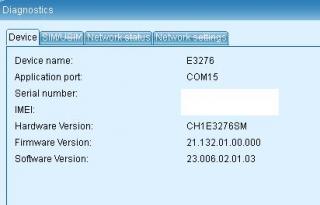
same right? |
|
|
|
|
|
lpc26
|
Nov 16 2013, 06:11 PM
|
Getting Started
|
QUOTE(chuahcs79 @ Nov 16 2013, 06:09 PM) yeah i think is same  [attachmentid=3725815] weird, i put this AT command result is ERROR AT^SETPORT="A1,A2;10,12,16,13,A1,A2" |
|
|
|
|
|
lpc26
|
Nov 16 2013, 06:15 PM
|
Getting Started
|
QUOTE(chuahcs79 @ Nov 16 2013, 06:14 PM) which version huntsman yo are using with that AT COMMAND ? for me, i am using the latest red version, after i finish flashed i reboot the router, and as soon as router is ready, i direct login LuCI and input that AT COMMAND first,. and after 10~20 second the E3276 will be dial in my case, I had done your step, but at the end its either GATEWAY ERROR at the web or ERROR output at the AT command dialog. |
|
|
|
|
|
lpc26
|
Nov 16 2013, 07:14 PM
|
Getting Started
|
@chuahcs79
Bro, help me 1 thing, putty your modem, and check the AT command
AT^SETPORT?
|
|
|
|
|
|
lpc26
|
Nov 16 2013, 07:24 PM
|
Getting Started
|
@chuahcs79 Bro, I found solution, Huntsman 2013-11-10Red is usable by turning on the AT command AT^SETPORT="A1,A2;1,2,3,10,12,13,16,A1,A2" and my QoS finally works.  This post has been edited by lpc26: Nov 16 2013, 07:27 PM
 |
|
|
|
|
|
lpc26
|
Nov 16 2013, 07:29 PM
|
Getting Started
|
QUOTE(chuahcs79 @ Nov 16 2013, 07:27 PM) finally found a rooter version which is fit our E3276 totally try this version Huntsman 2013-10-12 / LuCI Trunk (svn-r9811) -> hereno need to do anything, just flash it and wait for auto dial, auto recognize and auto reconnect !!! try it , no need at command    actually all works, its about the AT command that some bought modem need to be checked. some turn on Modem only function. some didn't turn on the HI-link function. some turn all on with GPS...makes my PC hang  so need to correctly turn off those things before plug in the huntsman. |
|
|
|
|
|
lpc26
|
Nov 16 2013, 07:41 PM
|
Getting Started
|
But after restart, what is this error...
[ 90.520000] usb 1-1: device not accepting address 5, error -145
[ 90.520000] hub 1-0:1.0: unable to enumerate USB device on port 1
|
|
|
|
|
|
lpc26
|
Nov 16 2013, 08:02 PM
|
Getting Started
|
QUOTE(blacktubi @ Nov 16 2013, 07:42 PM) Hi, you are having the same problem with me  Rooter V2 problem, not sure what's wrong most probably it’s a result of hardware failure rather than a driver or kernel bug. USB has an over-current protection, which gets triggered when power consumption from the port is too high. ----------------------------- any suggestion of device that can add the USB power? |
|
|
|
|
|
lpc26
|
Nov 17 2013, 07:17 PM
|
Getting Started
|
QUOTE(digilife @ Nov 17 2013, 07:03 PM) Get a 3meter USB 3.0 cable to hang the modem on the celling and plug the other end onto your router, btw, MR3420 is too weak for LTE Modem, atleast get a 1043ND which have RF shielded component on the inside to ward off signal interference from your other electrical devices.  wow so PRO router 1043ND  as I know V1 support only, if buy new I think is V2 already which is not support by Huntsman. This post has been edited by lpc26: Nov 17 2013, 07:23 PM |
|
|
|
|
|
lpc26
|
Nov 18 2013, 10:13 AM
|
Getting Started
|
QUOTE(digilife @ Nov 18 2013, 08:25 AM) Does this " AT Command used - AT^SETPORT=”A1,A2;10,12,13,16″ will be permanent even you switch off the router and use another modem [ eg E398 ] ? If yes, will these command affect the E398 ? this is AT command for the modem, which will make the permanent effect to the modem. some huawei maybe similar, u need to putty it to check whether your modem have that function or not. AT^SETPORT? will show the available function of the modem. |
|
|
|
|
|
lpc26
|
Nov 18 2013, 05:56 PM
|
Getting Started
|
by getting a USB powered Hub, E3276 don't have any problem already.
No more USB errors.
|
|
|
|
|
|
lpc26
|
Nov 18 2013, 06:13 PM
|
Getting Started
|
QUOTE(chuahcs79 @ Nov 18 2013, 06:00 PM) due it it supply enough power from the usb hub, as e3276 is a power hunger modem but why the Signal/Cell Information there write Network : HSPA+ without the DC ? is it display problem?  |
|
|
|
|




 Quote
Quote
 0.0504sec
 0.37
0.37
 7 queries
 GZIP Disabled